How to Properly Configure Proxies in Afina
Step by step setup of proxies in the Afina anti-detect browser: a separate IP per profile, connection string format, checks, and common mistakes.

How to Set Up Proxies in the Afina Anti-Detect Browser
Working with multiple accounts always comes down to one thing: each profile must look like a separate device with its own IP. Without proxies, the browser shows the same real IP for all tabs, and platforms quickly detect connections between accounts. Afina solves this at the architecture level: each profile gets a separate connection, its own digital fingerprint, and complete isolation from the rest.
This guide walks you through adding proxies in Afina, assigning them to profiles, and checking connections step by step-from a single account to mass deployment for a team.
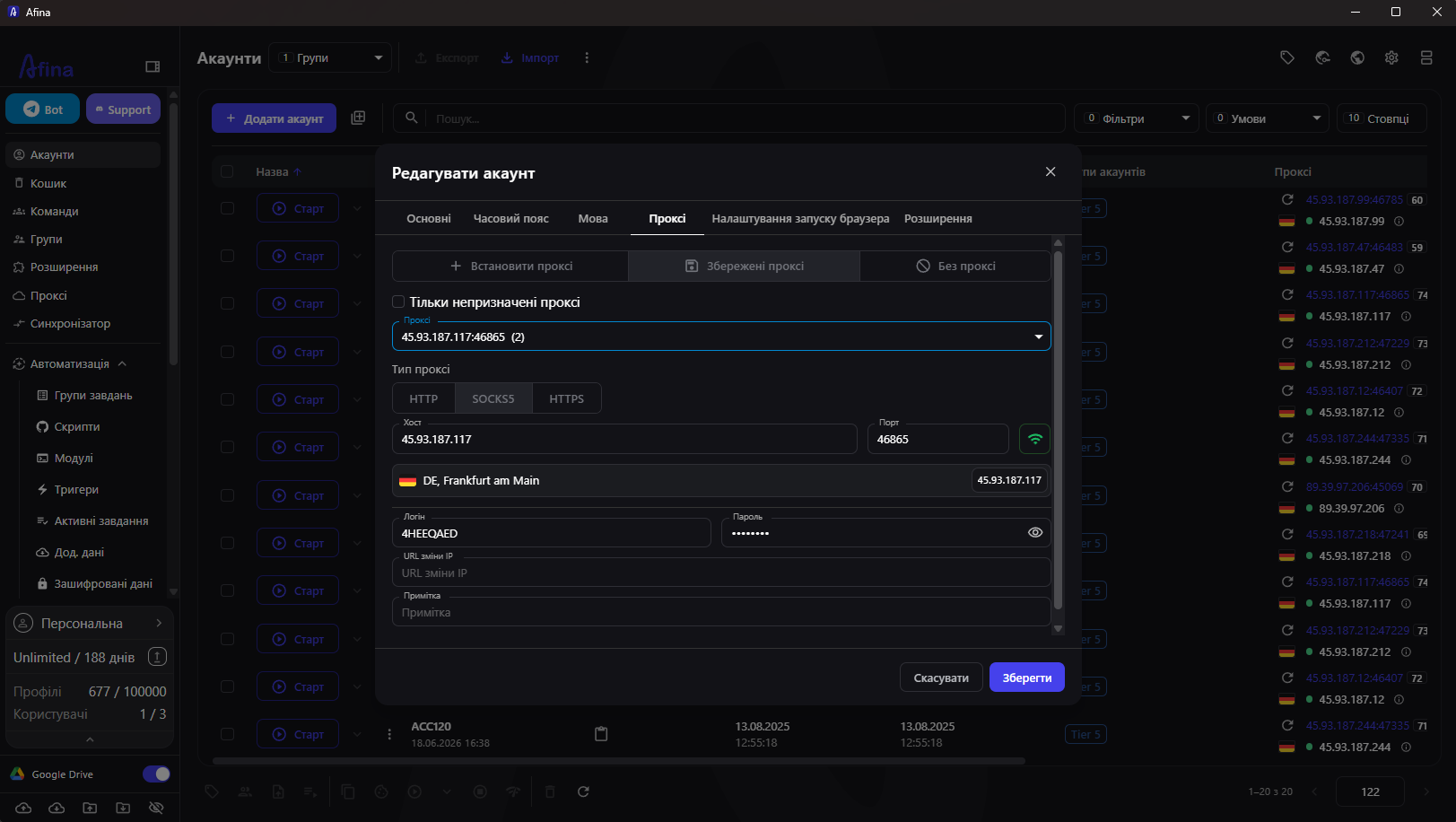
Which Proxy Protocols Does Afina Support
Afina works with three protocols: HTTP, HTTPS, and SOCKS5. This covers most scenarios, and the proxies themselves connect without extra configuration.
A particular strength of Afina is UDP support through SOCKS5. Most anti-detect browsers only tunnel TCP, so QUIC and HTTP/3 traffic-which real browsers actively use-falls back to your actual connection and reveals a network-level mismatch. Afina passes UDP through SOCKS5: when the proxy supports UDP, the browser automatically enables WebRTC, QUIC, and WebTransport-no manual setup required. As a result, the network profile looks like that of a regular device, not a connection wrapped in a proxy.
Important: if a VPN extension is installed in the profile, it will override proxy settings. Sites will see the VPN's IP, not your proxy server's.
Which Proxy Type to Choose: Residential, Mobile, or Datacenter
The protocol determines how the browser talks to the proxy, while the proxy type determines how "real" your IP looks to the platform. This choice often determines whether an account passes verification, so it's worth understanding the difference before purchasing.
Here's a quick breakdown of each type:
- Residential proxies are IPs of real home users from internet service providers; they inspire the most trust and work best for registrations, ad accounts, and marketplaces
- Mobile proxies are IPs from mobile carriers (4G/5G) that naturally rotate among many subscribers; this is the highest trust level for aggressive anti-fraud systems and social networks, though the most expensive option
- Datacenter (server) proxies are IPs from data centers; they're fast and cheap, ideal for high-load automation, scraping, and monitoring, but easier to detect-best reserved for lower-risk tasks
The general rule is simple: the stricter the platform's anti-fraud, the more "real" the IP needs to be. For sensitive tasks, go with residential or mobile proxies; for mass technical work, datacenter proxies will do.
How to Add Proxies in Afina
Go to the "Proxies" section in the left navigation panel. There are two ways.
Add a single proxy manually:
1. Click the "Add Proxy" button
2. Select the type: HTTP, HTTPS, or SOCKS5
3. Fill in the fields: Host, Port, Login, and Password
4. Click the check icon, and Afina will test the connection and show the IP and country
5. Save
Bulk Import
Click the "+" icon on the action panel and paste a list in the format host:port:login:password or with a protocol prefix, such as socks5://login:password@host:port. Even a hundred proxies can be loaded at once, so you can prepare a large campaign in minutes instead of entering each IP manually.
How to Assign a Proxy to a Profile
Open the "Accounts" section. For a new profile, click "Add Account"; for an existing one, click the "⋮" icon and select "Edit".
On the "Proxy" tab, two modes are available:
- Set Proxy - manual entry of parameters for a specific profile
- Saved Proxies - selection from those already added in the manager
Save the profile. On the next launch, the browser will use that proxy.
Bulk assignment for teams. Check the boxes for the needed accounts in the table, open the "⋮" menu in the top panel, and click "Assign Proxy". You can enable the "Only unused proxies" filter to avoid assigning one IP to multiple profiles at the same time.
What Else Can Be Configured in Afina for Complete Isolation
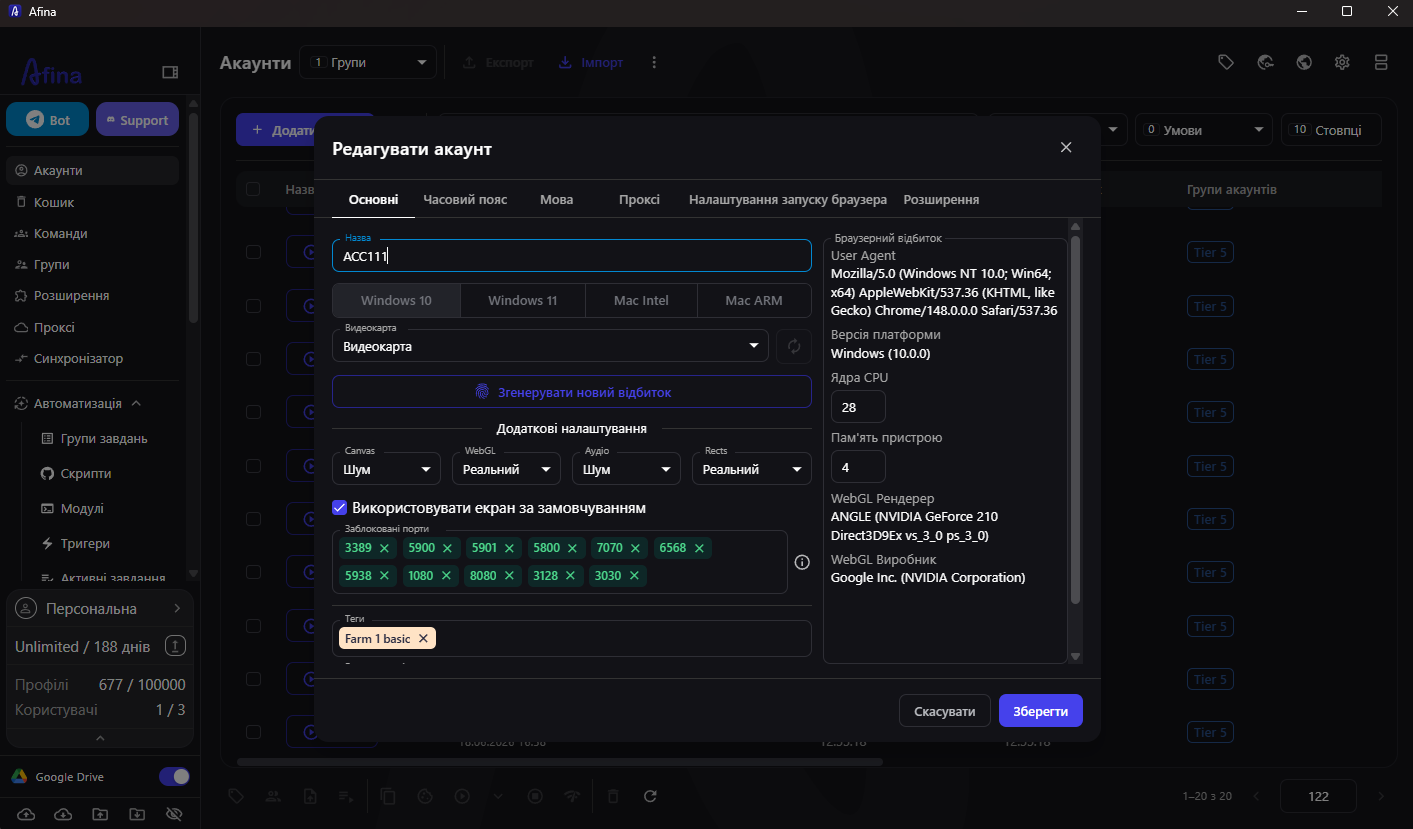
Proxies are just the first step. An anti-detect browser differs from a regular one in that it isolates not only the network connection but the entire digital fingerprint of the profile. Even with a perfect proxy, profiles sharing a fingerprint will cluster together, so Afina separates these signals for each account individually.
For each account, you can configure:
- Canvas, WebGL, Audio, and ClientRects-the parameters by which analysis systems distinguish a real device from a fake
- Time zone and language-automatically pulled from the IP or set manually
- WebRTC-disabled by default to protect against real IP leaks; enabled automatically if UDP support is present in SOCKS5
- Screen size-fixed so the browser doesn't stretch to fit the actual window
All these parameters can be updated at once for multiple profiles via the "Change Fingerprint" menu, which is convenient for mass deployment.
Scenarios Where This Setup Is Especially Needed
Traffic Arbitrage & Media Buying
Ad accounts analyze not just the IP but the entire device stack. A unique fingerprint for each profile plus residential or mobile proxies is the standard for teams scaling campaigns.
SMM & Managing Multiple Brands.
For each client or vertical-a separate browser profile with its own IP and fingerprint. Afina's synchronizer lets you perform the same actions simultaneously across multiple profiles.
E-commerce & Marketplaces.
Each store or seller account in a separate profile. The cookie manager imports and isolates sessions, so when switching between accounts, cookies don't mix.
Automation & Scripts.
Afina includes a no-code scenario builder: account warm-up, repeatable actions, task groups with schedules. For more complex scenarios, Node.js modules, a local API, and an MCP server for connecting AI agents are available.
Setting up proxies takes a few minutes, and then you get full profile isolation, no-code automation, and team collaboration in one workspace.
Download Afina Browser
Promo codes for new users:
- SALE20 - 20% off all plans except Max
- SALE30 - 30% off the Max plan
FAQ
What types of proxies does Afina Browser support?
Afina supports HTTP, HTTPS, and SOCKS5. If a SOCKS5 proxy has real UDP support, the browser automatically enables QUIC and HTTP/3 without additional configuration.
Which proxy type should I choose for account registrations?
For registrations and working with ad accounts, residential or mobile proxies work best because they inspire the most trust. Datacenter proxies are better reserved for technical tasks like scraping and monitoring, where the risk of blocking is lower.
Can I assign one proxy to multiple profiles?
Yes, but for proper isolation, it's recommended to use a separate IP for each profile. During bulk assignment, there's an "Only unused proxies" filter.
How do I check if my real IP is leaking through WebRTC?
By default, WebRTC is disabled in Afina to protect against leaks. When connecting a SOCKS5 proxy with UDP, it activates automatically, and the browser uses the proxy's IP instead of the real one.
Is Afina suitable for team work?
Yes. Afina allows you to share profiles among team members, assign tags, groups, and roles. For synchronized work, there's an action synchronizer across multiple open profiles.
Is profile data encrypted in Afina?
Yes. Sensitive data such as passwords, seed phrases, and tokens are stored with AES-256 encryption. Access requires a master password and key file.
Related articles

How to Build an Advertising Traffic Protection Infrastructure with CloakingHouse and SotaProxy
Learn how to build a reliable ad traffic stack with proxies, browser profiles and cloaking for GEO testing, filtering and campaign troubleshooting.

Fingerprint Spoofing: Methods, Detection, and Antidetect Use
Learn how fingerprint spoofing works, the methods used to bypass detection, and how antidetect browsers with proxies manage multi-account operations safely.
Real Time Monitoring
Real time monitoring. Real-time monitoring for proxy networks, ad accounts, and scraping stacks. Metrics, alerting, SLAs, and practical tactics
Network Redundancy for Proxy and Automation Platforms
Learn how network redundancy keeps proxy and automation platforms online. Covers active/passive, multi-region clusters, failover tuning, and 99.9% uptime

Geographic Distribution for Proxy Infrastructure
Master geographic distribution for proxy infrastructure. Learn how to choose locations, proxy types, and routing strategies for ad verification, scraping
What Is Sticky Session: A Technical Guide for Proxy Users
Learn what is sticky session, how session affinity works in load balancers and proxies, and when to use it for multi-accounting, scraping, and ad campaigns.