Boost Proxy Performance: Reliability Testing Guide
Ensure peak proxy performance with effective reliability testing. Learn key metrics, test types, & practical test cases for ad arbitrage & account farming.
You launch a Facebook ad account batch in AdsPower at breakfast. By lunch, half the sessions are asking for fresh verification. TikTok spend starts drifting because city targeting doesn't line up with the landing page rules. The proxies looked fine in a checker. They connected, authenticated, and returned the expected country. The significant work then began.
That's a common pitfall. They test whether a proxy connects. They don't test whether it stays coherent through login, warm-up, browsing, ad review, cookie reuse, and session aging inside AdsPower, Dolphin Anty, GoLogin, Multilogin, or Hidemyacc. For account farming, cloaking, and geo-targeted campaigns, a proxy isn't reliable because it pings. It's reliable because the target platform keeps treating the session like a normal user.
Table of Contents
- Why Proxy Reliability Testing Matters
- Core Reliability Metrics You Must Track
- Proxy Types and Their Reliability Profiles
- Common Methodologies for Proxy Testing
- Building a Practical Proxy Test Plan
- Sample Test Cases for Critical Workloads
- Interpreting Results and Choosing a Provider
Why Proxy Reliability Testing Matters
A bad proxy batch usually fails after the team has already committed budget. The first sign isn't always a dead connection. More often, Facebook or TikTok starts treating the session as inconsistent. A login that worked an hour ago suddenly triggers a checkpoint. A cloaking flow resolves the right geo at first, then background requests leak a different network path. An account farming setup in Multilogin or Hidemyacc looks stable during import, then goes sideways when the browser starts making secondary requests.
That failure pattern hurts more than a clean outage because it creates false confidence. The provider says the pool is live. Your browser profile passes the first check. The campaign still breaks once the target starts scoring behavior across multiple requests and session states.
Practical rule: If your test ends before login, you haven't tested the part that gets accounts flagged.
There's also a provider-risk angle. Reliability testing isn't only about packet flow and rotation logic. It's also about whether you trust the vendor handling your credentials, usage data, and account operation footprint. If you're vetting providers, review incidents like the Fineproxy Org security breach before you move serious workloads. A provider with poor operational hygiene can become your weak point even if the proxy itself connects.
For day-to-day operations, teams should also check how target platforms are likely to see their addresses. A quick IP reputation check workflow helps catch obvious trust issues before a batch of Facebook or TikTok ad accounts burns.
The real cost of skipping tests
For geo-targeted campaigns, reliability affects more than uptime. It affects whether city-level creatives, localized offers, and billing regions line up through the full session. For account farming, it affects whether the account survives warm-up and reuse. For cloaking, it affects whether the review path and user path stay separated the way you intended.
Reliable proxy operations come from testing the exact workflow you'll run in production. Anything less is guesswork.
Core Reliability Metrics You Must Track
The basic language matters because providers love vague promises. “Stable.” “Clean.” “Premium.” None of that helps when your automation starts throwing login challenges. You need a small set of metrics that tie directly to production behavior.
What the core metrics mean in practice
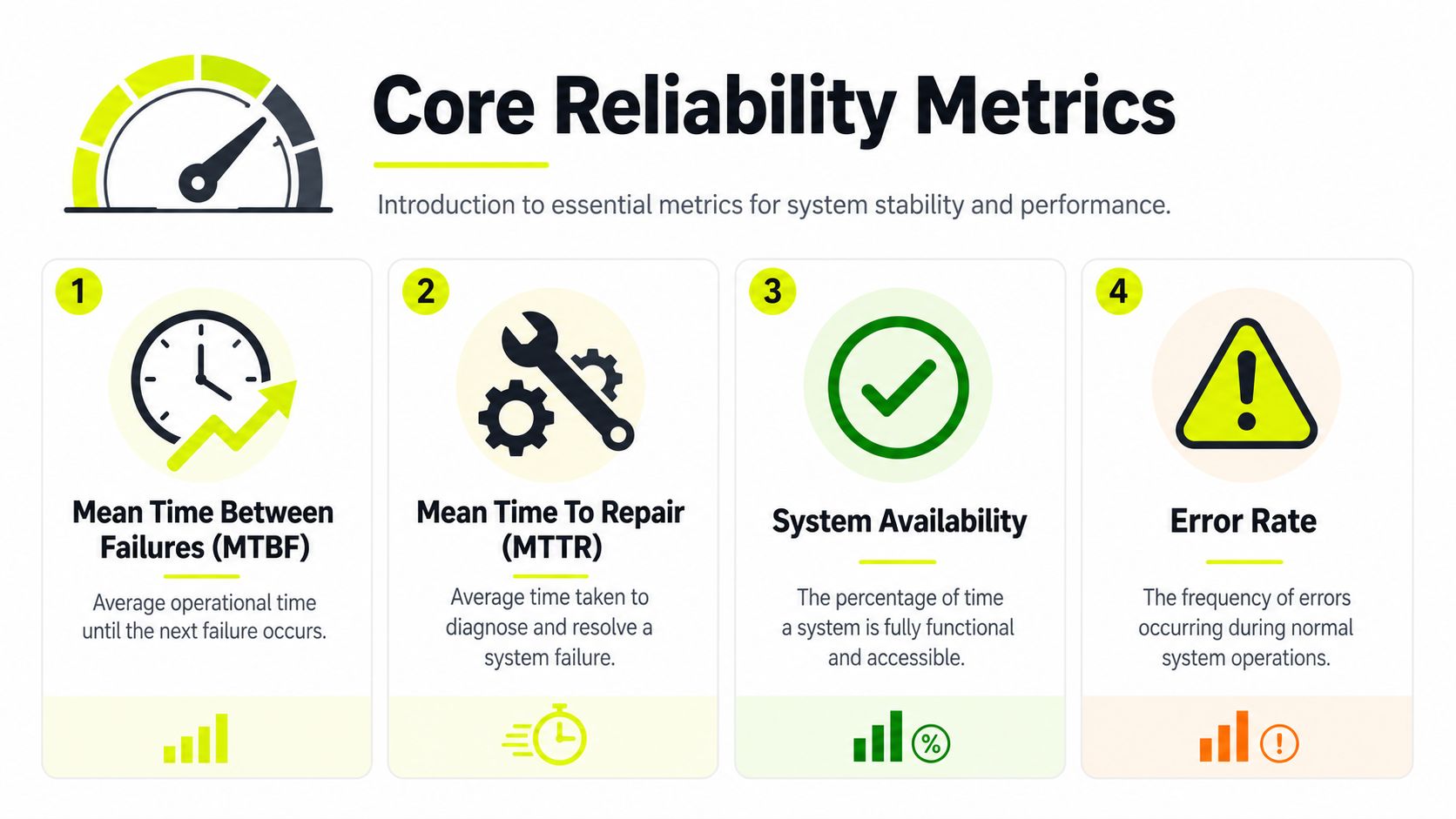
MTBF is the headline metric for software reliability testing. In software reliability testing, Mean Time Between Failures is calculated as MTBF = MTTF + MTTR, and high-availability infrastructure targeting 99.9% uptime should maintain MTBF values exceeding 10,000 hours under sustained load according to the software reliability testing reference.
For proxy users, MTBF answers a simple question. How long does this provider's network stay usable before something breaks badly enough to interrupt your workflow? If you're running sticky sessions for Facebook ad accounts or long-lived browser profiles in GoLogin, higher MTBF matters more than flashy peak speed.
MTTR tells you how painful a failure is once it happens. A provider can still be workable if failures are rare and recovery is fast. If recovery drags, your automation queue backs up, your warmed accounts age in the wrong state, and your media buying team wastes time rerunning failed steps.
Availability is often an initial inquiry. It's useful, but it's not enough by itself. A network can look available while still returning low-trust IPs, unstable rotation, or session incoherence on protected targets.
A provider that “stays up” but fails during login is available. It still isn't reliable for your workload.
What to ask a provider for
Ask for metrics that map to your actual use case, not just generic uptime language. For example:
- Sticky session durability: Can the provider keep the same session behavior stable through repeated authenticated actions in AdsPower or Multilogin?
- Repair behavior: When an IP goes bad, how fast does the system rotate or replace it without manual intervention?
- Operational visibility: Do you get enough data to spot bad geos, weak subnets, or rotation drift?
You should also run your own checks with a proxy checker workflow, then compare those results with what the provider claims. Don't treat one clean result as proof. Repeat the test across the exact browsers, account flows, and target platforms you use.
A second reliability lens comes from measurement quality. In statistics, reliability coefficients range from 0.00 to 1.00, with values closer to 1.00 indicating more consistent scores across repeated administrations, as outlined in the reliability in statistics reference). You won't use Cronbach's alpha to buy proxies, but the principle holds. A test method is only useful if it gives stable results when you rerun it under the same conditions.
Proxy Types and Their Reliability Profiles
A proxy type isn't “good” or “bad” on its own. It's good or bad for a specific workload. Teams lose money when they force one proxy type into every job.
Where each proxy type holds up
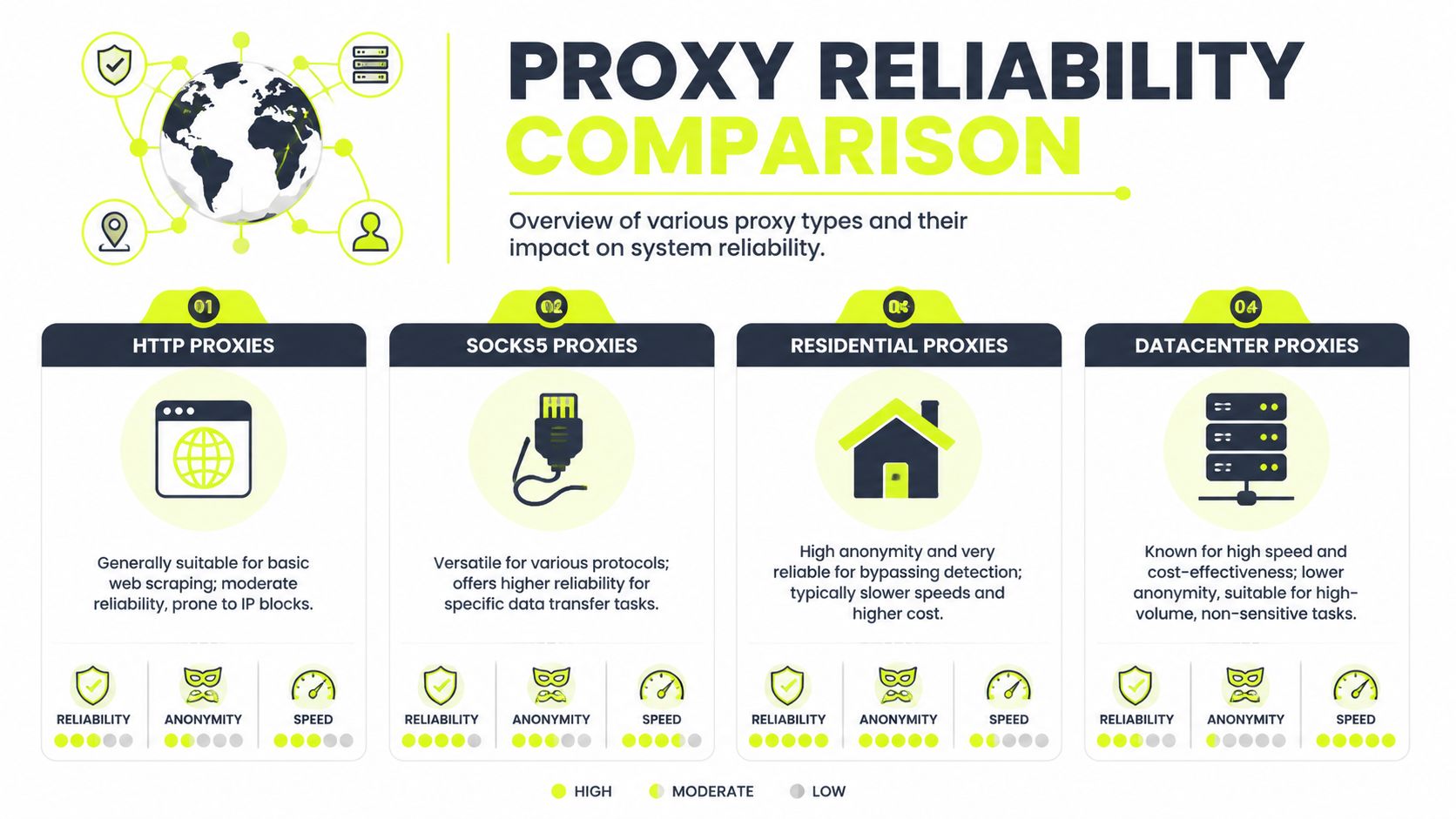
For protected platforms, the gap between proxy classes is large. Datacenter proxies achieve only 25–35% success rates on protected sites like Facebook and TikTok because their IP blocks are hosted in known cloud infrastructures. Mobile proxies using cellular carrier networks achieve 85–95% success rates because carriers use CGNAT, according to this datacenter vs residential vs mobile proxy comparison.
That lines up with what most buyers already see in the field. Datacenter IPs are fast and cheap for open targets, feed checks, monitoring, and volume tasks. They're weak for account farming, TikTok ad accounts, Facebook business flows, and cloaking setups that need to survive platform scrutiny.
Residential proxies sit in the middle. They generally fit geo-targeted campaigns, ad verification, and browser-based account work better than datacenter IPs. Their failure mode is inconsistency. Pool quality, blacklist history, and rotation logic matter a lot.
Mobile proxies are the trust-first option. If the job is sensitive and the target punishes anything that looks synthetic, mobile usually holds up best. That's why teams running warmed social accounts, review-sensitive cloaking flows, and persistent sessions in AdsPower or Dolphin Anty often reserve mobile inventory for the accounts that matter most.
A practical comparison for buyer workflows
| Proxy type | Best fit | Common failure point | Practical note |
|---|---|---|---|
| Datacenter | Open-site scraping, speed-volume tasks, non-sensitive automation | Fast detection on protected platforms | Good for throughput. Bad for Facebook and TikTok trust-heavy flows. |
| Residential | Geo-targeted campaigns, ad verification, mixed browser automation | Uneven pool quality and unstable rotation | Good balance when city targeting matters. |
| Mobile | Account farming, cloaking, high-trust social workflows | Cost and operational complexity | Best fit when session trust is more important than raw speed. |
| ISP | Sticky sessions and stable browser logins | Depends on provider implementation | Useful when you need consistency with better performance traits. |
| IPv6 | Scale-heavy tasks where targets support it | Target compatibility and uneven acceptance | Worth testing, never assume support across every target. |
A note on IPv6 proxies. They can be useful for scale-heavy tasks, but reliability depends on whether the target stack, your tooling, and the anti-bot layer treat IPv6 sessions normally. Many teams like IPv6 on paper because address space is massive. In practice, that doesn't help if the target or your antidetect stack handles it inconsistently.
For a broad breakdown of operational differences, a proxy types reference for practitioners is useful as a pre-buy checklist. Then test every type against your own flow. Don't buy based on category labels alone.
Common Methodologies for Proxy Testing
Running one test and calling it done is a common practice. That's not enough. Different tests expose different classes of failure, and proxy infrastructure breaks in more than one way.
Load tests catch pool weakness
Load testing tells you whether the provider can handle your normal working pressure without turning unstable. If your arbitrage team launches multiple Facebook or TikTok campaigns at once, or your scraper farm spins up across many browser profiles, you need to know whether the pool stays responsive under concurrency.
For datacenter and residential IP infrastructure, reliability measurement tests should execute load, stress, and soak tests simultaneously to simulate 10,000+ concurrent connections, while maintaining response times below 200ms and zero packet loss across 220+ geolocations, based on the reliability measurement testing reference.
Use load tests to answer questions like these:
- Can the pool keep up: Do logins, page loads, and API requests stay consistent when many workers hit the pool together?
- Does rotation break under concurrency: Do multiple workers start receiving duplicate or low-quality exits?
- Do geos stay accurate: Does city-level targeting drift when concurrency rises?
If you depend on frequent switching, a proxy IP rotation workflow then becomes part of reliability testing, not a side feature.
Stress and soak tests expose delayed failures
Stress testing pushes the provider past normal operating levels. You're looking for the break point and for signs of ugly failure behavior. Does the provider degrade cleanly, or does it start returning mismatched geos, hanging sessions, or partial failures that poison your browser profiles?
Soak testing is different. It keeps pressure on for a long run. This catches the problems that don't show up in a short benchmark. Sticky sessions decay. Rotating pools recycle weak exits. Background traffic starts leaking. Browser profiles in AdsPower, GoLogin, or Multilogin begin acting differently after enough time has passed.
Field habit: A proxy that survives a quick checker can still fail a real buyer workload after the session settles and the target starts watching for consistency.
The best teams combine all three methods around the actual task. They don't test an abstract network. They test account creation, ad account access, cloaked landing checks, and geo-targeted browsing under realistic pressure.
Building a Practical Proxy Test Plan
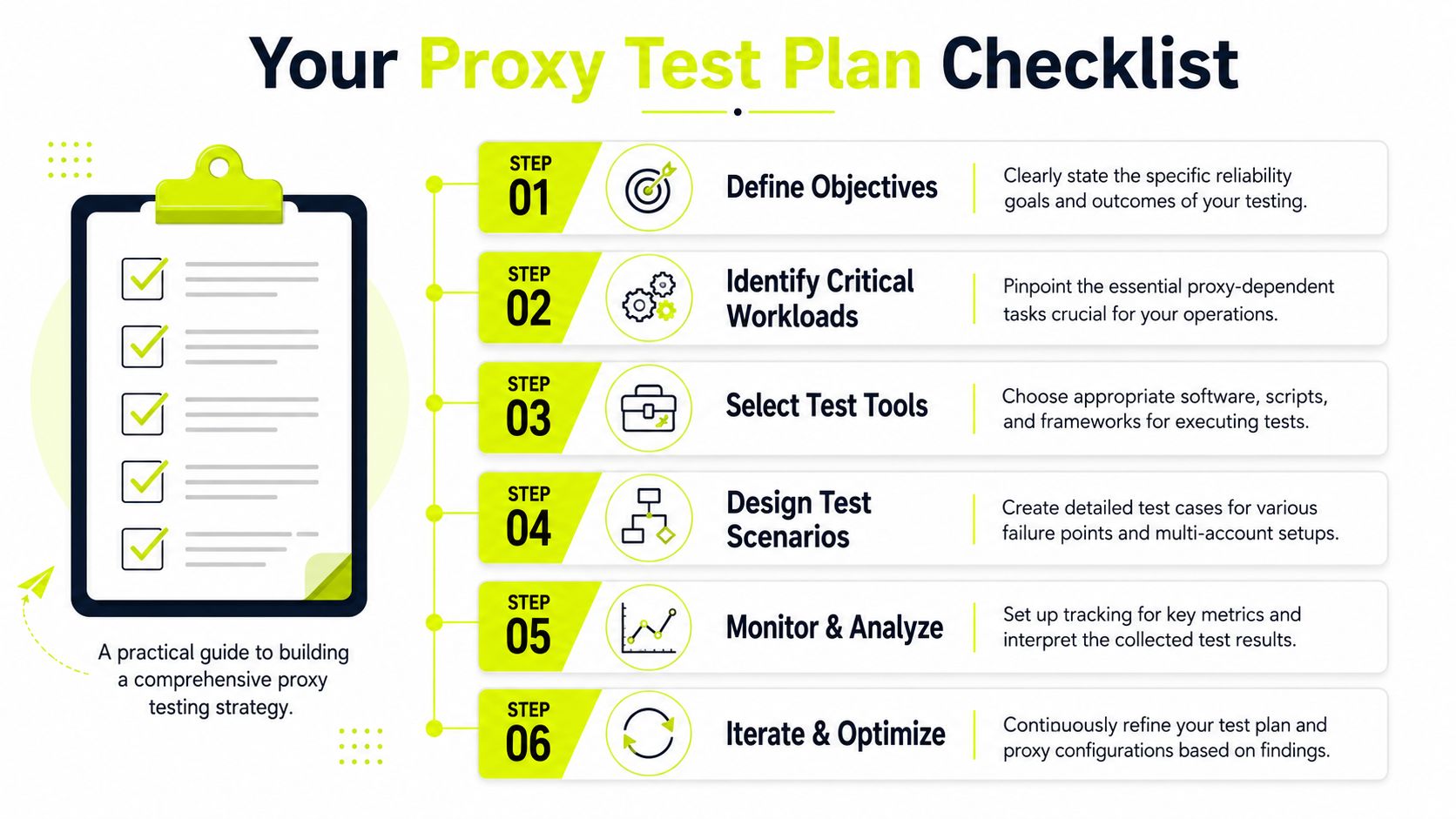
A usable proxy test plan starts with the workload. If you buy traffic on Facebook and TikTok, your test should look like a buyer workflow. If you farm accounts, your test should behave like account farming. Generic reachability checks don't help much.
Test the workflow, not just the endpoint
The biggest blind spot is post-login behavior. Most reliability testing guides ignore the post-login leakage gap, where DNS and WebRTC leaks only appear after authentication or session aging. Data shows 68% of proxy failures occur post-login, while 92% of testing protocols only validate pre-login states, according to this post-login leakage analysis.
That one point changes how you should test.
A proxy pool can pass pre-login checks and still fail once the browser profile starts doing what real users do. That includes loading account dashboards, refreshing ads views, opening support flows, or waiting between actions long enough for background traffic to fire. For AdsPower, Dolphin Anty, GoLogin, Multilogin, and Hidemyacc users, this means the browser fingerprint and the network path have to stay coherent after login, not only at the first request.
A usable checklist for media buying teams
Run a small but disciplined plan before you scale spend.
Define the exact workload
Separate tests by use case. Facebook ad accounts need one path. TikTok ad accounts need another. Cloaking review checks, account farming, and geo-targeted campaign validation each need their own scenario.Select representative browser stacks
Don't test in a plain browser if production runs in antidetect browsers. Use AdsPower, Dolphin Anty, GoLogin, Multilogin, or Hidemyacc the same way the team works.Check session coherence after login
Authenticate, browse, idle, continue browsing, and repeat. Watch for resolver drift, header inconsistency, sudden verification prompts, or mismatched geo signals.Validate rotation integrity
For rotating pools, ensure new sessions appear new from the target's perspective. For sticky pools, ensure the session remains stable as long as the workflow needs.Measure geo accuracy in the target workflow
Don't stop at country resolution. Verify the geo that matters to your campaign or offer logic inside the platform and landing experience.Record failure patterns, not just pass rates
A dead request is easy to spot. A session that logs in but gets challenged later is the failure pattern that matters more.
Don't sign off on a provider because the first request works. Sign off because the fifth, fiftieth, and post-idle requests still look like the same user.
Sample Test Cases for Critical Workloads
Reliability testing becomes valuable. Run tests that mimic the jobs your team gets paid for.

Long session test for ad accounts
Use this for sticky sessions tied to Facebook and TikTok ad accounts in AdsPower, GoLogin, or Multilogin.
for i in {1..12}; do
  echo "Run $i $(date)"
  curl --proxy "$PROXY" --silent https://example-check-endpoint.test/session
  sleep 900
done
The script itself is simple. The value comes from what you watch around it. Keep the same browser profile open. Log in once. Between checks, perform normal actions such as opening the ads dashboard, loading account settings, and revisiting the same pages after idle time. You're looking for login invalidation, geo drift, or security challenges that appear only after the session ages.
What fails in practice:
- Sticky sessions that aren't really sticky: The provider says the IP persists, but secondary behavior changes mid-session.
- Profiles that degrade after idle time: The first interaction works. The next one triggers a checkpoint.
- Cloaking paths that split: Review and user-facing requests stop matching the expected region or trust profile.
Rotation and geo validation
For rotating residential or IPv6 pools used in geo-targeted campaigns, test whether the target sees the rotation and whether city logic stays aligned.
for i in {1..5}; do
  echo "Session $i"
  curl --proxy "$ROTATING_PROXY" --silent https://example-check-endpoint.test/geo
done
Don't stop with the checker output. Open the actual landing flow through your antidetect browser and verify that the ad platform, prelander, and offer path all behave as expected for the intended location.
Use a simple worksheet like this:
| Test case | What to verify | Failure signal |
|---|---|---|
| City-targeted ad review | Platform and landing path agree on location | Wrong city logic or review mismatch |
| Rotating scrape session | New session looks distinct to target | Reused identity or repeated challenges |
| Cloaking validation | Review path and user path stay separated correctly | Rules fire inconsistently |
After the basic checks, add visual inspection with training material or team walkthroughs. This video is a useful prompt for discussing how to operationalize repeatable checks across a buying team:
Behavioral reliability against protected targets
This is the part many teams still ignore. In the last 12 months, 76% of major scraping targets increased CAPTCHA frequency by 3.2x, while 403 and 429 error rates rose 28% despite stable connectivity, which is why the behavioral reliability analysis argues that old success-rate metrics are no longer enough.
For practical testing, count behavioral failures by session and workload type. Don't just count connection failures.
Track things like:
- Challenge pressure: How often does the target introduce CAPTCHA or extra verification during normal browsing?
- Session aging behavior: Does the same account become less trusted after repeated navigation?
- Fraud-score drift: Do different exits from the same provider produce visibly different treatment from the target?
A pool that returns successful responses but keeps increasing challenge pressure is telling you it won't hold up in production.
Interpreting Results and Choosing a Provider
Raw test output doesn't make the decision for you. Patterns do. A provider is usable when behavior stays consistent across the exact workflows that matter to your team. If the pool works for open pages but falls apart in Facebook Business Manager, that provider might still fit scraping. It doesn't fit media buying.
How to read good and bad signals
Good signals are boring. Logins hold. Sticky sessions stay coherent. Geo-targeted flows match the intended region. Rotating sessions change cleanly without weird carryover. Browser profiles in AdsPower, Dolphin Anty, GoLogin, Multilogin, or Hidemyacc behave the same way on repeated runs.
Bad signals usually cluster:
- Login survives, then decays: That points to session aging or post-login leakage.
- Geo looks right in a checker but wrong in workflow: That points to target-side location inconsistency.
- Protected platforms challenge more over time: That points to behavioral reliability issues, not simple network failure.
- Only some subnets work: That points to uneven pool hygiene.
If you want an outside perspective while comparing vendors, this guide on proxies for web data operations is a decent companion read. Use it as a comparison input, not as a substitute for your own workload testing.
What to verify before you buy
Use your own acceptance criteria and keep them strict.
- Match provider to workload: Mobile for high-trust account work. Residential for broad geo-targeted campaigns. Datacenter for open targets and speed-volume tasks. IPv6 only when your target stack accepts it cleanly.
- Ask operational questions: How does the provider handle bad exits, sticky persistence, and location control?
- Test before scaling: A small buy that passes your workflow is worth more than a huge package sold on marketing claims.
- Check fit for your main use case: If residential inventory is your likely path, review a residential proxy comparison baseline and then validate against your own account flow.
Teams that like referring infrastructure they trust should also pay attention to commercial terms. Some vendors offer meaningful referral upside. Sota Proxy, for example, runs an affiliate program with up to 40% commission, which is relevant if your operation regularly recommends providers to partner buyers, scraper teams, or agency clients.
If you need proxy infrastructure for account farming, cloaking, geo-targeted campaigns, or protected-platform automation, Sota Proxy is built for those workloads. It offers residential, mobile, ISP, datacenter, and IPv6 options, plus city-level targeting, sticky sessions, rotating pools, and an affiliate program with up to 40% commission. Run your own reliability testing first. Then scale with a provider that holds up under real buyer traffic.
Related articles

Mastering Wget Proxy Server Configuration in 2026
Configure your wget proxy server (HTTP, HTTPS, SOCKS5) with ease. Learn command-line, env var, and wgetrc methods for account farming, ad verification, and

IP Reputation Check: A Guide for Media Buyers & Farmers
Master the IP reputation check process for ad accounts and automation. Learn to analyze scores, handle blacklists, and manage proxies to avoid platform bans.
Residential Backconnect Proxy: 2026 Guide & Best Practices
Master the residential backconnect proxy. A 2026 guide on how it works, its benefits over other proxies, and best practices for ad verification & account

Competitor Price Tracking: Technical Guide 2026
Build a robust competitor price tracking system. This guide covers scraping architecture, residential proxies, anti-bot evasion, and data pipelines.

Rotating Proxy Server: Mastering Techniques for 2026
Master rotating proxy servers for farming, ad verification & scraping. Learn architecture, rotation, & anti-detection tactics.
Amazon Scrape API: Build a Scalable Data Pipeline
Build a robust Amazon Scrape API. This guide covers proxy architecture, request engineering, CAPTCHA handling, and data parsing for technical operators.