Web Scraping PHP: A Guide for Operators and Arbitrage
Build reliable web scraping php bots for multi-accounting, ad verification, and cloaking. Learn to handle JS, rotate proxies, and evade blocks. For operators.
Your PHP scraper probably worked fine on a test site. Then you pointed it at a live target used for ad verification, competitor monitoring, cloaking checks, or account farming, and it fell apart. You got an access denied page, half-rendered markup, empty nodes, or a fake success response with useless HTML.
That gap is where most tutorials stop being useful. Real operators scraping landing pages, affiliate funnels, storefronts, Facebook ad surfaces, or TikTok creative pages don't just need selectors. They need a workflow that survives JavaScript rendering, proxy rotation, browser fingerprint checks, geo-targeted responses, and rate limits. If you're running campaigns across multiple ad accounts in AdsPower, Dolphin Anty, GoLogin, Multilogin, or Hidemyacc, your scraper is part of the same infrastructure stack. It has to behave like one.
Table of Contents
- Why Your Basic PHP Scraper Is Failing
- Choosing Your PHP Scraping Toolkit
- Building the Core Scraping Logic
- Handling JavaScript-Driven Websites
- Integrating Proxies for Evasion and Geo-Targeting
- Advanced Evasion and Anti-Bot Countermeasures
- Scaling Your PHP Scraping Operations
Why Your Basic PHP Scraper Is Failing
A raw file_get_contents() call works on sites that hand you the primary content in the first HTML response. That still exists, but it isn't the environment most media buying teams operate in. The first time you scrape a target tied to Facebook ad accounts, TikTok ad accounts, account farming flows, or geo-targeted storefronts, you hit systems designed to classify traffic fast.
The failure pattern is predictable. Your script fetches a page and gets one of four things: a challenge page, incomplete HTML, a localized variant you didn't expect, or markup that only makes sense after client-side JavaScript runs. The scraper isn't broken. Your assumptions are.
Basic fetch-and-parse code fails because modern targets don't just serve pages. They evaluate request patterns, IP reputation, headers, cookies, session behavior, and sometimes the full browser environment.
That matters for arbitrage teams. If you're checking cloaked pages, validating ad placements, or monitoring offer availability by geo, the wrong response is worse than no response. It poisons your data and pushes bad decisions into spend allocation.
What breaks first in production
- JavaScript-rendered content shows up empty in PHP because standard DOM parsing doesn't execute client-side code.
- Identity checks flag obvious bot traffic. A bare request with weak headers and a noisy datacenter IP gets noticed quickly.
- Geo checks return the wrong market version, which ruins local pricing, language, and compliance checks.
- Session-dependent flows break if you don't persist cookies or follow the same state transitions a browser would.
If you're running multi-account setups in GoLogin, AdsPower, Dolphin Anty, Multilogin, or Hidemyacc, you already know identity is layered. A scraper that ignores that layer won't last.
Choosing Your PHP Scraping Toolkit
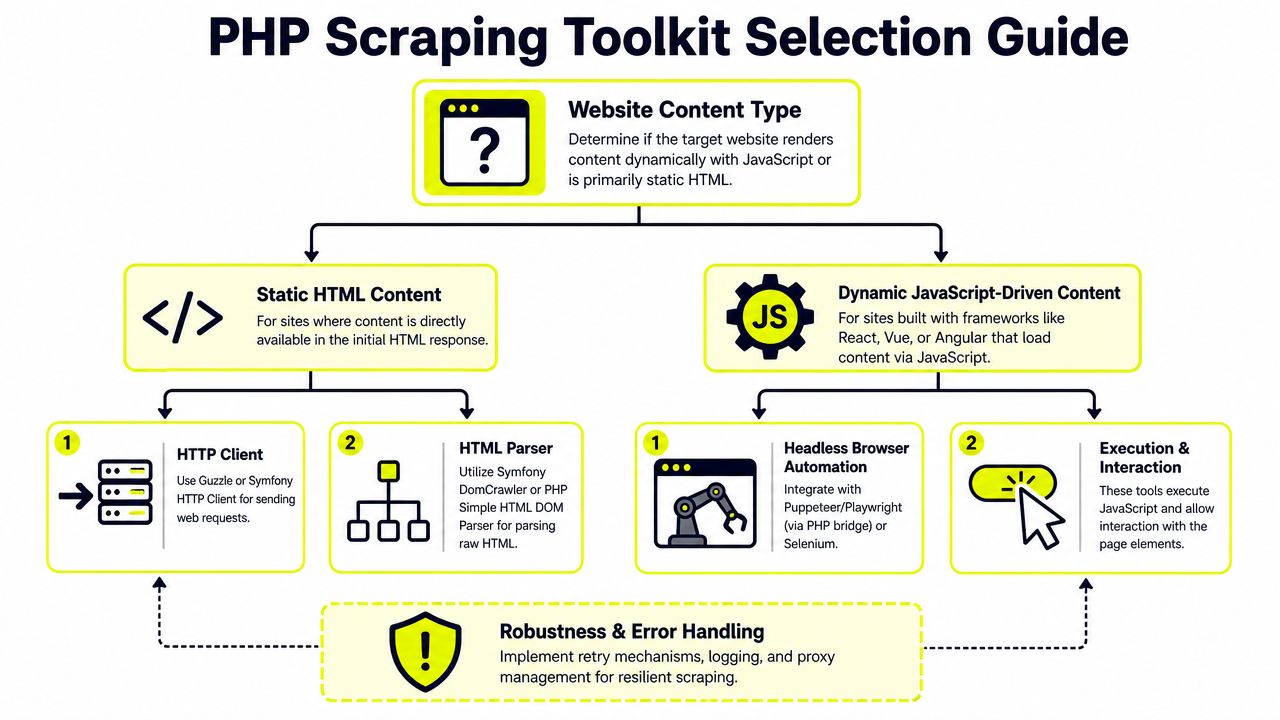
PHP scraping has matured into a component stack instead of a single magic library. In practice, web scraping with PHP works best when you split the job into request handling, parsing, and browser execution when needed. That shift away from deprecated all-in-one tools like Goutte toward maintained components like BrowserKit and DomCrawler is documented in Firecrawl's overview of modern PHP scraping stacks.
Static targets need a clean split
For static pages, keep the stack boring.
Use an HTTP client to fetch the page. Use a parser to extract data. Don't mix those concerns unless you're writing a throwaway script. The reliable combinations in the PHP ecosystem are well established:
- Guzzle for requests when you need headers, cookies, timeouts, retries, and proxy support.
file_get_contents()when the job is tiny and you control the environment.- DOMDocument and DOMXPath when you want zero extra parser dependencies.
- Symfony DomCrawler when you want a cleaner traversal API and better long-term maintainability.
- Roach PHP when the job looks more like a crawl than a single fetch.
What to use and what to leave behind
If I were putting together a scraping stack for a media buying team today, I wouldn't start with old convenience wrappers. I'd use Guzzle + DomCrawler for most static targets, and I'd only add browser automation after proving the target needs it.
Here's the practical breakdown:
| Tool | Use it for | Good at | Weak spot |
|---|---|---|---|
| Guzzle | HTTP requests | Headers, cookies, proxy config, request control | Doesn't parse HTML |
| DOMDocument + DOMXPath | Native parsing | Built into PHP, works well with XPath | Verbose |
| Symfony DomCrawler | Structured parsing | Cleaner traversal, integrates well with Symfony stack | Still static parsing only |
| Roach PHP | Large crawl workflows | Spiders, pipelines, middleware, scheduling | More setup than a one-file scraper |
| BrowserKit + DomCrawler | Simulated browser flow on static sites | Forms, links, crawler patterns | No client-side JS execution |
A lot of older guides still mention Goutte. Don't build new work around it. That library is treated as deprecated in newer PHP scraping guides, and the maintained path is the Symfony BrowserKit plus DomCrawler stack.
Practical rule: Choose the lightest tool that matches the target. If the HTML response contains the data, don't launch a browser. If the response doesn't contain the data, no parser will save you.
For arbitrage use cases, that choice matters. A simple product-page monitor for cloaking checks might run fine on Guzzle. A TikTok landing flow with rendered elements, localization, and interaction gates won't.
Building the Core Scraping Logic
For static targets, the core pipeline is simple: send a GET request, parse the HTML, extract with selectors, then move through pagination carefully. That exact workflow is shown in FreeCodeCamp's PHP scraping walkthrough with loadHTML(), DOMXPath, selector-based extraction, sleep(1), and retry pacing.

A baseline scraper that holds up
Start with Guzzle for the request. Then parse with native DOM tools or DomCrawler. The native route is enough for a lot of jobs:
<?php

require 'vendor/autoload.php';

use GuzzleHttp\Client;

$client = new Client([
    'timeout' => 20,
    'headers' => [
        'User-Agent' => 'Mozilla/5.0',
        'Accept-Language' => 'en-US,en;q=0.9',
    ],
]);

$response = $client->request('GET', 'https://example.com');
$html = (string) $response->getBody();

libxml_use_internal_errors(true);

$doc = new DOMDocument();
$doc->loadHTML($html);

$xpath = new DOMXPath($doc);

$items = $xpath->query('//article');
foreach ($items as $item) {
    $titleNode = $xpath->query('.//h2', $item)->item(0);
    $priceNode = $xpath->query('.//*[contains(@class, "price")]', $item)->item(0);

    $title = $titleNode ? trim($titleNode->textContent) : null;
    $price = $priceNode ? trim($priceNode->textContent) : null;

    if ($title || $price) {
        print_r([
            'title' => $title,
            'price' => $price,
        ]);
    }
}
The libxml_use_internal_errors(true) line isn't cosmetic. Real pages often contain malformed markup. Without it, loadHTML() can flood logs or fail in ways that waste time during long runs.
A lot of teams skip this and only discover the problem after a parser crash during a crawl window.
Pagination without acting like a flooder
Pagination is where beginner scripts become operational risk. The common pattern is either to detect the page URL format or follow the next link. Both work. What matters is pacing, retry behavior, and resumability.
Use something like this:
<?php

$nextUrl = 'https://example.com/page/1';
$failed = [];

while ($nextUrl) {
    try {
        $response = $client->request('GET', $nextUrl);
        $html = (string) $response->getBody();

        libxml_use_internal_errors(true);
        $doc = new DOMDocument();
        $doc->loadHTML($html);
        $xpath = new DOMXPath($doc);

        // extract records here

        $nextNode = $xpath->query('//a[contains(., "Next")]')->item(0);
        $nextUrl = $nextNode ? $nextNode->getAttribute('href') : null;

        sleep(1);
    } catch (\Throwable $e) {
        $failed[] = $nextUrl;
        sleep(2);
        // retry logic could continue with 4 and 8 seconds
        $nextUrl = null;
    }
}
The useful production habits are:
- Log failed URLs so you can resume instead of restarting the full job.
- Use backoff for temporary failures. A simple 2, 4, and 8 second sequence is enough to avoid hammering a shaky target.
- Sleep between pages even on friendly sites.
sleep(1)is a normal baseline. - Store raw HTML on parser failures so you can inspect what the target returned.
If you want more patterns for maintaining scrapers after launch, Sota Proxy's proxy and automation blog is worth keeping in your reference list.
Later in the workflow, when you move into proxies and session handling, this same logic stays. The fetch layer changes. The discipline doesn't.
A short walkthrough helps if you're training a junior on the team:
Handling JavaScript-Driven Websites
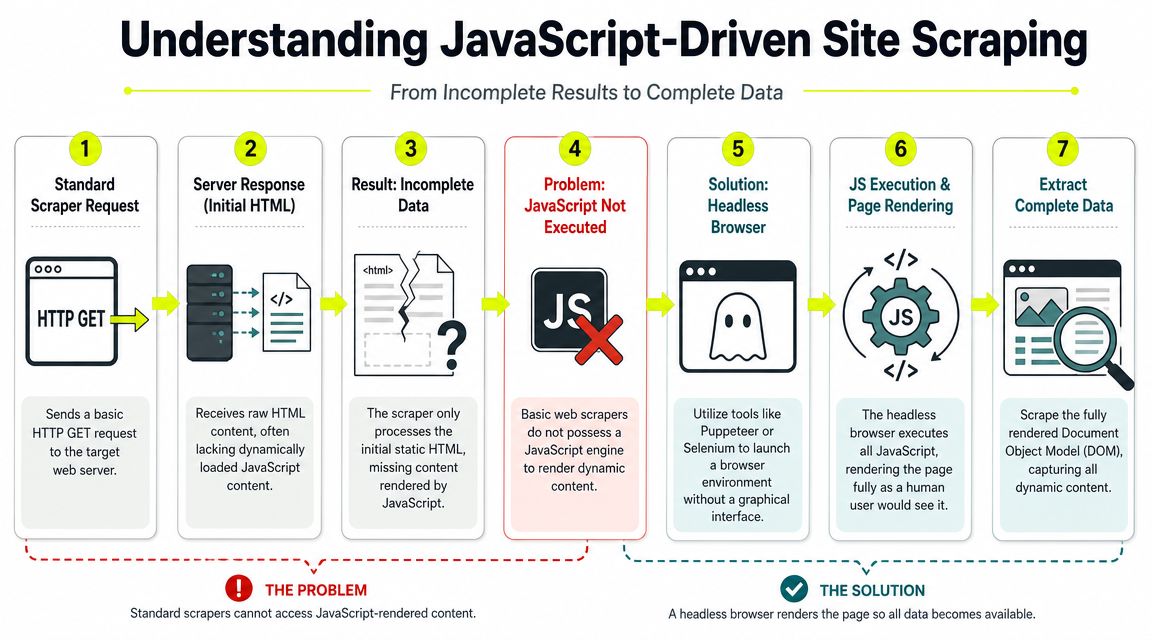
A lot of failed web scraping PHP jobs aren't parsing problems. They're rendering problems. Recent PHP guides still spend most of their time on static HTML, even though many live targets now render content through JavaScript and require a different extraction path. That gap is pointed out in Scrape.do's discussion of advanced PHP scraping and the limits of simple DOM parsing on JavaScript-heavy sites.
How to tell when PHP alone won't work
Open the target in your browser and inspect two things:
- View source, not just devtools DOM.
- Network activity after page load.
If the data you need doesn't exist in the initial HTML source, Guzzle plus DOMXPath won't extract it. That's common on React, Vue, and Angular sites. It's also common on internal ad libraries, storefront filters, account dashboards, and cloaked review pages.
Typical signs:
- initial HTML contains placeholders or shell markup
- content appears only after XHR or fetch calls
- pagination is tied to scroll or button interaction
- key fields arrive through background API requests
- anti-bot checks run before real content is shown
If you scrape the source and get empty containers, stop adding selectors. You're solving the wrong problem.
Headless browser or rendering layer
You have two workable options.
Option one is browser automation. In PHP, that usually means Symfony Panther, Selenium bindings, or a bridge to Puppeteer or Playwright. This gives you real page execution, DOM updates, clicks, waits, cookie persistence, and interaction with buttons, forms, or lazy-loaded content.
Option two is an external rendering layer. That can be a browser service, a scraping API, or a dedicated Node service that PHP calls. This is often cleaner for teams that already have PHP in production but don't want local browser orchestration on every worker.
Here are the trade-offs:
| Method | Good fit | Trade-off |
|---|---|---|
| Symfony Panther | PHP-centric stacks needing real browser execution | More CPU and memory pressure |
| Puppeteer or Playwright via bridge | Complex JS sites with interaction steps | Extra service layer and more moving parts |
| Selenium | Existing browser automation environments | Heavier infrastructure |
| Rendering API | Teams that want PHP to stay thin | Less control over low-level browser flow |
For Facebook and TikTok surfaces, I usually don't trust a pure DOM parser until I prove the content is in the response body. The same goes for account farming flows, profile checks, and geo-specific offer validation. Dynamic pages often need browser execution plus a stable identity layer. At that point, the scraper starts looking less like a script and more like an automation system.
Integrating Proxies for Evasion and Geo-Targeting
If you're scraping more than a handful of pages, proxies stop being optional. They aren't only for avoiding bans. They're also how you get the right version of the page. For arbitrage teams, that means checking the same offer as a user in the target country, validating creative delivery by region, and seeing what Facebook or TikTok funnels show from that market.
Pick proxy type by target, not by price
Cheap proxies create expensive bad data. The right proxy depends on the target and the session pattern.
| Proxy Type | Primary Use Case | Detection Risk | Performance | Cost |
|---|---|---|---|---|
| Datacenter | Fast scraping of low-sensitivity targets, bulk collection, public pages | High | High | Low |
| Residential | Ad verification, e-commerce, social surfaces, localized content | Medium | Medium | Higher |
| Mobile | Sensitive social platforms, app-like flows, high-trust identity work | Lower | Medium | Higher |
| IPv6 | Large-volume tasks on targets that accept IPv6 cleanly | Varies by target | High | Low |
A few practical rules matter more than vendor marketing:
- Datacenter proxies are fast and cheap. They work for static sites, broad discovery, and targets with weak defenses. They get flagged faster on social platforms and high-value commerce targets.
- Residential proxies are the default for serious scraping. They look more like ordinary user traffic and work better for geo-targeted campaigns, ad verification, and storefront checks.
- Mobile proxies are useful when trust matters more than throughput. If you're touching Facebook account flows, TikTok account checks, or sensitive farming routines, mobile often survives longer.
- IPv6 proxies can be useful for volume, but target compatibility decides whether they're practical. Some sites handle them fine. Others treat them like edge traffic and behave differently.
I didn't include ISP proxies in the table because you asked for specific proxy types, but they deserve a mention. They fit long-lived sessions well. If you need a sticky identity for repeated checks, ISP proxies often make more sense than aggressive rotation.
Residential rotation is usually the safe baseline for scraping pages tied to geo, commerce, or ad review. Mobile is for harder targets. Datacenter is for speed when trust doesn't matter much.
Wiring proxies into Guzzle
The integration itself is easy. The operational rules around it are the hard part.
<?php

use GuzzleHttp\Client;

$client = new Client([
    'proxy' => 'http://username:password@proxy-gateway:port',
    'timeout' => 30,
    'headers' => [
        'User-Agent' => 'Mozilla/5.0',
        'Accept-Language' => 'en-US,en;q=0.9',
    ],
]);

$response = $client->request('GET', 'https://example.com');
echo (string) $response->getBody();
What you need to decide is:
Rotating or sticky session
- rotating for broad crawling, ad checks by many regions, and high-request tasks
- sticky for login flows, account state checks, and anything cookie-bound
Country or city targeting
- country-level is enough for most offer checks
- city-level matters when ad delivery or local inventory changes by metro
Pool quality
- noisy pools get burned faster
- clean pools matter if you're using the same infrastructure for both scraping and browser automation
For teams wiring proxies into browser-based flows, Sota Proxy documents integration paths in its proxy integrations page. That's useful if you're splitting work between PHP fetchers and browser sessions in antidetect tools.
There's also a business angle some operators care about. If your team already recommends infrastructure to clients or downstream buyers, Sota Proxy has a referral program with up to 40% commission through its affiliate setup, described in the company's product materials. Mention it only if that fits your operation. The core point is still infrastructure fit, not side revenue.
Advanced Evasion and Anti-Bot Countermeasures
A proxy only changes where the request comes from. It doesn't fix a bad browser story. Targets score the full request profile. They look at headers, language, session continuity, cookie behavior, navigation flow, and sometimes whether the browser fingerprint matches the claimed environment.

Headers, cookies, and believable sessions
The fastest way to get blocked is to send sterile requests at scale. Don't rotate only IPs. Rotate request context in a controlled way.
Use a realistic header set:
- User-Agent that matches a real browser family and platform
- Accept-Language aligned with your proxy geo
- Referer when the flow normally has one
- Cookies persisted for repeat visits
- Session behavior that doesn't reset identity on every request
If you're scraping a public catalog, light header management is enough. If you're checking ad landing flows, cloaked funnels, or account-linked pages, you need session continuity. That means cookie jars, stable proxy assignment during the session, and fewer abrupt changes.
A feature list like the one on Sota Proxy's platform features page is useful when you're matching sticky sessions, rotation controls, and location targeting to a scraper design.
Antidetect browser handoff
For some targets, pure PHP should not be the last mile.
If the job involves Facebook ad accounts, TikTok ad accounts, account warmup, account farming, or cloaked campaign checks, an antidetect browser often needs to own the session. AdsPower, Dolphin Anty, GoLogin, Multilogin, and Hidemyacc all exist for the same operational reason. They give each browser profile a coherent fingerprint and persistent identity state.
A practical pattern looks like this:
- PHP collects targets. URLs, offer states, region lists, ad library references.
- Queue sends high-risk tasks to browser workers.
- Antidetect browser opens the assigned profile with its bound proxy.
- Browser automation performs checks that require rendering, clicks, login state, or profile trust.
- PHP receives structured result data for storage and downstream decisions.
This split works well because PHP is still great at orchestration, parsing, retry logic, and data cleanup. It just shouldn't pretend to be a full browser when the target clearly cares about browser identity.
A scraper can fake requests. An antidetect profile maintains an identity. Those are different jobs.
CAPTCHAs and operational limits
CAPTCHAs mean the target has moved from passive scoring to active challenge. At that point, you have three options:
- Manual solve path for rare, high-value sessions
- Solver service integration for repeatable challenge handling
- Workflow redesign so fewer tasks hit challenge-prone pages
Don't treat CAPTCHA solving as the first solution. Usually the better fix is upstream. Reduce request noise, improve session quality, slow down, keep language and geo aligned, and stop crossing identities between accounts.
Respect technical boundaries too. robots.txt isn't a legal shield or a permission token, but it's still a useful signal for crawl expectations. More important is simple discipline. Don't overload targets. Don't spray retries blindly. Don't run farm logic and scraping traffic through the same weak pool and expect stable results.
Scaling Your PHP Scraping Operations
One PHP script is useful. A scraping system is profitable. The difference is job control, worker isolation, and failure recovery.
Move from scripts to workers
At scale, stop running long loops from cron and hoping they finish. Put jobs in a queue. Redis and RabbitMQ are common choices because they let you decouple scheduling from execution.
A clean layout looks like this:
- Producer creates jobs from campaign needs, geo lists, or monitored URLs.
- Queue buffers work and controls distribution.
- Workers fetch, parse, render, or hand off to browser sessions.
- Storage layer keeps raw responses, extracted fields, and failure logs separate.
- Supervisor restarts dead workers and tracks repeated failures.
This matters for multi-account operations. A failed product-page scrape is one thing. A failed browser-driven Facebook verification job tied to a warmed profile is another. Separate those workloads.
Concurrency without chaos
PHP can scale request throughput if you use concurrency carefully. Guzzle supports concurrent request patterns, which is enough for static targets that don't require browser execution. That's how you shrink crawl time without opening a hundred uncontrolled loops.
A few rules keep it sane:
- Batch by proxy profile so one bad exit doesn't poison every request.
- Separate static and rendered jobs because their resource costs are different.
- Retry selectively instead of replaying the full batch.
- Track failure reason by category. Timeout, block page, parser miss, JS miss, or geo mismatch.
Roach PHP is also worth considering when the workload looks like an actual crawl. It adds spiders, pipelines, middleware, and scheduling, which helps once your PHP scraping operation has outgrown standalone scripts.
The end state is simple. PHP handles orchestration, parsing, storage, and queue logic well. Browser workers handle rendering and identity-sensitive actions. Proxies handle locality and reputation. Antidetect tools handle trust-heavy sessions. Once those roles are split correctly, the whole stack becomes easier to maintain.
If your scraping jobs depend on clean geo-targeted IPs, sticky sessions, or rotation that fits browser automation and PHP workers, Sota Proxy is one option to evaluate alongside the rest of your infrastructure stack. It covers residential, mobile, ISP, datacenter, and IPv6 proxy types, which makes it usable for both lightweight PHP fetchers and higher-trust antidetect browser workflows.
Related articles

Competitor Price Tracking: Technical Guide 2026
Build a robust competitor price tracking system. This guide covers scraping architecture, residential proxies, anti-bot evasion, and data pipelines.
Amazon Scrape API: Build a Scalable Data Pipeline
Build a robust Amazon Scrape API. This guide covers proxy architecture, request engineering, CAPTCHA handling, and data parsing for technical operators.

Effective Proxy IP Rotation: Avoid Blocks in 2026
Master proxy IP rotation for web scraping, arbitrage, and account farming. Learn strategies, implementation, and best practices to avoid blocks in 2026.

How Much You Actually Make on OnlyFans in 2026: The Full Fee Stack
The published earnings distribution, every cut between a fan's dollar and your bank account, when the money actually lands, and the one metric that decides whether promotion works.
How to Test a Proxy Before You Buy It: A 10-Minute Checklist
Ten checks that tell you whether a proxy trial is worth paying for: exit ASN, hosting flags, rotation behaviour, subnet spread, DNS and WebRTC leaks, and success rate on your own target.

How to Make Money With Web Scraping in 2026: Five Models, Priced
Five ways scrapers get paid, what each one charges, and what a scrape actually costs to run, measured on real pages: HTML-only against a full browser render.