24/7 Customer Support: What Operators Actually Need
24/7 customer support explained for proxy and automation operators. KPIs, SLAs, vendor questions, and real escalation workflows that cut downtime.

You're in the middle of a campaign when the account gets clipped, the cloaked page starts timing out, and your proxy pool turns into a landfill of dead sessions. The ad platform doesn't care that it's 3am. Your support vendor does, or they don't. That difference decides whether you recover the account and keep the spend alive, or spend the night watching dashboards and refreshing chat windows that only know how to say “we've received your request.”
For operators living inside AdsPower, Dolphin Anty, GoLogin, Multilogin, or Hidemyacc, 24/7 customer support isn't a trust badge. It's part of the stack. If you run Facebook ad accounts, TikTok ad accounts, account farming, cloaking, or geo-targeted campaigns, you already know the question isn't whether a provider answers eventually. It's whether a human can diagnose the failure fast enough to matter.
Table of Contents
- The 3am Test That Exposes Weak Support
- What 24/7 Customer Support Actually Means
- Proxy Types and Why Support Speed Matters for Each
- KPIs, SLA Items, and Questions to Ask Vendors
- Troubleshooting and Escalation Workflow That Actually Works
- Scenarios Where 24/7 Support Saved the Campaign
- Choosing a Provider and Getting More From the Relationship
- Operator Checklist Before the Next 3am Incident
The 3am Test That Exposes Weak Support
A TikTok account gets flagged mid-flight. The creative still looks good. The CPM is fine. The kill switch is the support inbox.
At 3am, you don't need a friendly acknowledgment. You need a human who can tell you whether the issue is account-side, proxy-side, fingerprint-side, or a platform hold. If your vendor sends a canned reply and says someone will look at it during business hours, you've just learned what 24/7 really means in their org. It means the chat widget stays on. It doesn't mean the resolver is awake.
That's why the operator mindset matters more than the brochure. Read the after-hours customer support strategy playbook with that lens, then test every promise against the one event that matters, a live failure when money is moving. The same applies to support pages like Sota Proxy's uptime guidance, because uptime claims don't help if nobody can turn an outage into action fast enough.
Practical rule: if the first reply only confirms receipt, you don't have 24/7 support yet. You have a queue with a night shift label.
The operator who survives the 3am hit doesn't start by asking, “Do you support customers around the clock?” They ask, “Who can fix this when the campaign is burning?” That question changes what you buy, how you staff, and which vendors deserve a reload on Monday.
What 24/7 Customer Support Actually Means
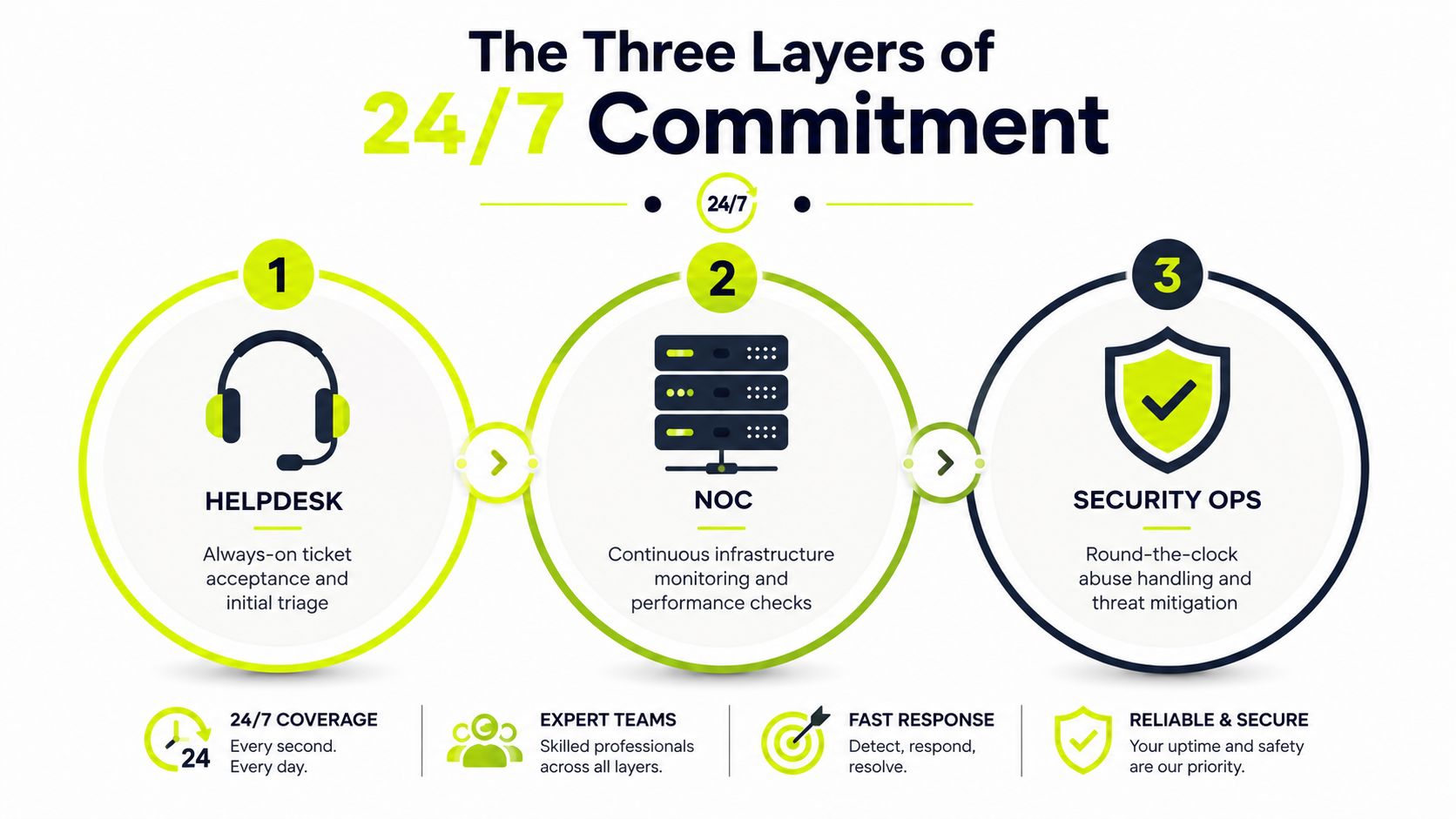
24/7 support works only when the provider has a real service commitment to accept, triage, and respond at any hour. That's different from having a chat bubble on a website. The useful model has three layers, a 24/7 helpdesk to accept and sort requests, a 24/7 NOC to watch infrastructure, and 24/7 security operations to handle abuse, IP reputation, and threat events.
Coverage is not capability
A chat agent who answers at 3am but can't reach an escalation engineer won't unblock a banned Facebook ad account. They can only collect symptoms. That's the difference between staffing and support engineering.
If your workflow depends on proxies, browser profiles, session persistence, or geo-targeted routing, the outage might sit in the pool, the carrier, the fingerprint stack, or the platform itself. A proper support setup connects those layers to a resolver who can act, not just answer. That's why the 24/7 call center services guide is useful as a baseline, but automation-heavy teams need a narrower standard than “someone picked up.”
Hybrid support beats full-time noise
The strongest pattern is a hybrid support model. Let automation absorb low-urgency work like password resets or IP rotation changes. Let live agents handle setup questions and status checks. Reserve humans for incidents that can kill revenue, such as a pool-wide ban, payment hold, or a cloaking break across multiple regions.
That hybrid model keeps queues clean. It also keeps your night shift from drowning in issues that a help article can solve in two minutes.
If the provider can't describe escalation tiers in plain language, they probably don't have them.
For operators, the litmus test is simple. Ask whether the provider can do more than acknowledge the issue. Ask whether the resolver can monitor, route, and escalate without waiting for office hours. The Sota Proxy support page matters because it shows where a vendor wants you to start when something goes sideways.
Proxy Types and Why Support Speed Matters for Each
Proxy type changes what “urgent” means. Residential, mobile, datacenter, and IPv6 all break in different ways, so the support burden isn't the same. If you buy the wrong response model for the wrong proxy class, you end up paying for uptime you still can't use.
| Proxy type | Typical automation use | Failure mode that needs support | Why 24/7 speed matters |
|---|---|---|---|
| Residential | Facebook and TikTok ad accounts, account farming, cloaking | A sub-pool gets flagged or quality drops | Fast replacement decisions keep sessions alive and save campaigns already in flight |
| Mobile | Harder-to-ban sessions, high-trust social workflows | Carrier-side rotation glitches or sticky session failures | Human investigation matters because the fault often sits outside your browser stack |
| Datacenter | Fast, cheap workloads, bulk testing, short-cycle tasks | Range burn, bans, or block spikes | Response speed controls how fast you swap ranges and stop wasting spend |
| IPv6 | Large-volume automation, low-cost parallelism, geo tests | Provider-side routing or acceptance issues | Quick replacement support matters because the cheap option stops being cheap when it dies |
Residential needs fast sub-pool triage
Residential IPs usually carry the most trust, but pool quality can vary. That means you can do everything right in AdsPower or Multilogin and still get punished by a bad slice of inventory. When a provider can replace or reroute fast, you preserve campaign continuity instead of letting one rotten segment contaminate the whole run.
Mobile and datacenter fail differently
Mobile proxies are useful because they're harder to ban, but carrier-side behavior can break rotation in ways that don't show up as a clean browser error. Datacenter and IPv6 are faster and cheaper, which is great until the platform burns the range and the replacement path becomes the actual product. If support can't move quickly, the low-cost option starts costing you time, and time is the thing that kills ad accounts.
For a deeper dive into how providers classify these options, the proxy types guide is a clean reference point. The practical takeaway is simpler. Pay for faster support where the proxy class has a higher probability of becoming a campaign blocker.
Don't grade proxies by price alone. Grade them by how quickly support can get you back to a working session.
KPIs, SLA Items, and Questions to Ask Vendors
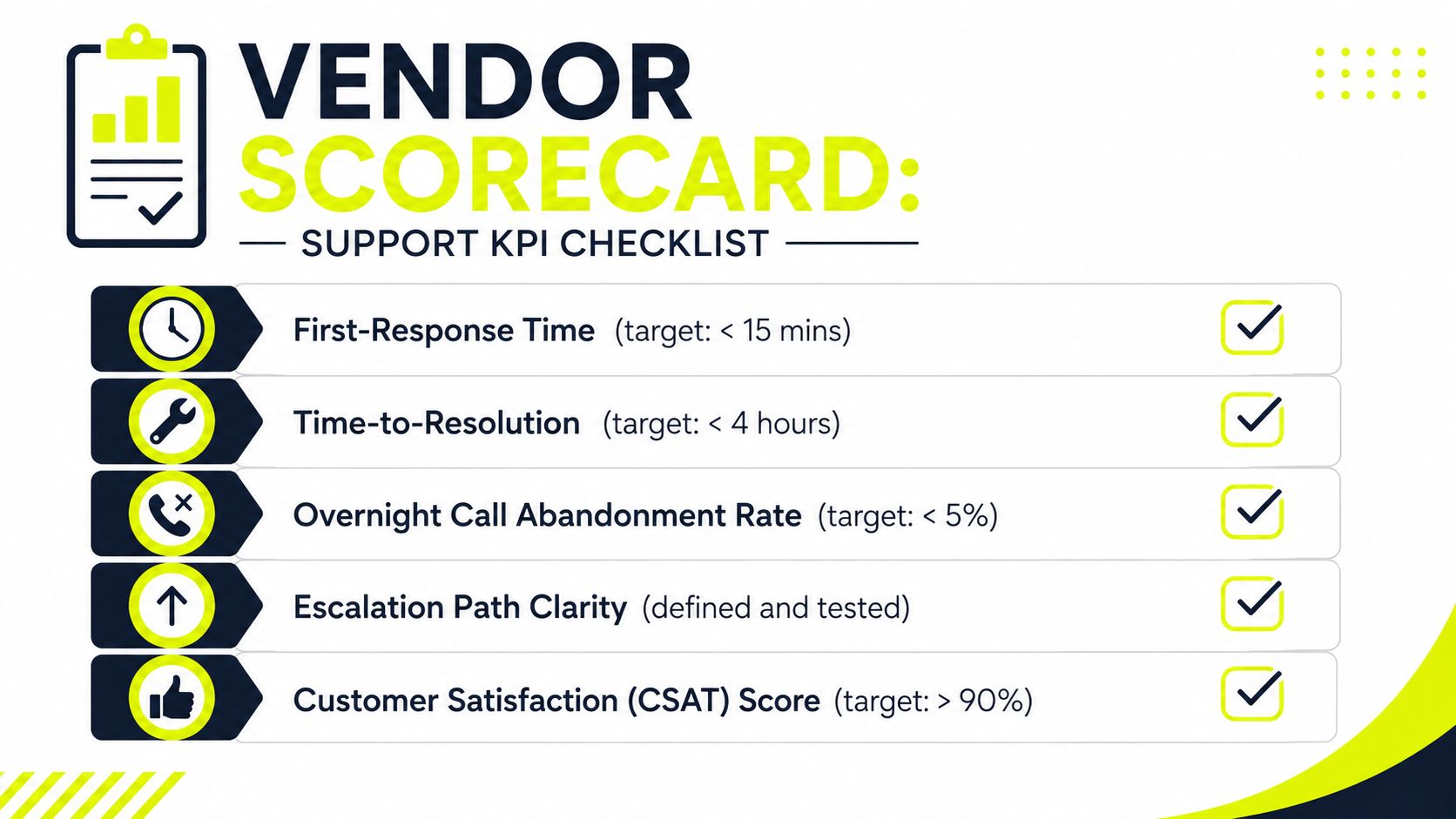
“Good support” is useless unless you can measure it. For operator workflows, the scorecard has to include first-response time, time-to-resolution, overnight call abandonment, escalation transfer rate, and failed-escalation paths. If a provider can't show those numbers, they're probably optimizing for ticket closure, not recovery.
What to demand in writing
Start with the SLA, not the sales deck. You want uptime guarantees, response windows by severity tier, named escalation contacts, and refund or credit clauses if the provider misses the promise. If a vendor won't put that in writing, they're asking you to accept their internal process on faith.
The fair usage policy also matters because support gets messy when usage rules are vague. A support team can't help you if the commercial terms are unclear or if the provider can point to a policy gap after the fact.
Questions that cut through noise
- Who answers at 3am? Ask whether it's an engineer, a generalist, or a vendor partner.
- Do I get a named contact? Anonymous queues waste time when an incident is already live.
- Can escalation be tested before signing? If not, you're trusting a promise you've never seen work.
- What happens when the first fix fails? Weak vendors loop the same reply. Strong ones route upward fast.
- How do you handle overnight failures? If they can't explain the path, they probably don't have one.
The support conversation should feel like procurement for critical infrastructure. Not a sales demo. Not a chat conversation. A system check.
Vendor rule: if the escalation path can't be described in one minute, it won't hold under pressure.
For teams running Facebook ad accounts, TikTok drops, and geo-targeted cloaking, the KPI question is whether the provider can keep the channel alive when the channel is already failing. That's the only support metric that matters in the middle of the night.
Troubleshooting and Escalation Workflow That Actually Works
The best incident workflow starts before support ever sees the ticket. First, check the dashboard, rotation controls, and sticky-session state. If the issue clears there, you just saved yourself a handoff. If it doesn't, ticket it with the details support needs.
Step by step without guessing
- Self-service first. Check profile health, switch rotation, reset sticky sessions, and confirm the failure is reproducible.
- Open a structured ticket. Include proxy type, geolocation, account IDs, error codes, timestamps, and what changed right before the break.
- Use live chat for mid-urgency issues. A single AdsPower profile misfire or one TikTok account acting weird usually needs a fast triage, not a full incident bridge.
- Escalate to a human engineer for critical incidents. Mass bans, cloaking pages failing geo-checks in multiple regions, or payment holds blocking top-ups need real escalation, not a looped bot reply.
The DNS resolution problems guide is relevant here because a surprising number of “support issues” start as misread infrastructure behavior. If the vendor can't tell the difference between a local misconfig and a platform-side issue, your ticket will stall.
What good escalation looks like
Good escalation means a named engineer takes ownership, not a chatbot recycling the same sentence. Good escalation also means the vendor asks for the data that shortens diagnosis, instead of making you repeat the same symptoms three times. The improve bug report handling resource is useful because it pushes the same discipline, structured input beats vague complaint every time.
A clean escalation path saves time in ugly ways. For a 50-account farm, that can mean the difference between a recoverable incident and a full-night wipeout. For a geo-targeted campaign, it can mean the difference between catching a carrier issue before the drop window closes and watching the window disappear.
Scenarios Where 24/7 Support Saved the Campaign
A good support team doesn't “feel helpful.” It stops losses. That shows up in blunt operator math.
Residential pool swap that kept spend alive
An AdsPower farm of 50 Facebook ad accounts gets flagged in a single sweep. The operator opens a ticket, gives the full stack details, and gets a clean residential pool swap in about 20 minutes. Without that response, the rest of the day's spend dies in the queue. With it, the week's campaign survives long enough to keep testing.
Carrier-side fix before a sneaker drop closes
A TikTok geo-targeted sneaker campaign fails because mobile IP rotation gets stuck. The browser looks fine. The routing doesn't. A midnight support engineer traces the failure to a carrier-side issue before the drop window closes, which matters because timed campaigns don't give you a second chance. Slow support turns that run into dead inventory.
IPv6 fallback when a datacenter range burns
A cloaking pipeline breaks across two regions after a datacenter range gets burned. The provider rotates to IPv6 within the SLA window, and the operator keeps the campaign moving instead of rebuilding the stack from scratch. That kind of fast path is exactly where a provider earns its keep.
If you want the rough math, the point is simple. A campaign that can't serve is a campaign that can't learn, and a campaign that can't learn burns money while it's offline. Fast support doesn't create revenue by itself. It stops preventable loss.
Downtime is never just downtime. It's wasted spend, missed learning, and a growing stack of recovery work.
Choosing a Provider and Getting More From the Relationship
Pick the provider like you'd pick any piece of infrastructure you can't babysit. Run a pre-contract test. Send a detailed ticket at 2am local time. Time the first response. Trigger a fake escalation. Grade whether the named contact exists and whether they can move the issue forward.
That test matters more than the sales call. A vendor can sound polished in daylight and still collapse when the queue gets ugly. If they answer slowly, if they hide behind generic replies, or if they can't explain the next step, walk.
What to standardize before you sign
- Document the stack. Keep proxy type, browser profile, account IDs, and escalation notes in one place.
- Rotate named contacts. Don't let one engineer become a single point of failure.
- Keep incident templates ready. Your first message should already contain the fields support needs.
- Match provider behavior to workload. If you need high-touch help every night, buy for that reality instead of hoping a chat widget grows up.
For teams already pushing serious volume, the vendor relationship can also offset cost. Sota Proxy has a referral program that pays up to 40% commission on converting referrals, which can matter if your group standardizes on one provider and routes other operators there too. Treat that as a cost-control lever, not a reason to ignore support quality.
The provider should fit the operational shape of the work. If you run account farming, cloaking, or geo-targeted campaigns in multiple browsers, you need quick escalation and clean diagnostics. If they can't support that pattern, the cheap plan gets expensive fast.
Operator Checklist Before the Next 3am Incident
Test the 3am response before you sign. Keep your stack, account IDs, and escalation path in one place. Demand SLA terms with severity tiers and credit clauses in writing. Track first-response and resolution times on every incident. Build a relationship with a named engineer, not just a chat widget.
If you're running proxy-heavy automation and need infrastructure that's built for real recovery, visit Sota Proxy and check the support flow before the next campaign goes sideways. You'll see how its proxy types, rotation controls, and human support fit the kind of 3am problems operators deal with.
Related articles
Network Redundancy for Proxy and Automation Platforms
Learn how network redundancy keeps proxy and automation platforms online. Covers active/passive, multi-region clusters, failover tuning, and 99.9% uptime

Geographic Distribution for Proxy Infrastructure
Master geographic distribution for proxy infrastructure. Learn how to choose locations, proxy types, and routing strategies for ad verification, scraping
Resource Limit Is Reached: Fixes for Proxies, Servers, And
Learn how to fix resource limit is reached errors on proxies, servers, and APIs with practical solutions for 2026.
API Integration Guide: Best Practices for 2026
A practical API integration guide for proxy platforms. Covers auth, rotation, geo-targeting, error handling, and SDKs for scraping and ads.

7 Data Collection Methods for Media Buyers & Farmers
Explore top data collection methods for media buyers. Learn to leverage scraping, APIs, and surveys for ad accounts, account farming, and geo-targeting.

7 Budget Friendly Options for Proxies in 2026
Explore budget friendly options for proxies. A technical guide to cheap datacenter, residential & IPv6 plans for ad arbitrage, scraping, and account farming.