What Is 99.9 Uptime, a Practical Breakdown for Proxy Users
What is 99.9 uptime? Convert the number into daily, monthly, and yearly downtime, compare tiers, and check SLAs before you buy.
99.9% uptime means about 43 minutes of allowed downtime per month and roughly 8 hours 45 minutes per year. That's not “always on.” It's a service level with a real outage budget, and a single bad incident can burn through a big chunk of it fast.
Table of Contents
- What 99.9% Uptime Really Means in Practice
- Converting 99.9% into Real Downtime Numbers
- Comparing 99%, 99.9%, 99.99%, and 99.999% Tiers
- How SLAs State 99.9% and What They Quietly Exclude
- What 99.9% Means for Proxy Workloads in Practice
- Verifying a Vendor Uptime Claim Before You Buy
- Choosing the Right Uptime Tier and Putting It to Work
What 99.9% Uptime Really Means in Practice
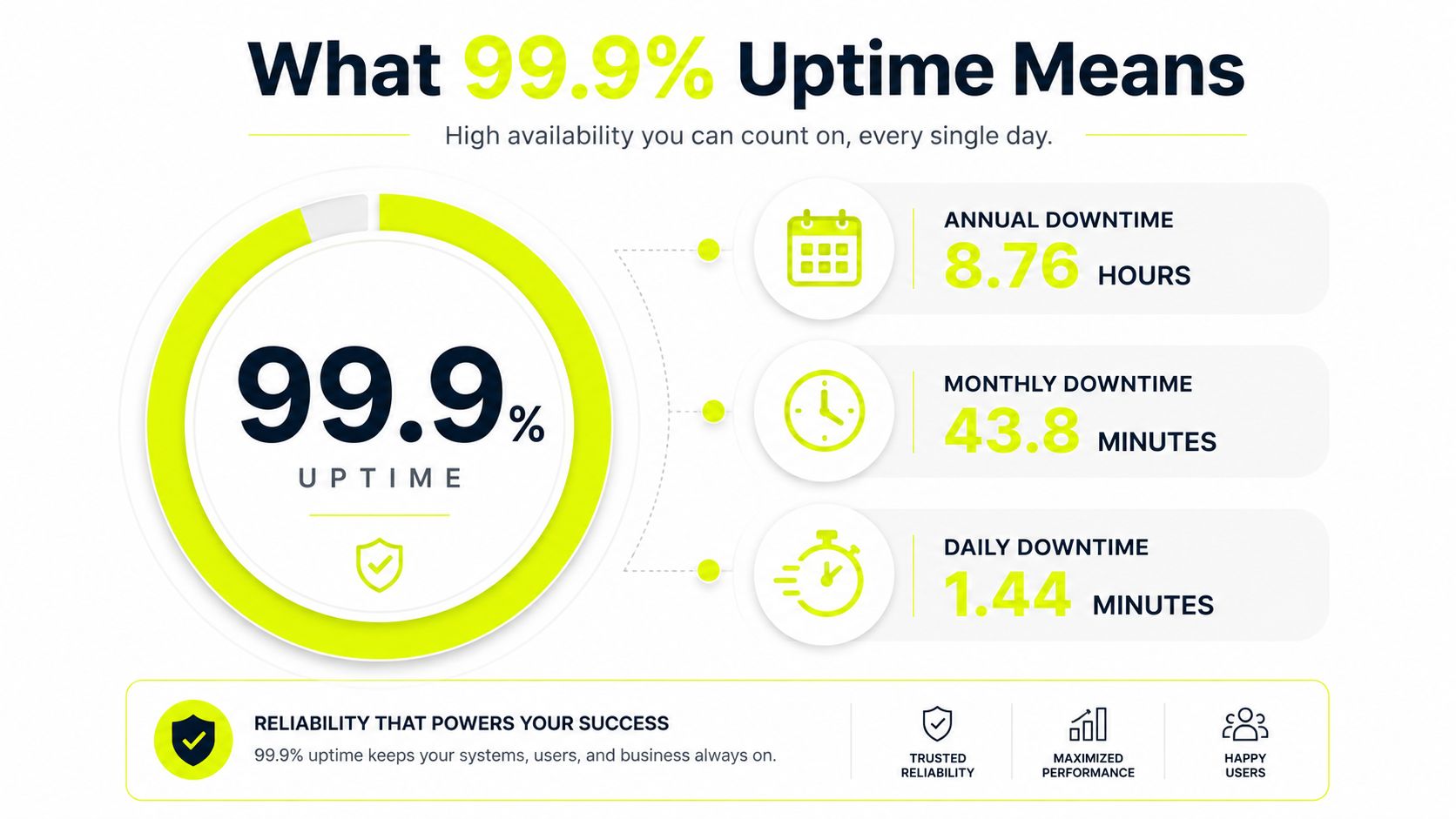
Three nines sounds clean on a sales page, but the math is blunt. 99.9% uptime still allows about 43 minutes of downtime per month and about 8 hours 45 minutes per year (Hyperping's three-nines reference). That is enough room for a real outage, not just a cosmetic blip.
For proxy operators, that allowance is the part that matters. If you are running Facebook ad accounts, TikTok ad accounts, account farming, cloaking, or geo-targeted campaigns, the question is whether a break lands inside a spend window, a farming session, or a scraping run that already took hours to queue. A short outage can waste warmed sessions, break rotation timing, or force a run to restart from scratch.
Practical rule: do not treat 99.9% as “always on.” Treat it as a limited outage budget, because once you spend it in the wrong window, the month gets harder to recover.
That is why 99.9% shows up so often in proxy and SaaS marketing. It is a baseline business SLA, not a promise that nothing will interrupt you. The service can still go down long enough to matter, and one long incident can consume most of the month's allowance. The right question is whether that outage budget matches your workload, your retry logic, and your tolerance for session loss.
Sota Proxy's own fair usage policy belongs in the same discussion, because uptime only matters if the platform also keeps traffic patterns controlled enough to protect pool quality. That is the operational side vendors often gloss over. If you are comparing claims, read the policy and the SLA together.
As noted by CloudOrbis Inc. on IT outages, a useful mindset is simple. 99.9% is a baseline for continuity, not immunity from disruption. If your workload can absorb pauses, the number may be fine. If one interruption breaks a campaign cycle, you need to test the vendor harder than the SLA headline.
Converting 99.9% into Real Downtime Numbers
A year has 525,600 minutes, and 0.1% of that is 525.6 minutes of allowed downtime. That's the math behind the headline. It's also why 99.9% uptime comes out to roughly 1 minute 26 seconds per day, about 10 minutes per week, and about 43 minutes per month (Web-Alert's uptime SLA explainer).
The conversion you should keep in your head
Use one year as the base and convert from there. That keeps the math honest and stops vendors from cherry-picking a friendlier window.
| Uptime tier | Per day | Per week | Per month, 30d | Per year, 365d |
|---|---|---|---|---|
| 99% | about 14 minutes 24 seconds | about 1 hour 41 minutes | about 7 hours 12 minutes | about 3.65 days |
| 99.9% | about 1 minute 26 seconds | about 10 minutes | about 43 minutes 12 seconds | about 8 hours 45 minutes 36 seconds |
| 99.99% | about 8.6 seconds | about 1 minute | about 4 minutes 19 seconds | about 52.6 minutes |
| 99.999% | under 1 second | a few seconds | under 30 seconds | about 5.3 minutes |
That table is the one I'd paste into a runbook. It makes the trade-off visible fast. 99.9% is not a tiny outage budget, it's a measurable slice of the month.
What the conversion changes operationally
For proxy ops, the unit that matters is rarely “year.” It's the ad cycle, the farming session, or the scrape batch. A vendor can look excellent on paper and still fail you during the exact window that matters. If you don't translate uptime into a per-window budget, you end up trusting a percentage instead of planning for interruption.
If you can't tell me what 43 minutes means for your busiest hour, you don't really understand 99.9%.
Keep the math in your own notes and cross-check any provider calculator against it. Then anchor the number against your actual run cadence. That's the only way to know whether a promise is usable or just cosmetically high.
For a deeper checklist on measuring service behavior, the internal note on reliability testing is the better companion than any sales page.
Comparing 99%, 99.9%, 99.99%, and 99.999% Tiers
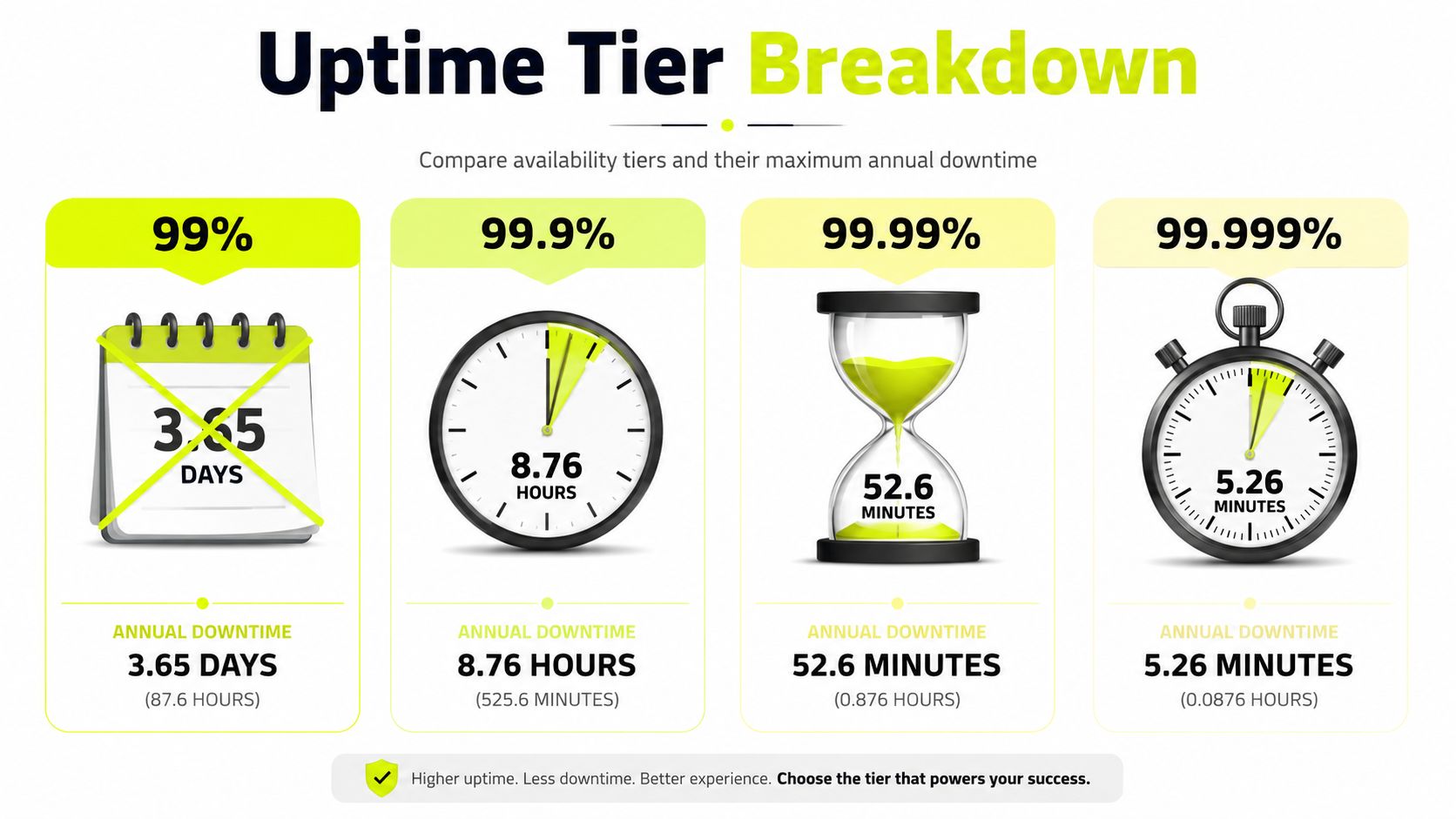
The jump between uptime tiers is not linear. Every extra nine cuts the permitted downtime by roughly a factor of ten, and the difference in practice is bigger than most buyers expect. IBM's tier reference makes that contrast easy to see, with 99.0% at about 3.65 days per year, 99.9% at about 8.8 hours, 99.99% at about 52.6 minutes, and 99.999% at about 5.3 minutes (IBM's 9s reference).
What each tier really buys you
99% is fine for low-stakes dashboards, side tools, and anything that can sit idle without costing you money every minute. It's not what you want for active traffic operations.
99.9% is the standard business SLA and the normal baseline for proxy services. Sota Proxy advertises that tier on its platform, and that's the right class of promise for most scraping, account management, and geo-testing flows that can tolerate short pauses.
99.99% is a different tier of engineering. It usually means the provider has built for full data center failure scenarios, not just node-level hiccups. That's the level you start looking at when an outage can stop spend, break a timed drop, or knock a whole region offline.
99.999% is the carrier-grade conversation. It's for systems where every minute hurts and where the architecture needs very aggressive redundancy.
The proxy-workload view
For Facebook ad accounts and TikTok ad accounts, 99.9% is often acceptable if you've got fallback pools and clean session handling. For account farming inside AdsPower, Dolphin Anty, GoLogin, Multilogin, or Hidemyacc, the tier is good enough if the farm is distributed and you can swap endpoints without blowing fingerprints.
For scraping and ad verification, the gap between 99.9% and 99.99% matters more when the job is time-bounded or region-sensitive. A short failure can force a rerun, kill a batch, or leave a region untested. The higher tier buys you less interruption, but it also usually costs more engineering and more money because the provider has to hold redundant capacity.
The decision isn't about chasing the biggest number. It's about matching the tier to the cost of the miss.
How SLAs State 99.9% and What They Quietly Exclude
A printed SLA is usually a monthly calculation wrapped in legal language. The provider counts downtime inside a defined window, then carves out whatever it wants to exclude. That means the headline number can look stronger than the operational reality if you don't read the fine print in the service terms, such as Sota Proxy's terms.
The usual exclusions
Most contracts draw a line between planned and unplanned downtime. Scheduled maintenance often doesn't count. Neither do force majeure events, upstream failures, or incidents the provider labels as outside its control. Some contracts also exclude short incidents under a threshold, so a noisy but brief outage may never hit the SLA ledger.
Credit language can be just as narrow. A 99.9% SLA may still come with a modest credit cap, which means even a real miss doesn't automatically produce meaningful compensation. If the provider defines availability in a tight way, it can also ignore degraded states that feel like downtime from your side, such as a service that responds slowly enough to break your workflow.
What proxy buyers should scan for
Read the clauses that mention maintenance windows, upstream provider outages, beta ranges, new IP ranges, and credit eligibility. Those are the places where the promise shrinks. Residential, mobile, ISP, and datacenter proxy contracts can all hide similar wording, even if the homepage looks clean.
If the SLA never says how outages get counted, assume the provider wants the most forgiving version.
That's the core trick. The marketing page talks about uptime, but the contract defines what the provider is willing to pay for if it misses. If you're buying proxies for paid traffic, you want the operational definition, not the prettiest percentage. The gap between those two is where most disappointment lives.
What 99.9% Means for Proxy Workloads in Practice
For proxy operators, the number matters less than the outage budget behind it. 99.9% looks solid on a sales page, but under live load it can still vanish at the wrong moment. One failed proxy hop during an ad cycle, a farming session, or a scrape run can mean a missed login, a broken session, or a partial job that has to be redone. Question is how much work you can lose before the vendor's uptime claim stops being useful.
Ads, farming, cloaking, and geo-testing
Facebook ad accounts and TikTok ad accounts show the failure mode fast. If a campaign is pacing hard during a peak window and the proxy layer drops, continuity breaks immediately. Residential or mobile proxies usually handle that pressure better than a raw datacenter setup because the session pattern fits platform behavior more naturally, but the uptime budget still matters if your workflow depends on sticky sessions.
Account farming inside AdsPower, Dolphin Anty, GoLogin, Multilogin, or Hidemyacc needs stable endpoints, not vague uptime language. If a profile loses its path while you are logging in, warming up, or repeating a routine, the whole session can go to waste and you may have to start again. Redundant pools and health checks do more here than a polished SLA headline.
Cloaking and geo-targeted campaigns add another failure point. A regional outage can make the target page or checker inconsistent, and then you end up debugging the wrong layer. Keep a fallback pool by region and test the path before you send traffic.
Operator rule: the shorter the campaign window, the less forgiving 99.9% becomes.
Scraping and verification loads
For web scraping and SEO monitoring, 99.9% is often enough if the queue can pause and resume cleanly. Rotating residential IPs absorb brief loss better than a single-session setup, but a full stop still forces retries and can throw off rate planning. Ad verification follows the same pattern, because region and timing matter more than raw throughput.
If the run is disposable, 99.9% is usually fine. If the run has to finish before a market event, a product drop, or a campaign cutover, the same tier gets painful fast.
The proxy type matters too. Residential proxies look like consumer access and usually fit sensitive flows better. Mobile proxies often behave even closer to handset traffic and can help where platform suspicion is high. Datacenter proxies give speed and clean routing, but they stand out more in strict environments. IPv6 proxies can help with scale and large pools, but they do not replace session quality or disciplined uptime.
For monitoring metrics and incident workflows, use that as the model for alerts and follow-up. The point is not to collect dashboards for decoration. The point is to catch a failure before your campaign or scrape run does it for you.
The point is not that one type wins everywhere. Uptime and proxy type solve different problems, and both have to line up before you trust a vendor with paid traffic.
Verifying a Vendor Uptime Claim Before You Buy
A vendor can say 99.9% and still hide a sloppy operational setup. I'd verify the claim the same way I'd test any traffic path, by checking external evidence, synthetic behavior, and the support process around incidents. A good vendor doesn't just talk uptime, it makes the monitoring visible.
What to check first
Look for a public status page, then compare it against third-party uptime trackers like UptimeRobot and StatusCake. If a provider won't expose a status history, treat the claim as marketing until proven otherwise. Then ask for incident history, not just a support promise.
Synthetic checks matter too. Run HTTP probes from multiple regions against the exact proxy type you care about, whether that's residential, mobile, ISP, or datacenter. If a pool looks good from one region and falls apart from another, you've learned something useful before you commit spend.
For a practical framework around monitoring metrics and incident workflows, use that as the template for how you want alerts and follow-up to work. The point is not to collect dashboards for decoration. The point is to catch a failure before your campaign or scrape run does it for you.
Buyer checklist
- Confirm the reporting window. Monthly and annual SLAs behave differently, and the penalty math changes with the window.
- Ask for credit examples. If the provider can't show how a miss turns into a credit, the SLA is too abstract.
- Request the exact geo and proxy type. A trial on the wrong network path doesn't tell you much.
- Verify real-time monitoring. You want the dashboard to show usage and health, not just a balance.
- Test support hours. A real 24/7 human response matters more than a polished FAQ when a pool fails in the middle of a run.
A few provider signals are worth extra weight. 24/7 human support, encrypted crypto payments, and transparent pay-as-you-go billing usually indicate that the operator expects serious usage and wants fewer billing or trust surprises. If the vendor also exposes a proxy checker, use it before you trust a pool. Sota Proxy's own proxy checker is the kind of utility you should expect to exist before you spend real traffic on a new setup.
Choosing the Right Uptime Tier and Putting It to Work
The right tier depends on what a failure costs you. If a short pause only delays a non-critical task, 99.9% is usually the pragmatic standard. If an outage can interrupt spend, break a launch, or knock a monitored region offline, paying for 99.99% starts to make sense because the provider has to carry more redundancy, reserved failover capacity, and heavier automation.
A simple decision filter
- Use 99.9% when the workflow can pause, retry, or fail over without major financial damage.
- Consider 99.99% when the workload is time-bound, region-sensitive, or tied to active revenue windows.
- Ask for proof when the vendor's SLA sounds clean but the operational details are missing.
For most account-farming and scraping setups, 99.9% is enough if the monitoring is solid and the pool design is sane. That means sticky sessions where needed, redundant pools where possible, and a habit of testing the exact proxy type before a live push. If the vendor can't survive your basic checks, the uptime percentage doesn't matter much.
Sota Proxy fits the practical side of this topic because it's built around 99.9% uptime, clean IP pools, redundant clusters, 220+ geolocations, and 24/7/365 human support. That combination covers the kinds of proxy-heavy operations discussed here, from geo-targeted campaigns to scraping and account management. If you already trust the platform, the Sota Proxy referral and affiliate program with up to 40% commission can also offset some of your cost structure without changing your traffic logic.
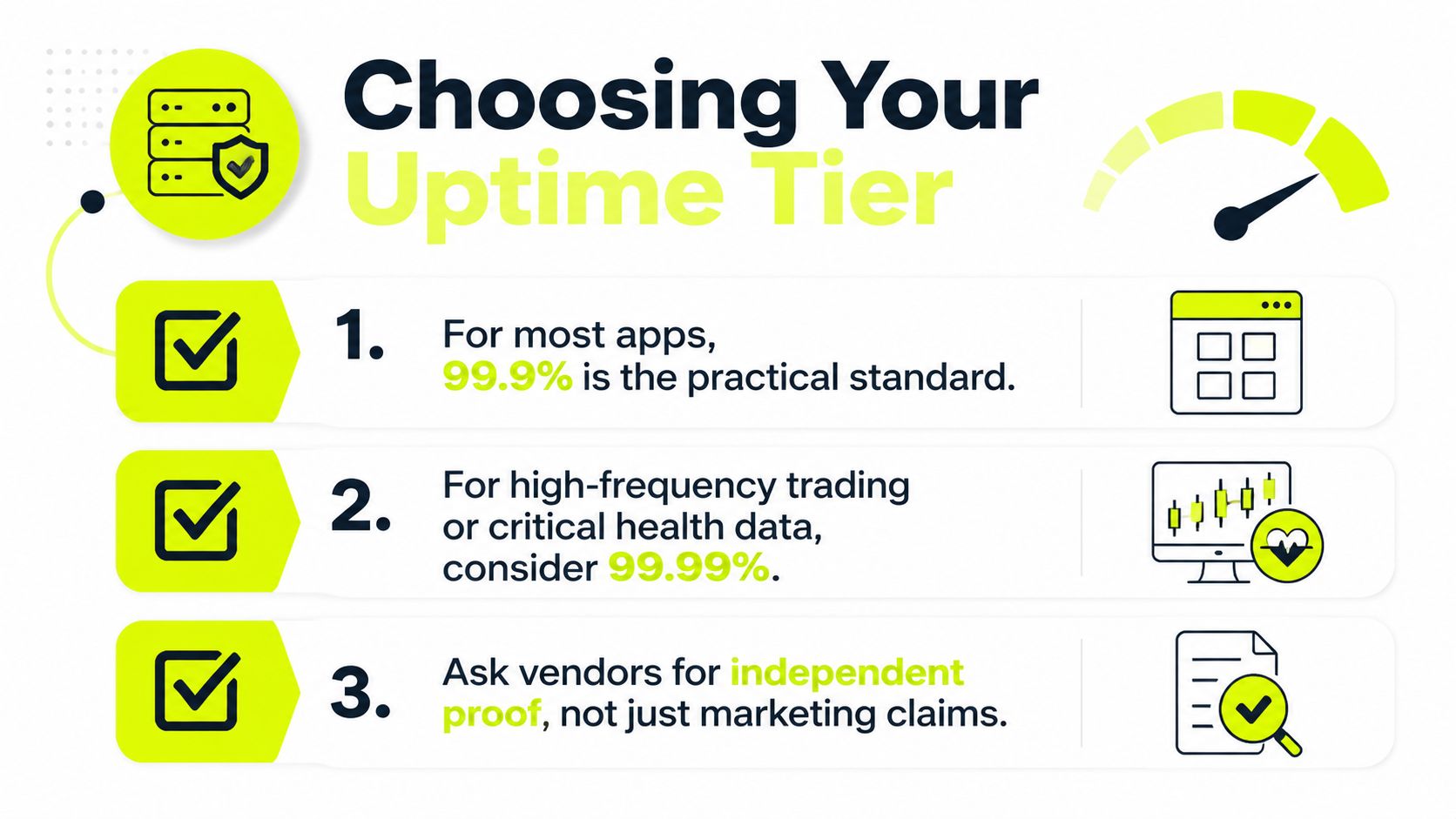
Run this checklist before you buy: does the SLA show the reporting window, does the provider publish incident behavior, and can you test the exact geo you need under real traffic conditions. If the answers are clean, the tier is probably usable. If they aren't, the percentage on the landing page isn't doing much for you.
If you want proxy infrastructure that's built for paid traffic, account management, scraping, and region-specific testing, visit Sota Proxy and compare the proxy type, location, and support model against the workload you run. If the fit is right, you can use the same platform for proxy operations and referral economics without changing your workflow.
Related articles
What Is a Proxy Used for: 2026 Arbitrage Guide
What is a proxy used for - Learn what a proxy is used for in 2026, from boosting security to managing multi-account operations for arbitrage teams

How to Build an Amazon Review Scraper That Actually Works
Build a reliable Amazon review scraper with proven proxy, anti-blocking, and parsing tactics. Step-by-step guide for technical operators and agencies.
CSV vs JSON: A Practical Guide for Scrapers and Ad Ops
CSV vs JSON compared for tech teams: structure, parsing speed, nested data, and real pick for scraping, ad verification, and automation pipelines.

API Call with Python for Ad Automation
Master the API call with Python for ad automation. Learn async patterns, proxy rotation, retries, and fingerprinting for multi-account workflows.

Blocklist on Instagram: How to Detect and Fix Blocks
Learn how blocklist on Instagram really works, how to detect blocks and shadowbans, and the exact steps to manage your blocked accounts list.
Fair Usage Policy Explained for Proxy Users
Learn what a fair usage policy really means for proxy users. Covers limits, throttling, and practical compliance tips for SotaProxy customers.