DNS Resolution Problems: Advanced Troubleshooting 2026
Fix DNS resolution problems for scrapers & ad campaigns. Guide covers CLI tools, cache flushes, & proxy-specific fixes.
Your proxies are up. Ads are spending. AdsPower or GoLogin profiles look clean. Facebook and TikTok accounts log in. Then the lander won't open in the target region, the cloak returns the wrong page, or your scraper starts throwing random host errors. That's usually where people blame the proxy pool first.
A lot of the time, the proxy isn't the root problem. DNS is.
For traffic arbitrage teams, media buyers, and account farming setups, DNS resolution problems don't behave like a neat office-network issue. They show up as dead redirects, mismatched geo pages, unstable verification runs, broken warm-up flows in antidetect browsers like AdsPower, Dolphin Anty, GoLogin, Multilogin, and Hidemyacc, and account actions that look suspicious because the browser, proxy exit, and resolver path don't agree. If you run cloaking, geo-targeted campaigns, scraping, or multi-account operations, DNS isn't background plumbing. It decides whether the request even reaches the right place.
Table of Contents
- Why DNS Failures Wreck Your Operations
- The 5-Minute Diagnosis Checklist
- Systematic Troubleshooting From Client to ISP
- Advanced Diagnostics with Dig and Nslookup
- Solving Proxy-Specific DNS Challenges
- Preventive DNS Strategy for High-Stakes Operations
Why DNS Failures Wreck Your Operations
A common failure pattern looks like this. A geo-targeted campaign goes live, spend starts, and conversions stay flat. The Facebook ad account is fine. The TikTok ad account is fine. The proxy gateway responds. But users in the target country never reach the intended landing page because resolution fails or resolves to stale infrastructure.

That's why DNS resolution problems hit harder in ad-tech and multi-account work than they do in a normal office setup. You aren't just loading one site from one ISP. You're rotating identities, switching geos, checking ad previews, validating redirect chains, and syncing what the target platform sees across browser fingerprint, IP, and location. If DNS breaks in one region, your numbers can collapse while the rest of the stack still looks healthy.
The hidden single point of failure
The internet still has concentration risk at the resolver layer. Google and Cloudflare answer nearly 50% of all global DNS queries, according to RIPE's resolver market measurements. If one of those providers slows down, a huge share of lookups slow down with it. That can break scraping runs, ad verification, and account workflows even when your proxies are online and responsive.
Practical rule: If requests fail before TLS even starts, stop blaming the target site first. Check name resolution.
For account farming, this matters because inconsistent resolution creates behavior drift. The profile opens through one exit IP, but the DNS answer arrives from a different path or times out, so retries kick in, assets half-load, and platform risk systems see unstable sessions. For cloaking, the damage is more direct. Review bots, users, and your own QA team may resolve different answers at different times.
Why proxy-heavy setups feel it first
Proxy users amplify DNS stress because they create more moving parts:
- Antidetect browsers keep browser fingerprints isolated, but they don't magically fix resolver mismatch.
- Residential and mobile rotations change network context fast, which can expose weak resolver paths.
- Datacenter and IPv6 proxies can look stable until the target depends on records that weren't tested.
- Geo checks and ad verification fail early because DNS is the first gate.
When people say “the proxy is bad,” they often mean one of three things: the resolver attached to that path is slow, the authoritative answer is inconsistent by region, or the DNS request leaked outside the intended tunnel. Those are DNS problems wearing proxy-shaped clothes.
The 5-Minute Diagnosis Checklist
When a lander won't resolve or a scraper starts throwing host errors, you need triage, not theory. The goal in the first five minutes is simple: decide whether the fault sits on your machine, your local network, your configured resolver, or the proxy path.
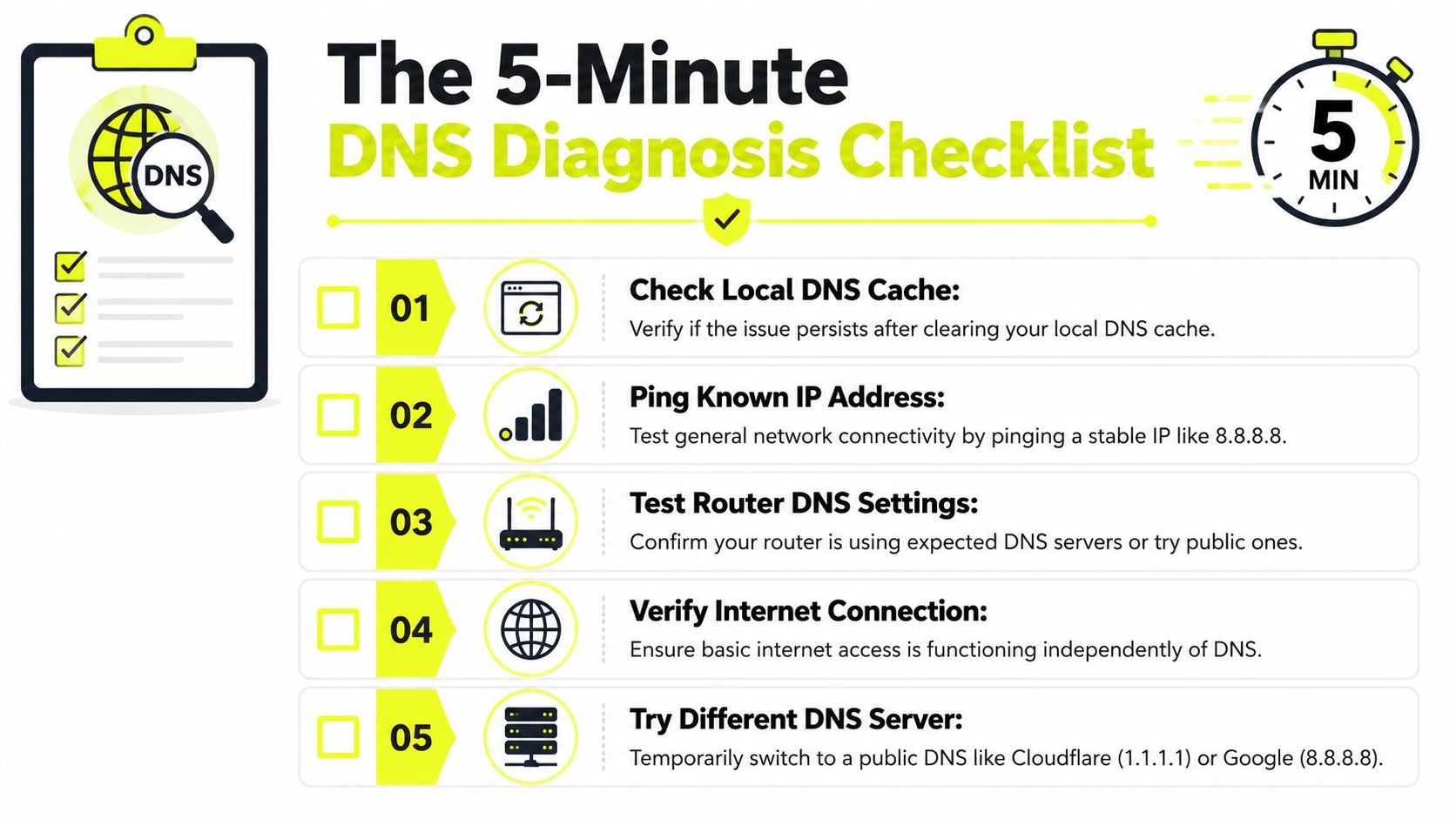
A useful benchmark: a normal cached DNS response completes in under 1ms, while an uncached resolution can take 50–200ms. If lookups keep going past 200ms, you've found a real bottleneck, as outlined in OneUptime's DNS troubleshooting write-up.
Run these checks in order
Test raw connectivity first
If the network is dead, DNS tests waste time.
ping 8.8.8.8Healthy pattern: replies come back.
Problem pattern: timeouts or unreachable errors. That points to broader connectivity, not just DNS.
Test resolution with your current resolver
Use:
nslookup example.comHealthy pattern: you get an answer quickly and the resolver shown is the one you expect.
Problem pattern: timeout, SERVFAIL, or a resolver you didn't intend to use.
Look at local cache state on Windows
Use:
ipconfig /displaydnsHealthy pattern: entries exist for recently visited names and don't look stale.
Problem pattern: no useful entries, or entries keep repopulating with wrong answers after flushes.
Compare with a public resolver
Temporarily switch the system or router to a public resolver and test again. This isolates ISP-side resolver issues fast.
Check whether the proxy changes the result
Resolve the same host with and without the proxy path. If direct works and proxied fails, you're dealing with proxy DNS behavior, not just local DNS.
If direct browsing works but the same domain fails in AdsPower, Dolphin Anty, Multilogin, or Hidemyacc, treat the browser profile and proxy path as separate layers. Don't lump them together.
Fast interpretation table
| Check | Healthy signal | Bad signal | What it usually means |
|---|---|---|---|
| Ping stable IP | Replies | No replies | General network issue |
| Nslookup default | Quick answer | Timeout or SERVFAIL | Resolver issue |
| Local cache view | Expected entries | Wrong or stale entries | Local cache pollution |
| Public resolver retest | Same or faster answer | Works only on public resolver | ISP resolver problem |
| Proxy vs direct | Same outcome | Proxy path fails | Proxy DNS mismatch or leak |
If you need a provider-side checklist for connection behavior, Sota Proxy keeps a practical proxy FAQ page that's useful when you're separating DNS symptoms from authentication or routing problems.
Don't over-diagnose too early
People lose time here by jumping straight into packet capture. Start smaller. If a domain resolves fine directly but breaks only inside a geo-targeted campaign flow, the first suspicion should be resolver path mismatch. That's common in Facebook and TikTok ad checks where the page itself loads in one path but third-party assets, tracking endpoints, or redirect hosts rely on another.
Systematic Troubleshooting From Client to ISP
Once quick triage points to DNS, work up the stack in a fixed order. Random changes make DNS resolution problems harder to isolate because caches and browser features hide the actual source.
Industry guidance puts uncached DNS under 100ms for a good user experience, and delays above 200 to 300ms become noticeable, especially on weak ISP resolvers in some regions, as described in LogicMonitor's DNS monitoring deep dive. For ad verification, scraping, and multi-step redirect flows, those delays stack fast.
Clear client-side state first
Flush the OS cache before you touch resolvers.
Windows
ipconfig /flushdns
macOS
sudo dscacheutil -flushcache; sudo killall -HUP mDNSResponder
Linux with systemd-resolved
resolvectl flush-caches
Then restart the browser profile that's failing. In antidetect browsers, use the failing profile itself. Don't test in your normal Chrome window and assume the result applies to AdsPower or GoLogin.
DNS fixes that only work in a standard browser but not in the antidetect profile usually point to profile-level DNS-over-HTTPS settings, cached host state, or proxy-specific handling.
Check browser DNS behavior
Modern browsers can bypass your OS resolver with DNS-over-HTTPS. That's useful for privacy. It's terrible for debugging if you forgot it's enabled.
Look for these failure patterns:
- Browser works, CLI fails: the browser may be using DoH while the system uses a broken resolver.
- CLI works, browser fails: the browser may have stale host cache, DoH problems, or proxy integration issues.
- One profile fails, another works: the problem is profile-specific, not system-wide.
In Chrome-based tools, inspect secure DNS settings and test with them toggled off and on. Then restart the profile. Don't change three things at once.
Move to resolver and router settings
If client-side cleanup doesn't fix it, inspect the resolver configured by DHCP, router, or VPN. Many teams leave this on the ISP default until a campaign starts failing.
Use these commands on Linux:
cat /etc/resolv.conf
resolvectl status
On Windows, inspect adapter DNS settings with PowerShell or the GUI. On macOS, review network service DNS servers.
A practical elimination sequence:
- Use the current resolver and test.
- Switch to a known public resolver and test.
- Test through the proxy path and compare.
- Revert one change at a time so you know what solved it.
If your environment also deals with firewall interference, this short piece on proxy servers and firewalls is relevant because filtered UDP or intercepted traffic often gets misread as pure DNS failure.
Spot ISP interference
Some ISPs hijack or filter DNS behavior. You'll recognize it when the configured resolver doesn't match the server answering, or when direct queries to expected resolvers behave strangely while web browsing still “sort of” works.
Use:
traceroute example.com
and basic latency checks against the resolver itself.
You're looking for patterns, not one-off misses:
- high latency to the resolver
- inconsistent answers across repeated queries
- direct browsing that works only because the browser cached earlier responses
- target-region failures that disappear when you change resolvers
Know when the problem isn't local
If multiple machines, multiple antidetect profiles, and multiple proxy exits all show the same failure at the same time, stop tweaking browser settings. That points upstream. It may be the ISP resolver, the public resolver you rely on, or the authoritative nameserver chain for the domain.
At that point, client cleanup is done. Query the chain directly.
Advanced Diagnostics with Dig and Nslookup
Basic checks tell you that something is wrong. dig and nslookup tell you where.

When you run scraping infrastructure, geo verification, or cloaked routing, you need to know what answer a specific resolver returns, whether delegation is intact, and whether IPv4 and IPv6 behave differently. That last point matters a lot. AAAA query failure sits at 64.2% globally, versus 12.5% for IPv4 A queries, based on APNIC's measurement of DNS failures in the wild. If you use IPv6 proxies, broken AAAA handling can look like random proxy instability when it's really DNS.
Query the resolver you actually use
Start with the default resolver:
dig example.com
Then compare it with a specific resolver:
dig @1.1.1.1 example.com
dig @8.8.8.8 example.com
Check:
- ANSWER SECTION. Did you get the record you expect?
- Query time. Is it consistently slow?
- SERVER. Which resolver answered?
- Status.
NOERROR,SERVFAIL, andNXDOMAINmean very different things.
nslookup is less detailed, but it's still useful for a fast sanity check:
nslookup example.com
If the answer changes between resolvers, stop assuming the issue is local. You're looking at propagation differences, resolver behavior, or upstream breakage.
For teams comparing address families in automation stacks, this IPv4 vs IPv6 glossary page is a handy reference when a proxy path looks healthy on A records but falls apart on AAAA.
Test record types that break real workflows
Many users only query A records. That misses a lot.
For ad-tech and account work, also test:
dig example.com Adig example.com AAAAdig example.com CNAME
Use that when:
- a cloaked domain resolves for desktop traffic but not for mobile proxy sessions
- a Facebook review path reaches a different target than your user path
- an IPv6 proxy exits cleanly but the host lacks valid AAAA handling
- third-party assets fail while the main lander loads
Broken AAAA handling wastes hours because the symptom looks like a bad proxy subnet. Test the record directly before you rotate the whole pool.
A quick visual walkthrough helps if you need to explain this to a teammate or VA managing account infrastructure:
Trace delegation when answers look inconsistent
If one resolver says the name exists and another says it doesn't, trace the chain:
dig +trace example.com
This bypasses a lot of guesswork. You can see whether the issue starts at delegation, authoritative nameserver response, or somewhere in recursive resolution.
Use +trace when:
- a fresh domain for cloaking behaves differently by region
- a recently changed record still serves stale destinations
- one antidetect browser profile resolves and another doesn't
- TikTok preview bots and your own QA workstation don't hit the same host
The strongest habit here is simple. Query the default resolver, query a known external resolver, then trace the chain. That sequence turns vague DNS resolution problems into evidence.
Solving Proxy-Specific DNS Challenges
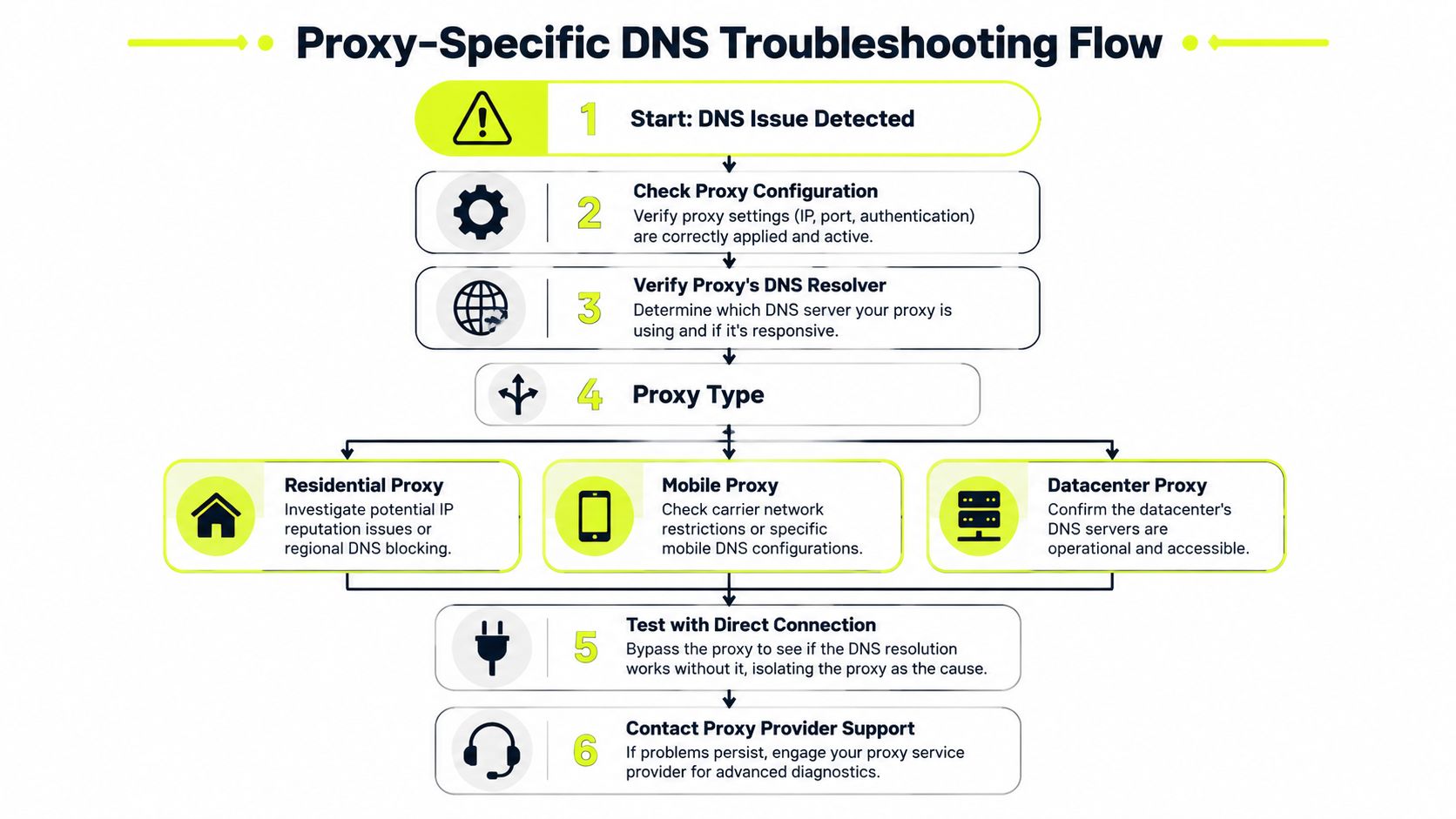
Proxies change who makes the request. DNS decides who finds the destination. If those two don't line up, your setup leaks.
That matters most in account farming, cloaking, ad verification, and regional testing. A browser in Multilogin or Dolphin Anty might present one IP to the target site while DNS resolution happens outside the proxy path. The result is a mismatch between visible network identity and resolver geography. Platforms don't need to know your real IP for that to become a trust problem.
What changes by proxy type
Each proxy type creates different DNS failure modes.
- Residential proxies look closest to normal user traffic, but they can suffer from resolver inconsistency tied to the provider's routing design. The hard part is that failures may appear only in certain geos or only after rotation.
- Mobile proxies inherit carrier behavior. That can be useful for trust on Facebook and TikTok ad accounts, but carrier DNS paths can change with network conditions and rotation.
- Datacenter proxies are easier to benchmark and usually more stable operationally. They're also easier for targets to classify, so DNS consistency alone won't make them look residential.
- IPv6 proxies can be fast and abundant, but they're less forgiving when DNS records are incomplete or broken. If the host's IPv6 path is weak, the proxy gets blamed.
How to test for leaks that matter
The key fact with residential setups is blunt: DNS leaks often come from the proxy service's own routing failures, not just user error, and the only reliable check is to test resolution from the proxy server path itself, as outlined in this residential proxy DNS leak note.
That means you should compare three things:
- Direct resolution from your local machine
- Resolution when the browser uses the proxy
- What the destination sees from that session
If direct and proxied results differ, don't stop at “it works now.” Find out whether the browser used local DNS, browser DoH, or the proxy's own resolver.
A practical workflow for AdsPower, GoLogin, Multilogin, and Hidemyacc:
- Disable browser-level secure DNS temporarily while testing. You need a clean view first.
- Run the same host lookup in a non-proxied shell and a proxied app flow.
- Compare region-specific landing behavior, not just whether the homepage opens.
- Check third-party hosts used for trackers, scripts, and redirectors. Those often fail before the main domain does.
If you need a dedicated breakdown of how proxy DNS behaves, this article on what proxy DNS is covers the moving parts clearly.
A session isn't clean just because the main domain loaded. If one tracker host, redirect host, or cloaking endpoint resolves outside the intended path, the session profile is inconsistent.
One more operational point. In account farms, teams often rotate proxies faster than they verify DNS behavior. That's backwards. Sticky sessions with validated DNS are usually safer than rapid rotation with unverified resolver paths. The same logic applies to geo-targeted campaigns. A stable residential or mobile path with coherent DNS beats a bigger pool that resolves unpredictably.
Preventive DNS Strategy for High-Stakes Operations
Reactive troubleshooting keeps spend from burning longer than necessary. Preventive DNS policy keeps the problem from showing up during launch windows.
For operators running cloaking, rotating ad creatives, account farms, scraper fleets, and geo-targeted checks, the preventive part comes down to resolver choice, browser policy, TTL discipline, and proxy selection that doesn't introduce DNS mismatch.
Set resolver policy on purpose
Don't leave resolver choice to whatever DHCP hands out. Pick a policy and enforce it across machines, browsers, and automation nodes.
Use a short checklist:
- Standardize the resolver path across your workstations and campaign boxes.
- Decide where DoH is allowed and where it must stay off for consistency.
- Validate by geography before launch, not after spend starts.
- Keep one clean fallback resolver for emergency comparison.
When you work with IPv6 paths, use them deliberately. Don't enable them everywhere just because the pool is available. If your operation depends on those exits, review the provider's IPv6 proxy service details and test your target stack against real record behavior before switching production traffic.
Use TTL like an operational control
DNS record TTL should not exceed 86400 seconds, and for dynamic operations like cloaking or rotating ad creatives, TTL of 6 hours or less is essential, based on Cloudflare's guidance on common DNS issues.
That matters because stale DNS breaks fast-moving operations in quiet ways:
- the old redirect target stays live longer than you intended
- review traffic lands on outdated infrastructure
- one region sees the new route while another still sees the old one
- campaign QA reports “works for me” while users get a different answer
Shorter TTL isn't always better for everything. Extremely aggressive changes can increase query churn and expose weak caching behavior. But for ad-tech workflows that change endpoints often, long TTLs create more pain than they save.
Treat TTL like deployment policy, not a box you fill once and forget.
If you recommend infrastructure to other operators, there's another practical angle. Reliable proxy infrastructure is something teams talk about in private chats, buying groups, and partner networks. Sota Proxy also runs a referral program with up to 40% commission, which makes sense for affiliates and tool builders who already send people toward stable proxy setups and want a recurring incentive attached to those recommendations.
If your operation depends on clean geo-targeting, stable account sessions, and predictable DNS behavior through residential, mobile, ISP, or datacenter IPs, Sota Proxy is worth a look. The platform is built for teams running scraping, ad verification, and multi-account workloads at scale, and it's backed by human support when a resolver path, browser profile, or proxy route needs real troubleshooting instead of canned replies.
Related articles
Network Redundancy for Proxy and Automation Platforms
Learn how network redundancy keeps proxy and automation platforms online. Covers active/passive, multi-region clusters, failover tuning, and 99.9% uptime

Geographic Distribution for Proxy Infrastructure
Master geographic distribution for proxy infrastructure. Learn how to choose locations, proxy types, and routing strategies for ad verification, scraping

What Is Sticky Session: A Technical Guide for Proxy Users
Learn what is sticky session, how session affinity works in load balancers and proxies, and when to use it for multi-accounting, scraping, and ad campaigns.

How to Avoid CAPTCHA on Automated Workflows
Learn how to avoid CAPTCHA on automated workflows with proxy tactics, antidetect browsers, request pacing, and solver fallbacks built for real operators.

AdsPower Proxy Integration: The Complete Setup Guide
Step-by-step AdsPower proxy integration with SotaProxy. Covers setup, proxy types, rotation, troubleshooting, and best practices for multi-account workflows.
7 Top Proxy Providers for Arbitrage and Scraping
Compare 7 top proxy providers by IP types, targeting, rotation, uptime, pricing signals, and fit for scraping, ad accounts, farming, and arbitrage.