Fair Usage Policy Explained for Proxy Users
Learn what a fair usage policy really means for proxy users. Covers limits, throttling, and practical compliance tips for SotaProxy customers.
You can run a clean campaign for three days, then wake up to a wall of throttled sessions and half-rendered dashboards. The usual failure mode is not a bad proxy pool, it's a fair usage policy kicking in after your traffic pattern looks expensive to the provider's network.
That's the part teams miss. “Unlimited” is a sales word, not a promise that shared infrastructure has no ceiling. On proxy plans, mobile buckets, broadband-style products, and even SaaS licenses, providers still measure usage, watch for heavy demand, and switch enforcement once a threshold is crossed, sometimes with warnings around 80% of allowance or speed drops from 100 Mbps to 10 Mbps after limits are exceeded, depending on the plan design (consumer guidance on broadband fair usage policies, Experian Aperture fair usage policy examples). If your team runs Facebook and TikTok ad accounts through AdsPower, Dolphin Anty, GoLogin, Multilogin, or Hidemyacc, this is not a theoretical policy issue. It's a throughput problem.
Table of Contents
- Why Proxy Teams Get Caught Off Guard by Fair Usage Policies
- What a Fair Usage Policy Covers
- The Metrics and Thresholds Providers Watch
- How Fair Usage Plays Out Across Proxy Types
- Common FUP Triggers in Real Workflows
- Practical Compliance and Configuration Tips
- Verifying a Policy Before You Buy and What to Do When You Hit It
Why Proxy Teams Get Caught Off Guard by Fair Usage Policies
A traffic arbitrage team spins up 40 Facebook ad accounts through residential proxies, runs overnight scraping, and comes back to a mess. Sessions open, but every page load drags. Campaign edits time out. The pool did not “break.” The provider's enforcement did exactly what the policy allowed.
The trap is simple. Teams read unlimited as if it means no ceiling. Operators on the other side read it as “no obvious meter on the storefront, but still subject to shared-resource protection.” That gap matters more on proxy infrastructure than on consumer broadband, because your workflows are bursty, parallel, and often tied to account health, not casual browsing.
A fair usage policy exists because shared infrastructure has to protect the majority of users from a few heavy consumers. In consumer guidance, providers monitor heavy usage and can reduce speed once a threshold is reached, often during peak periods like 6 PM to 11 PM (broadband FUP guidance). In proxy and SaaS environments, the same idea shows up as quota tracking, cumulative account accounting, and post-threshold throttling instead of a clean disconnect (ISPBills on FUP mechanics).
Practical rule: if you can't name the trigger metric, you don't control the limit, the provider does.
For media buyers and account farmers, this becomes operational fast. If a campaign manager assumes the pool can absorb unlimited profile switching, file uploads, and geo-tests, the proxy layer turns into the bottleneck right when spend is climbing. The smarter move is to treat FUP like a network constraint and design around it the same way you'd design around creative fatigue or ad account pacing.
If you're comparing usage models before buying, a pay-as-you-go setup gives you a cleaner relationship between spend and consumption than a vague bundle. Sota Proxy's own pricing model is framed that way, which makes it easier to see what you're consuming instead of discovering it after a slow-motion outage (pay-as-you-go pricing).
What a Fair Usage Policy Covers
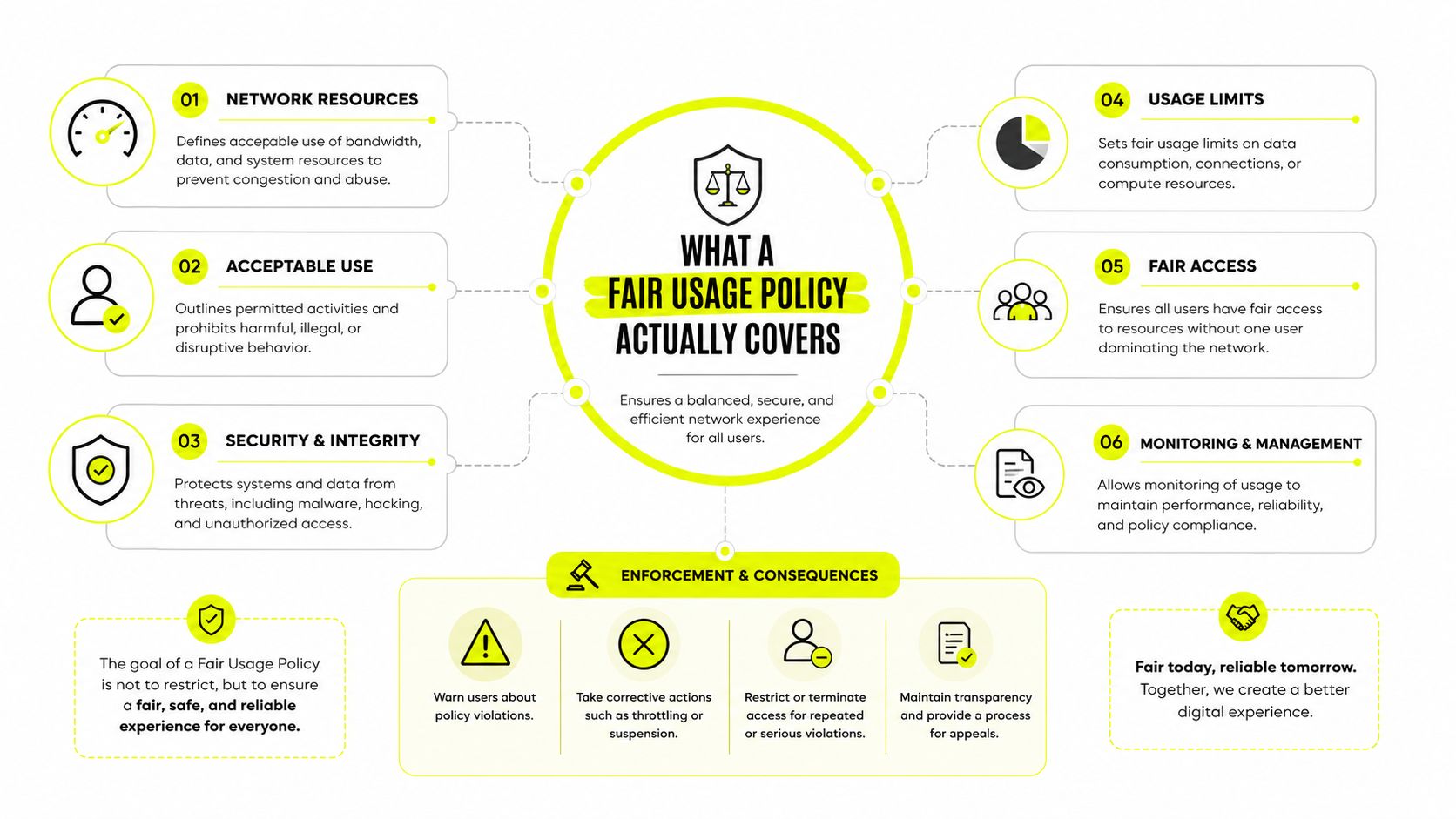
A fair usage policy is not the same thing as a speed cap, a soft cap, or a total cutoff. In practice, it is the provider's rule set for tracking consumption over a billing cycle and changing service once an account crosses the stated threshold. The response can be throttling, but some plans also deprioritize traffic, add charges, or end service altogether depending on the contract and product category (USwitch explainer).
Read the enforcement model, not the headline
If a provider says “unlimited,” the key question is what happens after sustained use. In proxy infrastructure, the cap may sit at the level of monthly volume, an account cluster, or a license. In broadband, provider guidance shows warning stages, speed reductions, and monthly caps that can sit anywhere from 100 GB to 1 TB depending on the package (consumer guidance).
The enforcement ladder usually looks like this:
- Monitoring stage, the provider measures consumption.
- Warning stage, the account gets flagged or notified.
- Degradation stage, speed or priority drops.
- Restriction stage, access can be constrained or halted.
A useful outside reference point is a standard usage policy for web hosting from ARPHost, LLC. It is not proxy-specific, but it shows how shared-resource services write boundaries into the contract instead of leaving them implied.
Don't confuse policy labels
Throttling means the connection stays live at a lower speed tier. Deprioritization means your traffic still moves, but it gets less favorable treatment when the network is busy. A hard cutoff ends access altogether. Those are materially different outcomes for Facebook ad review, TikTok profile warmup, cloaking checks, and automated verification flows.
Rate limiting is a narrower control than FUP. Rate limiting often governs request frequency, while FUP governs broader consumption across the cycle, as outlined in the rate limiting glossary. The distinction matters because you can satisfy one and still trip the other.
The Metrics and Thresholds Providers Watch
The quickest way to misread a fair usage policy is to hunt for one magic number. Providers usually watch a bundle of signals, and each one can trigger enforcement in a different way. If your dashboard only tracks bandwidth, you are still missing the rest of the stack.
The numbers that matter in practice
A documented proxy-adjacent policy can set an annual limit of 1,000,000 address searches per year, which works out to more than 2,700 searches per day on average (Experian Aperture policy). Another documented example caps “unlimited” datacenter and ISP proxy zones at 100 GB per proxy per month, with allowances recalculated monthly and reduced immediately when proxies are removed. That is the pattern to internalize. “Unlimited” often means “large enough to market, finite enough to enforce.”
Box gives another clear example. Its published Fair Use Policy caps each individual user at 1 TB of bandwidth per month and extends that same 1 TB limit cumulatively across multiple user accounts held by the same person (Box fair use policy). Related identities do not always get additive allowance. That logic maps cleanly to multi-account ops, where a team may assume every fresh login gets a fresh bucket.
What to put on your internal checklist
- Bandwidth volume: track total transfer, not just page views.
- Concurrent sessions: watch how many browser profiles, tunnels, or streams you open at once, especially if session concurrency is part of the provider's controls (concurrent sessions glossary).
- Request count: scrape jobs can hit request ceilings long before bandwidth looks risky.
- Hotspot vs tethered traffic: mobile plans can treat them differently, especially if carrier-side rules are in play.
- Time-of-day load: congestion controls often hit hardest in busy windows, not during quiet hours.
If your team cannot map each of those to a number, you are guessing. Guessing is expensive when the provider can enforce on multiple dimensions at once.
The practical test is simple. Can you point to the exact field in your logs that shows why a plan throttled? If not, you need better telemetry before you scale spend or open more profiles.
How Fair Usage Plays Out Across Proxy Types
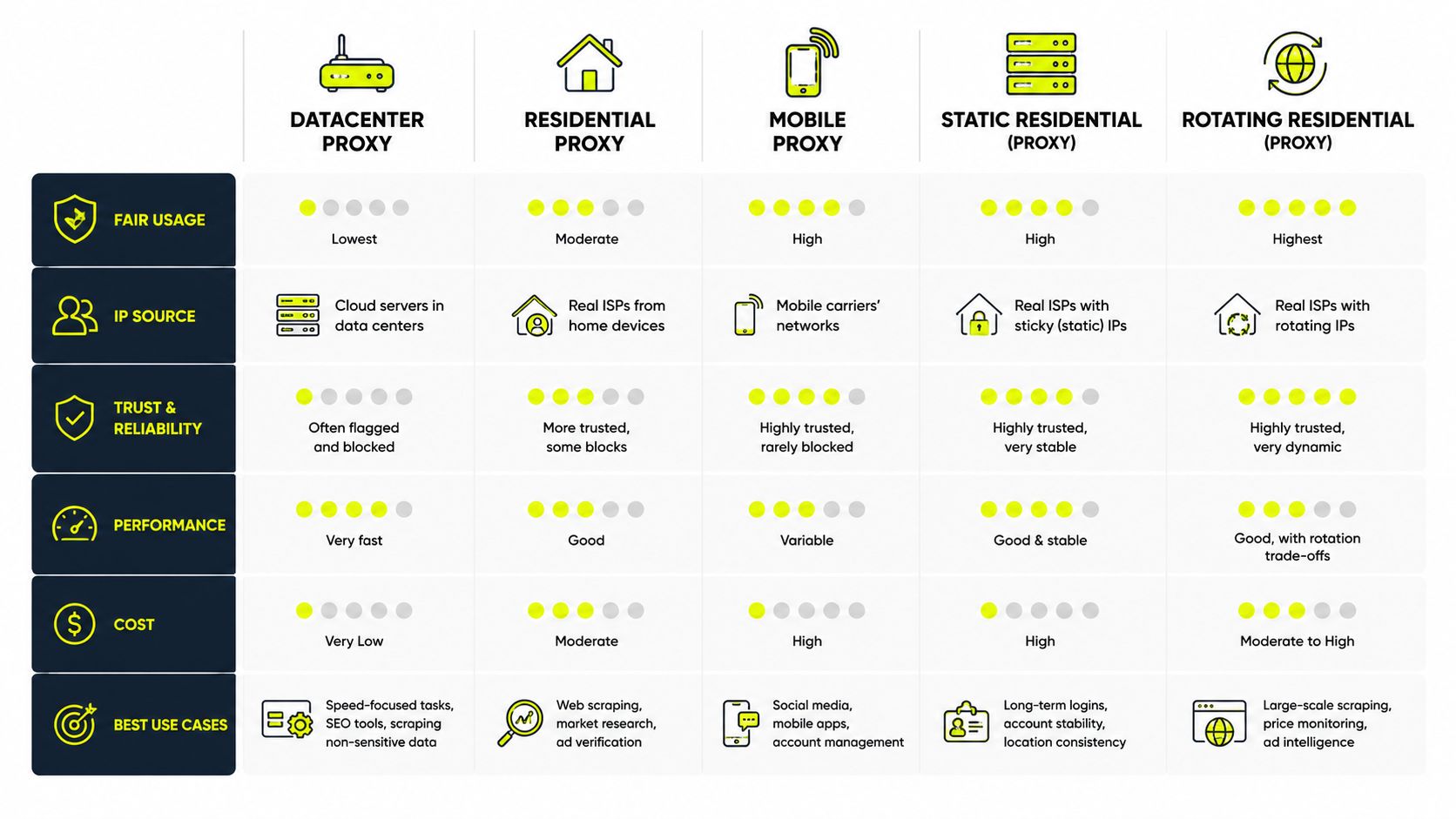
Proxy type changes how FUP risk shows up. The contract may look similar on the checkout page, but the enforcement mechanism is not the same across residential, mobile, ISP, datacenter, and IPv6 inventory. Teams that treat them as interchangeable usually learn this the hard way.
Residential and mobile pools
Residential pools usually carry a practical per-GB or per-IP budget, even when the storefront says the plan feels broad. That makes sense because the traffic has to sit inside a shared reputation and bandwidth envelope. Mobile proxies behave differently. They inherit carrier-side usage logic, so a clean pool can still degrade after heavy tethering or sustained throughput, especially when the destination service sees repeated high-volume access patterns.
ISP, datacenter, and IPv6 pools
ISP and datacenter proxies are often cheaper per GB, but they can be hit harder by reputation-based throttling once they look automated or repetitive. The pool itself may be fine, but the target side starts treating the traffic as risky. IPv6 pools change the shape of the problem again. They're abundant, but they don't automatically buy you warm reputation on the destination side, so the limiting factor often shifts from provider-side scarcity to target-side trust.
Sota Proxy publishes all of these proxy families in one stack, so teams can keep the operational model consistent while changing pool type when the use case changes. That matters for geo-targeted campaigns, account farming, and scraping jobs that need different enforcement behavior at different stages (proxy types overview).
Same spend, different FUP risk
The wrong mental model is “mobile is always safest” or “datacenter is always fastest.” The answer is tighter. Mobile may survive reputation checks longer, while datacenter may give you cleaner cost control for low-friction tasks. Residential can be better for natural-looking browsing patterns, but the allowance logic can still bite if you rotate too aggressively. IPv6 can be plentiful for scale, but it does not solve destination-side heuristics by itself.
For teams running AdsPower, Dolphin Anty, GoLogin, Multilogin, or Hidemyacc, the choice should follow the workflow, not the sticker label. If the workload is bursty and identity-sensitive, pool behavior matters more than raw speed.
Common FUP Triggers in Real Workflows
A TikTok account-farming team looks clean for days, then pushes 200 creator profiles through a residential pool overnight. The next morning, uploads stall and logins start lagging. That's not random bad luck. The workload pattern screamed “heavy consumption” before the throttle landed.
Antidetect browser churn
Fast profile cycling in Multilogin or similar browsers can burn through bandwidth and session allocations faster than the pool warms. The trigger is usually not one dramatic request. It's the combination of rapid profile opens, repeated asset loads, and synchronized login behavior across many accounts. The early warning is a climb in session count without a matching rise in successful task completion.
Cloaking and geo-targeted pages
Media buyers pushing cloaking pages across hundreds of domains often trigger a different signal. Repeated fetches from the same cluster, time-correlated checks, and heavy geo-routing can look like automated scanning. The likely response is slower responses first, then inconsistent loading, then a hard block on the destination side if the pattern persists.
Scraping and drop monitoring
Datacenter ranges used for sneaker drop monitoring or price scraping can trip request-rate controls long before total bandwidth becomes the issue. The early warning sign is simple. Latency creeps up, then certain endpoints start returning partial data or delayed responses. If no one is watching request telemetry, the team mistakes a soft warning for an upstream outage.
Mobile-heavy backup and tethering patterns
Mobile pools often degrade when teams push large file transfers, heavy cloud backup activity, or extended tethering through the same device footprint. The provider does not need to cut you off to make the workflow unusable. A lower priority tier is enough to disrupt ad approvals, profile warmups, and login checkpoints.
The practical lesson is that FUP events are usually visible hours before they hurt. Someone just needs to be watching the right graph. In most shops, nobody is.
Practical Compliance and Configuration Tips
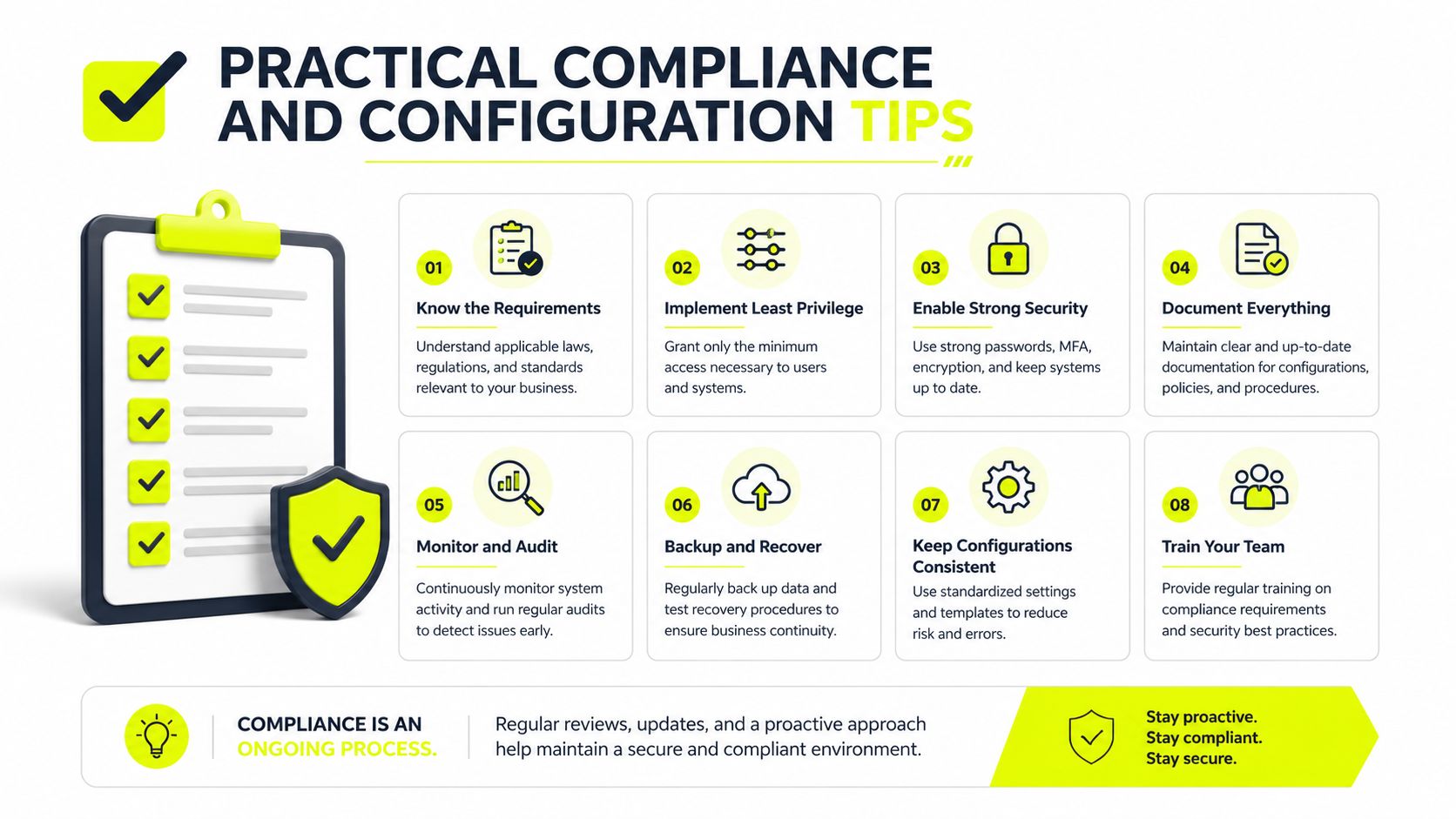
The cleanest way to stay inside policy is to make your proxy use look boring. Boring traffic rarely triggers enforcement. Bursty, synchronized, cross-account traffic does.
Tune the setup to the workflow
For account farming, keep sticky sessions long enough for the platform to see continuity, but not so long that one identity hammers the same exit point all day. For rotating scraping jobs, pace the rotation cadence so you're not reassigning IPs faster than the target can process the pattern. For geo-targeted ad workflows, split clusters by campaign rather than letting every account pull from the same pool at once.
Bandwidth budgeting needs to happen at the cluster level, not just per login. If one operator can open ten profiles, those ten profiles are still consuming the same shared allowance. That's where internal alerts matter. Set notices at 50%, 70%, and 80% of monthly allowance so someone can slow the job before the provider does.
Use the control tools before the network does
SotaProxy's real-time usage monitoring, balance control, and instant crypto top-ups give teams a way to reduce spend before the network forces a slowdown. That matters during campaign launches, scraping spikes, and bulk profile warmups, when a few minutes of visibility can prevent a long stall. If you're comparing unit economics across teams or affiliates, Sota Proxy also runs a referral and affiliate program with up to 40% commission, which can help offset heavy usage costs without changing operational discipline.
Do this for residential plans: keep rotations tied to task completion, not to an arbitrary timer.
Do this for mobile plans: watch tethering and heavy upload patterns first, because those tend to surface carrier-side pressure earliest.
Do this for datacenter plans: pace requests, watch burst size, and treat repeated endpoint hits as a throttle risk, not just a scraping tactic.
For setup hygiene, use a documented workflow instead of improvising each time a campaign starts. A tight reference like how to set up a proxy is useful because it keeps rotation, authentication, and browser binding consistent across operators.
A 15-minute config change usually prevents a 15-hour outage. That is especially true when the same team is running ad verification, cloaking checks, scraping, and multi-account access on the same budget line.
Verifying a Policy Before You Buy and What to Do When You Hit It
Before you buy, read the plan like an operator, not a shopper. Look for the trigger metric, reset period, speed after throttling, hotspot treatment, roaming treatment, and whether the provider uses congestion-based deprioritization during specific hours. The Hong Kong regulatory guidance says service agreements and marketing materials should disclose whether plans are subject to FUP and what form it takes, which is the standard you want to see in any market (Hong Kong communications guidance).
A useful comparison is Data Centers List terms, because it shows how providers spell out use limits and account responsibilities in plain contract language. That's the level of detail you want when you evaluate proxy, mobile, or SaaS offers marketed as “unlimited.”
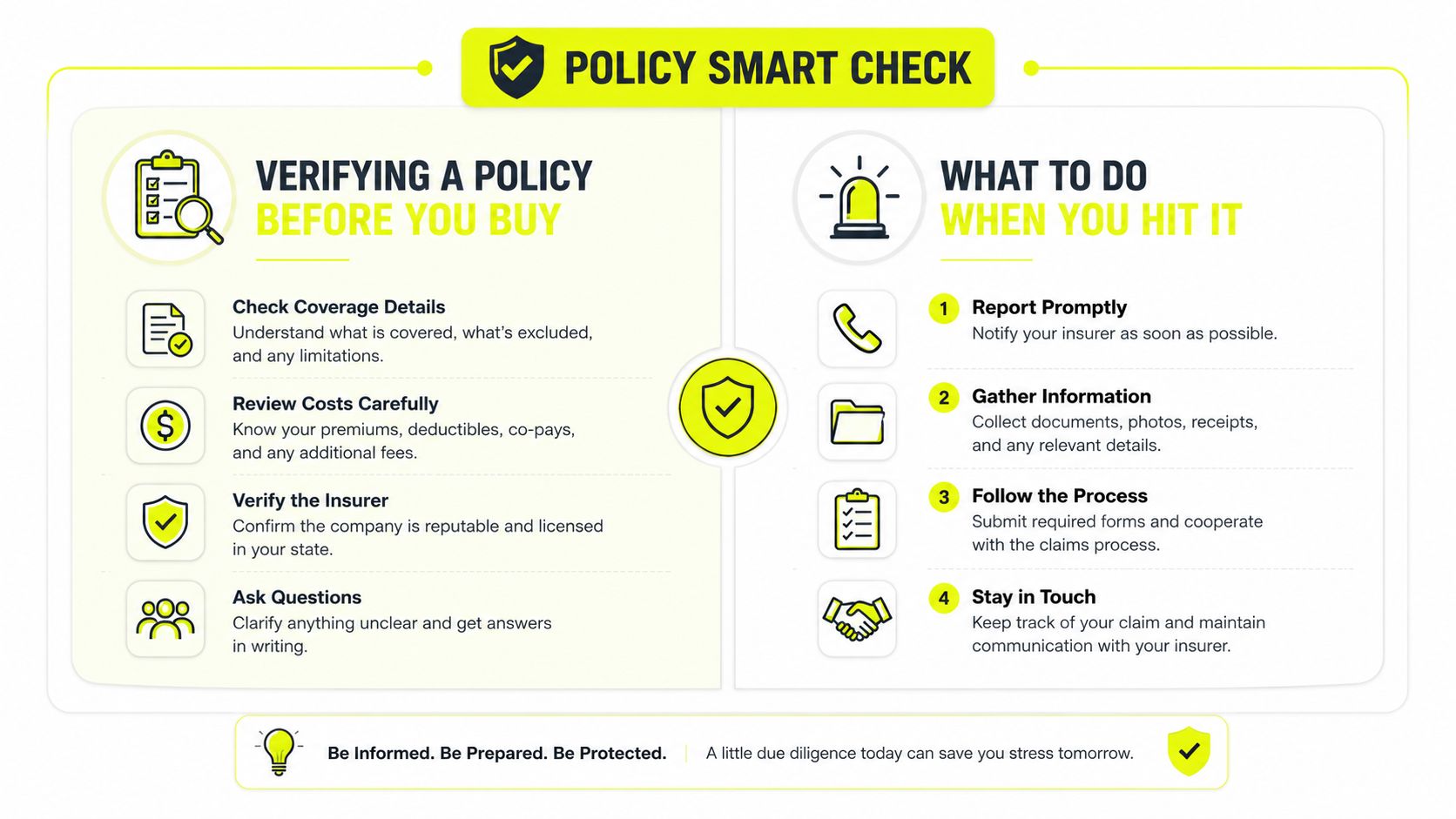
If the plan is vague, assume the hidden rule is stricter than the headline. If the provider won't say whether throttling, deprioritization, or cutoff applies, that's a buying risk, not a paperwork quirk.
FAQ
- Does FUP apply to crypto-paid plans? Yes, payment method doesn't remove usage enforcement.
- Do rotating IPs reset usage? Not necessarily. Usage often follows the account, license, or cycle, not the IP.
- What if the throttle looks wrong? Escalate with usage logs, timestamps, and session context, then push it to human support. SotaProxy offers 24/7/365 human support for configuration and troubleshooting, which is what you want when a false positive hits during active campaigns.
Fair usage is a contract, not a mystery. If you want proxy infrastructure that makes the rule set visible before you scale, start with a provider that shows usage in real time and gives you a clean way to control spend. Visit Sota Proxy to check current proxy types, monitoring, and plan options before your next campaign loadout.
Related articles

10 Smartproxy Alternatives for Technical Teams
Compare 10 smartproxy alternatives by proxy type, IP quality, targeting, rotation, speed, pricing, and use case for technical teams.
10 IPRoyal Alternatives for Serious Proxy Workloads
Compare 10 IPRoyal alternatives for scraping, ad verification, account farming, antidetect browsers, geo campaigns, pricing, rotation, and support.
10 Oxylabs Alternatives for Scraping and Ad Operations
Compare 10 oxylabs alternatives by proxy type, geo coverage, uptime, rotation, pricing, and use case for scraping, ad verification, and account farming.
Top Brightdata Alternatives for Proxy Teams in 2026
Explore the best brightdata alternatives for scraping, ad verification, and geo-targeted campaigns in 2026, plus migration tips.
Resource Limit Is Reached: Fixes for Proxies, Servers, And
Learn how to fix resource limit is reached errors on proxies, servers, and APIs with practical solutions for 2026.

API Integration Guide: Best Practices for 2026
A practical API integration guide for proxy platforms. Covers auth, rotation, geo-targeting, error handling, and SDKs for scraping and ads.