Curl Basic Auth: Secure Automation Guide
Master Curl Basic Auth for secure automation. Learn credential handling, proxy integration, & troubleshooting tips for efficient multi-account operations.

You're probably staring at a shell script that hits an API behind auth, routes through a proxy pool, and feeds a workflow tied to Facebook ad accounts, TikTok ad accounts, cloaking checks, or account farming. The test command worked locally. Then someone pasted curl -u user:pass into a cron job, a CI step, or an antidetect browser helper process. That's where small mistakes turn into leaked credentials, broken proxy auth, and failed geo-targeted campaigns.
For teams running AdsPower, Dolphin Anty, GoLogin, Multilogin, or Hidemyacc, curl basic auth isn't hard. Running it safely in production is the hard part. The weak point usually isn't the API. It's the way credentials get passed, logged, rotated, and forwarded through proxy layers.
Table of Contents
- The Standard Curl Basic Auth Method and Its Flaw
- Secure Credential Handling for Automation Scripts
- Using Curl Basic Auth with Proxies
- Manually Crafting the Authorization Header
- Advanced Options and Common Pitfalls
- Building a Production-Ready Workflow
The Standard Curl Basic Auth Method and Its Flaw
The default pattern is simple:
curl -u 'username:password' https://example.com/protected
In curl, Basic Authentication is triggered automatically when a username and password are provided via the -u username:password flag, causing the client to construct an Authorization: Basic header. The -u flag is the critical trigger for enabling the Basic Auth flow, as libcurl does not attempt any HTTP authentication by default, according to everything curl on libcurl HTTP auth.
If you want the shorthand version for a protected endpoint, that's it. For quick local checks, it works. For throwaway debugging against a staging API, it's fine. For repeatable automation tied to media buying or multi-account operations, it's a bad habit.

Where this breaks in real automation
The problem isn't the syntax. The problem is where the secret ends up.
When you pass credentials directly on the command line, they can leak into:
- Shell history if someone runs the command interactively
- Process listings that other users or tools can inspect
- CI logs when jobs echo commands or run in verbose mode
- Shared snippets inside team docs, cloaker configs, or account warm-up playbooks
That's how a test command becomes a production incident. One leaked password can expose an internal API, a proxy gateway, or a management endpoint used by account farming infrastructure.
Why teams still use it
Because it's fast. You can test an endpoint in seconds. You can pair it with -v and inspect the request during a 401 or 407 investigation. You can drop it into a quick helper script for AdsPower or GoLogin side tasks and move on.
That speed is useful. It's also why people keep promoting the unsafe version.
Practical rule: Use
curl -udirectly only for short-lived manual testing. Don't hardcode it into automation that touches ad accounts, proxy credentials, or geo-targeted campaign infrastructure.
What to use it for and what not to use it for
| Scenario | Direct -u user:pass |
Better choice |
|---|---|---|
| One-off local API check | Acceptable | Still prefer prompt if possible |
| Shared shell script | Bad idea | Environment variables or .netrc |
| CI/CD job | Risky | Secret injection or managed vault |
| Proxy auth in rotating workflows | Fragile | Explicit auth handling |
| Antidetect browser support scripts | Fragile | Externalized credentials |
If you're testing integrations and need a known-good baseline before hardening the request, use the minimal version first, then move it into a safer pattern. If you need example request structures for proxy-backed curl workflows, Sota Proxy's curl integration page is useful as a syntax reference.
Secure Credential Handling for Automation Scripts
The fastest way to lose control of curl basic auth is to bake secrets into shell scripts. That mistake shows up everywhere in arbitrage stacks, cloaking checks, proxy rotation helpers, and account management tooling that supports AdsPower, GoLogin, or Multilogin sessions.
A useful data point from Apify's write-up on Basic Auth in curl is that 73% of API security breaches in automation stem from hardcoded credentials in shell scripts or CI/CD variables, and the same piece calls out safer alternatives like curl --netrc-file, strict chmod 600 permissions, and environment variable injection.
Start with this mindset. The script should know where to fetch credentials. It should not contain them.
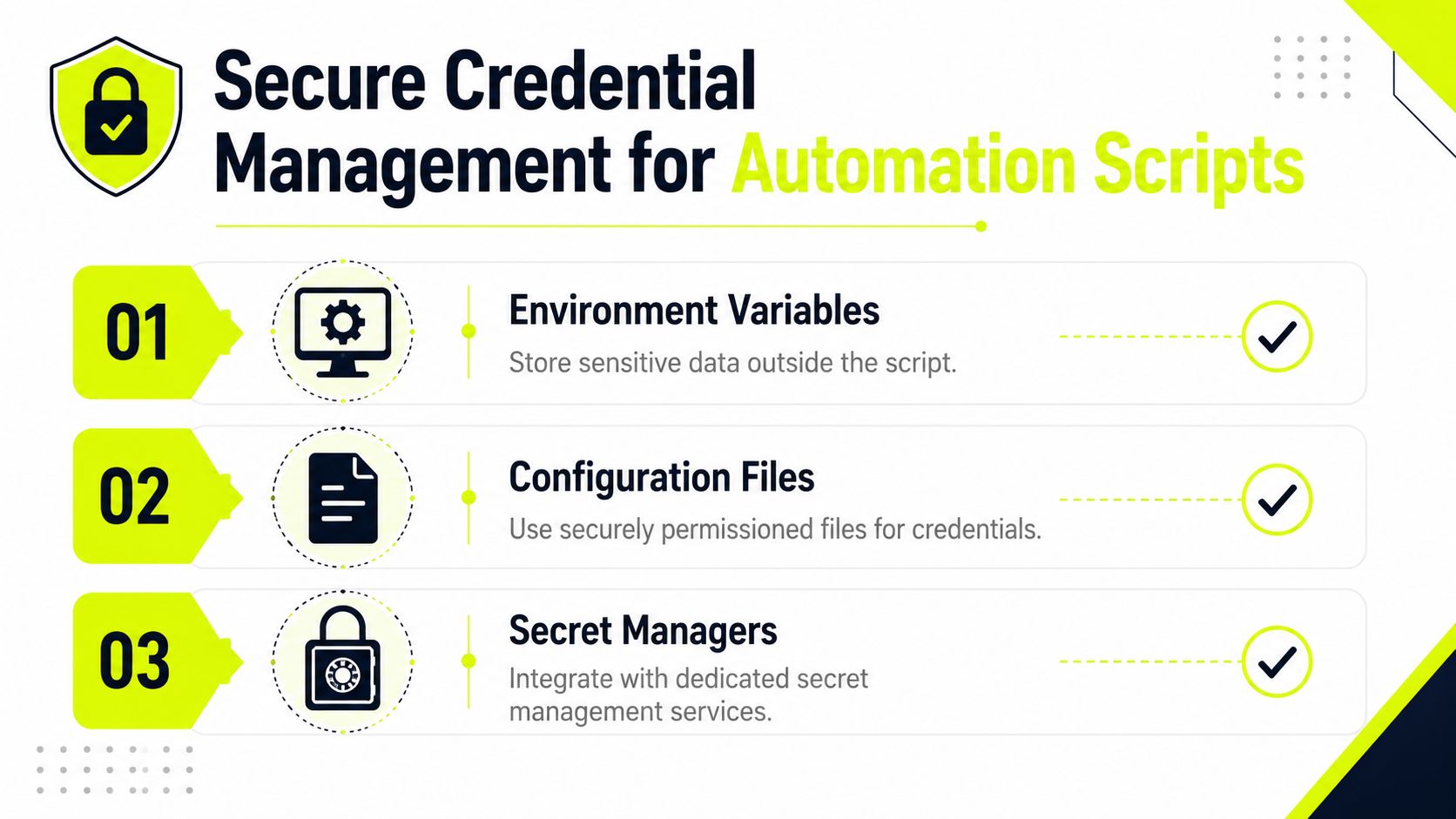
Environment variables for unattended jobs
This is the most common production pattern because it works with cron, containers, CI runners, and custom account-farm orchestration.
export API_USERNAME='your_user'
export API_PASSWORD='your_pass'

curl -u "$API_USERNAME:$API_PASSWORD" https://example.com/protected
This keeps secrets out of the script body. It also reduces the chance that someone commits credentials into a repo used by media buyers or cloaking operators.
Use it carefully:
- Quote variables so special characters don't get mangled by the shell.
- Avoid echoing commands in debug mode when they contain auth material.
- Scope variables tightly. Inject them only into the process that needs them.
For teams centralizing run-time secrets, a proper vault is cleaner than spraying variables across random jobs. If you're formalizing that layer, Geode's context vault is a good model for keeping sensitive operational context outside the script itself.
A short walkthrough helps if you're training junior operators:
.netrc for repeatable curl jobs
When a script makes repeated requests to the same host, .netrc is often cleaner.
Example file:
machine example.com
login your_user
password your_pass
Then call curl like this:
curl --netrc-file ~/.netrc https://example.com/protected
Set strict permissions:
chmod 600 ~/.netrc
That permission step matters. Without it, you've just moved the secret from the script into a world-readable file.
This pattern works well for stable internal APIs that feed campaign data, moderation checks, or support tasks around Facebook and TikTok account operations. It also keeps command lines shorter, which helps when your wrapper scripts already handle cookies, headers, proxies, and user-agent control.
Interactive prompt for attended runs
If a human is present, let curl ask for the password instead of putting it in the command line.
curl -u your_user https://example.com/protected
curl will prompt for the password. That keeps it out of shell history.
If the script is attended, prompting is often safer than pretending a secret baked into a helper file is “temporary.”
A simple standard for account operations teams
If you manage multi-account infrastructure, document one safe pattern and enforce it. Don't let every operator invent their own way to pass secrets.
A practical internal standard looks like this:
- Manual debug runs use prompt-based auth.
- Scheduled jobs use environment injection from a controlled secret store.
- Host-specific repeat jobs use
.netrcwith locked permissions. - Shared repos never contain live credentials, even for “internal-only” endpoints.
That matters even more when the same team also manages account warm-up and browser profiles in AdsPower, Dolphin Anty, or Hidemyacc. One leaked credential can expose far more than a single API. If you're building team process around that kind of operational hygiene, Sota Proxy's guide to multiple account management lines up well with the same discipline.
Using Curl Basic Auth with Proxies
A lot of curl basic auth failures have nothing to do with the target API. The problem sits in the proxy layer.
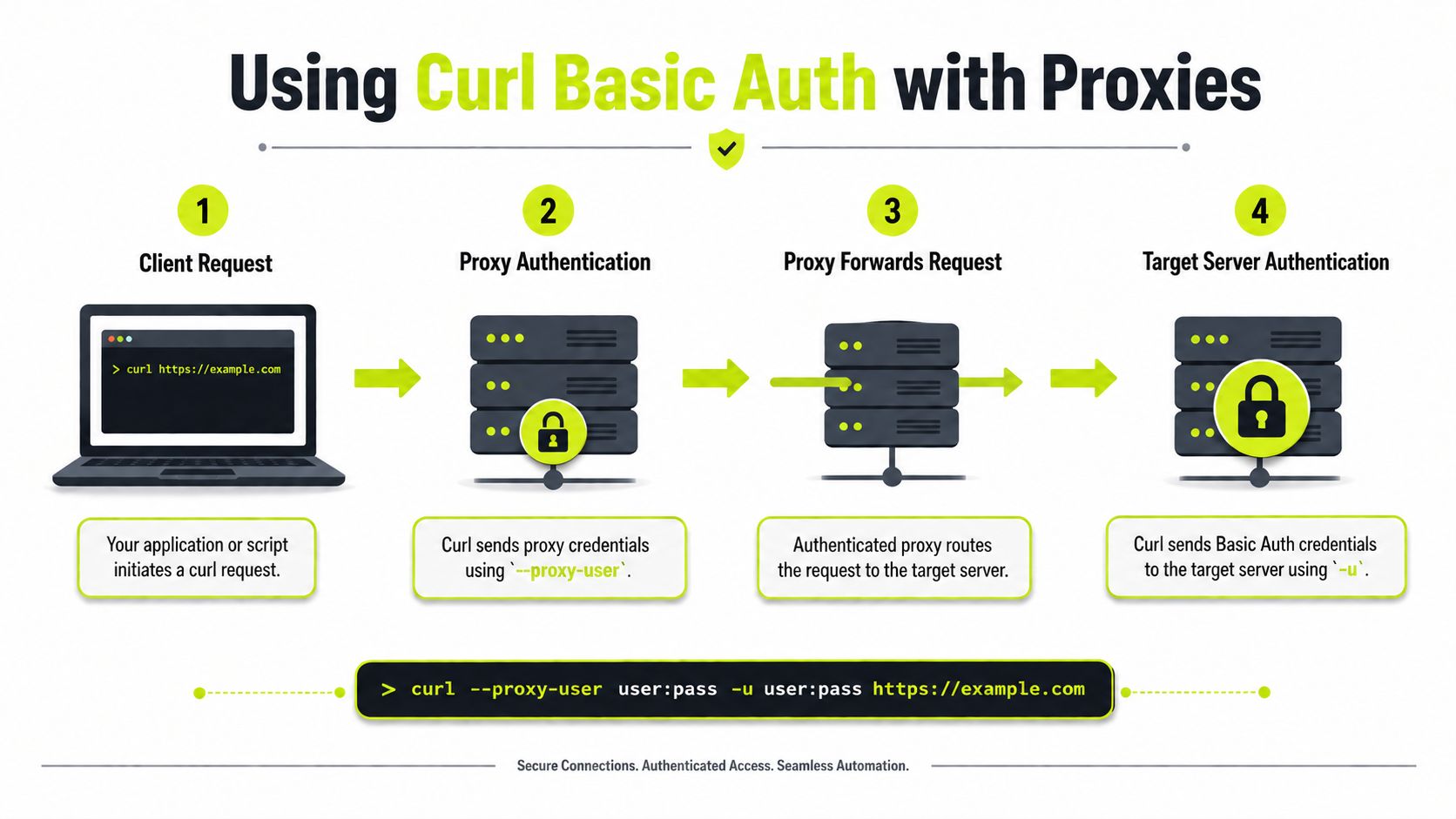
In real traffic arbitrage and account farming setups, you often need two separate authentication contexts in the same request:
- auth for the proxy
- auth for the target server
That means you need to be explicit.
curl -x http://proxy-host:proxy-port \
  --proxy-user 'proxyuser:proxypass' \
  -u 'apiuser:apipass' \
  https://example.com/protected
Here, --proxy-user authenticates to the proxy gateway. -u authenticates to the destination server. Mixing them up is a common cause of 407 and 401 errors.
What changes when a proxy sits in the middle
The request path gets more brittle. Headers may be modified, stripped, or re-encoded. If you're routing through several layers, a command that works from your laptop may fail inside a campaign runner.
This matters for geo-targeted campaigns and platform-sensitive flows. Connection speed benchmarks by proxy type note that datacenter proxies deliver 1–10ms latency, but for antidetect browser operators using AdsPower or Multilogin on geo-targeted TikTok campaigns, that can trigger rate-limit signals. The same source says residential and mobile IPs with 200ms+ latency appear as real users and bypass 403/429 errors.
That doesn't mean slower is always better. It means the wrong network profile can look fake.
Practical differences between proxy types
Here's the working view for operators, not the sales-page version.
| Proxy type | Best use | Weak point | Good fit for |
|---|---|---|---|
| Datacenter | Fast bulk requests | Easier to flag on protected targets | Public APIs, low-friction scraping |
| Residential | Better legitimacy | Higher latency and cost | Ad verification, login flows, regional checks |
| Mobile | Strong trust on strict targets | More session volatility | Facebook and TikTok account warm-up, account farming |
| IPv6 | Large address space where supported | Not accepted everywhere | Volume tasks on targets that fully support IPv6 |
For protected targets, SparkProxy's comparison of proxy types says residential proxies maintain 85–99% success rates at $3–15/GB, while datacenter proxies can drop to 40–70% on the same protected targets even though they can cost as little as $0.50/GB. That lines up with what operators see in ad verification and cloaking infrastructure. Cheap bandwidth doesn't help if the target keeps rejecting the session.
For strict social and banking targets, Mobile Proxy Now's residential vs mobile proxy comparison says mobile proxies deliver trust scores of 85–99%, while residential proxies reach 50–70%, which is why mobile is often the only practical option for high-risk Facebook or TikTok account creation.
Sticky sessions and auth stability
Session behavior matters just as much as the IP type. A comparison of residential and mobile sticky session behavior says mobile sticky sessions last 1–10 minutes, while residential proxies support 1–30 minutes. That same source recommends 3–7 minute sticky sessions on mobile for Facebook ad account farming and 10–20 minute sessions on residential for desktop landing tests and checkout workflows.
That matters because a proxy rotation at the wrong point can kill an authenticated flow even when curl basic auth itself is correct.
Don't debug auth in isolation. Debug auth, proxy type, and session stickiness as one unit.
If you keep getting proxy auth errors before the request even reaches the target, this guide to 407 Proxy Authentication Required is a practical reference.
Manually Crafting the Authorization Header
If you can't explain what -u does under the hood, you'll struggle when a proxy chain or middleware rewrites the request.
Basic Auth takes the username:password pair, encodes it in Base64, and sends it in the Authorization: Basic header. ApyHub's explanation of curl Basic Authorization makes the critical point clearly. The encoding is reversible, not encrypted, so Basic Auth must only be used over HTTPS to prevent credential theft.
That's the part many operators skip. Base64 is transport formatting. It is not protection.

Manual header construction in shell
Say your credentials are:
myuser:mypass
Encode them:
printf '%s' 'myuser:mypass' | base64
Then send the header yourself:
curl -H 'Authorization: Basic bXl1c2VyOm15cGFzcw==' https://example.com/protected
That gives you full control. It also helps when you need to compare curl's default behavior with a manually built request during 401 troubleshooting.
When manual construction is the right move
Use this approach when:
- a proxy chain keeps interfering with
-u - you need to test whether the header arrives intact
- a middleware layer behaves differently with explicit headers
- you're reproducing a request inside another tool or script
This comes up in cloaking checks, anti-fraud testing, and proxy-backed scraping where the request passes through more than one hop before it hits the target.
If
-ufails but a manualAuthorizationheader works, stop blaming the credentials. Inspect the path between curl and the target.
Base64 example and sanity check
The article from ApyHub gives a simple example: admin:apipwd becomes YWRtaW46YXBpcHdk. That's useful as a sanity check when you're validating your own encoding flow.
Just remember the operational rule. Never send that over plain HTTP. Anyone who intercepts it can decode it.
For teams that also switch between curl and application code, it helps to compare header behavior across tools. This guide to Python requests headers is a handy reference when you're matching curl output against Python-based workers.
Advanced Options and Common Pitfalls
Once the obvious mistakes are gone, curl basic auth failures usually fall into a few annoying categories. They're easy to miss because the error looks generic.
Oxylabs' curl Basic Auth guide highlights a key issue for complex routing. Data from 2025 indicates that 62% of proxy-based authentication failures occur due to header leakage or improper encoding when credentials pass through multiple proxy layers. The same source notes that users sometimes need to manually construct the Authorization: Basic header to avoid double-encoding or proxy interference.
Advanced flags that help
These aren't magic. They solve specific problems.
--anyauth
curl --anyauth -u "$API_USERNAME:$API_PASSWORD" https://example.com/protected
Use this when you don't control the target and want curl to negotiate the auth method. It can help during discovery. It's less useful when you already know the endpoint expects Basic Auth and you want deterministic behavior.
--basic
curl --basic -u "$API_USERNAME:$API_PASSWORD" https://example.com/protected
Use this when you want to force Basic Auth explicitly.
-K or --config
curl --config request.conf
A config file helps when a command gets crowded with headers, cookies, proxy options, user-agent settings, and retry controls. It's easier to review and less error-prone than a giant pasted one-liner.
Example request.conf:
url = "https://example.com/protected"
user = "myuser:mypass"
proxy = "http://proxy-host:proxy-port"
proxy-user = "proxyuser:proxypass"
Treat config files like secrets if they contain credentials. Don't commit them.
Common failures and fast fixes
401 even though the username and password are correct
Usually one of these is happening:
- The target expects HTTPS and you tested the wrong scheme
- A proxy or middleware removed the auth header
- You hit the wrong host or path
- The server expects a different auth method despite old docs
Run with -v and inspect the request path carefully. If needed, switch to a manually constructed Authorization header and compare behavior.
407 Proxy Authentication Required
That means the proxy rejected your credentials or never got them in the right form. Check that --proxy-user is set, and don't assume -u covers the proxy.
Special characters in passwords
Quote them.
curl -u 'user:p@ss word!$' https://example.com/protected
If you skip quotes, the shell may break the value before curl ever sees it. This is a common failure in quick support scripts for Dolphin Anty or Hidemyacc profile operations.
Header leakage through multiple layers
The complexity arises when account-farming and cloaking stacks get messy. A helper service adds auth. A gateway rewrites it. A proxy strips it. Then the target returns 401 and everyone blames the credential store.
Use a stepwise check:
- Test direct to target without the proxy.
- Add one proxy layer and compare.
- Switch from
-uto manual header injection. - Inspect verbose output for duplicate or missing auth headers.
What doesn't work
A few habits waste time:
- Retrying the same broken command with no visibility
- Turning on verbose logs everywhere and accidentally leaking secrets
- Assuming all proxies treat headers the same
- Using datacenter IPs for every target because they're fast
For strict Facebook and TikTok flows, especially when you're supporting account farming or geo-targeted creatives through AdsPower, GoLogin, or Multilogin, auth errors often sit inside the network profile, not the credentials themselves.
Building a Production-Ready Workflow
A production curl basic auth workflow should be boring. That's the goal.
Use HTTPS only. Keep credentials out of scripts. Inject secrets through environment variables or a locked-down credential file. Don't log full commands, auth headers, or verbose output into shared systems. Pair the request with the right proxy type for the target, then match session behavior to the task. Residential and mobile fit protected ad platforms better than datacenter in many cases, while IPv6 only makes sense where the target fully supports it.
For teams operating at scale, reliability discipline matters as much as syntax. Fluxtail's guide to SRE reliability is a useful reference for the mindset behind stable automation, controlled failure handling, and clean observability without leaking secrets.
If your jobs depend on rotating exits, document rotation rules the same way you document auth handling. This is especially important for Facebook and TikTok account flows, cloaking checks, and geo-targeted campaign verification. This guide to proxy IP rotation is a practical reference for building that operational layer.
There's also a business angle if you already recommend proxy infrastructure to clients or partners. Sota Proxy runs a referral program with up to 40% commission, which fits naturally for agencies and operators who already standardize on reliable proxy access as part of their automation stack.
If you need proxy infrastructure that fits real automation, not toy examples, Sota Proxy is built for exactly that. It covers residential, mobile, ISP, datacenter, and IPv6 use cases across geo-targeted operations, scraping, ad verification, and multi-account work. For teams running high-stakes workflows, that means cleaner routing, stable auth paths, and less time wasted on avoidable proxy failures.
Related articles
Dolphin Anty for Multi-Accounting: Features, Automation, and Proxy Integration
How to use Dolphin Anty for multi-accounting: browser profiles, Cookie Robot, scenarios, Synchronizer, API automation, and three ways to connect SotaProxy proxies. Promo code SOTA20 gives 20% off.

Inventory Monitoring Guide for Traffic Arbitrage Teams
Learn how inventory monitoring powers geo-targeted campaigns with real-time data, proxy scraping, KPIs and cost controls for Facebook and TikTok ad accounts.

AdsPower Proxy Integration: The Complete Setup Guide
Step-by-step AdsPower proxy integration with SotaProxy. Covers setup, proxy types, rotation, troubleshooting, and best practices for multi-account workflows.

7 Top Proxy Providers for Arbitrage and Scraping
Compare 7 top proxy providers by IP types, targeting, rotation, uptime, pricing signals, and fit for scraping, ad accounts, farming, and arbitrage.

10 Best Proxy Services for Ads, Scraping, and Automation
Compare the best proxy services for ad verification, scraping, account operations, and geo-targeting by IP type, price, uptime, and controls.

10 Smartproxy Alternatives for Technical Teams
Compare 10 smartproxy alternatives by proxy type, IP quality, targeting, rotation, speed, pricing, and use case for technical teams.