Multiple Account Management a Secure Scalable Framework
Build a secure, scalable multiple account management system. This guide covers threat modeling, proxies, antidetect browsers, and automation for media buyers.
You're usually reading about multiple account management after a bad day. A batch of Facebook ad accounts hits checkpoints. A few TikTok profiles go into review. An account farm that looked stable yesterday starts collapsing in clusters. You check proxies first, then cookies, then the antidetect setup, then your scripts. Hours later, you realize the problem wasn't one tool. The problem was the system.
That's the split between hobby setups and production setups. If you manage hundreds of accounts across AdsPower, Dolphin Anty, GoLogin, Multilogin, or Hidemyacc, a single flagged identity can spread fast when your browser profiles, proxy assignment, hardware use, and daily workflow don't isolate failure properly. That's how operators lose aged assets, warm ad accounts, and geo-targeted campaigns in one sweep.
Multiple account management only works when you treat it like infrastructure. That means threat modeling first, proxy selection by task, profile isolation by rule, automation with pacing, health monitoring, and a repeatable troubleshooting process. If you run cloaking flows, account farming, ad verification, or geo-specific Facebook and TikTok delivery, you need a setup that survives mistakes instead of amplifying them.
Table of Contents
- Building Your Multiple Account Management System
- Start with Your Threat Model and OPSEC
- Selecting Your Proxy Infrastructure
- Configuring Profiles and Session Management
- Automating Account Lifecycle Workflows
- Monitoring Health and Managing Costs
- Troubleshooting Common System Failures
Building Your Multiple Account Management System
One account getting flagged isn't the disaster. The disaster is when that flag exposes the rest of your stack. What each platform actually permits, and what it forbids instead of a count, is compared in how many accounts you can have on each platform. Agencies running creator accounts hit that wall first, and the process side of keeping them apart is written up separately.
A lot of operators still build around a favorite antidetect browser and call it a system. That's backwards. AdsPower, Dolphin Anty, GoLogin, Multilogin, and Hidemyacc are just containers. Proxies are transport. Scripts are force multipliers. Hardware is the base layer. None of them save you if your identities overlap or your workflow leaks.
The production mindset is simple. Every account needs a clean identity, a predictable operating path, and a way to fail alone. If one Facebook ad account gets hit after a cloaked campaign review, that event shouldn't contaminate other ad accounts, warm pages, or backup profiles. If a TikTok farm starts triggering checks in one geo, you should be able to quarantine that lane without touching the rest.
What a real system includes
A resilient multiple account management setup usually has these parts:
- Identity isolation: One account per browser profile, separated cookies, storage, fingerprint, and proxy path.
- Network control: Dedicated proxy assignment by account or by tightly controlled group.
- Hardware discipline: No cross-login from personal devices, unmanaged phones, or random laptops.
- Workflow rules: Defined warm-up, spending, posting, and login behavior.
- Logging: A usable audit trail for profile changes, IP assignment, and operator actions.
Practical rule: If you can't explain why an account was safe yesterday and unsafe today, you don't have a system. You have a pile of tools.
That's the frame for everything that follows. The strongest operators don't spend all day hunting for a magic browser or “undetected” proxy. They build layers that make account linking harder, mistakes easier to spot, and failures easier to contain.
Start with Your Threat Model and OPSEC
Most bans aren't mysterious. The platform linked assets that should have looked unrelated.
That's why OPSEC starts before you buy anything. You need a threat model. Not a corporate document. A rulebook for how identities can collide across Facebook and TikTok ad accounts, farmed social profiles, cloaking assets, and geo-targeted campaign infrastructure.

Think like the platform's risk team
A platform doesn't need one perfect signal. It only needs enough overlap to group accounts into the same operator cluster. That overlap can come from IP reuse, fingerprint collisions, cookie contamination, DNS leaks, login timing, device switching, or operator behavior.
Write your rules in plain language:
- Device rule: Never access managed accounts from a personal device.
- Profile rule: One account per antidetect profile. No exceptions.
- Proxy rule: One profile maps to one dedicated proxy path.
- Operator rule: If multiple staff touch accounts, assign account groups and keep access boundaries fixed.
- Recovery rule: Never improvise recovery steps from a dirty environment.
If you don't document this, people drift. Drift is what causes contamination.
Map where linkage happens
A useful threat model lists every point where identities can leak into each other:
- Browser layer: Shared local storage, extension overlap, reused fingerprints.
- Network layer: Same proxy subnet, bad DNS path, mismatched geolocation.
- Human layer: Logging into the wrong profile, copy-pasting credentials into the wrong container, running manual checks outside policy.
- Behavior layer: Identical action patterns across account groups.
DNS is one of the most overlooked leaks. If you're tightening your browser and proxy setup, review how proxy DNS handling affects identity consistency before you trust a profile to hold aged assets.
Treat every account like evidence. If something goes wrong, you should be able to trace where it lived, how it connected, and who touched it.
Build OPSEC that operators can actually follow
Complicated rules fail in live operations. Use short controls that survive fatigue:
- Label every profile clearly. Include platform, geo, account tier, and operator owner.
- Separate sensitive lanes. Don't mix high-value Facebook ad accounts with disposable farming profiles in the same operational pool.
- Lock the workflow. Creation, warm-up, spend, scaling, and recovery should happen from approved environments only.
- Log exceptions immediately. If someone opens a profile without its proxy or changes a fingerprint setting, record it.
Good OPSEC feels strict at first. Then it becomes the reason one bad checkpoint stays limited to one account.
Selecting Your Proxy Infrastructure
Monday, 9:12 a.m. One operator opens a healthy ad account from the wrong IP pool. By lunch, the platform has tied that session to a cluster of lower-trust logins, and a single routing mistake has turned into payment reviews, fresh checkpoints, and a cleanup job across accounts that were fine an hour earlier.
That is why proxy selection is infrastructure, not a shopping decision. The proxy layer has to match the account's value, the platform's tolerance, the action being performed, and the way your team works. If those pieces do not line up, the rest of the stack will not save you.
Pick proxy types by workload and failure impact
Proxy type should be assigned the same way you assign spend limits or operator permissions. Based on risk.
Residential proxies fit day-to-day management of valuable accounts. They are usually the safest default for Facebook, TikTok, and geo-sensitive ad verification because the IP space looks closer to normal consumer traffic. They cost more than datacenter routes, but they usually cost less than recovering a restricted account or replacing an aged asset.
Mobile proxies belong on the highest-risk lane. Use them for fragile accounts, recovery work, sensitive warm-up periods, or environments where trust matters more than throughput. They can absorb more noise because mobile carrier traffic is naturally mixed, but that advantage comes with real trade-offs: higher cost, lower consistency, and weaker unit economics for bulk operations.
Datacenter proxies are for disposable work, speed-sensitive checks, and supporting tasks that do not touch important account state. They are useful for scraping, low-stakes automation, and monitoring jobs. They are a poor place to save money on accounts with history, spend capacity, or payment trust.
IPv6 proxies look attractive on paper because the address pool is huge. In production, they add compatibility questions you may not want during incident response. If a platform, browser tool, or internal script handles IPv6 inconsistently, you now have two problems at once: account trust and transport reliability.
If you need a technical breakdown of residential, mobile, datacenter, and IPv6 trade-offs, this guide to proxy types for different workloads is a good reference.
Proxy Type Comparison for Account Management
| Proxy Type | Primary Use Case | Trust Score | Cost | Key Weakness |
|---|---|---|---|---|
| Residential | Facebook and TikTok account management, ad verification, geo-targeted campaigns | High | Medium | More expensive than datacenter for bulk work |
| Mobile | Sensitive accounts, fragile farms, high-risk actions | Very high | High | Cost and lower efficiency at scale |
| Datacenter | Low-stakes automation, scraping support, disposable tasks | Low | Low | Easier for platforms to identify |
| IPv6 | Large address pool experiments, selective workloads | Variable | Low to medium | Limited support and inconsistent trust |
Build routing rules before you buy more IPs
A stable setup depends less on having many proxies and more on assigning them correctly.
Map each account group to an approved proxy class. Separate acquisition, warm-up, spending, review, and QA traffic if those actions create different risk. Keep high-value accounts off shared pools used for farming or testing. If an operator can freely switch a profile from residential to datacenter because it is cheaper that day, the system is not under control.
Inefficient practices lead teams to waste money. They buy premium mobile IPs for every task, then use them on checks that could run through cheaper infrastructure. Or they put revenue accounts on low-trust routes and spend the savings later on replacements, appeals, and delayed launches.
Cheap routing decisions usually fail at the most expensive point in the workflow.
Clustering risk matters as much as raw proxy quality. Ten good accounts behind the same subnet, ASN pattern, or city-level route can still create linkage if the usage pattern is wrong. Spread sensitive accounts across clean pools. Avoid putting unrelated business units, offers, or account tiers on infrastructure that can be correlated later.
For cloaking and review-sensitive operations, keep management traffic separate from viewing and verification traffic. If the same network path is used to log into the asset, inspect the landing flow, and validate the review path, you are creating a traceable relationship that the platform can examine after the fact.
Configuring Profiles and Session Management
An account survives review pressure or dies on profile hygiene. In large fleets, profile mistakes rarely look dramatic at first. One reused template, one login before the proxy is active, one operator opening the wrong asset from the wrong container. A week later, the platform has enough overlap to cluster accounts that should never have touched each other.
Treat the browser profile as a controlled identity object, not a convenience layer.
Near the top of the workflow, keep session controls visible to the operator.

One profile means one identity
One profile gets one account identity. The tool matters less than the rule. AdsPower, Dolphin Anty, GoLogin, Multilogin, and Hidemyacc all fail the same way when teams treat profile isolation as optional.
A clean identity keeps its own cookies, local storage, fingerprint parameters, proxy assignment, timezone, language stack, and login history. If backups, admins, and test sessions share the same container, you are no longer managing one identity. You are creating a mixed artifact that is harder to reason about and harder to recover after a checkpoint.
The practical setup is simple:
- Use one browser profile per account. Do not place backup logins, admin access, or test activity inside the same container.
- Keep device presentation stable. User-agent, screen size, timezone, language, and WebRTC behavior should fit the account's normal operating pattern and stay consistent over time.
- Keep geolocation coherent. If an account normally operates from one city or region, do not bounce it across unrelated locations because a different proxy pool is available that day.
- Segregate storage fully. Cookies, cache, local storage, and saved sessions stay account-specific or the isolation layer stops meaning anything.
For high-value assets, standardize the profile template before your team touches live inventory. If you use Multilogin in production, review how Multilogin environments pair with controlled proxy routing and lock that template before rollout.
Sticky sessions versus rotation
Session policy breaks more setups than proxy quality does.
Persistent identities need continuity. Facebook ad account work, TikTok warm-up, inbox handling, billing checks, and routine operator logins usually perform better on sticky sessions because the account keeps presenting from a stable network context. Broad scraping, disposable checks, and other peripheral tasks can use rotation because those actions do not define the long-term identity in the same way.
The mistake is not choosing sticky or rotating. The mistake is letting operators switch between them based on convenience. Session behavior is part of your identity model, so it needs a written rule tied to task type.
Use this pattern:
- Use sticky sessions for account logins, warm assets, payment work, inbox activity, and any workflow that should look continuous.
- Use rotating sessions for high-volume support tasks, external checks, scraping, and disposable interactions.
- Set rotation windows by task sensitivity. Rapid IP changes during account use can look synthetic. Very long persistence in a low-trust pool can create its own problems.
- Document the policy. Operators should not guess whether a task belongs on a sticky lane or a rotating lane.
Fast rotation during identity-building activity creates noise. Long-lived sessions on the wrong network create linkage.
A short walkthrough helps if you're training team members on setup logic before handing them live accounts.
Avoid the profile mistakes that trigger clusters
The highest-cost errors are repetitive and operational.
Logging in before the proxy binds the session is one of them. So is cloning a successful browser template too aggressively and forgetting that copied settings can preserve overlap across identity groups. Another common failure is operator contamination. One staff member jumps between unrelated profiles, reuses habits, bookmarks, or workflows, and creates a behavioral link your tooling never tracked.
That is why profile management has to connect to the rest of the system. Hardware assignment, proxy rules, browser templates, operator permissions, and task routing all need to agree. If one layer says the account belongs to a US retail cluster and another lets the same operator open it from a mixed QA workstation, the system is inconsistent even if the fingerprint looks clean on paper.
For TikTok specifically, the platform allows a maximum of 3 accounts on a single device without external software, and going beyond that requires separate hardware or management tools like Shift, according to Shift's TikTok multiple account guide. Treat that as a platform constraint, not something an antidetect browser automatically cancels.
Automating Account Lifecycle Workflows
Automation is necessary. Bad automation is expensive.
If you manage Facebook and TikTok ad accounts, account farms, cloaking support profiles, or geo-targeted posting lanes at scale, manual work becomes the bottleneck fast. But the answer isn't to script everything at machine speed. Platforms judge behavior, not just environment. The best setup can still fail if the action pattern looks synthetic.
Automation fails when it acts like a bot
Most tools can click, post, scroll, and fill forms. That isn't the hard part. The hard part is pacing.

A critical gap in multi-account operations is the lack of data-driven frameworks for human-like behavior pacing. Existing advice usually tells operators to stagger schedules, but it doesn't provide quantifiable interaction intervals, which matters as platforms tighten velocity checks on Facebook and TikTok, as described in DesignRush's review of multiple online account management.
That means you shouldn't trust generic advice like “just add random delays.” You need pacing logic tied to account stage, action type, and risk level.
Build workflows around account stages
Automation works better when each account moves through a controlled lifecycle instead of one giant script.
- Creation stage: Set identity, establish profile consistency, complete low-risk setup actions only.
- Warm-up stage: Add browsing, normal page movement, limited social actions, and light dwell time.
- Operational stage: Run the account for its actual job, whether that's ad management, posting, farming, or verification.
- Maintenance stage: Keep the account alive with realistic check-ins, minor updates, and low-noise behavior.
- Retirement or quarantine stage: Stop activity cleanly when the account weakens or becomes contaminated.
The script shouldn't ask, “What can I automate?” It should ask, “What would this account plausibly do today?”
That's the difference between automation that scales and automation that creates synchronized failure.
A lot of operators build this with Python because it's flexible enough to handle browser control, scheduling, file management, and rule-based execution. If you're structuring task orchestration or support scripts, this XML and Python workflow reference is a practical starting point.
What works in live operations
The safest automation patterns usually share a few traits:
- They break routines. Posting every account at the same minute is lazy and visible.
- They separate account classes. A farmed TikTok profile shouldn't behave like an ad-spend account.
- They adapt to state. Checkpoints, lag, and review prompts should pause scripts automatically.
- They preserve continuity. The same account should keep the same environment assumptions unless there's a documented migration.
Use automation to remove repetitive operator work. Don't use it to force account volume beyond what your identity controls can support.
Monitoring Health and Managing Costs
If you only react after accounts die, you're already late.
Stable multiple account management depends on leading indicators. You need to watch health drift before it becomes a ban wave. That applies to accounts, proxies, profiles, and operator habits. It also applies to cost. A setup can be technically clean and still bleed money through bad proxy matching, bloated data use, or lazy tooling choices. Run your roster through the stack cost calculator and the leak usually shows up in one line.
Watch leading indicators, not just bans
A simple monitoring stack should answer these questions every day:
- Account state: Active, checkpointed, disabled, limited, under review.
- Proxy performance: Success consistency, connection failures, geo consistency, session reliability.
- Profile integrity: Last login path, config changes, unexpected environment changes.
- Operator activity: Who touched what, when, and from which approved workflow.
For teams that manage valuable accounts, relationship depth is the best leading indicator in enterprise account management because mapped stakeholder coverage beats single-threaded reliance, according to Arpedio's account management guide. The same logic applies here in a different form. Don't rely on one signal. A healthy operation reads multiple signals before acting.
Control spend without weakening the setup
Most proxy waste comes from mismatched use. Operators pay for high-trust routes on low-value tasks, or they cheap out on sensitive tasks and pay later through losses.
Use a cost review process built around task classes:
| Task class | Recommended approach | Cost mistake to avoid |
|---|---|---|
| High-value ad accounts | Prioritize cleaner, more stable infrastructure | Using low-trust routes to save short-term spend |
| Farming and warm-up | Match proxy quality to account value and age | Overpaying for premium routes on disposable assets |
| Scraping and support tasks | Use speed-focused infrastructure where trust is less critical | Burning expensive traffic on non-identity tasks |
Track usage by workflow, not just by provider invoice. If one lane consumes too much data, inspect the script before blaming the proxy pool. If one operator always burns expensive sessions, fix the process.
There's also a practical finance angle. Some teams offset infrastructure cost through partner programs tied to the tools they already recommend. For example, the Sota Proxy referral program offers up to 40% commission, which can help absorb recurring proxy spend when you refer other operators or clients into the same stack.
Troubleshooting Common System Failures
You log in at 9:10 a.m. and see six accounts disabled across two platforms. The wrong response is to start swapping proxies, opening profiles, and retrying logins one by one. That destroys the trail you need.
Treat failures like an incident. Freeze affected assets, preserve the environment, and work from shared variables outward. In a large setup, the goal is not just to recover one account. The goal is to identify whether the problem lives in identity, infrastructure, automation, operator behavior, or the platform itself before it spreads.
Read the failure pattern before touching anything
Start with containment. Stop automation on the affected cluster. Block operators from opening those profiles until you snapshot the basics: account IDs, profile IDs, assigned proxy or gateway, device or browser template, last successful action, last failed action, and the exact timestamp window. A centralized log is not optional here. If you cannot reconstruct who touched the account, from which environment, and what changed in the last day, troubleshooting turns into guesswork.
Then sort the incident with three questions:
- Is this isolated or clustered? A cluster usually means a shared dependency failed.
- What is common across the failures? Proxy ASN, subnet, profile template, cookie import method, operator, automation script, funding source, campaign type.
- What changed before the event? New proxy routing rules, browser updates, extension changes, profile cloning, altered warm-up cadence, new login flow.
That order matters. Teams that skip straight to “fixing” often trigger secondary flags by changing multiple variables at once.
If several accounts fail together, inspect the shared layer first. If one account fails alone, inspect the local identity and recent actions on that account.
Common failure paths
Symptom: Several Facebook ad accounts hit problems in the same window.
Probable cause: Shared proxy pool degradation, bad IP reputation, subnet overlap, or one operator pushing the same routine across the group.
Response: Freeze the cluster. Pull login and action history for every affected account. Check whether they shared the same egress, browser build, or funding workflow. Do not reopen them repeatedly just to confirm they are still disabled.
Symptom: One account gets flagged while nearby accounts stay healthy.
Probable cause: Local contamination. This usually means inconsistent fingerprint data, a broken session policy, sloppy cookie handling, or behavior that spiked too fast on that asset.
Response: Review the profile record before recovery. Look at credential age, session age, recent IP history, last device state, and the exact sequence of actions before the flag.
Symptom: TikTok account creation or login keeps failing even on a clean route.
Probable cause: Credential reuse or weak identity separation. TikTok is especially sensitive to recycled signup inputs and repeated account patterns, as noted in RecurPost's TikTok account management guide.
Response: Issue unique emails, phone numbers, recovery details, and profile records for every account. Audit your creation workflow, not just the proxy.
Symptom: CAPTCHA volume spikes across active profiles.
Probable cause: Rotation is too aggressive, IP ranges are overused, profile fingerprints are too similar, or automation timing became too regular.
Response: Review the identity policy as a whole. Check stickiness rules, profile variance, request timing, and whether recent automation changes made traffic look synthetic.
Turn each incident into a system fix
A stable operation keeps a short postmortem on every serious failure. Record the root cause, affected assets, blast radius, detection method, and the control that would have prevented it. Then update the SOP, template, or routing rule that caused the issue.
That is the difference between random account management and a real system. Recovery matters, but failure containment matters more. One bad proxy decision, one cloned profile template, or one careless operator can burn far more than the accounts you see on the first dashboard refresh.
If your operation depends on stable Facebook and TikTok account access, clean geo-targeted sessions, and proxy assignment you can control, Sota Proxy is worth a look. The platform supports residential, mobile, ISP, IPv6, and datacenter infrastructure, city-level targeting across 220+ geolocations, and a dashboard that makes rotation, sticky sessions, and usage monitoring easier to manage in production.
Related articles
Rotating Proxy Server: Mastering Techniques for 2026
Master rotating proxy servers for farming, ad verification & scraping. Learn architecture, rotation, & anti-detection tactics.
What Is a Proxy Used for: 2026 Arbitrage Guide
What is a proxy used for - Learn what a proxy is used for in 2026, from boosting security to managing multi-account operations for arbitrage teams

How to Change IP Location for Ad & Social Accounts
Learn how to change IP location using proxies, VPNs, and antidetect browsers. A guide for media buyers and account managers on avoiding blocks and bans.
How to Get Around an IP Ban: A Technical Guide for 2026
Facing an IP ban? Learn how to get around an IP ban with technical steps for diagnosing block types, choosing the right proxies, and configuring your stack.
Residential Backconnect Proxy: 2026 Guide & Best Practices
Master the residential backconnect proxy. A 2026 guide on how it works, its benefits over other proxies, and best practices for ad verification & account
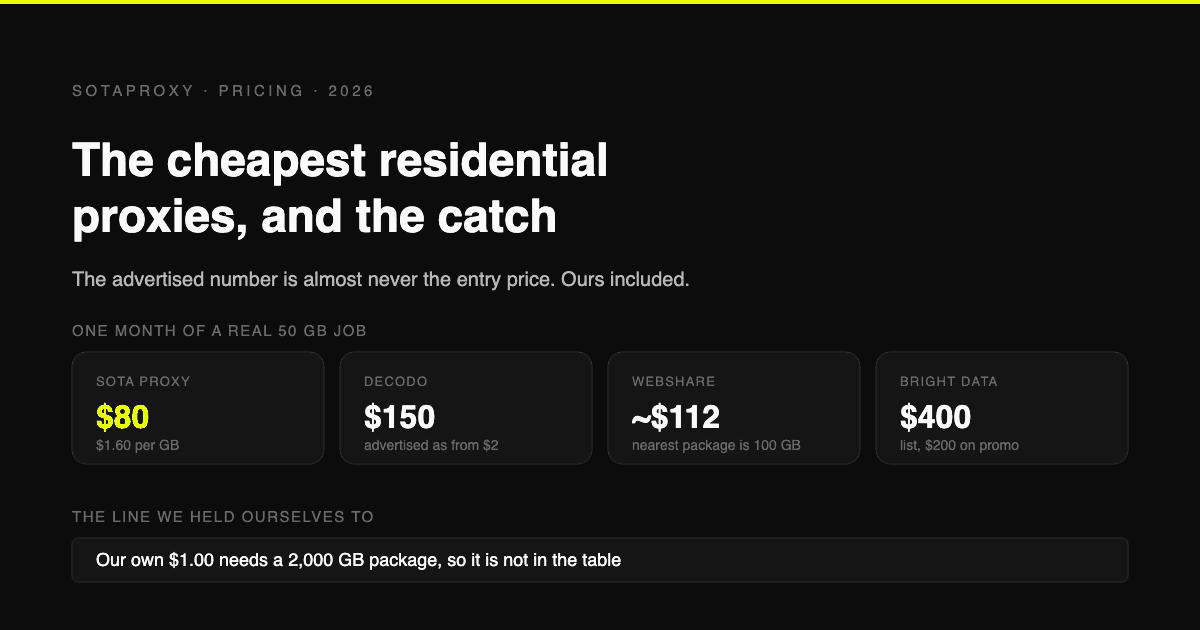
The Cheapest Residential Proxies in 2026, With the Catch Each One Hides
Verified per-gigabyte prices from five vendors' own pages, not from last year's blog posts. Why the advertised number is almost never the entry price, which providers put a monthly floor under your bill, and how to work out your real cost per gigabyte.