Contains in Xpath
Contains in xpath - Master the `contains` in XPath function. Get syntax, examples, advanced patterns, and performance tips for Selenium and proxy automation

You're in the middle of a run, a login form is loading inside AdsPower or Multilogin, and the selector that worked yesterday now returns nothing. The platform changed a class name, a label got localized, or the button text picked up an extra wrapper span. That's where contains in XPath earns its keep. It gives you a partial-match path that survives small DOM shifts, which matters when you're juggling Facebook and TikTok ad accounts, account farming, cloaking checks, and geo-targeted campaigns across unstable pages.
Table of Contents
- Introduction to contains in XPath
- Understanding the Key Concepts
- Examples with Attributes and Text Nodes
- Advanced Patterns and Version Differences
- Combining contains with Other Functions
- Performance and Proxy Best Practices
- Common Pitfalls and Debugging Techniques
- Conclusion and Next Steps
Introduction to contains in XPath
A lot of automation breaks for the same boring reason. The locator is too exact, the page isn't. In real account-creation flows, a label might change from “Sign in” to “Sign in now”, or a form control might keep the same meaning while its generated ID shifts on every render. Exact matching dies fast in that kind of environment.
XPath contains() is the partial-match tool that keeps selectors usable when the DOM moves under you. MDN documents it as a boolean string function with the core form contains(haystack, needle), where the first argument is the string you search and the second is the substring you want to find, returning true or false depending on whether the substring is present. That simple behavior is why it shows up so often in browser automation and scraping work, especially when labels, IDs, or classes only stay stable in pieces, not in full. See the MDN reference on XPath contains() and, if you work with XML and Python in proxy-heavy pipelines, the related XML and Python integration guide.
In practice, this matters most in high-risk flows. Cloaking checks, ad review pages, and account-farming dashboards often move fast and expose just enough structure to make exact locators brittle. contains in XPath doesn't solve every selector problem, but it gives you a reliable middle ground when a stable fragment is all you can count on.
Practical rule: if the platform owns the markup, assume the exact string will drift sooner than you want.
Understanding the Key Concepts
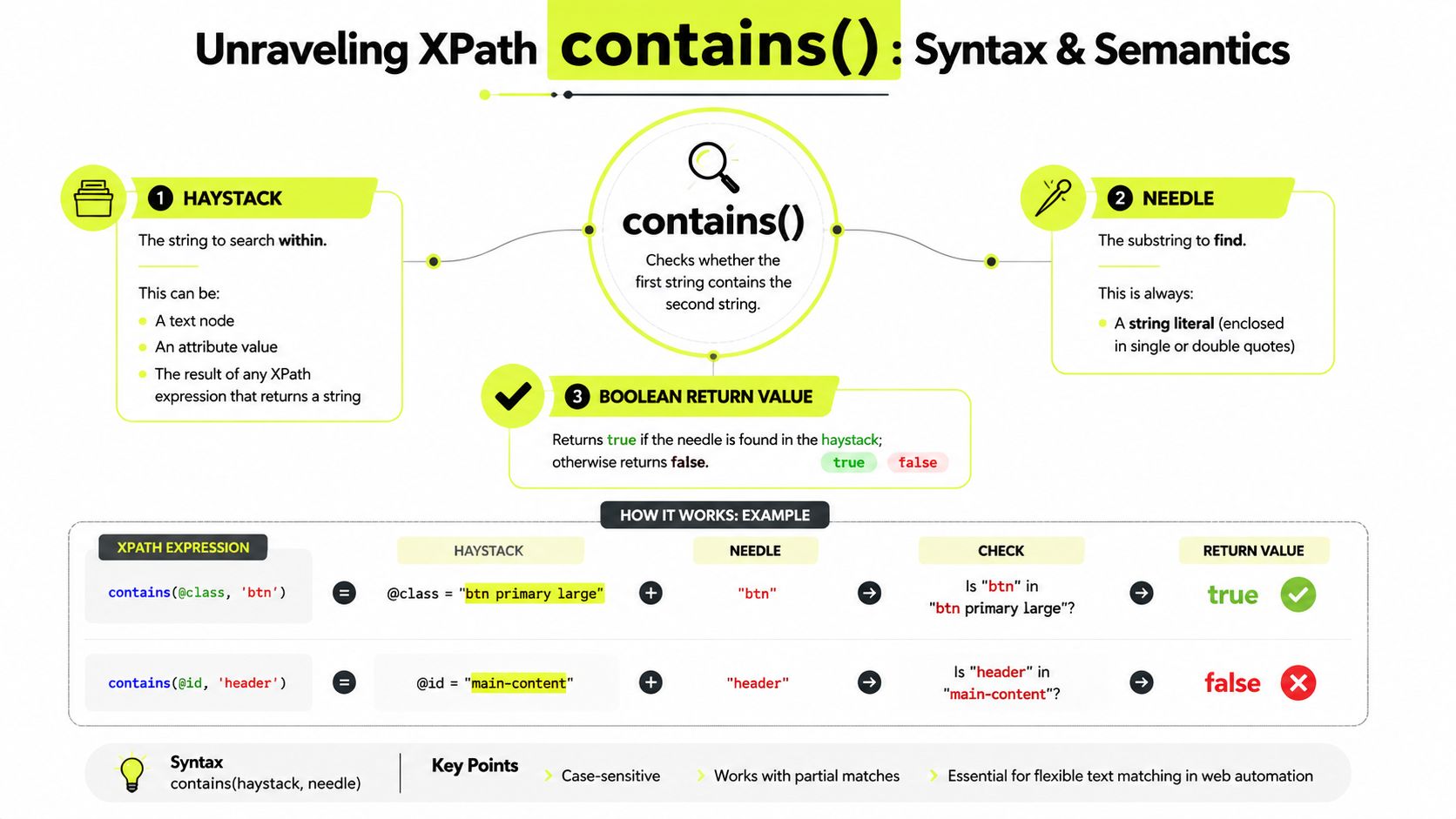
The mental model is straightforward. contains(haystack, needle) asks whether the haystack string includes the needle string anywhere inside it. XPath treats that result as a boolean, so the function slots cleanly into predicates that either keep a node or drop it. MDN's syntax guidance makes the structure explicit, and that's the part worth memorizing: the first argument is what you search, the second is what you're looking for, and the return value is binary. Read the MDN function reference for contains() in XPath.
What the arguments actually mean
Think in terms of element attributes or visible text. If you write contains(@id, 'user'), the @id value is the haystack and 'user' is the needle. If you write contains(text(), 'Welcome'), the text node becomes the haystack and the substring becomes the needle. That's it. No magic.
A clean pattern looks like this:
//input[contains(@id, 'user')]
Another one looks like this:
//div[contains(text(), 'Welcome')]
The reason this pattern keeps showing up in Selenium guidance is simple. Partial match behavior survives small UI changes that break equality checks. If a form field gains a suffix, or a greeting banner picks up a locale-specific prefix, your locator can still anchor on the stable part instead of the whole value.
A selector that depends on a full string is fragile by default. A selector that depends on a stable fragment gives you room to breathe.
Examples with Attributes and Text Nodes
Attribute matching is usually the first place people reach for contains in XPath because it solves the generated-value problem quickly. If an input ID is decorated with a stable prefix and a volatile suffix, contains(@id, 'user') keeps working across renders. The same idea applies to classes, names, and data attributes. In dynamic testing and scraping, that pattern became common because exact-match locators stopped being reliable as interfaces evolved, and practical Selenium examples kept showing the same partial-match approach in different forms, like partial attribute and partial text matching. For that background, the historical discussion in Apify's XPath contains guide is relevant. For scraping setups that pair these locators with crawl logic, the Scrapy integration notes fit naturally.
Attribute matching that survives suffix changes
HTML:
<input id="user_48372" name="email" />
XPath:
//input[contains(@id, 'user')]
That works because the stable part is inside the changing string. You're not chasing the whole ID, only the fragment that matters. In account-farming flows, that approach is useful when the app keeps regenerating field names but leaves a recognizable prefix intact.
Text matching for banners and labels
HTML:
<div class="notice">Welcome back, advertiser</div>
XPath:
//div[contains(text(), 'Welcome')]
That pattern is handy for greeting banners, approval notices, and localized prompts. It's also useful in cloaking checks, where you often want a partial text anchor rather than a brittle full sentence. In GoLogin or Hidemyacc, where small UI variations are normal, partial text selection usually ages better than exact string matching.
If the visible copy can drift, match the stable word, not the whole sentence.
Advanced Patterns and Version Differences
On real automation targets, contains() usually fails first on string cleanliness, not on logic. Whitespace shifts, casing changes, and generated values can make a locator look correct while still missing the target node. Mendix's XPath reference also shows a practical edge case, contains() on a null or empty target returns false, and an empty search term is treated as an empty string, so the expression behaves like a non-empty check. That matters in cloaking checks, account-farming dashboards, and antidetect browser flows, where field values often change faster than the page structure. The practical constraint is documented in Mendix's XPath contains reference.
Cleaning whitespace before matching
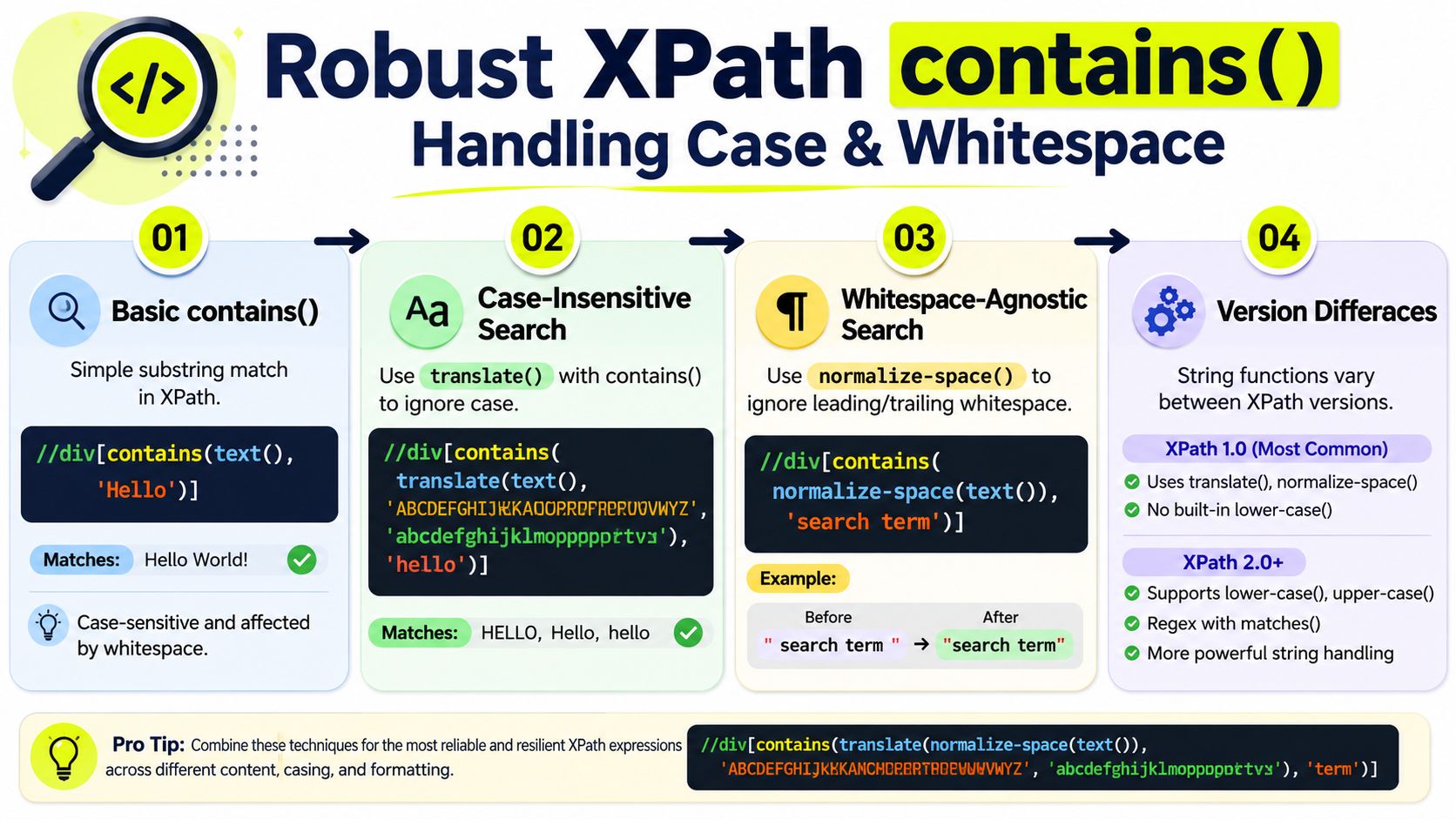
normalize-space() is the first helper to pair with contains() when the page renders messy text. It trims leading and trailing whitespace and collapses internal spacing, which helps when HTML formatting adds line breaks or indentation. In practice, a locator like this is safer than a raw text check because the visible label stays readable even when the DOM adds noise:
//button[contains(normalize-space(text()), 'Submit')]
That pattern shows up often in dashboards and ad review pages where front-end components wrap copy in extra markup. The text on screen may look simple, but the underlying node rarely is. If you are pulling values through Selenium-heavy browser automation, the older engine behavior in many environments still makes this pattern the safer choice, and the Selenium integration guide gives the setup context for that kind of stack.
Forcing case consistency
XPath 1.0 does not give native case-insensitive contains logic, so translate() is the common workaround. The usual pattern lowercases the source string and compares it against a lowercase needle. It is awkward, but it holds up when labels are not consistently cased across pages or sessions.
contains(translate(text(), 'ABCDEFGHIJKLMNOPQRSTUVWXYZ', 'abcdefghijklmnopqrstuvwxyz'), 'submit')
XPath 2.0 adds richer string and regex support, including functions that simplify case-insensitive searches. Selenium-heavy browser automation still leans on older engine behavior in many environments, so the translate() pattern remains practical.
Use normalize-space() when spacing is messy. Use translate() when casing is unstable. Use stable fragments only when the target string can survive page updates.
Combining contains with Other Functions
A bare contains() is often too loose on its own. You get resilience, but you can also get too many matches. That's why the strongest locators usually chain it with other predicates. Pair it with starts-with() when the stable fragment sits at the beginning of a value, use position() when you only want the first match in a repeating list, and combine it with structural constraints when the page reuses the same class names everywhere.
Tightening the match with multiple predicates
A practical locator can look like this:
//li[contains(@class, 'item')][position()=1]
That grabs the first matching item in a list without hardcoding a brittle index into the DOM path. In account-farming dashboards, that kind of selector is useful when you're scraping or interacting with repeating cards that all share the same base class.
Another useful pattern:
//button[starts-with(@id, 'submit') and contains(text(), 'Save')]
This one is more specific than a plain substring search because it requires both an attribute prefix and a visible action word.
Using contains inside larger filters
You can also nest contains() inside broader expressions when the page structure is noisy. That's useful in multi-account tools where the same label appears in multiple containers. If you anchor on the right parent and then filter the child text, you reduce false positives without giving up flexibility.
For crawlers and automation stacks that need XPath inside extraction logic, the Python web crawling integration guide is a useful companion read. The important part here is not the language or framework. It's the habit of scoping before you substring-match.
Practical rule: scope first, then filter. A tight parent plus a partial child match beats a global substring hunt every time.
Performance and Proxy Best Practices
contains() is flexible, but flexibility costs something if you spray it across large node sets. Broad expressions force XPath engines to inspect more candidates, and that gets expensive when you use //* or chain multiple descendant searches together. The fix is simple. Anchor your selector to a specific tag, keep the search scope tight, and avoid making every locator a whole-document scan.
That matters even more when your automation runs through different proxy classes. The IP layer can help or hurt the session before your selector even matters.
| Proxy Type | Latency | Trust Level | Cost | Ideal Use Case |
|---|---|---|---|---|
| Datacenter | Low and consistent | Lower on stricter sites | Lowest class | Fast checks, broad coverage, low-friction tasks |
| Residential | More variable | Higher than datacenter | Mid-range | Geo-targeted campaigns, general web coverage |
| Mobile | Usually lower throughput | Highest trust behavior in many platforms | Highest on a per-GB basis | Facebook and TikTok ad accounts, account farming, high-reputation workflows |
| ISP | Between datacenter and residential | Better than datacenter, below mobile | Mid to higher | Balanced uptime and trust for stable automation |
The operational split is real. Datacenter proxies are the fastest and cheapest class, but they trigger more blocks and CAPTCHAs on stricter sites. Residential proxies usually get better acceptance, but latency varies because consumer ISP conditions vary. Mobile proxies are harder to detect because carrier IPs sit behind CGNAT, which makes them look closer to aggregated real-user traffic. ISP proxies sit in the middle, because they use consumer-ISP registration while running on data-center infrastructure. That comparison comes from LiveProxies' breakdown of residential, datacenter, mobile, and ISP proxies.
For teams using antidetect browsers such as AdsPower, Dolphin Anty, GoLogin, Multilogin, and Hidemyacc, the selection usually follows the task. Mobile fits when reputation scoring matters most, especially for Facebook and TikTok ad accounts. Residential stays the lower-cost default for bulk account farming, geo-targeted campaigns, and general web coverage. Datacenter works when speed matters more than trust, and ISP makes sense when you want a steadier middle ground.
The external proxy market details also shape buying decisions. One mobile proxy guide says mobile packages are usually priced per gigabyte and that market pricing is roughly $1–$15 per GB depending on volume and pool quality, with carrier users sharing IPs through CGNAT. That same pricing model is why repeated high-consumption workflows are the natural fit for mobile plans, not one-off sessions. Read the broader positioning in Infatica's mobile proxy guide. For teams comparing reliability under load, the reliability testing guide fits well with selector testing.
You can also use a resource like proxies for web scraping data as a practical reference when you're weighing crawl volume, acceptance rates, and selector churn.
Common Pitfalls and Debugging Techniques
Most contains in XPath mistakes don't come from the function itself. They come from bad assumptions about the node you're matching. Empty @id values return false, text split across nested elements behaves differently from direct text, and case mismatches still bite when you forget that XPath comparisons stay literal unless you normalize them. In browser DevTools, test the expression directly with $x() and inspect the result count before you blame Selenium or the page.
A few common failure modes show up over and over:
- Empty attributes:
contains(@id, 'user')won't help if the target node has no meaningful ID. - Wrong text target:
text()only sees direct text nodes, so nested spans can hide the visible string. - Over-broad fragments: matching on a tiny substring pulls in too many nodes.
- Whitespace noise:
normalize-space()is often the difference between one match and zero. - Case drift: use
translate()when the page can switch casing.
Test selectors in the browser console first, then replicate them in your automation framework. If the query returns too many nodes, tighten the parent scope. If it returns none, strip the selector back to the minimum string fragment and rebuild it step by step. In AdsPower or GoLogin, that habit saves time when a campaign page or login form changes mid-run.
Conclusion and Next Steps
A selector built with contains() holds up better than a brittle exact match because real pages keep shifting. Stable fragments, normalize-space(), translate(), tighter scoping, and careful predicate chaining give you selectors that survive small UI changes without forcing a full rewrite. In account farming, cloaking flows, and geo-targeted automation, that matters because exact strings can change with a label swap, a localization update, or a minor front-end A/B test.
Proxy choice affects that selector work more than many teams expect. High-risk automation usually behaves better with mobile proxies or carrier-style IPs, but the trade-off is cost and consistency, since those pools often require more careful session handling and repeated usage planning. If your run depends on a trust profile that matches human traffic, choose the proxy class for that goal first, then tune the XPath to match the page structure you observe in browser DevTools.
Test your live selectors against the same pages your automation hits, then confirm they still return the nodes you expect after small layout changes. If a selector becomes too broad, narrow the parent scope before you add more fragments. If it becomes too fragile, remove the extra conditions and rebuild it around the most stable attribute or text fragment. That workflow keeps Selenium jobs from failing for avoidable reasons, and it gives you a cleaner handoff from selector design to proxy selection when you standardize the rest of the stack.
A CTA for Sota Proxy.
Related articles

How to Get Around an IP Ban: A Technical Guide for 2026
Facing an IP ban? Learn how to get around an IP ban with technical steps for diagnosing block types, choosing the right proxies, and configuring your stack.

Mastering Wget Proxy Server Configuration in 2026
Configure your wget proxy server (HTTP, HTTPS, SOCKS5) with ease. Learn command-line, env var, and wgetrc methods for account farming, ad verification, and

IP Reputation Check: A Guide for Media Buyers & Farmers
Master the IP reputation check process for ad accounts and automation. Learn to analyze scores, handle blacklists, and manage proxies to avoid platform bans.

Residential Backconnect Proxy: 2026 Guide & Best Practices
Master the residential backconnect proxy. A 2026 guide on how it works, its benefits over other proxies, and best practices for ad verification & account
Competitor Price Tracking: Technical Guide 2026
Build a robust competitor price tracking system. This guide covers scraping architecture, residential proxies, anti-bot evasion, and data pipelines.

Rotating Proxy Server: Mastering Techniques for 2026
Master rotating proxy servers for farming, ad verification & scraping. Learn architecture, rotation, & anti-detection tactics.