How to Avoid CAPTCHA on Automated Workflows
Learn how to avoid CAPTCHA on automated workflows with proxy tactics, antidetect browsers, request pacing, and solver fallbacks built for real operators.

Your campaign is live, spend is moving, and then the login flow stalls behind another CAPTCHA. One account needs an image challenge. A second asks for phone verification. By morning, the same proxy pool has pushed multiple Facebook Business Manager IDs into review, while TikTok profiles start requesting additional checks. The obvious reaction is to search for a faster solver. In production, that's usually the wrong first move.
CAPTCHA avoidance is mainly a fingerprint and trust-score problem. Platforms evaluate the whole request context, including the network, browser profile, session history, timing, and interaction pattern. A clean puzzle solve can't repair a damaged identity. This guide focuses on reducing unnecessary challenges across AdsPower, Dolphin Anty, GoLogin, Multilogin, and Hidemyacc, with practical considerations for Facebook and TikTok ad accounts, account farming, cloaking, and geo-targeted campaigns.
Table of Contents
- Why CAPTCHAs Keep Hitting Your Workflows
- Picking the Right Proxy Type for Lower CAPTCHA Triggers
- Configuring Antidetect Browsers for Stable Fingerprints
- Request Pacing and Session Hygiene That Reduces Challenges
- Choosing Between CAPTCHA Solver APIs and Human Solvers
- Monitoring and Fallback Patterns When CAPTCHAs Spike
- Legal, Ethical, and Platform Risk Considerations
Why CAPTCHAs Keep Hitting Your Workflows
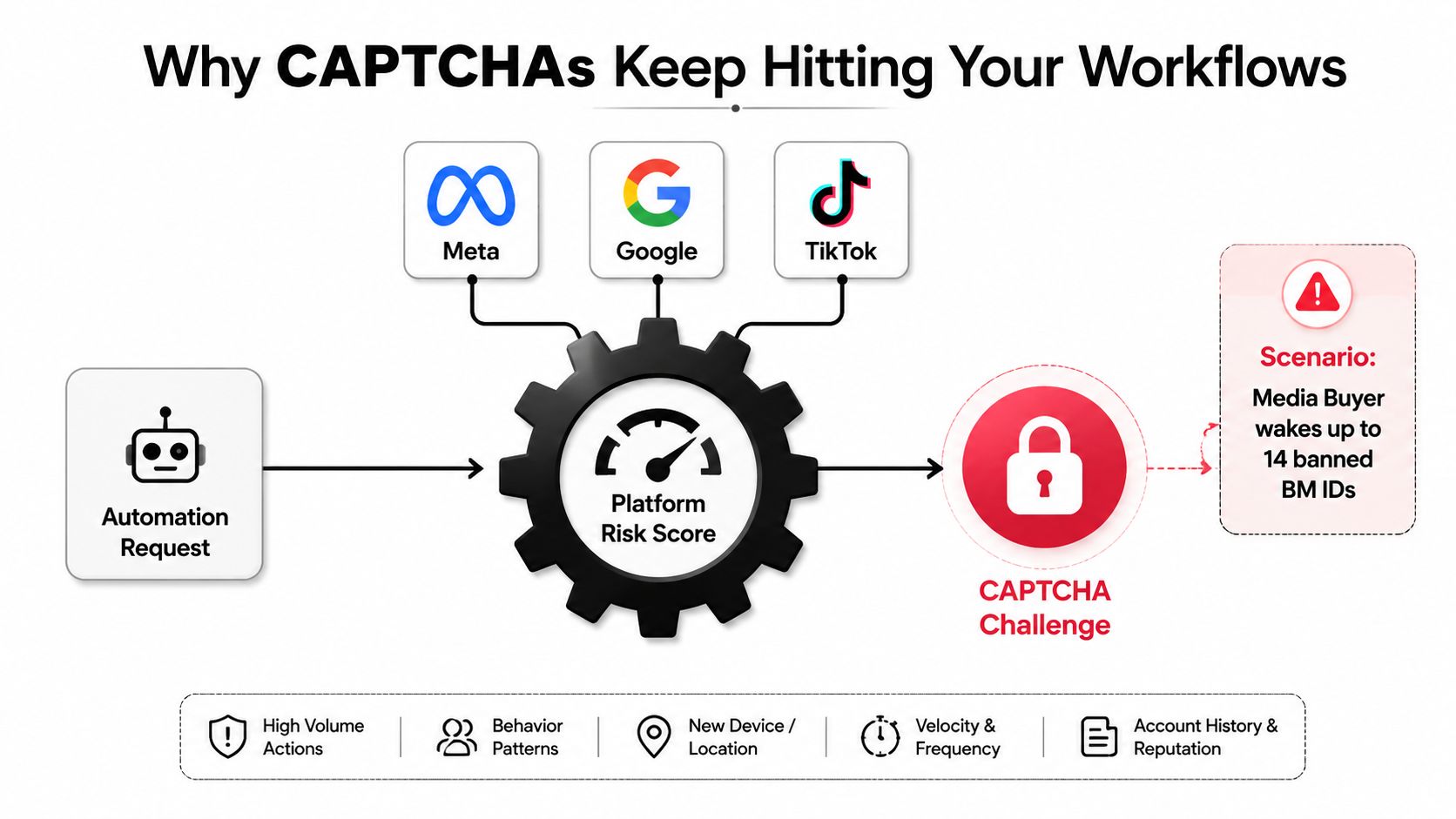
A media buyer opens the dashboard and finds a farm of accounts stuck in verification. The team didn't necessarily deploy a new script. A proxy pool degraded, a browser profile changed its WebGL output, or several identities logged in from the same network pattern. The platform sees the combined signal, lowers its confidence, and adds friction.
Cloudflare reported that 31.2% of application traffic was bot traffic in its 2024 update, while 93% of identified bots were unverified and potentially malicious (Cloudflare's application security report). That environment forces platforms to classify requests continuously. A CAPTCHA often appears after the classifier detects a suspicious combination, not because one isolated page visit proves automation.
The signals that lower trust
The practical signals are familiar to anyone running multiple identities:
- IP reputation: A previously abused exit node can trigger a challenge before the browser loads the workflow.
- Fingerprint drift: Canvas, WebGL, audio, fonts, screen dimensions, and client hints should remain coherent across sessions.
- Request cadence: Parallel bursts and identical timing look unlike ordinary navigation.
- Cookie age: A fresh profile with no meaningful session history carries less trust than an established, consistent identity.
- Behavioral biometrics: Scroll depth, focus changes, navigation order, and time between actions contribute to the classification.
Each signal has a corresponding control. Improve the network rather than repeatedly changing exits. Keep the antidetect profile stable rather than regenerating fingerprints. Pace actions and preserve sessions instead of hammering retries. Match timezone and language to the proxy location instead of presenting contradictory geography.
A useful primer on CAPTCHA terminology and challenge types helps separate visible puzzles from background risk systems. For legitimate testing and authorized automation, guidance on how to bypass CAPTCHAs legally is a better reference than forums promising universal evasion.
Production rule: Treat a rising CAPTCHA rate as a trust-score alarm. Don't treat it as a puzzle queue.
The objective isn't to outsmart a challenge indefinitely. It's to reduce false positives in a classifier owned by someone else. That means fewer abrupt identity changes, fewer suspicious bursts, and stronger alignment between the profile, proxy, and workflow.
Picking the Right Proxy Type for Lower CAPTCHA Triggers
Proxy selection changes the starting reputation of every identity. It won't fix a contradictory browser fingerprint or abusive request pattern, but a poor network choice can make every other optimization irrelevant. The main distinction is how the address originates and how platforms interpret its history.
Mobile proxies use carrier networks. Their addresses often belong to smaller, operator-managed pools and tend to fit the traffic patterns associated with ordinary mobile users. That can make them useful for sensitive Facebook and TikTok account operations, especially when the profile geography and device model make sense together. Rotation still needs control. Frequent switching across distant locations creates its own anomaly.
Residential proxies come from consumer ISP assignments. Clean ranges with stable sessions usually perform better than low-quality cloud infrastructure for account management, ad verification, and geo-targeted campaign checks. They suit workflows that need a realistic regional presence without the constraints of a carrier pool.
Datacenter proxies come from cloud-hosted infrastructure. They offer speed and predictable availability, but budget ranges often carry a reputation that platforms already associate with automation. They're suitable for lower-risk collection, public-page checks, and workloads where a challenge doesn't threaten an account.
IPv6 proxies expand available address space, but the protocol alone doesn't grant trust. A fresh allocation can work well when the upstream provider maintains clean history. It can also perform badly when the issuing network has an abuse record or the target platform handles that range aggressively.
| Proxy Type | IP Reputation Tier | CAPTCHA Trigger Frequency | Best Use Case |
|---|---|---|---|
| Mobile | Often strong when carrier-aligned | Often lower for identity-sensitive flows | Facebook and TikTok account access, mobile-like profiles |
| Residential | Variable, strongest with clean ISP ranges | Usually moderate to low with stable sessions | Geo-targeted campaigns, ad verification, account operations |
| Datacenter | Variable, often weaker in budget ranges | Often higher on protected platforms | Public data, fast checks, low-risk infrastructure |
| IPv6 | Entirely dependent on upstream history | Can be low or high depending on range reputation | Address expansion and specialized regional workloads |
Keep each account on a sticky session under ten minutes when the workflow needs continuity, then rotate before the exit accumulates suspicious behavior. Cap the number of identities using one ASN. Match the proxy country and city to the antidetect profile's timezone, locale, and language. Rotate exit nodes before trust decays, not immediately after every request.
Platform defenses also change how they treat address ranges, so teams should understand automated IP blocking for 2026 before building a pool around one provider or ASN. A more detailed breakdown of proxy types and their operational differences helps when assigning mobile, residential, datacenter, and IPv6 capacity to different workflows.
Configuring Antidetect Browsers for Stable Fingerprints
Antidetect browsers don't create trust by themselves. They give you control over the identity surface. The mistake is changing every available parameter until a profile looks unusual. Stable, internally consistent output beats aggressive randomization.
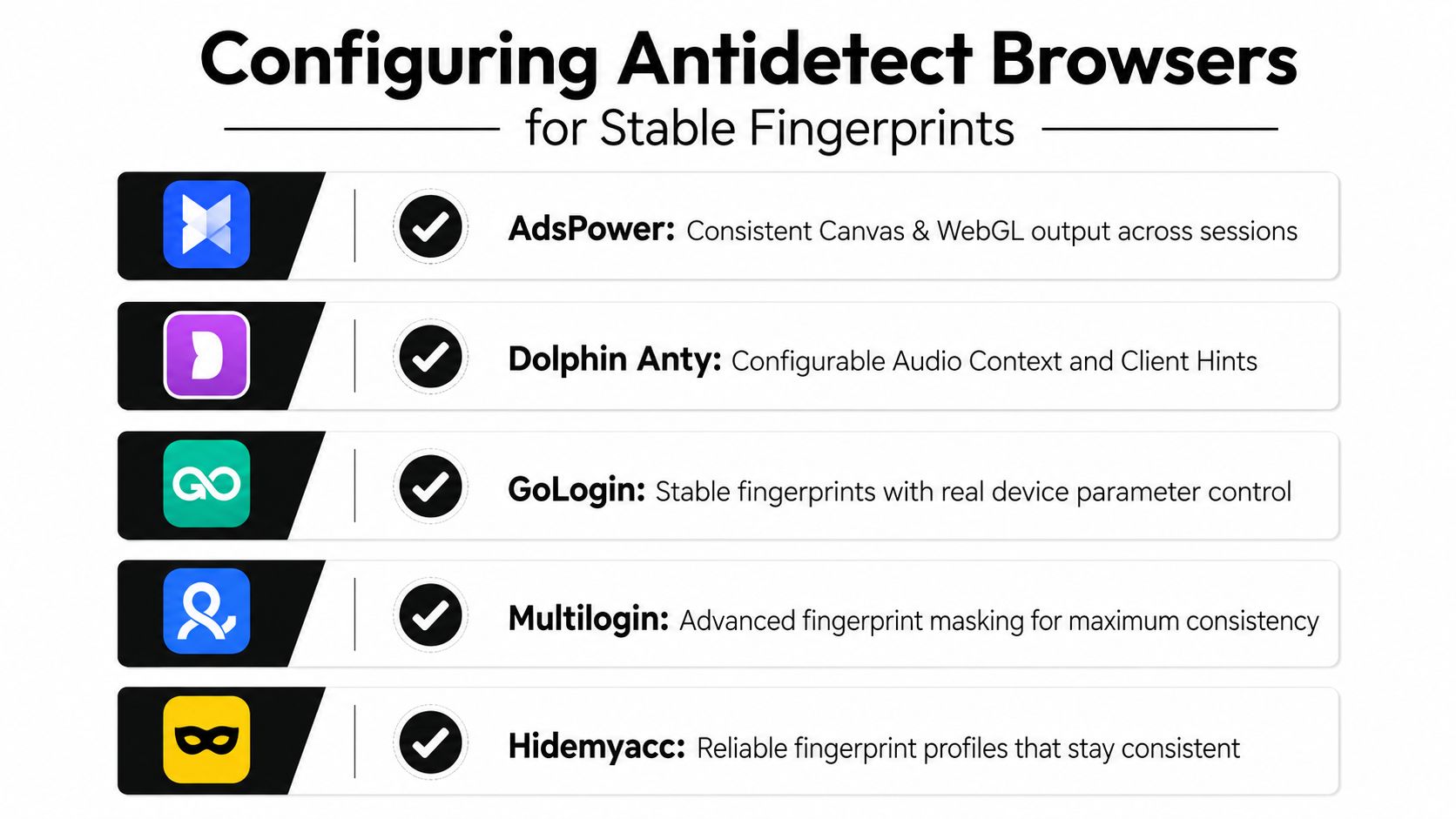
AdsPower, Dolphin Anty, GoLogin, Multilogin, and Hidemyacc expose different controls, but the setup logic stays similar.
Build one coherent device identity
Start with the operating system and browser build. A profile that claims one OS while exposing a mismatched Chrome build creates an avoidable contradiction. Keep the browser version current and align the user agent, client hints, platform value, and rendering behavior.
Canvas and WebGL noise should remain stable for that profile. The same applies to AudioContext and client rect output. Randomizing these values at every launch creates fingerprint drift, which can look less like privacy protection and more like identity switching.
Timezone, locale, and language must agree with the proxy geography. A French locale, an Eastern European timezone, and a North American residential exit form a suspicious combination unless the workflow has a legitimate reason for it. The profile should also expose a plausible screen size, device memory, and CPU core count for the claimed device class.
Remove common leaks
Pin fonts to the selected platform. Disable WebRTC paths that can reveal the egress address. Check that the profile doesn't expose a different audio device, renderer, or media capability each time it starts.
Before using a profile for a Facebook ad account, TikTok business account, account-farming workflow, or cloaking QA run, validate it outside the target platform:
- Review browser fingerprint output with a reputable detection checker.
- Run a cover-your-tracks review for WebRTC, canvas, WebGL, fonts, and client hints.
- Confirm timezone, language, and proxy geography match.
- Perform a dry-run login with no campaign edits or rapid navigation.
- Record the profile state, then avoid changing it without a documented reason.
The browser fingerprinting glossary is useful when your team needs consistent terminology across profile builders and QA logs. Don't confuse more spoofing with better spoofing. Every extra inconsistency expands the surface that a risk engine can compare.
Request Pacing and Session Hygiene That Reduces Challenges
Traffic shaping usually produces more reliable results than solver escalation. A workflow that sends requests in parallel, repeats the same sequence, and rotates its exit after every action creates a recognizable pattern even when the browser fingerprint looks plausible.
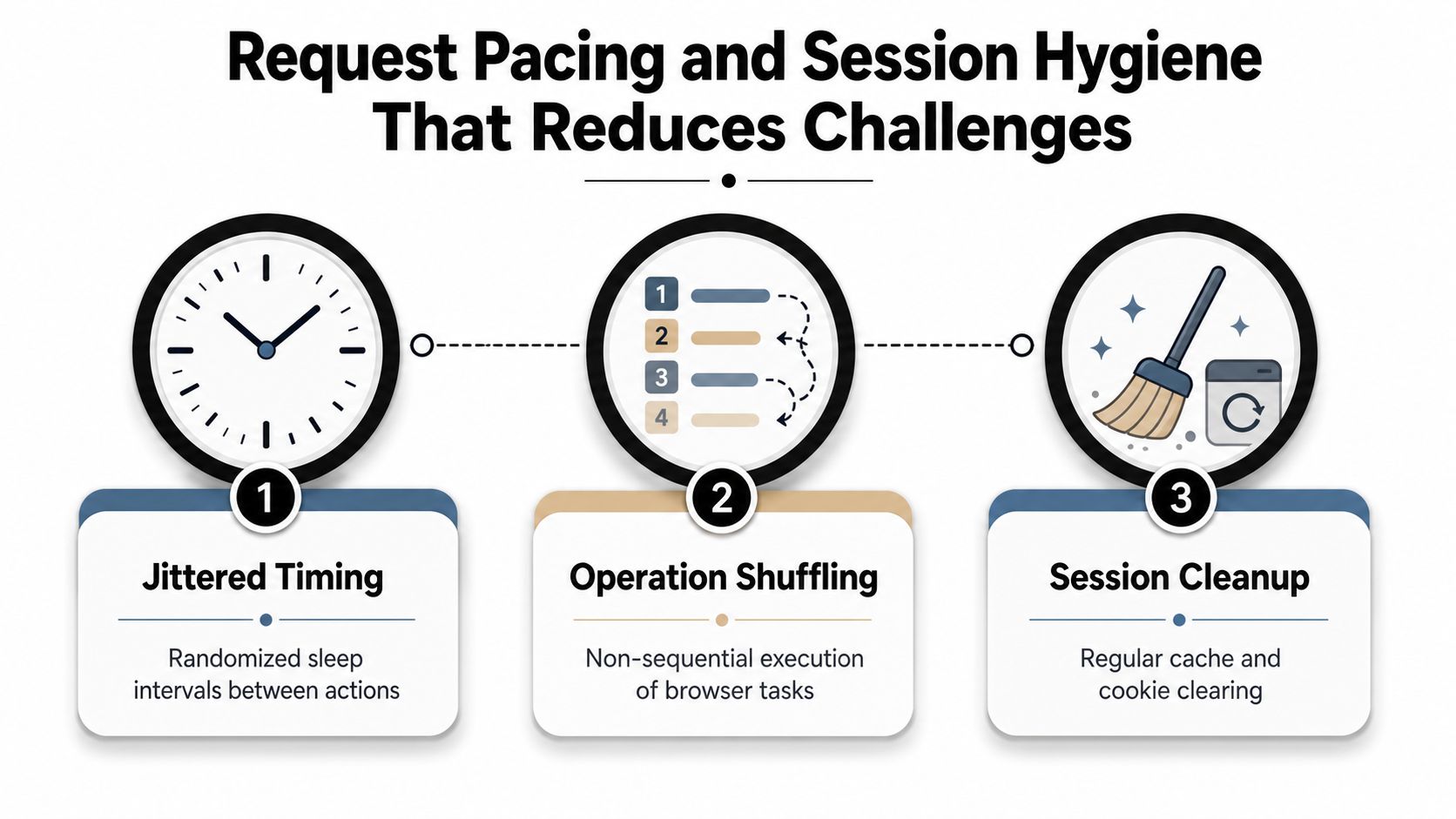
Use jitter, not a fixed sleep. Vary the delay between page loads, clicks, form fields, and campaign edits within a sensible workflow range. Random timing alone won't make an abusive process legitimate, but fixed intervals make classification easier.
Shuffle operations where the application allows it. A user might open notifications, inspect a campaign, visit billing, and return to the account. A script that logs in, edits the same field, refreshes, and repeats across every identity creates a clean machine signature.
Keep sessions deliberate
Use sticky sessions for residential and mobile proxies when a sequence depends on continuity. Aggressive rotation can be worse than a stable exit because each new address forces the platform to reassess the identity. Rotate when the session becomes unhealthy, not because a timer says every request needs a new IP.
Set account-level caps for sensitive operations. New identities need a warm-up period with ordinary, low-volume activity before they handle complex campaign changes or high-value actions. Avoid running every account at the same moment. Stagger work across the farm so the network doesn't produce a synchronized burst.
TLS and headers also matter. Your client should resemble the browser profile rather than a cURL default. Keep the TLS fingerprint, header order, user agent, Accept-Language, and navigation headers coherent. Don't reuse one user agent across unrelated device profiles and domains.
Avoid these patterns:
- Parallel bursts: Many identities performing the same action simultaneously.
- Identical intervals: Requests arriving on a fixed rhythm.
- Contradictory language: Browser language that doesn't match the claimed region.
- Shared user agents: One device signature copied across unrelated profiles.
- Uncontrolled cleanup: Clearing cookies after every action and destroying useful session history.
For implementation teams, session persistence practices provide a practical framework for deciding which cookies and sessions should survive between tasks.
Choosing Between CAPTCHA Solver APIs and Human Solvers
A solver belongs at the end of the control stack, not at the beginning. If every login requires a token, the workflow has a network, fingerprint, or behavior problem. Solvers can handle unavoidable challenges in authorized workflows, but they don't repair an identity that platforms already distrust.
The common API options include 2Captcha, Anti-Captcha, and CapSolver. Human-oriented services such as Kolotibablo use a different operating model. API providers offer integration and queue-based automation. Human services can be useful for image tasks where visual judgment matters, but they introduce availability and handling variability.
Don't invent performance expectations from provider landing pages. Measure your own cost per successful solve, queue latency, failure rate, and retry behavior by challenge type. A service can appear cheap while wasting time on repeated failures or creating operational exposure through uncontrolled retries.
| Provider | Cost per 1000 | Avg Latency | Detection Risk | Best Use Case |
|---|---|---|---|---|
| 2Captcha | Validate current account pricing | Measure by challenge type | Depends on integration and target | Broad API coverage in established workflows |
| Anti-Captcha | Validate current account pricing | Measure queue and task latency | Depends on integration and target | General-purpose challenge handling |
| CapSolver | Validate current account pricing | Measure token and browser-task latency | Depends on integration and target | API-led workflows requiring flexible task types |
| Kolotibablo | Validate current account pricing | Human queue dependent | Different operational profile from APIs | Image challenges requiring human review |
Route by challenge and account value
A hybrid router can send low-risk image tasks to a human queue and reserve API capacity for token-based challenges. reCAPTCHA v3 doesn't present a conventional image puzzle, so repeatedly submitting tokens without correcting the underlying score can produce a failure loop. Cloudflare Turnstile needs a solver path designed for that implementation, not a generic image endpoint.
API integrations also create maintenance work. Tokens, browser tasks, proxy binding, vendor changes, billing controls, and failed-task handling need monitoring. Human queues remove some API fingerprint concerns but add latency, privacy, and consistency questions. Don't send banking, healthcare, or other sensitive-domain challenges to an external queue unless you have explicit authorization and a clear data-handling basis.
A useful AI-powered CAPTCHA automation option can be evaluated alongside those providers, but production decisions should come from measured results and account risk tolerance. A low-value public workflow can tolerate more latency than a high-value advertising identity. The safest solver is the one you rarely need.
Monitoring and Fallback Patterns When CAPTCHAs Spike
A CAPTCHA spike often arrives before an account restriction. Track it as an operational health metric, not as a nuisance that the team clears manually.
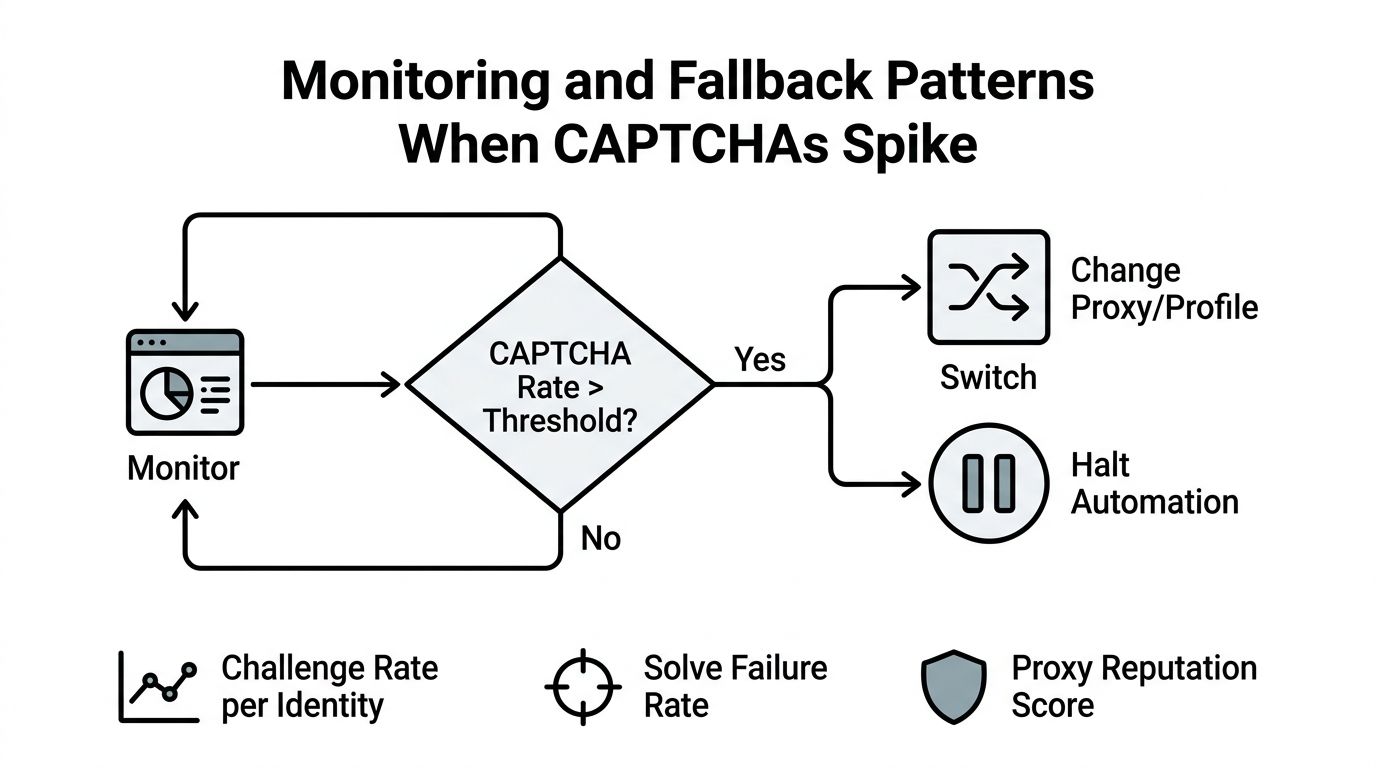
Record the challenge rate per identity per hour, solve failure rate, challenge type, proxy exit, ASN, browser profile, target action, and timestamp. Redact credentials, tokens, personal data, and full session cookies. You need enough context to correlate failures without turning logs into a second security risk.
Use controlled degradation
Set an internal baseline for each workflow, then alert when the rate moves materially above its normal level. A single challenge may be normal. Repeated challenges across several identities using one proxy group point toward network reputation. Challenges limited to one browser profile point toward fingerprint drift or corrupted session state.
Use these fallback actions:
- Cooldown the identity: Stop actions when challenge frequency rises instead of retrying immediately.
- Change one variable: Test a new exit or a known-good profile, but don't rotate everything at once.
- Slow the workflow: Reduce concurrency and widen timing variation.
- Quarantine the proxy: Compare its results with other exits from the same geography.
- Escalate manually: Review Facebook or TikTok account status before resuming campaign operations.
Consecutive solve failures should trigger a pause, not a larger solver budget. If several profiles fail on the same target while using different networks, investigate the browser build, workflow change, or platform-side policy update. If only one provider's exits fail, the provider may be the root cause.
Keep logs immutable enough to compare changes over time. A useful dashboard separates identity health, proxy health, and solver health. That separation prevents teams from blaming the CAPTCHA when the actual defect sits in a shared fingerprint template or a degraded ASN.
Legal, Ethical, and Platform Risk Considerations
The smarter question isn't how to outpace every challenge. It's whether the workflow should generate that challenge at all. CAPTCHA systems protect login forms, payment flows, account creation, and other surfaces where automated abuse can harm users. Repeatedly defeating them can violate a platform's terms, trigger account enforcement, or create legal exposure.
Meta can request additional identity or business verification when it detects potentially suspicious or inauthentic behavior, and failure to complete that process can restrict or suspend an advertising account (Meta verification guidance for advertisers). TikTok's business verification flow requires advertisers to submit the accounts they want verified, making verification part of account-level controls rather than a signup-only event (TikTok's business verification documentation).
That matters for account farming, cloaking, high-churn media buying, and geo-targeted campaigns. A solver may clear a screen while leaving the account's broader behavior unchanged. Don't use third-party solve queues for banking or health portals, and don't automate actions that imitate fraud signals without authorization.
| Tier | Use Case | Risk Level | Mitigation |
|---|---|---|---|
| Green | Public data with clear rate limits | Lower | Follow robots, terms, rate limits, and data-minimization rules |
| Yellow | Authenticated scraping with consent | Moderate | Obtain permission, protect credentials, limit collection, and document purpose |
| Red | Activity that mimics fraud or bypasses account controls | High | Stop, obtain explicit authorization, or redesign the workflow |
Public data doesn't automatically mean unrestricted automation. Personal data can create additional obligations, and authenticated access raises the stakes. In the United States, the Computer Fraud and Abuse Act may become relevant when access exceeds authorization. GDPR Article 32 can matter when processing personal data requires appropriate security. UK Computer Misuse Act concerns can arise when automation crosses into unauthorized access or security circumvention.
Calibration check: If the workflow needs constant solver retries, disposable identities, and contradictory geographies to function, reduce the scope before scaling it.
Use fewer accounts, longer warm-up, stable residential or mobile sessions matched to real user geography, and explicit platform permission where required. For government or healthcare portals, CAPTCHA farming can carry consequences beyond a terms-of-service violation. The safest implementation reduces requests, preserves consent, and stops when the platform signals that the activity isn't welcome.
Sota Proxy provides residential, mobile, datacenter, ISP, and IPv6 proxy options with rotation and sticky-session controls for authorized workflows that need consistent regional access. Visit Sota Proxy to compare proxy types, locations, and session settings before you rebuild your Facebook or TikTok automation stack.
Related articles

How to Set Up Proxy: A Guide for Automation & Ad Teams
Learn how to set up proxy servers for technical use cases. A step-by-step guide on configuration, proxy types, automation, and troubleshooting for ad teams.
Dolphin Anty for Multi-Accounting: Features, Automation, and Proxy Integration
How to use Dolphin Anty for multi-accounting: browser profiles, Cookie Robot, scenarios, Synchronizer, API automation, and three ways to connect SotaProxy proxies. Promo code SOTA20 gives 20% off.

Fingerprint Spoofing: Methods, Detection, and Antidetect Use
Learn how fingerprint spoofing works, the methods used to bypass detection, and how antidetect browsers with proxies manage multi-account operations safely.

Zip Code Targeting for Ad Campaigns: The Practitioner Guide
Zip code targeting explained for media buyers and traffic arbitrage teams. Covers proxy setup, ad platform rules, detection risks, and best practices.

What Is Forward Proxy: A Complete Guide for 2026
Learn what is forward proxy, how it works for outbound traffic, and why teams use it with antidetect browsers for Facebook, TikTok, and scraping.

What Is a Proxy Used for: 2026 Arbitrage Guide
What is a proxy used for - Learn what a proxy is used for in 2026, from boosting security to managing multi-account operations for arbitrage teams