Fingerprint Spoofing: Methods, Detection, and Antidetect Use
Learn how fingerprint spoofing works, the methods used to bypass detection, and how antidetect browsers with proxies manage multi-account operations safely.

You've got 30 Facebook accounts warming, TikTok creatives queued, and separate browser profiles mapped to separate proxies. Then one account opens with a different canvas result, a WebGL renderer that doesn't match the claimed device, and a timezone that belongs to another region. The first restriction looks isolated. It rarely stays that way. Trust checks spread across linked profiles, sessions, payment activity, and network history until a small fingerprint mismatch becomes a full account cascade.
Fingerprint spoofing doesn't solve that problem by itself. It changes selected browser signals, but reliable operations need a complete antidetect stack, including a persistent browser profile, a matching proxy, controlled behavior, clean cookies, and consistent account history. The same principle applies to account farming, cloaking, and geo-targeted campaigns across Facebook and TikTok.
The technical background is broader than browser tooling. Fingerprint spoofing has been a formal research problem in biometric security since at least the early 2000s. Research on fingerprint presentation attack detection developed from basic fake-material checks into structured methods for unknown attacks, sensor variation, and material analysis, as documented in this survey of fingerprint presentation attack detection.
This guide focuses on what matters in production: the signals browsers expose, the methods used to alter them, why random spoofing fails, how detection systems correlate layers, and how proxy selection compounds or reduces the risk.
Table of Contents
- What Fingerprint Spoofing Means in 2026
- The Anatomy of a Browser Fingerprint
- Spoofing Methods Compared Side by Side
- How Detection Systems Catch Spoofed Fingerprints
- Matching Proxy Types to Spoofed Identities
- Stacking Antidetect Browsers With Proxies
- Why Stable Spoofing Beats Random Spoofing
- Operational Checklist for Reliable Multi-Account Work
What Fingerprint Spoofing Means in 2026
A buyer clones a profile, assigns a proxy, changes the location, and launches the same Facebook workflow. The account logs in, but its canvas output no longer matches earlier sessions. WebGL reports a renderer that conflicts with the operating system. The IP points to one geography while the browser timezone and language point elsewhere.
Platforms do not need one signal to prove manipulation. They can score these mismatches with login timing, cookies, device history, and account behavior. The result may be verification prompts, delayed ad reviews, rejected payments, or a disabled account. The direct loss is the account and its history. The operational loss is rebuilding a profile that never reached a stable state.
A browser fingerprint consists of values and rendering behaviors that scripts and services can observe from a device and browser. Fingerprint spoofing changes those exposed values or alters how the browser produces them. Canvas output, WebGL details, fonts, audio processing, user-agent data, screen properties, and hardware hints can all form part of that surface.
The practical distinction is between one altered value and a coherent identity. A canvas randomizer changes one result, but it does not align proxy geography, TLS behavior, cookies, browser headers, timezone, language, or interaction patterns. A useful definition of browser fingerprinting helps separate observable signals from the controls used to modify them.
Spoofing is one layer in an antidetect stack, not a standalone trick. The stack also needs a persistent browser profile, a matching proxy, clean cookies, controlled behavior, and consistent account history. At scale, repeated spoof patterns and proxy mismatches become easier to correlate, especially when several accounts share the same unusual configuration.
Resources such as Prompt Builder's online identity tag provide context for the broader relationship between browser signals, privacy, and online tracking.
Practical rule: A profile should resemble one device used by one person, not a set of independently randomized fields.
The same rule applies to Facebook and TikTok ad accounts, affiliate cloaking systems, and geo-targeted campaigns. Antidetect browsers hold the profile. Proxies establish the network identity. Behavior and account history shape reputation. Fingerprint spoofing covers only part of the stack.
The Anatomy of a Browser Fingerprint
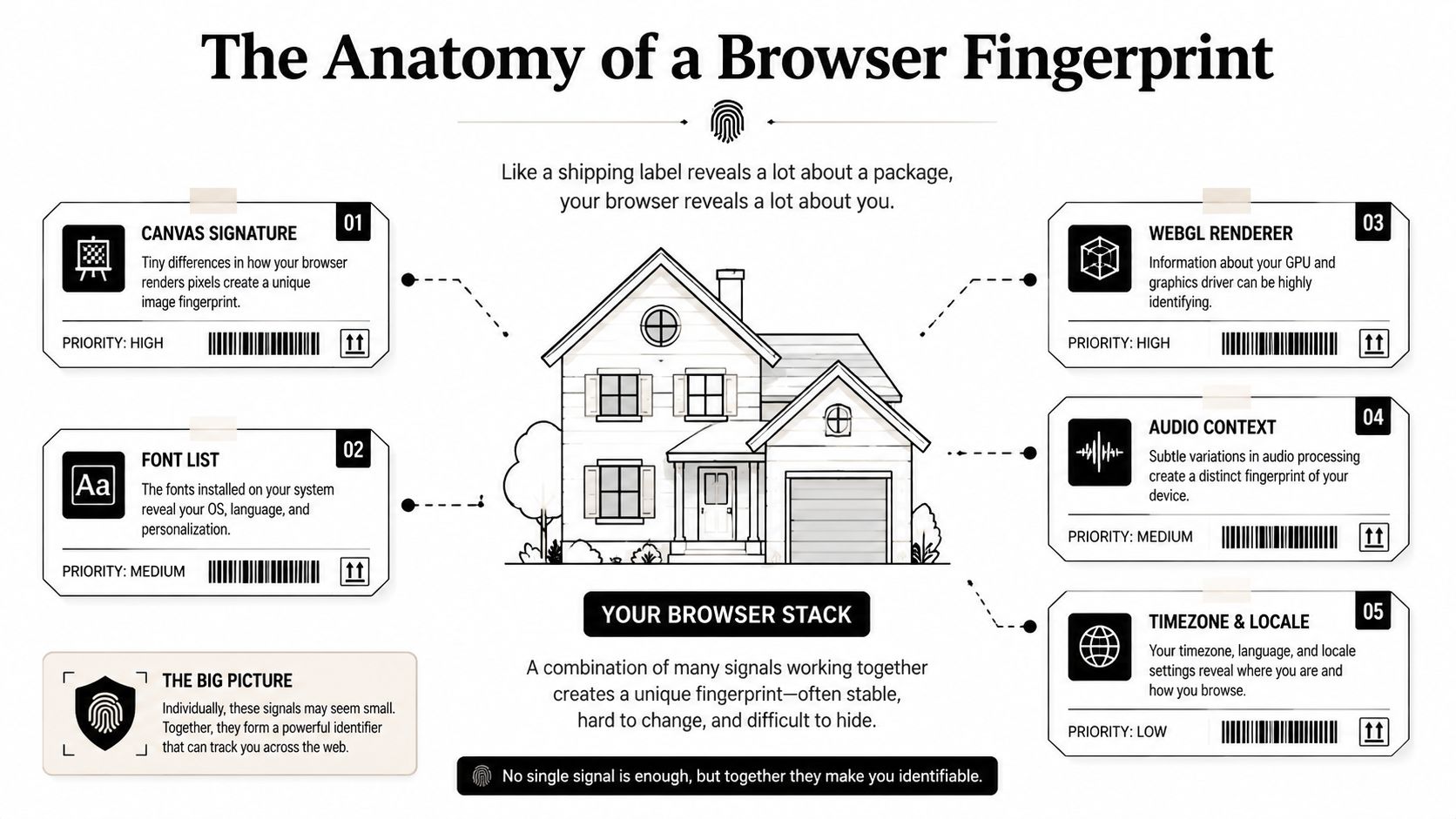
Think of the browser stack as a house. The outside world can't see every room, but it can read the shipping labels attached to packages leaving the property. Each label reveals something different. When the labels disagree, the house becomes suspicious.
Rendering and software signals
Canvas rendering asks the browser to draw shapes, text, or gradients and then measures the output. Small differences in graphics libraries, operating systems, drivers, and rendering paths can produce a recognizable result. Randomizing canvas output may hide a repeatable value, but excessive noise can look less natural than a stable signature.
WebGL exposes the graphics pipeline, including vendor and renderer strings, shader behavior, and precision characteristics. A profile claiming a common Windows laptop shouldn't suddenly report a renderer associated with a different hardware class. WebGL also connects to the TLS fingerprint and JA3 layer, which gives defenders another way to compare the claimed browser with the network handshake.
Fonts reveal what the operating system and applications have installed. A font list can expose the underlying platform, language configuration, and sometimes the environment used to create the profile. Font enumeration is difficult to fake cleanly because the list must agree with text rendering, locale, page layout, and the rest of the browser stack.
Audio context produces another implementation-dependent signal. Audio processing can vary with browser version, operating system, and hardware path. A spoofed audio hash that changes between sessions, while every other profile property remains fixed, creates its own anomaly.
Hardware, display, and environment
Hardware concurrency exposes the browser's reported processor capacity. Device memory provides another coarse hardware clue. Neither value identifies a machine alone, but both contribute to a claimed device class. A high-memory desktop profile paired with a mobile carrier connection can require more scrutiny if the rest of the session doesn't support that story.
CPU architecture, screen resolution, color depth, and display scaling affect how pages render. Screen dimensions also influence responsive layouts and interaction geometry. A profile that changes its resolution every session doesn't resemble a returning user.
Timezone, language pack, and Accept-Language behavior connect the browser to a geography. A timezone that conflicts with the proxy region is one of the simplest inconsistencies to detect. Battery information can reveal whether a device behaves like a portable computer, while installed plugins and browser capabilities help distinguish a normal browser from a managed or synthetic environment.
Platforms don't weight every field equally in every workflow. Account-trust systems typically assess the agreement between layers, not the dramatic value of one isolated attribute. A fingerprint becomes useful only when the canvas, WebGL, fonts, audio, hardware, display, locale, and network all tell the same story.
Spoofing Methods Compared Side by Side
The cheapest approach is usually the least stable. Canvas randomization can be free or built into a privacy extension, but it only touches a narrow part of the browser identity. JavaScript injection reaches more attributes, yet extensions can leave detectable traces and may fail when a site changes its collection script.
Native spoofing operates deeper inside Chromium or Firefox forks. It can coordinate canvas, WebGL, fonts, audio, and other browser properties through one profile model. Full virtual environments go further by recreating an operating system or device context, but they consume more resources and create their own virtualization signals.
| Method | Cost Band | Detection Risk | Best Fit |
|---|---|---|---|
| Canvas randomization | Free | High when used alone | Low-risk testing and basic privacy |
| JavaScript injection | $20-50/mo | Medium to high | Controlled experiments and limited automation |
| Native hook-based spoofing | $80-200/mo | Lower when configured consistently | Paid-traffic profiles and account operations |
| Full virtual environment | $100+/mo | Variable, often high if virtualization leaks | Device-specific testing and isolated workflows |
The cost bands describe common operating ranges, not guaranteed product pricing. Stability depends on the implementation, profile persistence, browser version, proxy quality, and how aggressively the target collects signals.
Where each method breaks first
Canvas randomization usually fails through cross-signal disagreement. The canvas changes, but the WebGL renderer, fonts, display, and operating system still identify the underlying environment.
JavaScript injection often fails when the platform detects altered APIs, extension behavior, timing differences, or values that don't correlate. It's also vulnerable to site-side script updates. A method that worked during a test can degrade when the target changes its collection library.
Native spoofing tends to fail through poor profile discipline. Operators clone profiles, rotate user agents, or reuse the same browser identity across unrelated accounts. The engine may be capable, but the operating process creates the signal.
Full virtual environments fail when the virtual hardware, automation layer, or cloud-phone pattern becomes visible. They can be useful for Android-specific workflows, but they're expensive to scale and don't remove the need for coherent network and behavioral history.
For Facebook and TikTok paid traffic, native spoofing inside an antidetect browser is the practical choice. Extension-only methods don't provide enough control for persistent profiles, payment sessions, account farming, cloaking, or long-running geo-targeted campaigns.
How Detection Systems Catch Spoofed Fingerprints
Modern detection isn't a single liveness check. It's a layered scoring pipeline that compares browser output, network context, behavior, and session history.
Passive inconsistency checks
A platform can inspect how canvas noise is distributed, how fonts appear during page loading, and whether audio output behaves consistently. A randomizer that produces a different result on every visit may create more entropy than a normal device. Script timing, API responses, and browser capability combinations add further context.
Cross-signal correlation
The most useful checks compare related fields:
- Location agreement: Proxy geography, timezone, system locale, and language headers should align.
- Device agreement: User agent, screen dimensions, WebGL renderer, fonts, and hardware hints should describe the same device class.
- Session continuity: Cookies, storage, profile history, and recurring browser properties should persist across logins.
- Network context: IP reputation, ASN patterns, and related account activity can change the meaning of an otherwise ordinary fingerprint.
Behavioral biometrics provide another layer. Mouse trajectories, scroll velocity, keyboard cadence, and the timing of actions during an opening session can separate a returning user from a scripted workflow. A profile can pass passive checks and still look abnormal if every action follows the same interval.
Biometric spoofing raises the bar
Fingerprint spoofing also exists outside the browser. In biometric security, the LivDet competition series exposed how strongly results depend on the sensor and attack material. A survey reports that LivDet 2009 top systems had fake-fingerprint error rates of 1.9%, 2.8%, and 11.4%, depending on the sensor. LivDet 2011 remained harder, with fake-error rates from 6.2% to 15.1% and live-fingerprint errors as high as 29.2%. By LivDet 2013, some sensors reached 0% fake error, while another still recorded 31.3%, showing why device conditions matter (benchmark history and survey).
Material-aware defenses can outperform image-only checks. A terahertz study reported true detection rates of 87.9% with predefined time-frequency features and 98.8% with deep-learning analysis (material-property fingerprint spoof detection).
The browser equivalent is correlation. An anti-bot system glossary is a useful reference for the wider control layer, but practitioners should think in terms of accumulated evidence rather than one magic detector.
Matching Proxy Types to Spoofed Identities
A convincing browser profile paired with the wrong IP still creates a contradiction. Proxy selection must match the device class, geography, session purpose, and account history.
Residential IPs originate from home internet connections. They usually fit desktop browser sessions better than datacenter ranges, especially for logged-in Facebook, TikTok, ecommerce, and social workflows. Their main operational trade-off is cost and pool quality.
Mobile IPs come from cellular carriers. They can carry strong consumer context, but mobile carrier behavior doesn't automatically fit a desktop identity. A Windows Chrome profile on a mobile carrier network can look unusual when the session pattern doesn't support it. Mobile pools also bring carrier-level sharing and shifting network behavior.
Datacenter proxies come from servers. They're fast and economical for scraping, monitoring, and infrastructure tasks, but they often carry stronger hosting-network signals. They're a poor default for sensitive logged-in sessions.
IPv6 proxies use the larger IPv6 address space to mask the originating IP and can complicate tracking. Their treatment varies by platform, and compatibility matters. IPv6 isn't automatically more trusted than residential access.
| Proxy Type | Trust Score | Cost / GB | Best Fit |
|---|---|---|---|
| Residential | Generally strong for consumer sessions | Variable | Facebook, TikTok, account work, geo-testing |
| Mobile | Strong consumer-carrier context | Variable to high | Sensitive accounts and mobile-oriented workflows |
| Datacenter | Often weaker for logged-in consumer sessions | Often lower | Scraping, monitoring, and high-volume requests |
| IPv6 | Platform-dependent | Variable | Address-space management and compatible workloads |
A practical proxy explainer such as this SMS Activate guide to proxy servers can help when evaluating regional infrastructure. For implementation details, use a dedicated proxy type comparison.
Operational rule: The user agent, timezone, language, display profile, and proxy geography should describe one plausible device and user.
There isn't a universal session count at which a mismatch triggers a flag. Platforms score context differently, so claims about a fixed threshold are unreliable. The safe approach is to test the complete profile against the target workflow before assigning it to a valuable account.
Stacking Antidetect Browsers With Proxies
An antidetect browser is the container. The proxy is the network identity. Behavior creates the reputation that ties both together.
Start by creating one isolated profile in AdsPower, Dolphin Anty, GoLogin, Multilogin, or Hidemyacc. These tools differ in how they control canvas, WebGL, fonts, audio, user-agent data, and browser-level properties. Multilogin and AdsPower are often selected for Chromium-level profile management, while Dolphin Anty is common in affiliate media-buying workflows. GoLogin and Hidemyacc can fit teams that need centralized profiles and operational separation.
Build the profile before adding the account
Choose the operating system, browser family, screen dimensions, language, and timezone first. Don't create a profile with one locale and correct it after login. The first session becomes part of the account's baseline, so early inconsistencies can create unnecessary verification.
Bind a proxy through the profile's per-profile proxy slot. Keep the network location aligned with the browser's timezone and language. A residential proxy generally fits a desktop consumer profile better than a datacenter range, while a mobile IP needs a device and behavior pattern that make the carrier context plausible.
The AdsPower proxy integration guide is useful for teams documenting profile-level assignment and connection checks. The same operating principle applies across the other antidetect browsers.

Add behavior and account hygiene
A fresh profile shouldn't behave like a high-speed script. Use a controlled warm-up cadence, vary session lengths naturally, and avoid identical action timing across profiles. That doesn't mean adding random delays everywhere. It means preserving a believable sequence, such as browsing, reading, navigating, and completing actions at different intervals.
Keep cookies and local storage inside the assigned profile. Don't move a Facebook session between browsers. Don't open a TikTok ad account in one profile and manage it from another because the second environment is convenient. Account farming fails when isolation exists only in the browser dashboard but not in the operator's workflow. That gap is easiest to see in agency setups where chatters in three countries share one account.
For cloaking and geo-targeted campaigns, test the complete route from the claimed geography. Check the landing-page response, ad preview, browser locale, and proxy region as one unit. A profile that works for a public page may still fail once billing, identity, or campaign-management screens apply stricter checks.
Why Stable Spoofing Beats Random Spoofing
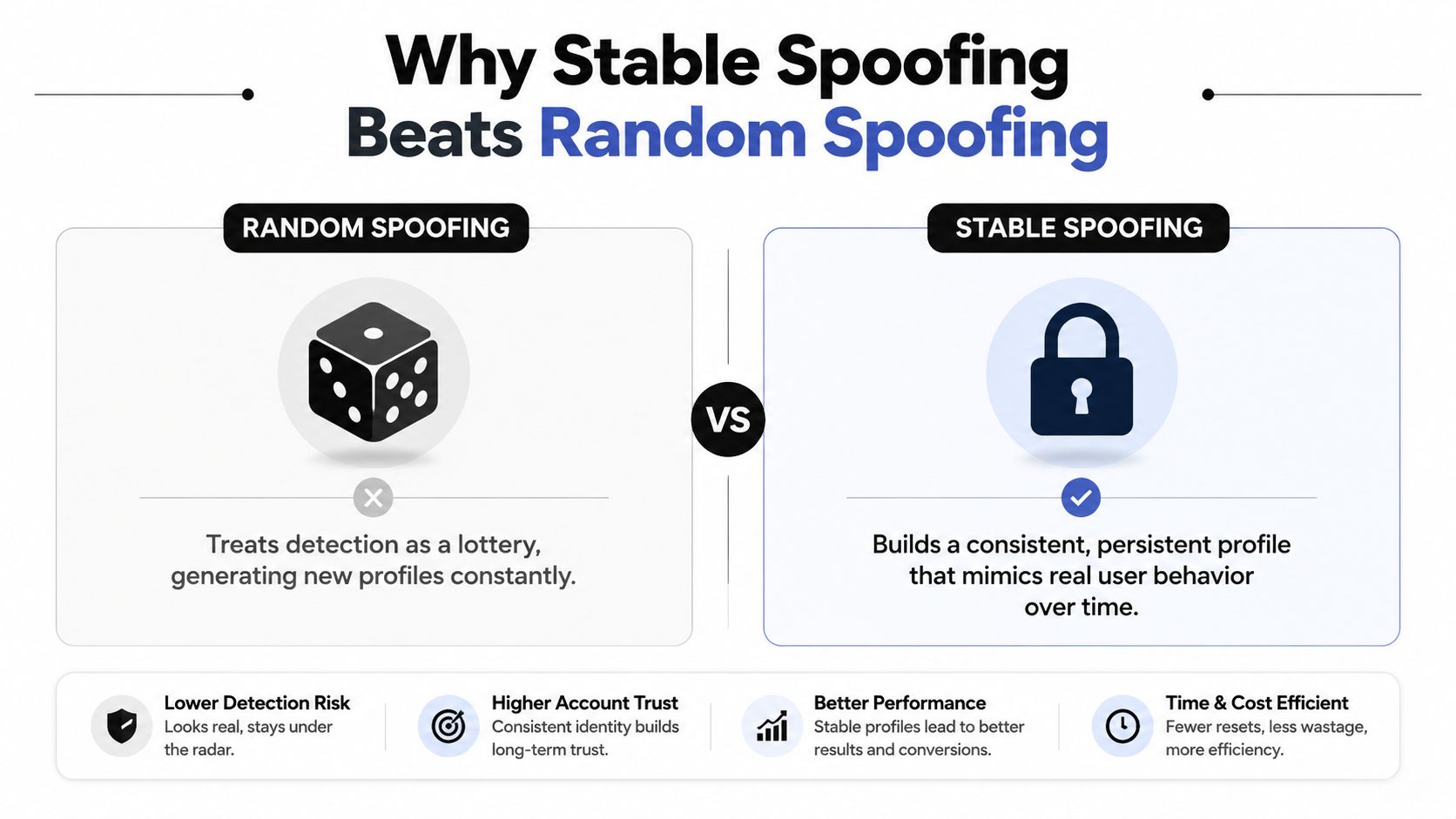
Random generation sounds like stealth because it prevents a static fingerprint. In practice, it can create a profile that changes faster than a real device ever would.
A returning user usually keeps the same browser family, rendering behavior, installed fonts, screen characteristics, and audio path. If canvas, WebGL, fonts, and audio all change on every session, the platform sees a moving target rather than a stable device. That pattern can be more suspicious than a consistent profile with ordinary imperfections.
The stability problem also affects account history. IP behavior, cookies, login geography, and action cadence should support the same identity over time. A profile that keeps its fingerprint but jumps between incompatible proxy locations still produces a contradiction. A proxy that stays fixed while the User-Agent changes creates another.
The goal isn't maximum randomness. It's minimum contradiction.
The 2023 systems-security research shows why spoofing remains a serious problem for real systems. An attack achieved a 97.78% success rate against an open-source automated fingerprint recognition system using 6,342 fingerprint images. At security level 1, 86.9% of fake fingerprints succeeded, and at the highest tested security level, 75.33% still broke the system (systems-security evaluation).
Browser operators should take the opposite lesson from those results. Don't assume a higher security setting or one spoofed attribute fixes the stack. The same research found spoof-detector performance varied across materials and sensors, with generalization results of 75.24% and 91.78% depending on the evaluation setting. Another result showed misclassified fakes rising from 14.91% on known sensors to 39.58% on unknown sensors, which demonstrates how quickly performance can degrade when conditions change.
A stable profile still needs maintenance. Update stale browser versions, keep the User-Agent consistent with the actual browser family, and review timezone drift when an account changes region. Stability doesn't mean freezing every value forever. It means making deliberate changes while preserving a coherent device history.
Operational Checklist for Reliable Multi-Account Work
Use this checklist before attaching a valuable Facebook or TikTok account to a profile:
- Profile consistency: Keep canvas, WebGL, fonts, audio, screen properties, and hardware hints aligned. Don't randomize one layer independently.
- IP reputation and geography: Bind one suitable residential proxy per profile when the workflow involves logged-in consumer accounts. Match the proxy location to timezone, language, and claimed device context.
- Behavioral cadence: Vary session length and action timing without turning every action into a random delay. A returning user should have a recognizable rhythm.
- Account isolation: Keep cookies, local storage, credentials, and payment workflows inside the assigned profile. Never reuse a warmed profile across unrelated accounts.
- User-Agent discipline: Don't rotate the User-Agent inside a persistent profile. If the browser changes, create a controlled migration plan rather than abruptly changing the identity.
- Profile persistence: Store profiles in the antidetect browser's encrypted cloud when the platform supports it. A returning account should load the same fingerprint profile it used during warm-up.
The same controls matter for account farming, cloaking, affiliate campaigns, scraping, and regional ad verification. Test each profile with its assigned proxy before login, then monitor for browser drift, location mismatch, failed cookies, and unexpected verification.
Proxy quality caps the rest of the stack. Sota Proxy's referral and affiliate program offers up to 40% commission, and its residential and mobile pools can be evaluated as one sourcing option for teams that need proxy locations aligned with persistent profiles.
Sota Proxy provides residential, mobile, ISP, datacenter, and IPv6 proxy options with location selection, rotation or sticky sessions, usage monitoring, and profile-oriented management. Visit Sota Proxy to match the proxy layer to your antidetect browser setup before scaling Facebook, TikTok, cloaking, or geo-targeted workflows.
Related articles

What Is Forward Proxy: A Complete Guide for 2026
Learn what is forward proxy, how it works for outbound traffic, and why teams use it with antidetect browsers for Facebook, TikTok, and scraping.

What Is a Proxy Used for: 2026 Arbitrage Guide
What is a proxy used for - Learn what a proxy is used for in 2026, from boosting security to managing multi-account operations for arbitrage teams

Residential Backconnect Proxy: 2026 Guide & Best Practices
Master the residential backconnect proxy. A 2026 guide on how it works, its benefits over other proxies, and best practices for ad verification & account
Dolphin Anty for Multi-Accounting: Features, Automation, and Proxy Integration
How to use Dolphin Anty for multi-accounting: browser profiles, Cookie Robot, scenarios, Synchronizer, API automation, and three ways to connect SotaProxy proxies. Promo code SOTA20 gives 20% off.

Why a Working Proxy Isn't Enough: A ToDetect Pre-Launch Checklist
A working proxy doesn't guarantee a consistent browser environment. Learn how ToDetect checks IP, DNS, WebRTC, and browser fingerprint signals before launch.

How to Avoid CAPTCHA on Automated Workflows
Learn how to avoid CAPTCHA on automated workflows with proxy tactics, antidetect browsers, request pacing, and solver fallbacks built for real operators.