Referral Program

Set Up a Proxy in Chrome Browser for Multi-Account

Configure a proxy in Chrome browser for multi-account management. Learn system settings, extensions, antidetect browsers, and best practices for operators in

June 14, 2026
20 min read
Set Up a Proxy in Chrome Browser for Multi-Account

You're probably in the same spot most serious media buyers hit sooner or later. The proxy tests fine, the IP checker looks clean, the Facebook or TikTok account logs in, and then the account still gets flagged, checkpointed, or burned after a short run. That usually isn't a “bad proxy” problem. It's a proxy in Chrome browser problem, or more specifically, a misunderstanding of how Chrome handles network routing when you're juggling multiple accounts, cloaking flows, geo-targeted campaigns, and antidetect profiles.

A basic Chrome setup works for casual browsing. It breaks down fast when you're running AdsPower, Dolphin Anty, GoLogin, Multilogin, or Hidemyacc with separate account identities and different traffic paths. If you're account farming, warming Facebook assets, launching TikTok ad accounts, or verifying regional landers, the leak usually happens in the gap between the browser profile and the actual network stack. If you haven't checked your DNS path yet, review this breakdown of proxy DNS behavior and leak paths.

Table of Contents

Why Your Standard Chrome Proxy Setup Is Leaking

The common failure pattern is simple. You set a proxy at the system level, open Chrome, confirm the visible IP changed, and assume the browser session is isolated. Then you run multiple ad accounts, maybe one in clean Chrome and several more in AdsPower or Multilogin, and one cluster starts tripping reviews or login challenges while another looks stable.

That happens because Chrome doesn't behave like a self-contained browser with its own full proxy control panel. It leans on the operating system for manual proxy settings, and that design pushes routing, bypass rules, and authentication outside the browser in many setups, as documented in the Chrome proxy API reference. For normal users, that's fine. For multi-account operators, it creates blind spots.

The visible IP isn't the whole session

A visible IP check only proves one thing. One request left through the proxy.

It doesn't prove that every request in that profile followed the same route. It doesn't prove DNS stayed aligned. It doesn't prove your antidetect browser respected Chrome's system-level path. And it definitely doesn't prove that your Facebook or TikTok account saw a stable browser identity tied to the same region and network characteristics across the whole session.

Practical rule: If the proxy is configured outside the profile you're using, assume the profile can leak until you verify otherwise.

For account farming and cloaking setups, the dangerous part is false confidence. Operators often think they're safe because Chrome shows the right country in a checker. Meanwhile, the actual working environment includes multiple profiles, extension states, saved credentials, and sandboxed browsers with their own network logic.

Where bans really come from

A lot of bans blamed on “low-quality proxies” are really mismatches between these layers:

  • Browser profile identity that claims one location
  • Network route that exits through another path
  • DNS behavior that doesn't match the exit node
  • Session persistence that changes too aggressively or not enough
  • Account intent that looks unusual when several assets share infrastructure badly

That's why standard setup guides don't help much. They teach you how to change the path. They don't teach you how to isolate the path per account.

Chrome Proxy Configuration Methods and Their Limits

A buyer logs into one Facebook account through a UK proxy in Chrome, then opens an antidetect profile meant for Germany. Chrome still looks "configured." The operator still sees a proxy badge or extension icon. But the two sessions are not necessarily using the same network stack, and that gap is where a lot of account damage starts.

A comparison chart showing the pros and cons of three common proxy methods for Chrome browsers.

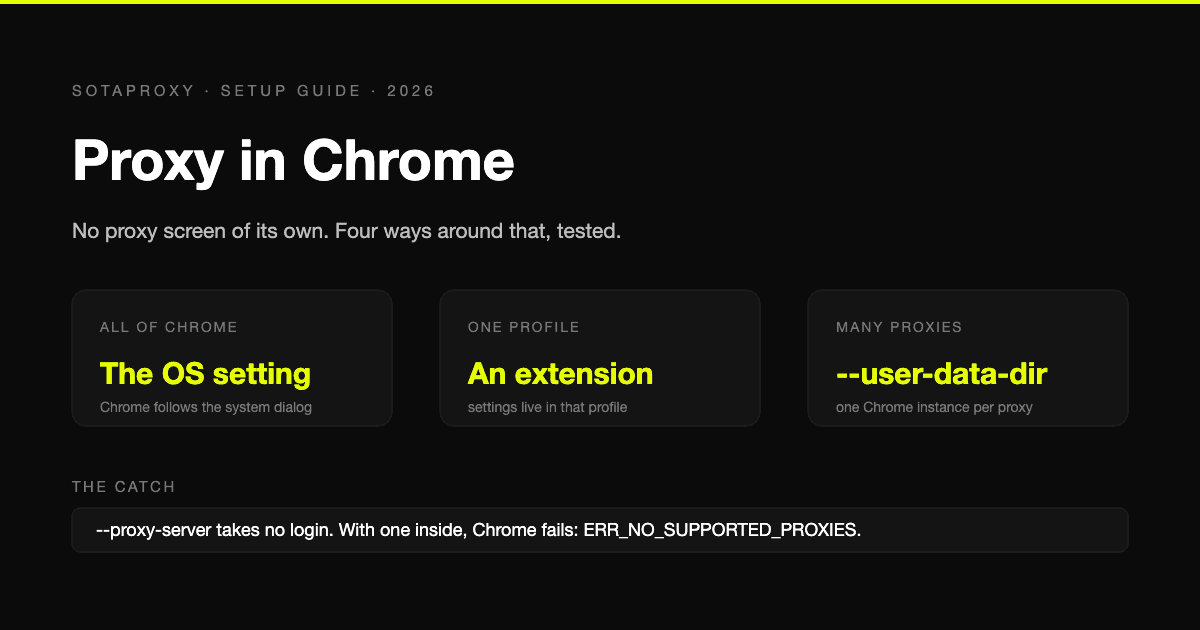
Chrome has three common ways to set a proxy. All of them can work. None of them gives clean account-by-account isolation on its own, which is the standard multi-account operators need.

System proxy settings

This is the setup many people mean when they say they configured a proxy in Chrome. They open Chrome, click into System, and Chrome sends them to the operating system proxy panel.

That design is fine for one browser doing one job. It is weak for ad account operations.

The problem is scope. System proxy settings apply at the machine level first, and Chrome inherits that route. If one account needs a static US residential IP, another needs France, and a third should stay local for billing work, the OS-level method turns all of that into a juggling act. The browser is no longer the unit of control. The whole machine is.

That creates predictable failure points:

  • Too much traffic shares one route. Browser sessions, support tools, uploaders, and background apps can hit the same exit IP.
  • Geo switching gets sloppy. Changing countries for one account can affect another session you forgot was open.
  • Credential handling is clumsy. Authentication prompts, saved credentials, and OS dialogs add friction right where you want repeatable setup.
  • Antidetect conflict is common. If the antidetect browser runs its own isolated proxy stack, the system setting may be ignored. If it does not, the system route can bleed into profiles that were supposed to stay separate.

That last point is the one standard Chrome guides miss. They explain how to send Chrome through a proxy. They do not explain what happens when Chrome is only one layer inside a larger account environment.

Extensions using the Chrome proxy API

Proxy extensions move control into the browser interface, which makes them easier for manual switching and team use. For light workflows, that helps.

For ad accounts, the trade-off is profile complexity. Every extension becomes part of the profile state. It adds files, permissions, update behavior, and another place where settings can drift. If the extension fails to apply the rule, crashes after an update, or stores auth inconsistently across cloned profiles, the network setup stops being predictable.

I use extensions for testing and short-lived tasks. I avoid them as the foundation for high-value accounts.

They also do not solve the main isolation problem by themselves. An extension can control Chrome traffic inside that browser context, but that does not guarantee harmony with an antidetect browser's own proxy assignment model. If the antidetect profile expects proxy credentials, timezone, WebRTC policy, and DNS behavior to be bound inside the profile, an external extension layer can work against that design instead of helping it.

Command-line launch flags

Launch flags give tighter control and fit automation better than the other two methods. You can define proxy behavior at startup, script it, and keep the launch template consistent across repeat tasks.

Chrome also supports detailed proxy rules, bypass behavior, and scheme-specific handling, which matters when you need to be precise about how traffic is routed. The Chromium proxy design notes are useful if you are building controlled launch environments. If you need a clearer view of how secure proxy layers fit into encrypted browser traffic, this explanation of an SSL proxy server and secure traffic flow is also worth reviewing.

The downside is operational overhead. Flags are strong in bot frameworks, QA rigs, and internal tools where startup is scripted and controlled. They are weaker for day-to-day buying work where a human needs to reopen sessions, swap accounts, review landers, and recover from platform checkpoints without touching launch strings all day.

What each method is actually good for

The cleanest way to judge Chrome proxy methods is by the job:

  • System settings fit single-route browsing, simple tests, and machine-wide traffic changes.
  • Extensions fit temporary switching and browser-level convenience, but they increase profile surface area.
  • Launch flags fit automation and repeatable scripted environments where startup parameters are controlled.

For multi-account media buying, the limit is the same across all three methods. Chrome proxy control is still separate from the identity container unless the browser you use binds network settings directly to each profile. If that profile isolation layer is missing, or if it conflicts with Chrome's own routing path, bans get blamed on the proxy provider when the actual issue is the setup.

Matching Proxy Type to Mission Critical Tasks

Choosing the wrong proxy type creates slow burns. The login may work. The campaign may even launch. The account quality still degrades because the network type doesn't match the job.

For media buying, account farming, cloaking, and geo-targeted campaign review, I look at four things first. Trust, speed, session control, and cost. Those matter more than marketing labels.

If you're handling encrypted sessions or region-sensitive account access, understanding the practical differences between transport setups also helps. This overview of an SSL proxy server and how it fits secure traffic flows is worth reviewing alongside browser routing.

What each proxy type is good at

Residential proxies fit social platforms best when trust matters most. They look closer to normal user traffic. That makes them the default choice for Facebook and TikTok account creation, account farming, ad review, and geo-targeted checks where platform scrutiny is high. The trade-off is cost and sometimes lower raw speed than cleaner datacenter routes.

Mobile proxies are useful when the target platform heavily trusts mobile-origin traffic or when you need a network posture that blends with mobile app and mobile web behavior. They can be strong for high-friction social environments. They're usually more expensive and can be less predictable for teams that need stable desktop browser workflows.

Datacenter proxies are about speed and volume. They're fine for scraping public data, QA checks, bulk fetches, and tasks where platform trust isn't the main issue. They're usually the first thing to get burned on sensitive account actions. I wouldn't use them as my default route for serious Facebook or TikTok account management.

IPv6 proxies can work when the target supports IPv6 well and your workflow benefits from scale or cost efficiency. They're not a universal fix. A lot of operators force them into jobs that really need stronger trust signals. If your target stack, cloaker, or anti-fraud system handles IPv6 inconsistently, you create avoidable noise.

Proxy type use case matrix

Proxy Type Primary Use Case IP Trust Score Speed Cost
Residential Facebook and TikTok accounts, account farming, geo-targeted ad checks High Medium High
Mobile Sensitive social flows, mobile-like traffic posture, hard review environments High Medium High
Datacenter Scraping, QA, public data collection, fast non-sensitive tasks Low to medium High Low
IPv6 Scale-oriented tasks where target support is solid Variable High Low to medium

A lot of teams lose money by using one proxy class for everything. That's lazy infrastructure design. Different tasks create different risk.

If the account is expensive to replace, pay for trust. If the task is cheap and repetitive, pay for speed.

For cloaking and pre-landing verification, I also separate review traffic from management traffic. The browser that checks a geo-targeted page doesn't need to share the same proxy pool as the browser that edits billing, confirms business settings, or warms the ad account.

The Antidetect Browser Workflow

You launch a warmed Facebook profile in an antidetect browser, the proxy test says green, and the account still trips a checkpoint after a few actions. In a lot of cases, the proxy itself is not the problem. The problem is that Chrome-level proxy habits do not map cleanly to an antidetect browser's isolated profile stack.

A professional workspace featuring a person using a keyboard and mouse with two computer monitors displaying dashboards.

That is the failure point standard Chrome guides miss. AdsPower, Dolphin Anty, GoLogin, Multilogin, and Hidemyacc do not inherit whatever you set at the host browser or OS level. They build profile containers with their own storage, fingerprint rules, startup logic, and proxy binding. If the proxy is attached in the wrong place, you can end up with a clean-looking Chrome setup and a dirty account session.

Why Chrome settings fail inside antidetect tools

An antidetect profile has its own network context. The host machine can show one IP while the profile uses another, or fails over in ways the operator does not notice until the account starts throwing warnings.

I see four recurring failure modes:

  • Profile-level proxy missing: The machine proxy is set, but the antidetect profile launches without its own bound route.
  • Fingerprint and network mismatch: Timezone, language, WebRTC posture, or geolocation do not line up with the proxy region.
  • Shared infrastructure across accounts: Multiple profiles reuse the same exit path or auth pattern and create linkage.
  • Host fallback traffic: Some requests escape through the local route because the environment was only half-configured.

This is why account operators get banned on “good” residential or mobile IPs. The IP quality was fine. The isolation was not.

If you want a profile-first setup instead of relying on host-level Chrome behavior, this Afina antidetect browser integration for profile-level proxy control is the type of pairing worth reviewing.

How to bind proxy and profile correctly

The order matters more than many operators think.

  1. Create the browser profile first.
  2. Set the intended device and fingerprint posture before any login or page load.
  3. Add the proxy inside the antidetect browser's native proxy field, not only in Chrome or system settings.
  4. Run the profile's own connection test if the browser provides one.
  5. Open an IP and leak check inside that exact profile.
  6. Only then log into Facebook, TikTok, BM, Ads Manager, or the cloaker panel tied to that identity.

Profiles get contaminated early. If a target platform sees the wrong route on first contact, fixing the proxy afterward does not erase that first signal.

One mistake I still see is importing cookies before the route is stable. For aged accounts, that is reckless. Cookies, local storage, device posture, and network path need to agree from the first request.

Here's a useful walkthrough for teams that prefer a visual reference before they configure profiles at scale:

What to check before opening the target platform

A green proxy status is not enough. The profile has to look internally consistent.

Use this preflight check:

  • Region alignment: Proxy country, timezone, browser language, and claimed device locale should match the account history and the task.
  • Session design: Use sticky sessions for account management and billing work. Use rotation only where the task can tolerate identity changes.
  • Auth stability: Repeated proxy auth prompts need to be fixed before login. Those interruptions create noise during warmup and sensitive actions.
  • No route bleed: Confirm the profile is not falling back to the host connection for DNS, WebRTC, or startup requests.

For multi-account work, boring infrastructure wins. A profile with a correctly bound proxy, stable fingerprint, and no host leakage will usually last longer than a setup patched together from standard Chrome settings, extensions, and late-stage fixes.

Verifying Your Connection and Troubleshooting Leaks

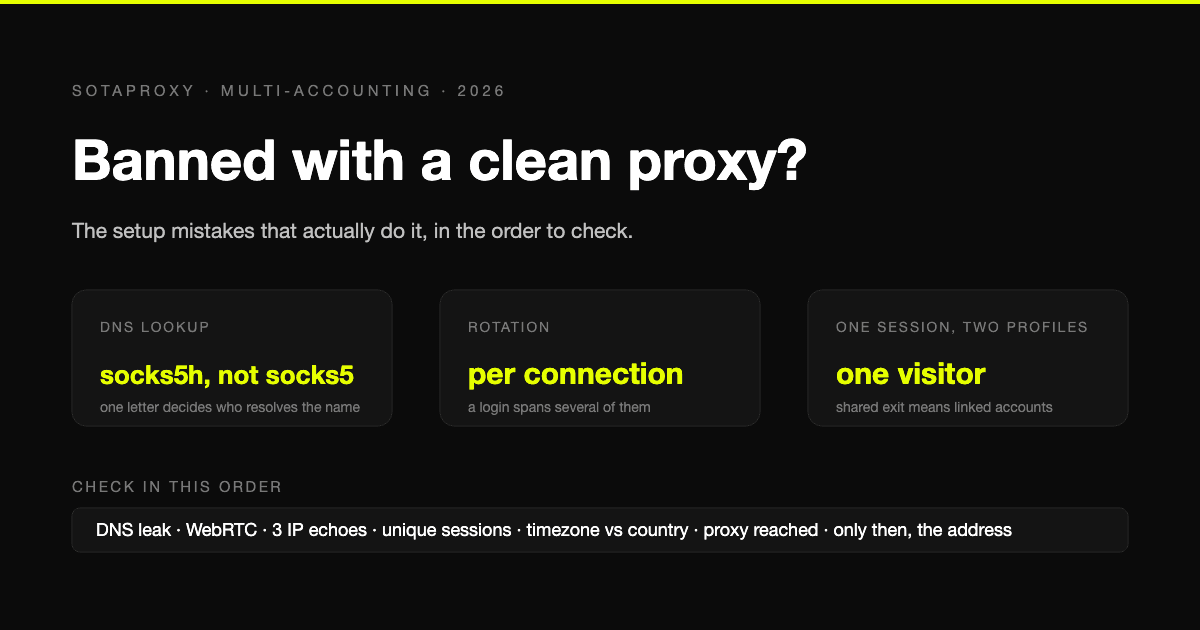
The failure usually shows up at the worst moment. You open a warmed ad account, the login looks normal, then the platform sees one IP on the first request, another on a later asset call, and a resolver path that does not match either. That is how stable accounts get flagged by setups that looked fine in standard Chrome.

In multi-account work, verification has to happen inside the exact antidetect profile that will run the session. Testing in system Chrome proves the host browser can reach the proxy. It does not prove the isolated profile owns DNS, WebRTC, startup traffic, or connection reuse. Standard Chrome proxy checks miss that distinction, and that is why operators think the proxy is clean while the target still sees mixed network state.

A five-step infographic showing how to verify and troubleshoot proxy connections for privacy and anonymity.

A real verification routine

My baseline check goes past IP display tools.

Run these checks in the live profile, before login and again after any proxy change:

  • IP and ASN check: Confirm the exit IP, carrier or hosting profile, and country fit the account's normal pattern.
  • DNS check: Verify lookups resolve through the proxy path, not the host resolver or ISP.
  • WebRTC check: Make sure local interfaces and host routing details are not exposed.
  • Fingerprint consistency check: Review timezone, locale, language, and geolocation against the proxy region.
  • Repeat-load check: Refresh after a short pause and confirm the same route persists across requests.

A single clean result is not enough. The target platform will see a sequence of requests, not one screenshot from an IP checker.

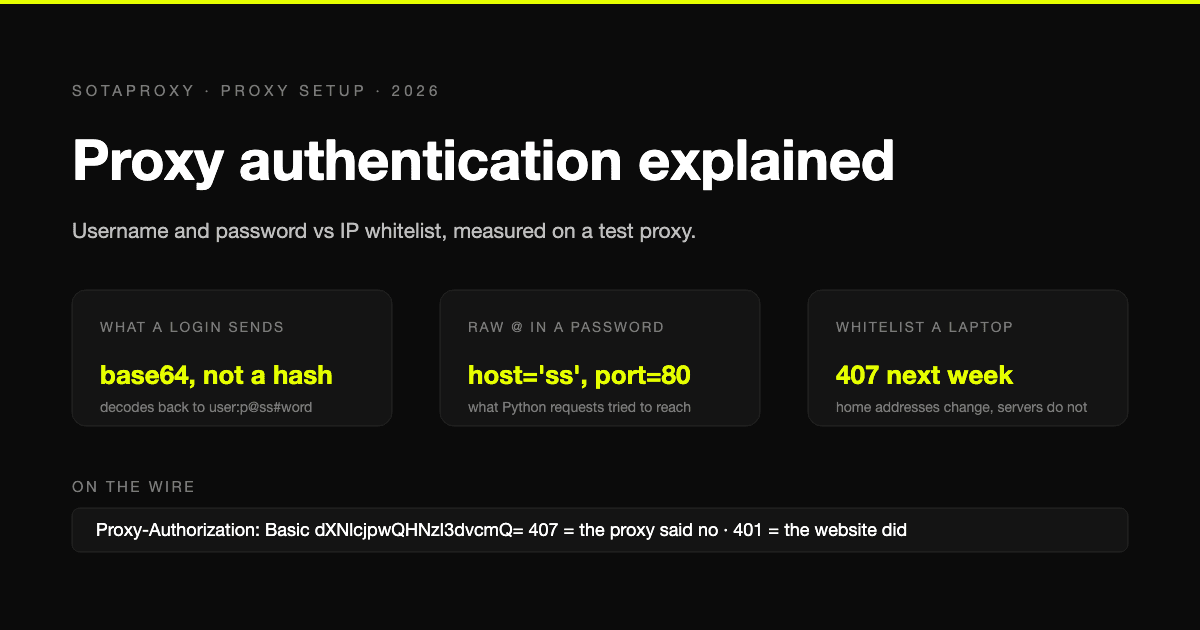
Repeated proxy auth prompts are another warning sign. They often get misread as bad proxy quality when, in fact, the problem is authentication handling inside the browser stack. If that is happening, this guide on 407 proxy authorization required errors is worth reviewing before you keep testing accounts.

Where leaks usually happen

The weak point is rarely the proxy alone. It is the handoff between Chrome behavior and the antidetect browser's isolated profile.

These are the patterns I see most often:

  • Connection reuse after a proxy change: Chrome-family browsers keep sockets alive. If you rotate and click into a target immediately, some requests can still ride the old connection.
  • DNS on the host, traffic on the proxy: The page loads through the proxy, but resolver behavior still points back to the local machine or ISP.
  • WebRTC exposing local network details: This shows up in sloppy profile builds and in environments where browser protections were never tested after import.
  • Startup requests escaping the profile route: Update checks, preconnects, extension traffic, or helper processes can fire before the profile is fully settled.
  • The antidetect profile is isolated, but the proxy is still controlled at the OS level: That split creates conflicting signals standard Chrome guides do not account for.

This last one causes more damage than people admit. Standard Chrome proxy settings were built for one browser instance following one system route. Antidetect browsers try to isolate each profile, but if part of the traffic still depends on host-level networking, the account is no longer presenting one coherent identity.

A practical way to test after rotation

After a route change, do not trust the first page load.

Use a short reset routine:

  1. Close tabs tied to the old session.
  2. Apply the new proxy and wait for the profile to settle.
  3. Run IP, DNS, and WebRTC checks inside that same profile.
  4. Reload the test once more after a short pause.
  5. Open the target only after both checks match.

This matters for ad accounts, billing flows, cloaker review pages, and geo validation. Any task that depends on a stable identity can break if the browser mixes old sockets, new IPs, and host-side DNS.

My rule is simple. If the route changed, prove the entire profile changed with it. If the profile cannot prove that, do not touch the account.

Scaling Your Operations with Best Practices

At small volume, a bad proxy habit costs time. At scale, it gets accounts flagged.

The break usually happens when teams treat Chrome proxy settings and antidetect browser profiles as if they control the same network path. They do not always do that. Standard Chrome guidance was built around one browser following one host-level route. Multi-account operators run isolated profiles, different trust levels, different geos, and different session goals at the same time. If your process does not reflect that split, you get cross-contamination: the right cookies in the wrong route, or the right proxy in a profile that still leaks host behavior through another layer.

A long, illuminated aisle of a large, modern data center filled with rows of server racks.

Organize by risk, not convenience

Teams that keep accounts alive the longest do not assign proxies based on whoever needs one first. They map them to the job and the risk of that job.

  • Account management sessions: Use sticky routes with long continuity. Business Manager changes, billing work, ID checks, and payment recovery need a stable network identity.
  • Spend and launch profiles: Keep these close to the account's normal operating geo and device story. Random rotations create review friction.
  • Ad review and geo validation: Use separate regional routes. Do not run broad checks from the same IPs that own the account.
  • Scraping and research: Put these on faster, lower-trust infrastructure so they do not contaminate management traffic.
  • Reviewer-facing flows: Isolate them from owner traffic completely.

That separation lowers exposure. It also makes troubleshooting faster because each profile class has one purpose.

If blocks are still showing up, fix the pattern behind them, not just the IP. This guide on how to avoid IP bans during repeated account activity is a useful reference.

Standardize the parts operators usually leave undocumented

Once a team passes a few dozen profiles, memory stops working. Someone will import cookies into the wrong environment. Someone will rotate a route during a warm session. Someone will open an account in the host browser because the antidetect browser was slow to launch.

Write rules for the failure points:

  • Profile naming: Include platform, geo, account owner, and proxy class
  • Approved pairings: Define which proxy types are allowed for billing, farming, launch, review, and scraping
  • Rotation timing: State when a route can change and when it cannot
  • Ownership: Limit who can edit proxy settings, browser fingerprints, and session storage
  • Quarantine steps: Remove failed profiles from production until they pass checks again
  • Change logs: Record proxy swaps, cookie imports, payment edits, and major trust events

This is operational hygiene. It prevents the kind of inconsistency that gets blamed on "bad proxies" when uncontrolled handling was the issue.

Build for repeatability across isolated browsers

The biggest scaling mistake is assuming an antidetect browser fixes network consistency by itself. It only isolates part of the environment. If the team still manages routes with host-level logic, shared extensions, or ad hoc system proxy changes, the browser stack and the network stack can drift apart.

Treat each profile as one unit: fingerprint, cookies, timezone, language, DNS path, WebRTC behavior, and proxy assignment. Manage them together. Audit them together. Replace them together when something breaks.

I have seen stable accounts survive aggressive platform reviews on average infrastructure because the operator kept those variables aligned. I have also seen high-quality residential routes fail because the profile was copied badly and the network rules changed outside the browser.

Cut complexity before you add volume

More accounts do not require more proxy types. They require fewer exceptions.

Start with a small number of approved workflows. One for account ownership and billing. One for campaign operations. One for geo validation. One for research. If a new workflow cannot explain why it needs a different route, it probably does not need one.

Teams that scale well keep the setup boring. Boring setups are easier to verify, easier to train, and harder to misuse.

The operators who last are not the ones with the biggest proxy pool. They are the ones who keep each account inside one coherent network story.

If you need infrastructure built for account management, scraping, geo checks, and antidetect workflows, take a look at Sota Proxy. It covers residential, mobile, ISP, and datacenter options, and if you refer other operators or clients, its affiliate program offers up to 40% commission.

Related articles

Fingerprint Spoofing: Methods, Detection, and Antidetect Use
fingerprint spoofingantidetect browserbrowser fingerprinting

Fingerprint Spoofing: Methods, Detection, and Antidetect Use

Learn how fingerprint spoofing works, the methods used to bypass detection, and how antidetect browsers with proxies manage multi-account operations safely.

August 26, 2026
Read more
How to Avoid CAPTCHA on Automated Workflows
avoid captchaantidetect browserproxy setup

How to Avoid CAPTCHA on Automated Workflows

Learn how to avoid CAPTCHA on automated workflows with proxy tactics, antidetect browsers, request pacing, and solver fallbacks built for real operators.

August 21, 2026
Read more
What Is Forward Proxy: A Complete Guide for 2026
forward proxyproxy typesantidetect browser

What Is Forward Proxy: A Complete Guide for 2026

Learn what is forward proxy, how it works for outbound traffic, and why teams use it with antidetect browsers for Facebook, TikTok, and scraping.

August 7, 2026
Read more
What Is a Proxy Used for: 2026 Arbitrage Guide
proxy use casesresidential proxiesproxy types

What Is a Proxy Used for: 2026 Arbitrage Guide

What is a proxy used for - Learn what a proxy is used for in 2026, from boosting security to managing multi-account operations for arbitrage teams

August 4, 2026
Read more
Blocklist on Instagram: How to Detect and Fix Blocks
blocklist on instagraminstagram blockinstagram shadowban

Blocklist on Instagram: How to Detect and Fix Blocks

Learn how blocklist on Instagram really works, how to detect blocks and shadowbans, and the exact steps to manage your blocked accounts list.

July 30, 2026
Read more
Authentication Issues: Proxy and Antidetect Browser Fixes
authentication issuesproxy troubleshootingantidetect browser

Authentication Issues: Proxy and Antidetect Browser Fixes

Resolve authentication issues with proxies and antidetect browsers. Practical fixes for seamless access in 2026.

July 28, 2026
Read more