CSV vs JSON: A Practical Guide for Scrapers and Ad Ops
CSV vs JSON compared for tech teams: structure, parsing speed, nested data, and real pick for scraping, ad verification, and automation pipelines.
Many teams ask the wrong question. CSV vs JSON is rarely a clear-cut decision by itself, because the format only works when it matches the job in front of it. If you run scraping pipelines, ad verification jobs, or account farming exports, the key choice tree is flat tables versus nested payloads, streaming versus full-file loads, and human inspection versus machine ingestion.
That's why the binary advice breaks down. CSV still owns flat, tabular exports because RFC 4180 standardized the common record model, with each line carrying the same number of fields, while JSON objects can vary by record and carry nested structure. JSON wins when the payload has hierarchy or changing fields. In the middle, JSONL often beats both for logs and append-only feeds, and Parquet wins when analytics and storage efficiency matter more than eyeballing raw text.
| Format | Best fit | Strength | Weak point |
|---|---|---|---|
| CSV | Flat exports, spreadsheets, SQL imports | Compact, easy to stream, simple to diff | Weak for nesting and mixed typing |
| JSON | APIs, nested objects, config files | Self-describing, flexible structure | Verbose on the wire, slower to parse |
| JSONL | Logs, streaming responses, append-only feeds | Line-by-line processing, no full-file load | Still text, still verbose for wide data |
| Parquet | Warehouses, data lakes, large archives | Strong compression and query efficiency | Not human-friendly in a text editor |
Table of Contents
- Stop Asking CSV vs JSON and Start Asking What You Actually Need
- Structure, Schema, and Typing Side by Side
- Size, Parsing Speed, and Memory Footprint
- Parsing Libraries and Conversion Code Snippets
- Picking a Format by Use Case in Scrape and Ad Ops
- Escaping, Encoding, and Security Pitfalls
- When JSONL or Parquet Beats Both
- Recommendations by Pipeline and Proxy Choice
Stop Asking CSV vs JSON and Start Asking What You Actually Need
The debate gets messy because people compare CSV and JSON as if they solve the same problem. They don't. CSV is a flat record format. JSON is a document format with room for nested objects, arrays, and optional fields. If you force one into the other's job, you end up writing conversion glue, babysitting edge cases, and explaining malformed exports at 2 a.m.
Start with shape, not preference
If your source is a row per account, row per keyword, or row per proxy event, CSV usually fits. If each record carries nested creatives, variable metadata, or a changing object graph, JSON is the cleaner wire format. If the source is a stream of events, JSONL can keep you from loading an entire file just to read line 17. If the archive is for analytics, Parquet is often the better long-term storage choice, because columnar files support more efficient downstream querying than row-oriented text.
Practical rule: choose the format by how the data moves through the pipeline, not by what's easiest to export from the source system.
That matters in ad ops and scraping because the same team often needs all four formats in different places. A browser automation job in AdsPower or Multilogin may emit structured logs. A Facebook or TikTok ad verification export may flatten cleanly into rows. A cloaking check may produce nested request metadata. A warehouse job may need a compressed analytical store, not a text file someone opens in Excel.
The real decision tree
Use CSV when humans need a table, when database imports are simple, and when you want compact exports. Use JSON when the payload is nested or variable. Use JSONL when you need append-only, line-by-line processing. Use Parquet when the output is destined for analytics, data lakes, or repeated scan-heavy queries. That choice tree is more useful than arguing over which of the two text formats is “better.” It also lines up with the way modern data-engineering guidance splits simple exports, streaming interchange, and analytical storage into different buckets, not one generic file-format contest.
Structure, Schema, and Typing Side by Side
CSV and JSON differ first at the shape level, then at the schema level, then at the typing level. That's the part many hand-wave away until a parser breaks. CSV gives you rows and columns. JSON gives you objects and arrays. One is built for tabular records. The other is built for documents.
campaign_id,geo,spend,is_active
1001,US,12.50,true
1002,DE,8.00,false
[
  {"campaign_id": 1001, "geo": "US", "spend": 12.50, "is_active": true},
  {"campaign_id": 1002, "geo": "DE", "spend": 8.00, "is_active": false}
]
The CSV version is easy to scan, easy to import, and easy to join in SQL. The JSON version is self-describing, and that matters when your records don't all look identical. In a scraping pipeline, a product card may have nested price history, while a listing card may not. JSON handles that without inventing empty columns just to keep a matrix happy. CSV does better when every row should share the same fields.
| Criterion | CSV | JSON |
|---|---|---|
| Data model | Row and column | Object and document |
| Schema | Implicit, usually external | Embedded in the structure |
| Types | Weak, usually string-heavy on disk | Native support for numbers, booleans, arrays, objects |
| Nested data | Awkward | Natural |
| Human readability | Strong for simple tables | Strong for small objects, weak for large arrays |
| Spreadsheet fit | Excellent | Poor |
| API fit | Poor | Excellent |
CSV maps cleanly to spreadsheet and SQL workflows because the file already looks like a table. JSON maps to REST APIs and NoSQL-style payloads because records can vary and nest. That structural mismatch drives everything else in the article. If your downstream consumer is a spreadsheet operator or a SQL loader, CSV usually stays out of the way. If your downstream consumer is an API client or an application service, JSON usually reduces friction.
For proxy-driven automation, that distinction shows up immediately. Ad account exports often start as flat tables. Browser automation logs from tools like AdsPower, Dolphin Anty, GoLogin, Multilogin, or Hidemyacc often include nested metadata that CSV can't represent without flattening decisions you'll regret later. A format that fits the data shape saves cleanup work later, and that's the part teams feel in production.
For a broader automation workflow around account management, this proxy automation guide sits in the same practical space as format choice, because format handling and traffic handling usually fail together.
Size, Parsing Speed, and Memory Footprint
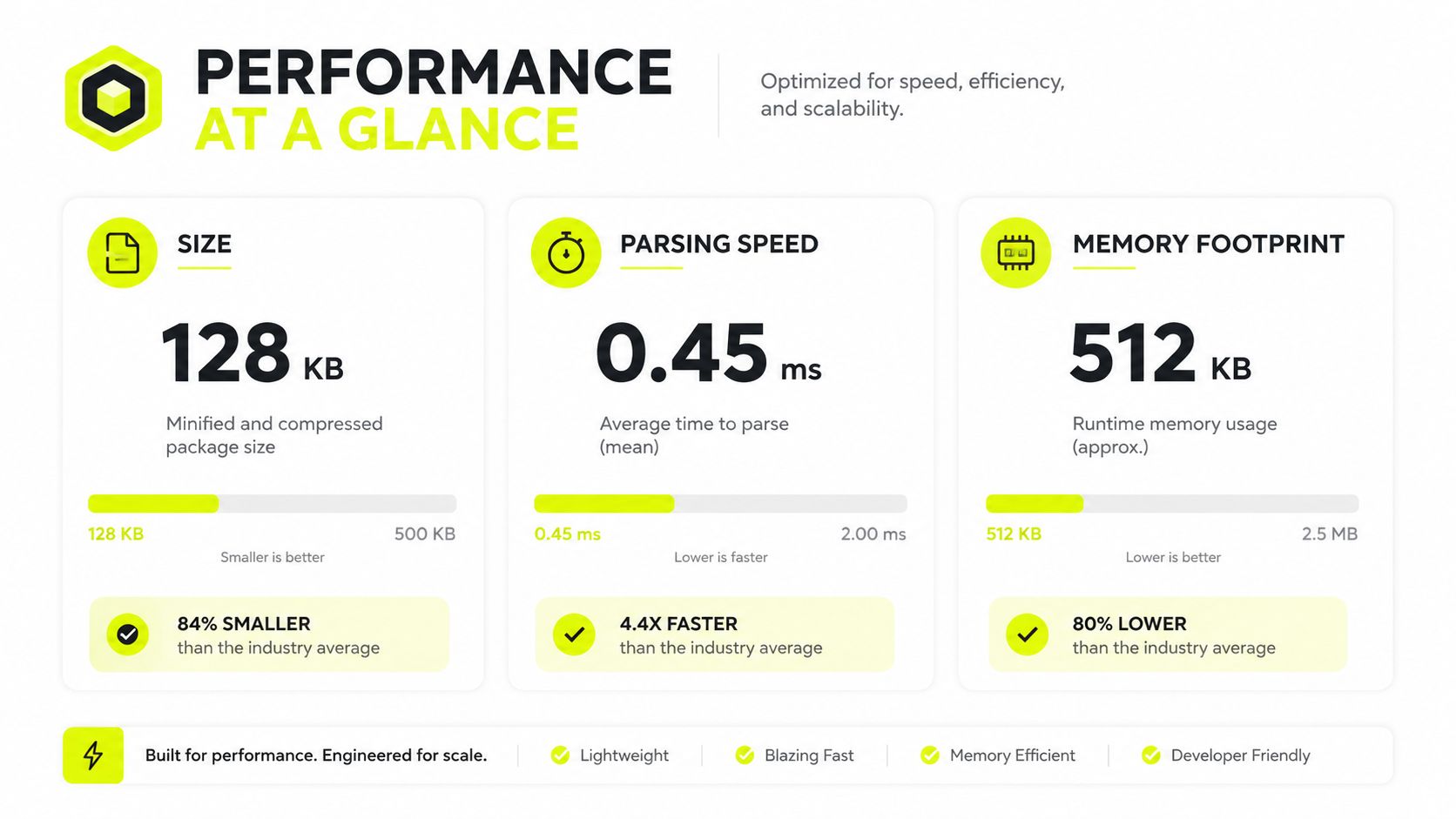
On flat feeds, CSV usually wins because it stays smaller and cheaper to parse. One published comparison on a 1 million-row by 10-column dataset reported CSV at 85 MB and 2.3 seconds parse time with 120 MB memory, versus JSON at 210 MB, 5.8 seconds, and 340 MB memory. The same benchmark also showed CSV parsing faster in JavaScript, Python, and Java across a 100,000-row dataset, with the gap holding in each language. That gap shows up fast in scraping workers, proxy log processors, and campaign feed jobs that run all day.

Why CSV usually wins on flat feeds
CSV stays lean because it does not repeat field names on every row. JSON repeats keys and adds braces, brackets, and quotes for every record. Independent comparisons often put real-world JSON files at 1.5 to 3 times larger than equivalent CSV files for comparable flat data, and one commonly cited example puts a 10,000-row dataset at about 1 MB as CSV versus 2.5 MB as JSON. That difference is payload overhead, not magic in the parser.
That overhead matters for geotargeted campaign feeds and bulk account-farming exports. Every extra byte still has to move through storage, network, and parsing layers. If you are feeding a queue, a job runner, or a warehouse loader, CSV usually gives you less friction. If you are sending nested objects through an API, JSON earns its keep in readability and structure.
Practical rule: for flat tables, use CSV by default unless nesting or downstream interoperability gives you a reason not to.
Compression changes the math
Compression narrows the gap because repeated JSON keys compress well. One comparison puts the post-compression difference at roughly 10% to 20%. That does not erase CSV's advantage, but it does change the economics for archived files and long-term storage. Once the file sits behind gzip-style compression, the raw on-wire penalty shrinks enough that schema clarity can matter more than byte count.
For data science pipelines, the same pattern shows up in token usage too. A benchmarked LLM-oriented dataset with about 5,000 cells used 56.20% fewer tokens in CSV than in JSON, while also improving accuracy and latency in that test. That is a narrow benchmark, but it still points to the same operational result, flat text tables are cheaper to consume when the data is flat.
For a broader breakdown of crawl throughput trade-offs, the Python crawling guide is a useful companion to this format decision, because crawl volume and file format usually hit the same bottlenecks.
Parsing Libraries and Conversion Code Snippets
Python's standard library is enough for basic production work. For CSV, csv.DictReader and csv.DictWriter cover most flat exports. For JSON, json.load, json.dump, json.loads, and json.dumps handle the standard cases. In Node, people usually reach for Papa Parse or csv-parse on the CSV side. In Java, OpenCSV is the usual starting point when you need straightforward tabular handling.
Minimal Python read and write
import csv
import json

# Read CSV
with open("input.csv", newline="", encoding="utf-8") as f:
    rows = list(csv.DictReader(f))

# Write CSV
with open("output.csv", "w", newline="", encoding="utf-8") as f:
    writer = csv.DictWriter(f, fieldnames=["campaign_id", "geo", "spend"])
    writer.writeheader()
    writer.writerow({"campaign_id": "1001", "geo": "US", "spend": "12.50"})

# Read JSON
with open("input.json", encoding="utf-8") as f:
    payload = json.load(f)

# Write JSON
with open("output.json", "w", encoding="utf-8") as f:
    json.dump(payload, f, ensure_ascii=False, indent=2)
The gotcha is that a naive csv.DictReader to json.dump conversion turns everything into flat strings unless you explicitly coerce types. It also drops nested arrays if you've already flattened them badly upstream. That's how teams end up with broken booleans, date strings everywhere, and “mysteriously” missing structure after a conversion step.
Clean CSV to JSON conversion with nested fields
import csv
import json

def parse_tags(value):
    return [x.strip() for x in value.split("|") if x.strip()]

records = []
with open("input.csv", newline="", encoding="utf-8") as f:
    for row in csv.DictReader(f):
        records.append({
            "campaign_id": int(row["campaign_id"]),
            "geo": row["geo"],
            "spend": float(row["spend"]),
            "flags": {
                "active": row["is_active"].lower() == "true",
                "tags": parse_tags(row.get("tags", "")),
            }
        })

with open("output.json", "w", encoding="utf-8") as f:
    json.dump(records, f, ensure_ascii=False, indent=2)
That pattern is better because you decide the types before serialization. It also makes the conversion explicit, which helps when account-farming exports or ad-verification logs need to survive multiple pipeline stages. For a practical Python integration path, this setup reference fits the same production mindset.
Picking a Format by Use Case in Scrape and Ad Ops
The right answer changes by workload. A bulk scraping feed is not the same thing as an ad verification report, and neither of those behaves like an antidetect-browser export or a proxy log stream. Picking one format for everything usually creates unnecessary conversions later.
Bulk web scraping feeds
Use CSV when the scrape produces rows with a stable column set. Product feeds, price snapshots, SERP exports, and lead lists usually fit this pattern. CSV is easier to scan, easier to diff, and less painful to load into a database or spreadsheet.
If the scraper emits pages of mixed payloads or streaming events, use JSONL instead of a single JSON array. That gives you line-by-line parsing, which is a better fit for long-running crawls. The internal link web scraping use cases is relevant here because file format and proxy strategy usually get tuned together.
Ad verification reports across Facebook and TikTok
Use JSON when the report includes nested creative metadata, placement data, or variable campaign objects. Flat spend snapshots can still land in CSV, especially when media buyers need quick filters in Excel or Google Sheets. The important part is not to flatten nested creative data just to satisfy a spreadsheet habit.
Account farming exports for antidetect browsers
For AdsPower, Dolphin Anty, GoLogin, Multilogin, and Hidemyacc, CSV usually works best for bulk profile exports, profile status tracking, and handoff sheets. The file tends to be row-oriented, and operators often want to sort, filter, and reimport it without extra tooling. Keep the encoding strict and the column list stable. Account farming breaks fast when a “small” format change spreads through a shared sheet.
Proxy log ingestion
For high-volume proxy logs, JSONL or Parquet usually makes more sense than plain JSON or CSV. JSONL supports append-only log ingestion. Parquet is stronger when the log archive turns into a warehouse query problem. If you're running residential or mobile proxies for trust-sensitive jobs, or datacenter and IPv6 for raw throughput, the file format should match the same operational goal. For the architecture side of that decision, this ETL versus ELT guide is a good companion piece.
Escaping, Encoding, and Security Pitfalls
CSV breaks in ugly ways when text fields contain commas, newlines, or quote characters. JSON breaks when encoding assumptions drift and the parser receives hostile or malformed text. Both formats can blow up in production if you treat them as “just text” and skip validation.
CSV pitfalls that keep showing up
An embedded comma inside a campaign name can shift columns. A newline in a notes field can split one row into two. Mixed quoting conventions can make a file unreadable by one parser and “fine” in another.
- Embedded commas and quotes: use a real CSV writer, not string concatenation.
- Newlines inside fields: always open files with explicit newline handling and quote fields correctly.
- CSV injection: prefix risky spreadsheet formulas with a safe escape strategy before anyone opens the file in Excel.
JSON pitfalls that matter in automation
JSON is stricter about structure, but it's not immune to production failures. UTF-8 assumptions can still break when upstream systems emit bad bytes. Large payloads can also trigger memory pressure if you load them whole instead of streaming them.
Parse hostile data as if it was built to break your parser, because eventually someone will hand you exactly that file.
The streaming trap matters here. A file that looks manageable in size can still kill a worker if you force it fully into memory. That's how a scrape becomes an OOM crash. Use streaming parsers, chunking, or a line-oriented format when the source can grow without warning.
For a useful adjacent reference on stream handling, choosing between Yellowstone gRPC and parsed Solana streams shows the same engineering instinct, namely choosing transport and parsing strategy together instead of separately.
When JSONL or Parquet Beats Both
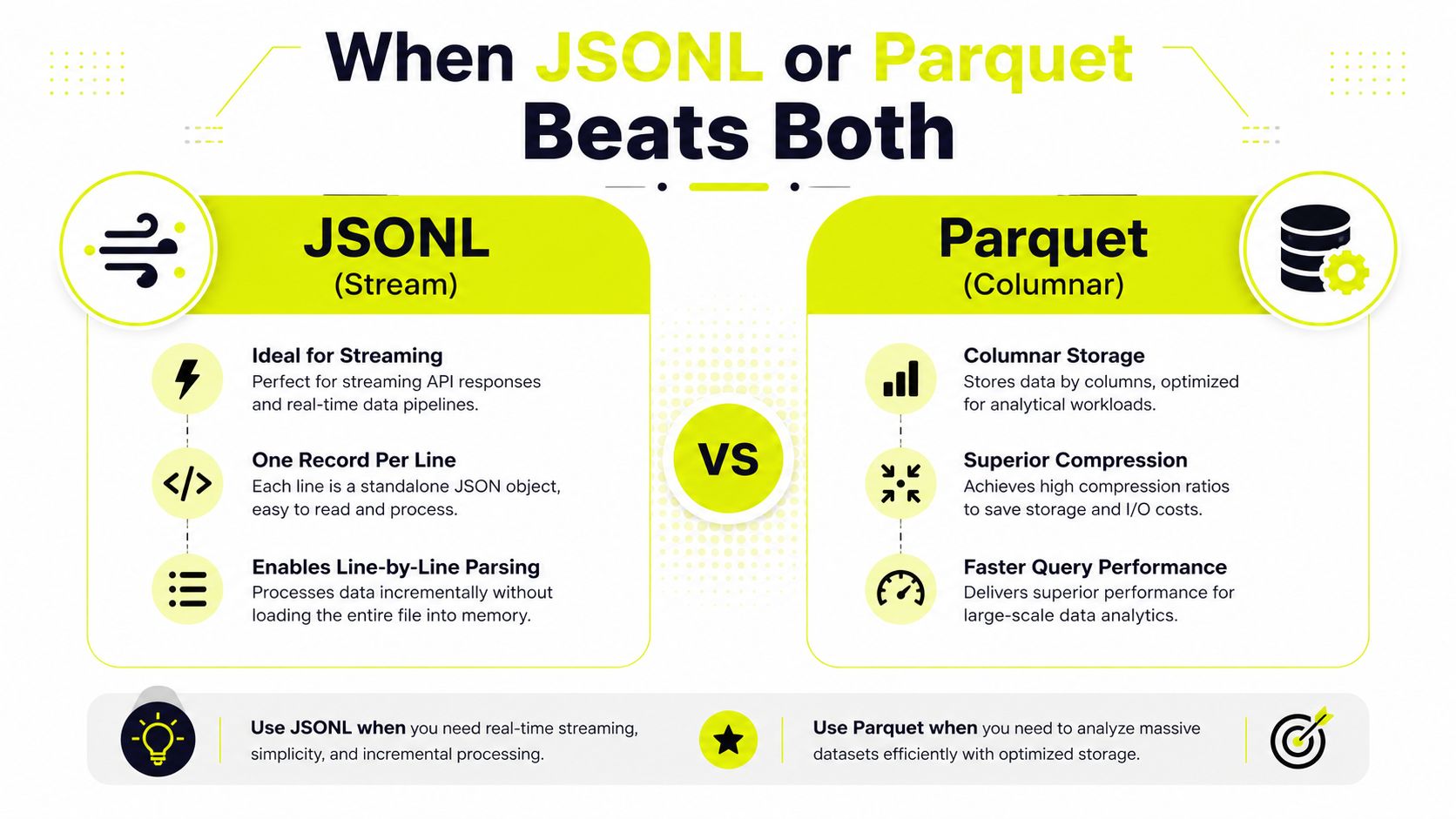
CSV and JSON get overused because they're familiar, not because they're always correct. Once the data turns into a stream or a warehouse workload, the better answer is often neither. JSONL solves the “I need to append and read one record at a time” problem. Parquet solves the “I need compact storage and fast analytical scans” problem.
JSONL for streams and logs
JSONL stores one JSON object per line. That makes it ideal for log pipelines, streaming API responses, and append-only feeds. You don't need to load the whole file before processing starts, and you can recover partial progress after a failure without replaying a giant array.
Parquet for analytics
Parquet is a columnar format. That's why it fits analytics warehouses, data lakes, and large scraping archives better than row-oriented text files. Columnar storage gives you better compression and query behavior when you keep scanning the same fields across big datasets. Recent data-engineering guidance treats Parquet as the storage format to reach for when efficiency and scale matter more than human readability.
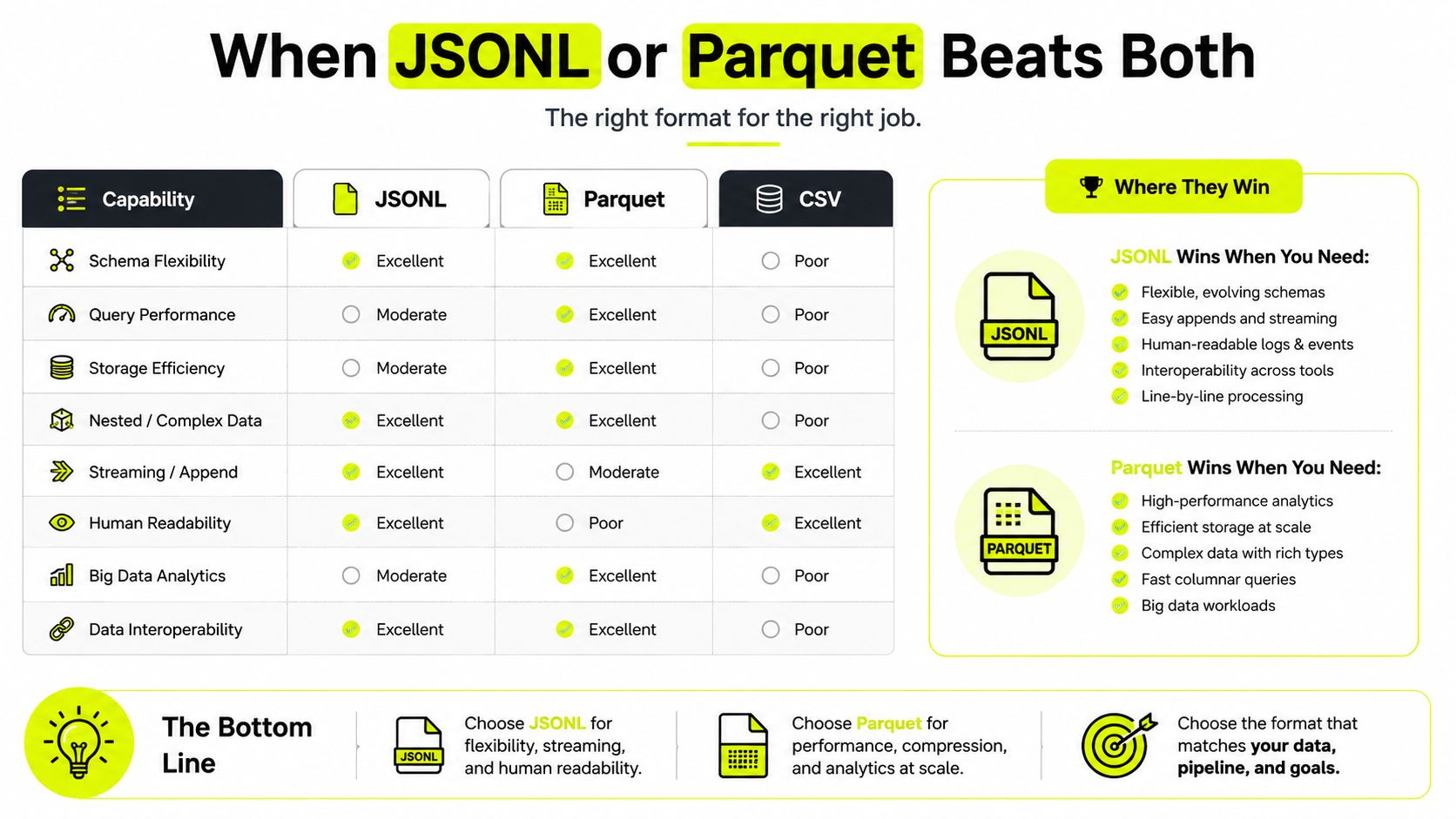
The rule of thumb is simple. Spreadsheet or SQL export, choose CSV. REST API or nested config, choose JSON. Streaming logs or append-only feeds, choose JSONL. Analytics warehouse, choose Parquet. That mapping is more useful than pretending CSV and JSON cover every serious workload.
Recommendations by Pipeline and Proxy Choice
Scraping pipelines should start with the format that matches the failure mode you see in production. For flat feeds, CSV is still the easiest choice because operators can open it, filter it, and hand it off without extra parsing code. Once the feed turns into a stream, or records arrive one by one and need restart-safe ingestion, JSONL is the cleaner fit. If the output is headed for warehouse storage rather than a quick report, Parquet is usually worth considering before you lock in a text archive.
For ad verification reports across Facebook and TikTok, use JSON for nested creative, placement, and audit details, and keep CSV for flat spend or status snapshots. That split preserves structure where it matters and avoids forcing every downstream consumer to walk a document tree just to read a few fields. It also keeps media buyers in spreadsheets for the parts they review every day.
For account farming exports in AdsPower, Dolphin Anty, GoLogin, Multilogin, and Hidemyacc, CSV with strict UTF-8 encoding is the practical default. These jobs are row-based, and the people handling them usually want something they can sort, import, and pass along without custom tooling. If the export is going back into automation, keep the schema narrow, stable, and boring. If you also need to line up the transport layer, set up the proxy layer first, then map the file format around it.
For proxy logs, JSONL works better when the logs are append-heavy and need line-by-line parsing. Parquet wins once the archive becomes an analytics problem and scan speed matters more than human readability. Residential or mobile proxies fit workflows that depend on trust signals, especially in cloaking or account-heavy work. Datacenter and IPv6 proxies make more sense when throughput and rotation matter more than looking like a consumer network.
If you are building a partner workflow around proxy infrastructure, choose your data pipeline architecture before you decide how the files move across it. The same teams that run scraping, ad verification, and multi-account workflows often need steady proxy supply, and a bad pairing between format and transport turns into messy retries fast. Keep the proxy layer and the data layer aligned, whether you are using residential, mobile, datacenter, ISP, or IPv6 options.
Related articles

7 Data Collection Methods for Media Buyers & Farmers
Explore top data collection methods for media buyers. Learn to leverage scraping, APIs, and surveys for ad accounts, account farming, and geo-targeting.

7 Budget Friendly Options for Proxies in 2026
Explore budget friendly options for proxies. A technical guide to cheap datacenter, residential & IPv6 plans for ad arbitrage, scraping, and account farming.

Zip Code Targeting for Ad Campaigns: The Practitioner Guide
Zip code targeting explained for media buyers and traffic arbitrage teams. Covers proxy setup, ad platform rules, detection risks, and best practices.

24/7 Customer Support: What Operators Actually Need
24/7 customer support explained for proxy and automation operators. KPIs, SLAs, vendor questions, and real escalation workflows that cut downtime.
What Is Forward Proxy: A Complete Guide for 2026
Learn what is forward proxy, how it works for outbound traffic, and why teams use it with antidetect browsers for Facebook, TikTok, and scraping.

Bing Search API Key: Setup, Testing, and Scaling in 2026
Get a working Bing Search API key in 2026, test requests, secure the key, and scale high-volume scraping without blocks. Practical guide for technical teams.