Blocklist on Instagram: How to Detect and Fix Blocks
Learn how blocklist on Instagram really works, how to detect blocks and shadowbans, and the exact steps to manage your blocked accounts list.

Instagram doesn't publish a public hard limit on blocked accounts, and the blocked list lives in Settings/Privacy rather than as a visible quota. In practice, that means a blocklist on Instagram can grow without a stated ceiling, and one blocked profile can pull related accounts into the same enforcement orbit.
That's the part most guides miss. Operators usually think they're dealing with one nuisance profile, then the farm starts losing reach, DMs, and profile visibility across multiple browser profiles, proxy segments, and cloned workflows. When you run AdsPower, Dolphin Anty, or any other antidetect stack, Instagram's block system behaves less like a personal privacy feature and more like an access-control layer that can spread across your whole setup.
Table of Contents
- What Actually Happens When You End Up on a Blocklist on Instagram
- Block, Restrict, Mute, and Shadowban Explained Clearly
- Quick Reference Table Comparing Instagram's Enforcement Actions
- Detecting Whether an Account Is Blocked or Shadowbanned
- How to View, Manage, and Clean Up Your Instagram Blocklist
- Proxy Strategy and How It Affects Your Blocklist Risk
- Account Hygiene, Warmup, and Automation Best Practices
- Recovery and Appeal Workflow When an Entire Farm Gets Swept
What Actually Happens When You End Up on a Blocklist on Instagram
A farm wakes up dead. Fourteen profiles are gone, the creative account still loads, and the media buyer swears only one burner got blocked the night before. That's the normal failure pattern on Instagram. One block action rarely stays isolated once the same actor, device family, or IP habit shows up again.
The block is not just a profile-level action
Instagram's own block system behaves like access control, not just a hidden contact list. When one account blocks another, neither side can easily view the other's profile, posts, Stories, or DM the other side, and the platform doesn't give you a public way to see who blocked you. That's why blocked users usually infer the event through missing profiles, blank search results, or “page isn't available” behavior instead of getting a clean notification. The two-way wall is the point, and that's why it hits operations harder than a simple hide button. Instagram's block behavior and list mechanics matter because the system is built to suppress visibility, not explain itself.
In a managed farm, the practical problem is graph expansion. Instagram can show related accounts in the blocked area, which means one enforcement event can expose alternate profiles the same person might spin up later. That lines up with the platform's anti-abuse direction, where blocking isn't just one-to-one anymore. Meta also added a related control in 2022 to block other accounts the blocked person may already operate, which is exactly the kind of thing that hurts recycled identities. Meta's related-account blocking behavior changes the cost of a single bad actor.
Practical rule: if one profile in a cluster starts getting blocked, treat the whole identity graph as contaminated until proven otherwise.
A real-world example is a media buyer running a TikTok creative that links back to an Instagram profile inside several AdsPower sessions. If the profile gets blocked or heavily restricted, the linked behavior can make the other sessions look related, especially when they share a residential pool and similar warmup habits. The same thing happens in Facebook ad accounts and cross-posting setups, where one noisy asset drags down adjacent profiles because the operator reused the same browser fingerprints.
Block, Restrict, Mute, and Shadowban Explained Clearly
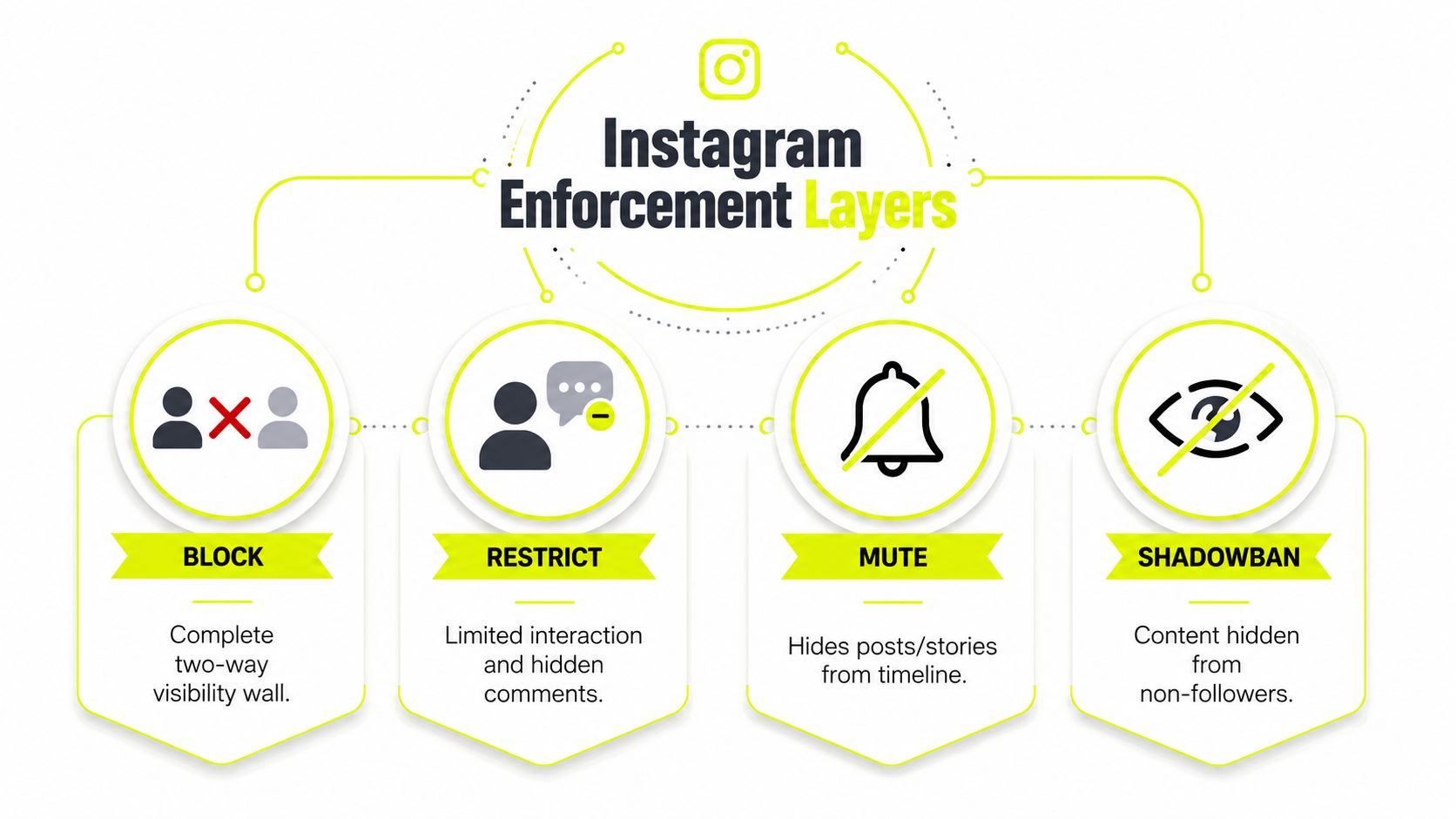
Instagram's enforcement stack gets muddled in most discussions because people mash together four different controls. They're not interchangeable. If you diagnose the wrong one, you waste time rotating proxies, rebuilding fingerprints, or blaming content when the issue is a direct user block.
Block and restrict are relationship controls
A block cuts visibility in both directions. Neither account can easily see the other's posts, Stories, or profile, and direct messaging gets shut down at the access layer. That makes it the hard wall.
Restrict is softer. The other person can still try to engage, but their comments land in a limited state and their messages behave more like requests. In workflow terms, it hides your replies from the person who restricted you without making the break obvious. That matters for creators, brand managers, and support inboxes because it lets you reduce friction without telegraphing that you did it.
Meta's later related-account control also matters here because it lets users extend blocking behavior to other accounts the same person already operates. For farms, that means one account can poison the adjacent ones if they look too linked.
Mute and shadowban are not the same thing
Mute is the least severe of the bunch. It only changes what shows up in someone's feed or Story tray. It doesn't remove discoverability, it doesn't break DMs, and it doesn't create the same enforcement boundary as a block.
Shadowban is different again. It's not a visible user action, it's an algorithmic suppression pattern. Content can still exist, but it stops surfacing the way it should in Explore or hashtag paths. That makes it look like a reach problem instead of a direct relationship problem.
A muted account still exists in your workflow. A blocked account stops being a usable contact path. A shadowbanned account keeps posting, but the platform stops handing it normal discovery.
The diagnostic shortcut is simple. If the profile disappears on both sides, suspect a block. If comments are hidden or redirected, think restrict. If Stories are missing from the feed, mute is more likely. If posts still publish but discovery collapses without a UI warning, treat it as a reach suppression problem instead of a block issue.
Quick Reference Table Comparing Instagram's Enforcement Actions
| Action | Profile Visibility | DM Behavior | Comment Behavior | Reach Impact | Reversible |
|---|---|---|---|---|---|
| Block | Neither side can easily view the other's profile, posts, or Stories | DMs are cut off at the access layer | No normal public interaction path | No direct discoverability between the two accounts | Yes, by unblocking |
| Restrict | Profile still visible | Messages are filtered into requests or limited states | Comments are hidden from normal view until approved | Little direct reach impact, mostly interaction control | Yes, by removing restriction |
| Mute | Profile remains visible | No DM change | No comment change | Feed and Story visibility change only | Yes, by unmuting |
| Shadowban | Profile still exists | DM behavior usually unchanged | Comment behavior usually unchanged | Discovery and hashtag reach drop without a clean UI signal | Sometimes, after content and behavior reset |
The table compresses the key difference. Block breaks access, restrict changes interaction flow, mute changes what you see, and shadowban changes what Instagram surfaces to others. If your account is dying, don't guess. Match the symptom to the layer, then test the smallest possible fix first.
Detecting Whether an Account Is Blocked or Shadowbanned
Many users search their own blocklist on Instagram and stop there. That's backward. If you're trying to diagnose why an account vanished, you need the inverse workflow, not your personal moderation screen.
Use a clean session first
Start from a logged-out state or a different profile in a separate browser container. Search the suspected account from that clean session. If the profile loads there but not from the original account, the block path is usually the strongest signal. If it returns blank, fails to load, or behaves like the page doesn't exist, that lines up with the private visibility wall Instagram uses for blocks.
Then check the DM route. If a message thread disappears, won't open normally, or stays stuck in request-style behavior, that's another strong signal. A direct block often breaks the messaging path first, because Instagram filters access at the account layer instead of only hiding the page.
The simplest separation test is reach. Use a controlled account to publish a hashtagged post, then check whether it appears in search paths that a normal account should see. If the post exists but discovery looks dead, you're in shadowban territory or a broader reach suppression pattern, not a simple block.
A useful cross-check is Instagram's graph-based suggestion area. Current app observations and creator guidance show a “You may want to block” or “People You May Want to Block” section at the bottom of the blocked-accounts screen, and it can surface accounts Instagram thinks are related to previously blocked behavior. That's useful when you're cleaning up nuisance accounts in a geo-targeted campaign, but it's also where false positives creep in for farms with shared fingerprints.
Use the suggestion list as a lead, not a verdict. If several profiles appear there after a cluster action, inspect them manually before you block again.
For a deeper IP-side sanity check, use the separate diagnostic flow in Instagram IP reputation checks. If the account only fails on one proxy segment, your problem may be network reputation, not a block.
How to View, Manage, and Clean Up Your Instagram Blocklist
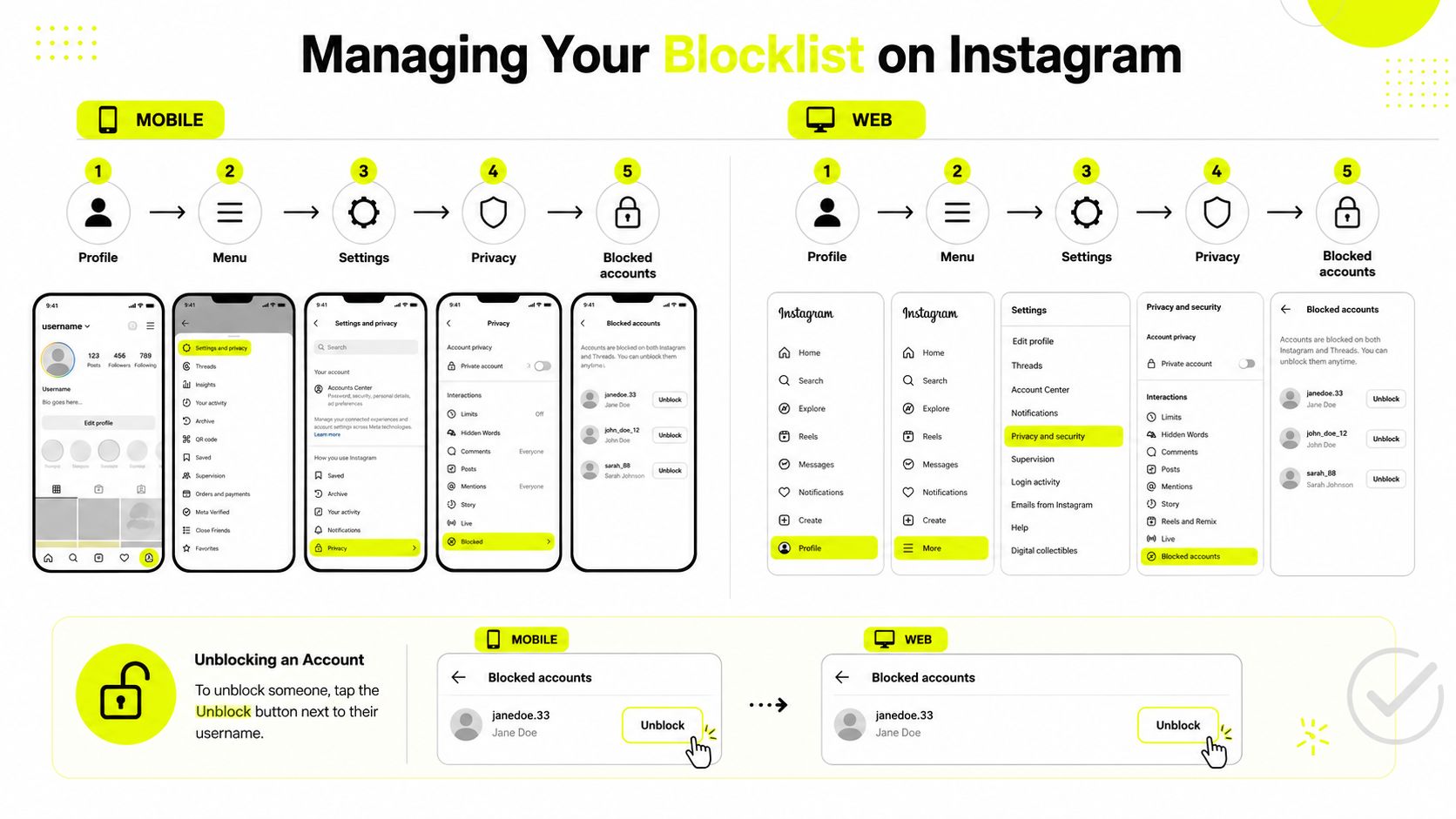
The path is straightforward on paper. On mobile, go Profile → Menu → Settings → Privacy → Blocked accounts. On web, the label and exact clicks can vary, but the same blocked-account area still lives under account privacy controls. That's the authoritative list, not the search result you got from a random session.
Clean the list like an ops log
Tap into each account and unblock only when you have a reason. If you run large brand pages, affiliate accounts, or Facebook and TikTok ad accounts tied to the same creative stack, the list becomes a useful incident log. You can see which users keep reappearing after mass-reporting an ad or hitting the same comment thread from recycled profiles.
Instagram does not publish a public cap for blocked accounts, and that matters operationally. The list can feel incomplete in the settings view because the platform doesn't state a hard ceiling on blocking, and the UI is just a display surface. The blocked-accounts list behavior explains why managers should audit the section directly instead of trusting a shallow summary badge.
If you need to unblock in bulk, work through the list one account at a time. Don't treat the suggested-block area as a bulk-delete trigger. That section can surface likely related profiles, but if your farm shares fingerprints too aggressively, you can end up blocking the wrong cluster and training your own account graph in the wrong direction.
Here's the clean way to review the list:
- Check age of the block: stale blocks from old campaigns often belong in the archive, not the active denylist.
- Look for repeated names and avatars: those are usually the same nuisance actor recycling profiles.
- Compare against proxy and browser groups: if the same cluster keeps appearing across one residential segment, the issue is broader than one account.
- Unblock only after the abuse pattern stops: otherwise you just reopen the same path.
If you also manage comment moderation, keep the blocklist and comment workflow aligned with Instagram ad comment moderation tips. The two tools solve different problems, but they often get used on the same bad traffic.
For operators reviewing network churn, the companion guide on changing IP location helps when you need to separate list hygiene from location noise.
Proxy Strategy and How It Affects Your Blocklist Risk
Proxy choice does not erase a block. It changes how fast a farm gets interpreted as related. That's the lever. If you use the wrong network type for the wrong task, Instagram's abuse filters have more signals to connect.
Match proxy type to the action
Residential proxies work best when you need a profile to look like a normal home user. A sticky residential session keeps one account on a consistent IP for hours, which is useful for warmup and low-drama activity. That's the right shape for account creation and slow trust building.
Mobile proxies usually give the strongest consumer signal because the traffic looks like it came from a phone network, which fits Instagram's normal user base better than a datacenter range does. For active engagement, mobile sticky sessions are the safer bet. If you share one 4G dongle across too many accounts, though, that pattern becomes obvious fast.
Datacenter proxies are fast and cheap, but they get burned quickest on mature abuse-detection platforms. They're fine for read-only checks, scraping-adjacent verification, or low-risk validation, not for accounts you expect to survive scrutiny.
IPv6 is cheap and plentiful, but it's still a fingerprinting surface. Abuse systems can flag suspicious ranges fast when the other signals around them look synthetic. In practice, IPv6 is best treated as a supporting option, not your core survival layer.
Sota Proxy's residential and mobile pools across 220+ geolocations fit geo-targeted campaign work when you need the account, the content, and the IP story to line up naturally. That's useful when you're running split tests across regions and want to keep block pressure low by matching the session to the audience.
Operational rule: use rotating residential for creation and warmup, sticky mobile for engagement, and keep datacenter or IPv6 for tasks that don't need trust.
If your setup needs tighter API plumbing, simplify API integration is the sort of reference worth keeping nearby. It's useful when your automation stack needs to swap endpoints cleanly without touching each workflow by hand.
The rotation side of the equation matters too, and the companion note on proxy IP rotation helps when you're deciding how aggressively to shift sessions without creating new noise.
Account Hygiene, Warmup, and Automation Best Practices
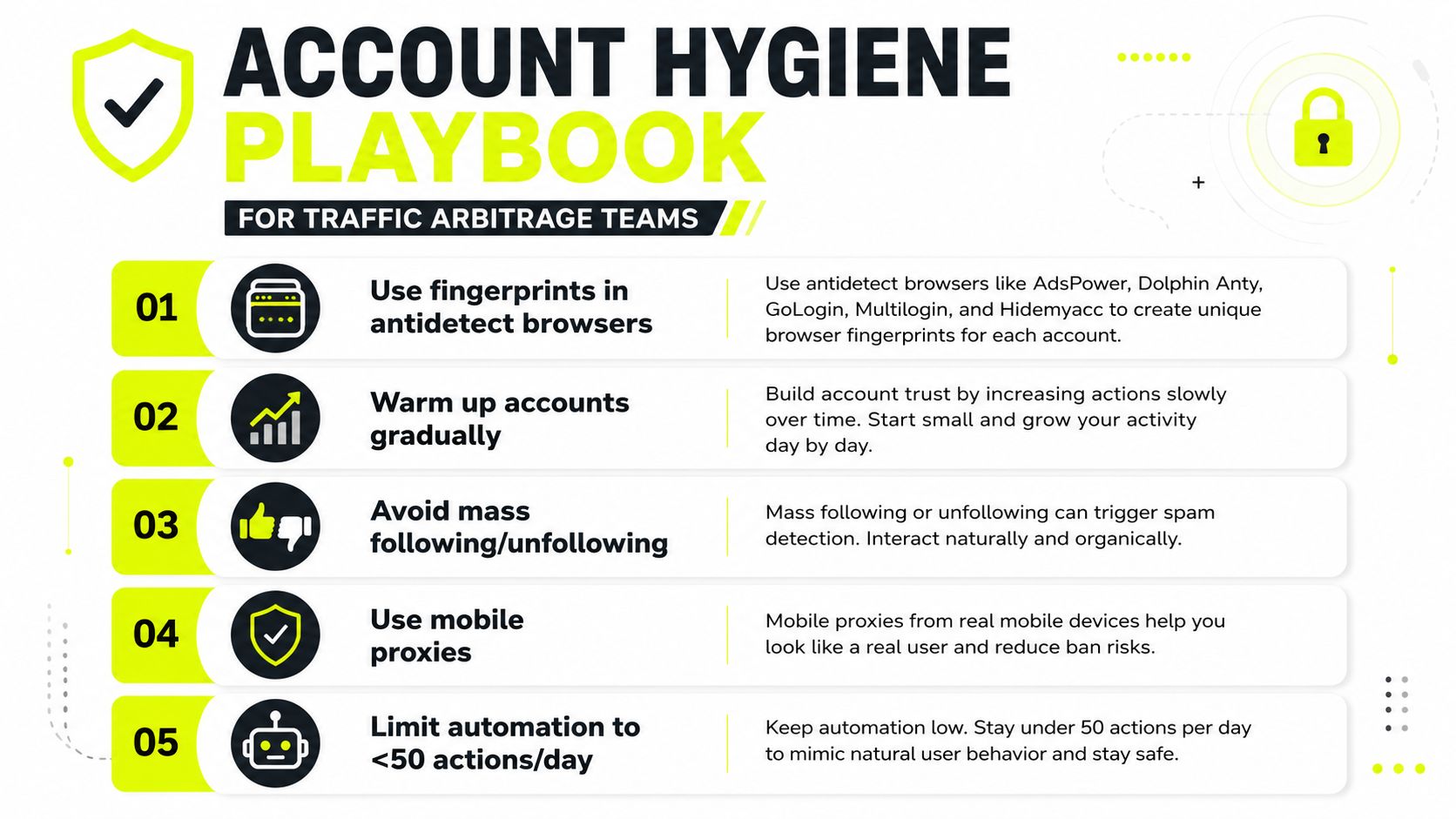
The fastest way to get your whole farm tagged is to let every profile behave the same way. Same browser fingerprint, same cookies, same timing, same proxy habit. That's exactly what tools like AdsPower, Dolphin Anty, GoLogin, Multilogin, and Hidemyacc are supposed to prevent, and people still blow it by cloning too hard.
Keep fingerprints separated
One browser profile should never share cookies with another. Not ever. If you reuse storage, the farm stops looking like separate users and starts looking like one operator replaying a pattern. That's when graph-based suggestions and linked-account blocking become a problem.
Warmup has to look boring. New accounts should spend a few days just scrolling, then move to likes, then comments, then DMs. Keep the pace slow enough that the profile doesn't look like a scripted launch sequence. The exact cap depends on age and trust, but the direction matters more than the number.
Mass following, mass unfollowing, and comment bursts get farms flagged because they create a neat, machine-shaped signature. That's why people who rush cloaking and geo-targeted campaigns often burn the account before the ad even stabilizes. Keep the activity mixed, light, and inconsistent enough to look like a human with a life.
The same hygiene rules apply when you're handling account farming for Facebook and TikTok ad accounts. Instagram is often the canary. If your Instagram stack starts throwing suggested-block noise, your Facebook and TikTok workflows are probably sharing too much fingerprint overlap already.
A useful side benefit is that Sota Proxy's referral program can offset proxy spend for teams that rotate operators through the same infrastructure. The commission goes up to 40%, which makes sense if you're already allocating budget across multiple seats and account lanes.
For teams testing automation layers, find AI agents for social media is a useful reference when you need to decide what to automate and what to leave manual. The cleanest farms still keep human review in the loop on high-risk actions.
Multiple-account management matters because the blocklist is only one symptom of sloppy identity separation. If the browser, proxy, and warmup plan all drift together, the platform will eventually tie the accounts together for you.
Recovery and Appeal Workflow When an Entire Farm Gets Swept
When a sweep hits, do not fire off panic appeals from the same network. That just gives Instagram a cleaner set of matching recovery signals. Start in the app at Settings → Help → Report a problem → Something isn't working, and keep the wording plain. Say the account was disabled unexpectedly, ask for review, and ask for the restriction to be checked. Short, factual, and boring is better than a long emotional note.
If the sweep lines up with proxy churn, broken session reuse, or a bad residential pool, separate the access problem from the account problem before you keep appealing. For detailed steps on bypassing IP bans, see our guide at https://sotaproxy.com/en/blog/how-to-get-around-an-ip-ban. In practice, that means checking whether the same IP range, browser fingerprint, or login pattern hit multiple accounts at once. If the infrastructure is contaminated, repeated appeals only keep feeding the same signal back to Instagram.
Document before you appeal
Save the creation date, the proxy history from your dashboard, warmup logs, and any linked ad account IDs if the profile touched Facebook or TikTok business systems. If you can show the session moved through distinct residential or mobile ranges cleanly, you have a better chance of separating a bad lane from a bad identity. I keep those records because support will sometimes ask for details that are easy to lose once the farm is half-burned.
Escalate through the Meta Business Help Center when the sweep touches paid media, shared business assets, or brand-side accounts. If the same fingerprint family keeps dying, stop appealing individual survivors and rebuild from a clean profile stack plus a new residential pool. That is the point where account recovery stops being a support task and turns into infrastructure cleanup.
If 30% of a farm dies in one wave, rebuild. Do not keep feeding the same graph. The survivors usually drag down with the dead accounts.
If proxy infrastructure becomes the bottleneck during recovery, get 24/7 support involved before you start another round of appeals. Fix the network path first, then reintroduce accounts one by one with stricter hygiene. I would rather spend time isolating the bad proxy lane than burn more accounts proving the same failure twice.
If you are rebuilding a farm, tightening geo-targeted campaigns, or separating clean sessions from burned ones, use Sota Proxy to match the right proxy type to the right account stage. Clean residential and mobile pools, sticky sessions, and 24/7 support make a real difference when a blocklist starts turning into an ops problem.
Related articles
Top Brightdata Alternatives for Proxy Teams in 2026
Explore the best brightdata alternatives for scraping, ad verification, and geo-targeted campaigns in 2026, plus migration tips.
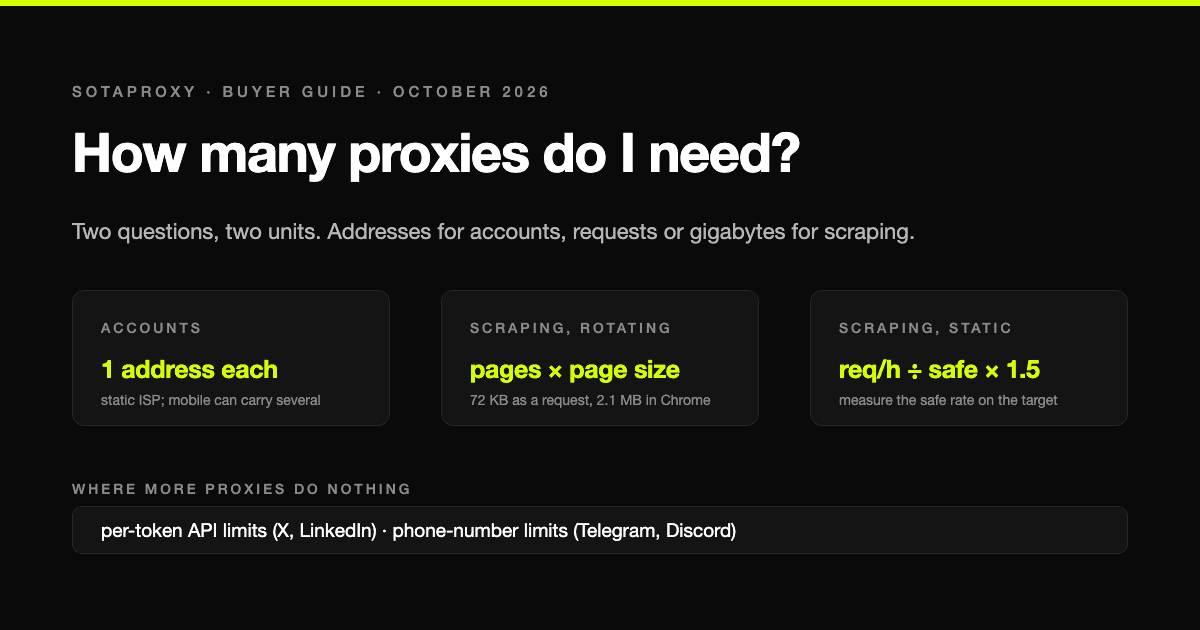
How Many Proxies Do I Need? Two Formulas: One for Accounts, One for Scraping
The answer depends on whether you are running accounts or collecting pages, and the two questions have different units: addresses for accounts, requests per address or gigabytes for scraping. Both formulas, the real per-address limits that platforms publish or that we measured, and four worked examples with what they cost.
How to Test an Android App Across Global Countries Before Google Play Release
A practical framework for testing Android apps across countries before Google Play release, covering network setup, device coverage, cloud phones, and troubleshooting.
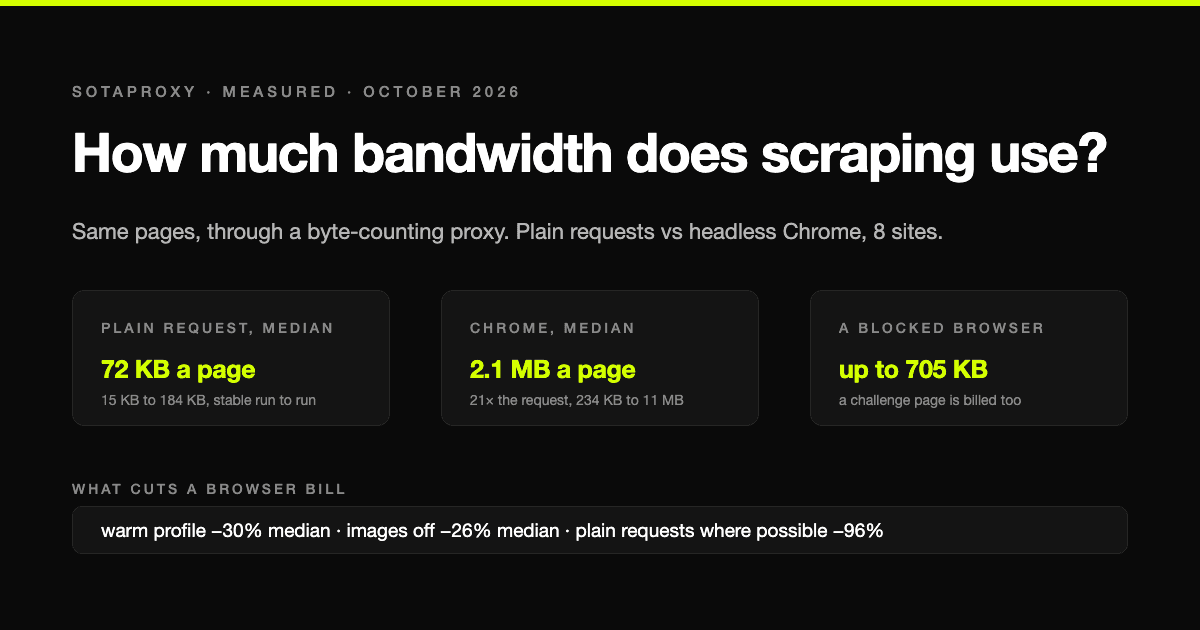
How Much Bandwidth Does Web Scraping Use? We Measured It, Requests vs Headless Chrome
On residential proxies you pay per gigabyte, so the scraping method sets the bill. We loaded the same pages with plain HTTP requests and with headless Chrome through a proxy that counts every byte: the median page cost 72 KB one way and 2.1 MB the other, a 21-fold difference, plus what blocking images, reusing a browser and getting blocked actually cost.
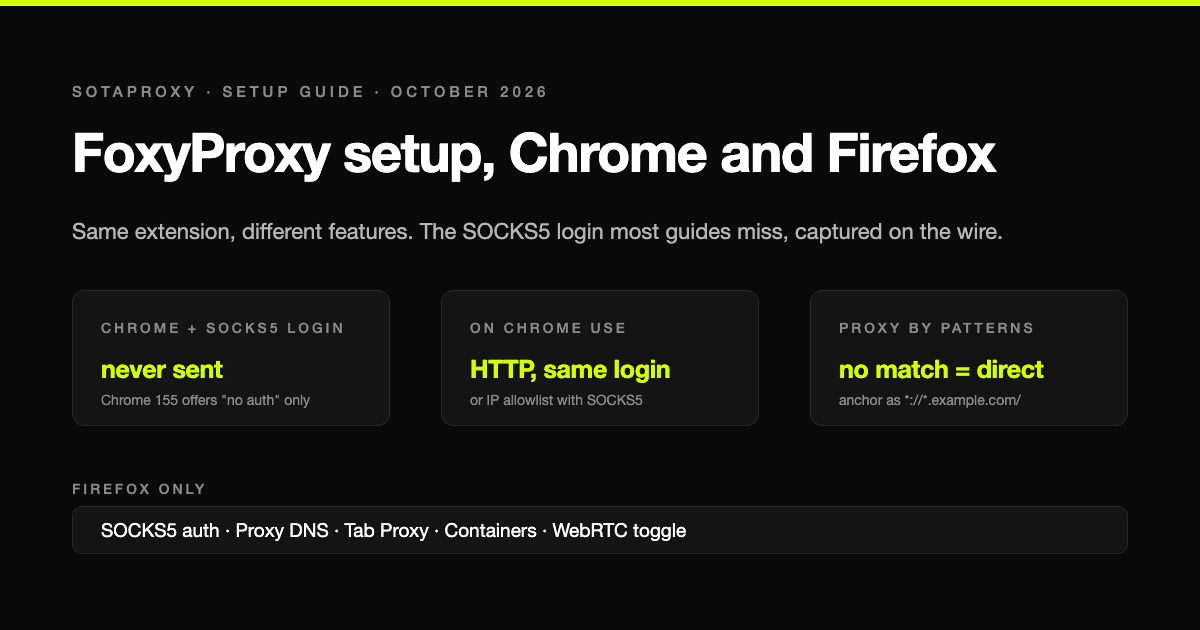
FoxyProxy Setup in 2026: Chrome, Firefox, Patterns, and the SOCKS5 Login Chrome Ignores
FoxyProxy is the same extension on Chrome and Firefox and does different things on each. The setup step by step for version 9, the pattern syntax that actually matches, and the one limit most guides leave out: in Chrome a SOCKS5 proxy with a login cannot work, which we confirmed by capturing what Chrome sends.

How Many Google and Steam Accounts Can You Have in 2026
The two platforms in this series where the count is genuinely unlimited and the limit is somewhere else: Google rations phone numbers and never says how many accounts one buys, Steam lets you make as many accounts as you like and then locks every one of them until it has spent $5. The rules from Google's and Valve's own pages, and what actually ties two accounts together.