IP Reputation Check: A Guide for Media Buyers & Farmers
Master the IP reputation check process for ad accounts and automation. Learn to analyze scores, handle blacklists, and manage proxies to avoid platform bans.

You launch a fresh Facebook campaign from a proxy that looks clean in generic checkers. The browser profile in AdsPower matches the country. Cookies are isolated. Spend starts. Then the account gets hit with review, the BM loses trust, or TikTok starts forcing checkpoints on every login.
That's the normal failure mode now. For traffic arbitrage teams, account farmers, and operators running cloaking or geo-targeted campaigns, an IP reputation check isn't about email hygiene. It's about whether the platform sees your session as native, recycled, rented, or abusive. If you're using AdsPower, Dolphin Anty, GoLogin, Multilogin, or Hidemyacc, you already know the IP is only one part of the story. The problem is that most public guidance still treats IP reputation like a deliverability topic, not an ad account survival topic.
Table of Contents
- Why Your IP Reputation Check is Failing You
- Your IP Reputation Check Toolkit for 2026
- Interpreting Scores and Blacklist Hits
- The Remediation Playbook Delist Rotate or Replace
- Building an Automated IP Health System
- Advanced Tactics for Antidetect and Multi Account Ops
Why Your IP Reputation Check is Failing You
A lot of teams still run an IP through a blacklist tool, see no obvious red flags, and assume the session is safe for Facebook or TikTok. That workflow is outdated. It was built for email and perimeter security, not for ad accounts, account farming, or multi-login operations inside antidetect browsers.
The mismatch is why teams waste time on the wrong fix. Recent 2025 to 2026 industry analyses state that 68% of ad account bans stem from behavioral anomalies rather than IP blacklist flags. That means the IP may look acceptable in a generic scan while the platform still sees a bad combination of geo-shift, device mismatch, login rhythm, or suspicious ASN type.
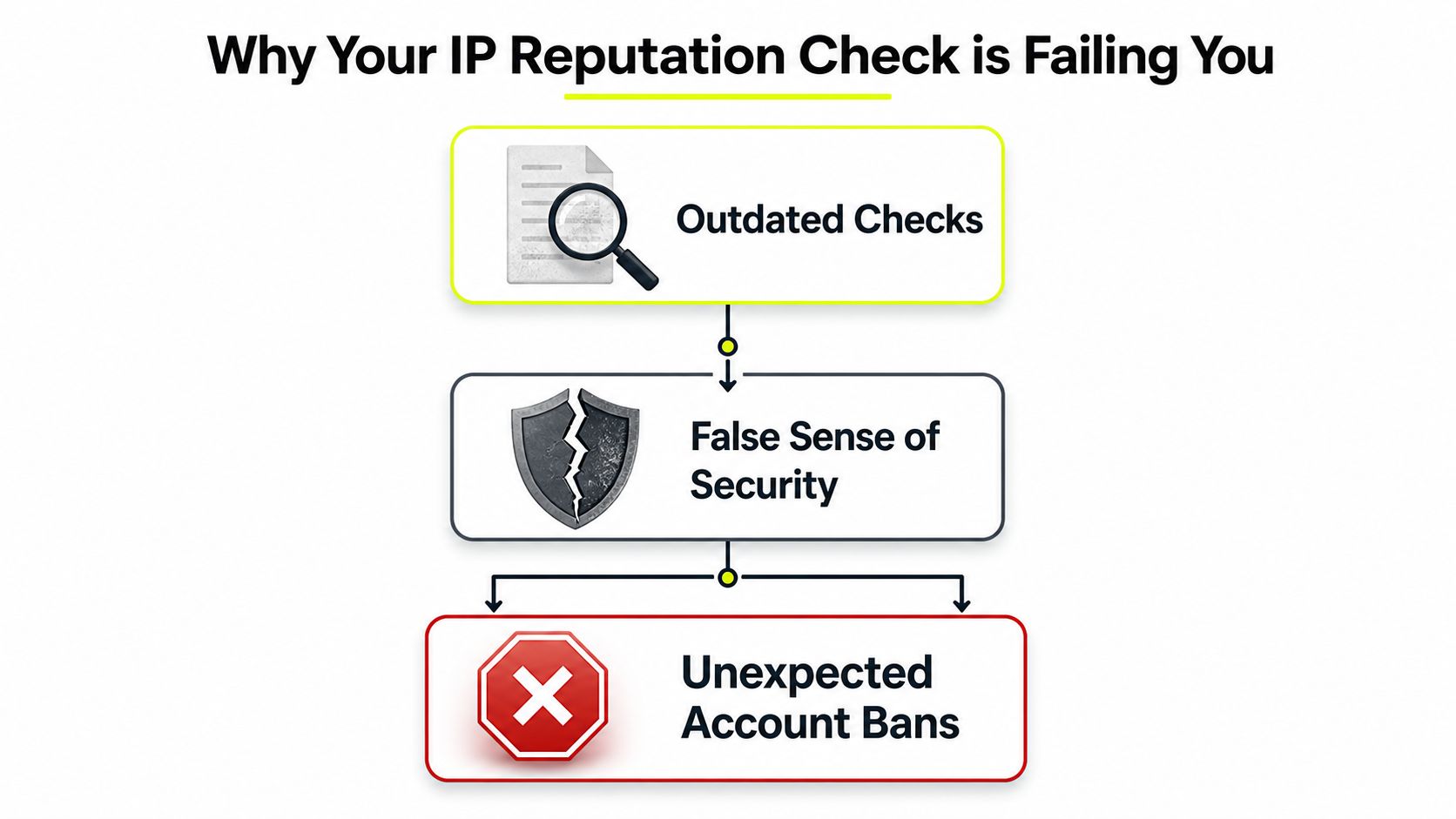
Clean in a checker, dirty to a platform
A public checker can tell you if an IP is listed, hosted, proxied, or tied to abuse history. That's useful, but it's incomplete. Facebook and TikTok don't publish the full logic behind their risk models, and that's the whole point. They score combinations of signals, not single inputs.
One “clean” residential IP can still be toxic if:
- The ASN looks wrong for the user story. A local shopper persona routed through infrastructure that behaves like proxy traffic gets attention fast.
- The geolocation doesn't match the profile. Time zone, language, browser locale, and city don't align.
- The session pattern looks synthetic. Fresh account, fresh cookie jar, first login, immediate ad activity.
- The IP history is inherited. In rotating pools, you may be taking over an address that another operator just burned.
Use a generic checker as a gate, not a verdict. If you want a fast first pass before attaching an IP to a Facebook or TikTok profile, a proxy checker that surfaces obvious exposure issues is useful. It just won't explain platform trust by itself.
Practical rule: If the checker says “clean” but the account still gets challenged, stop diagnosing the IP as an isolated object. Diagnose the session.
What platforms actually care about
In ad operations, the platform usually cares more about consistency than purity. A mediocre IP with stable behavior often lasts longer than a pristine IP attached to sloppy fingerprints.
That's why the old email-first mindset breaks down. Sender reputation tools can still matter in adjacent workflows, especially if you run lead funnels, outreach, or mail infrastructure. But for media buying, the IP reputation check has to answer a different set of questions:
| Check area | What you need to know for ad ops |
|---|---|
| Network identity | Is this residential, mobile, ISP, datacenter, or IPv6 space that platforms already classify aggressively? |
| Geography | Does the IP location match the ad account market, browser profile, and login history? |
| Reuse risk | Is this part of a heavily shared rotating pool with inherited abuse? |
| Behavioral fit | Does this IP make sense for the account's age, action pattern, and device fingerprint? |
If you ignore those questions, you'll keep getting blindsided by “random” reviews that aren't random at all.
Your IP Reputation Check Toolkit for 2026
Serious teams don't rely on one dashboard. A usable workflow stacks quick visibility with deeper context. The backbone is a seven-category intelligence pipeline: geolocation data, ASN or network ownership, hosting provider identification, proxy or anonymization detection, blacklist presence, threat category classification, and a composite risk score, as outlined in Reconshield's IP reputation check guide.
Tier one quick scan
This tier is for intake. You're not proving the IP is safe. You're filtering out obvious bad fits before they ever touch AdsPower, Dolphin Anty, GoLogin, Multilogin, or Hidemyacc.
Use a quick scan to answer:
- Where does the IP geolocate. Country is not enough. City-level mismatch matters for geo-targeted campaigns.
- What network owns it. If the ASN screams hosting provider, don't expect smooth behavior on protected social platforms.
- Does it disclose proxy usage. Some tools can reveal whether the IP is broadly categorized as VPN or proxy traffic.
- Is there immediate blacklist noise. One hit doesn't always kill the IP, but multiple signals change the risk.
A simple what-is-my-IP lookup for location and exposure checks helps verify that the browser profile is aligned before login. That's especially useful when teams clone profiles across buyers and forget to adjust time zone, language, or city targeting.
Tier two deep dive
Quick scans catch obvious junk. They don't tell you why a “good” IP keeps failing. The deep dive is where you check whether the problem sits in infrastructure, in account behavior, or in the match between them.
I'd structure the deeper investigation like this:
Map the ASN and host pattern
For Facebook and TikTok, this often tells you more than a generic score. Datacenter and known hosting ranges can be fine for low-friction scraping. They're often weak choices for account creation, account farming, and warm ad assets.Cross-reference several reputation sources
Don't trust a single database. Different providers see different abuse classes. One source may tag spam heritage while another flags bot automation or anonymizer usage.Classify the abuse type
A poor score from mail abuse means something different from a history tied to botting, account creation, or login automation. Context matters because platform enforcement isn't uniform.Overlay your own logs
Review which profiles, ad accounts, and geos touched the IP. If the same proxy class fails only on one buyer's setup, the fingerprint stack is probably the issue, not the IP pool.
Good operators don't ask, “Is this IP clean?” They ask, “Is this IP believable for this account, in this browser, for this action?”
That distinction is what separates a usable IP reputation check from a checkbox exercise.
Interpreting Scores and Blacklist Hits
Those responsible for IP reputation management either overreact or underreact. They see one blacklist hit and kill the IP immediately, or they see a decent score and assume the asset is safe. Both mistakes cost money.
The score is just a compressed opinion. The hit is just a flag. You still need to decide whether the signal matters for your use case.
Signal versus noise
In the email world, the stakes are obvious. Spamhaus reports that approximately 30% of all global email traffic is rejected or flagged due to poor IP reputation, and over 1 billion IP addresses were listed on its DNS-based Blackhole List in 2024. The same reference also notes that IPs with a reputation score below 50 on Spamhaus are typically blocked by major providers.
That matters if you own sending infrastructure. It matters less if you're trying to keep a TikTok ad account stable inside GoLogin. The mistake is treating all blacklist data like platform-enforcement data.
Here's the working model:
High signal for email and owned infrastructure
If you run domains, mail servers, landing pages, or outbound systems tied to your funnel, blacklist data can be critical.Moderate signal for social platform ops
A listing can still indicate prior abuse, poor neighborhood quality, or recycled proxy supply. But it's rarely the full explanation for ad account issues.Low signal when behavior obviously conflicts
If the buyer logs in from one country, the browser profile says another, and the device fingerprint changes after each session, a clean blacklist record won't save you.
A practical triage model
I use a simple three-way read: ignore, watch, or quarantine.
| Situation | Read | Action |
|---|---|---|
| Single weak blacklist hit, stable account behavior, aligned geo | Noise unless repeated | Keep the IP in low-risk tasks and monitor |
| Multiple reputation warnings or suspicious proxy classification | Watch closely | Limit spend, avoid account creation, test on aged assets only |
| Repeated platform friction plus poor infrastructure signals | High risk | Pull the IP from ad ops and move it out of the production pool |
The pitfall is operators get burned by false certainty. If you isolate the IP and ignore device data, you can make the wrong call fast.
The better read combines infrastructure with behavior:
- Look at the session goal. Account creation is stricter than browsing. Payment events are stricter than ad edits.
- Check the account age. New accounts need calmer infrastructure than aged BMs with a stable history.
- Review fingerprint consistency. Fonts, language, time zone, WebRTC behavior, and browser version should all make sense with the IP's location.
- Separate platform issues from transport issues. A mail blacklist hit doesn't automatically explain a Facebook checkpoint.
For teams that keep seeing friction after a rotation, it helps to review a practical guide on how to avoid IP bans. The main lesson is simple. Don't treat a blacklist result as a universal truth across every platform you touch.
A blacklist hit tells you the IP has history. It doesn't tell you whether that history is the reason your ad account just died.
That distinction keeps you from deleting usable inventory and keeps you focused on the actual failure point.
The Remediation Playbook Delist Rotate or Replace
Once you've identified a bad IP, you need to move fast. Not every IP deserves a recovery attempt. In multi-account ops, trying to rescue the wrong address can burn more accounts than the IP is worth.
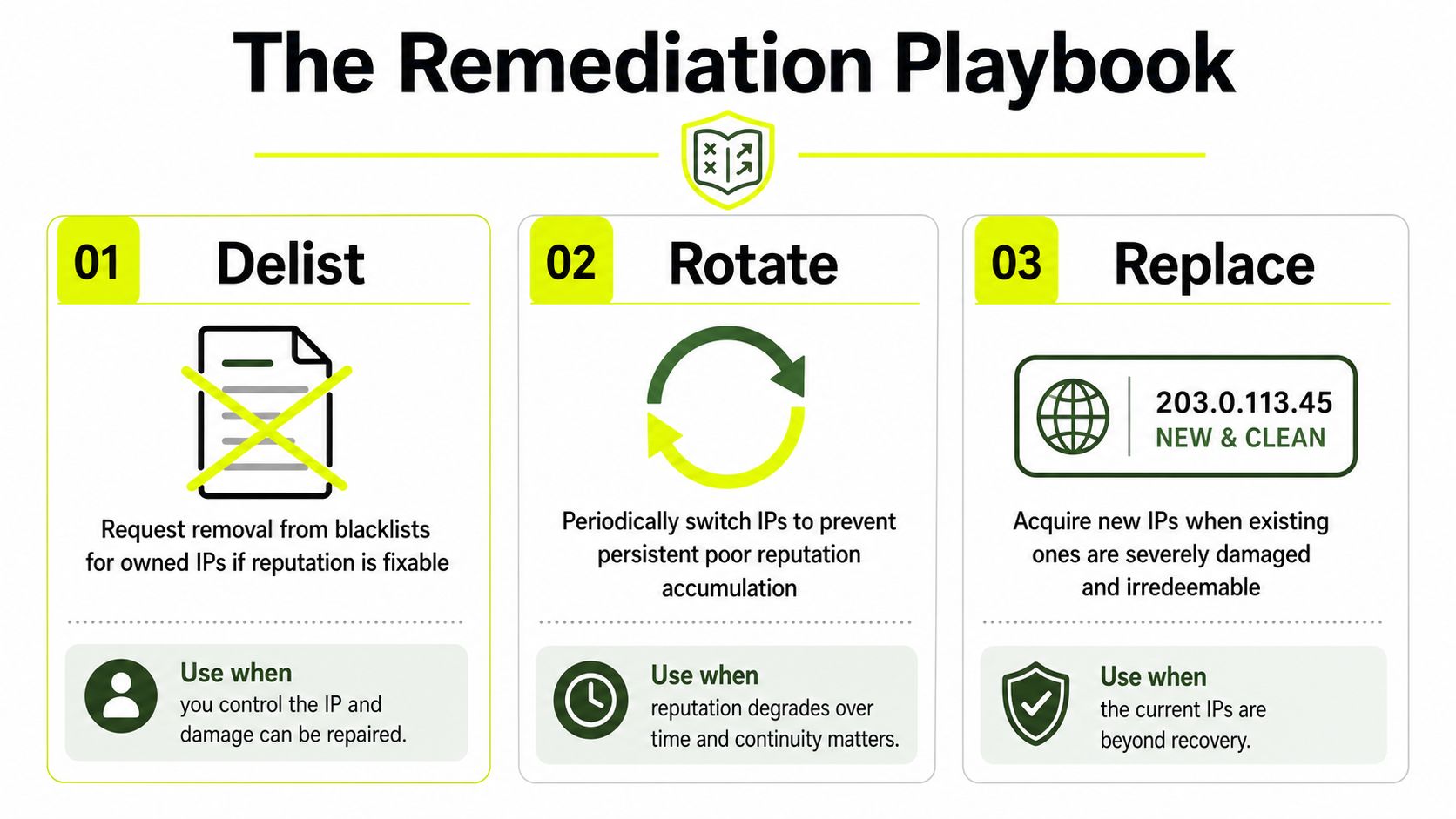
When delisting makes sense
Delisting is for infrastructure you control. If you own the IP, lease the server directly, or manage the sending environment, then cleanup and delisting can be worth the effort.
Good delisting candidates usually look like this:
- Owned server IPs tied to a temporary abuse event you've already fixed.
- Static ISP or dedicated lines where continuity matters more than swapping.
- Operational dependencies where replacing the IP creates more breakage than repair.
If you're using a shared residential or mobile proxy pool, delisting usually isn't the move. You don't control the address long enough, and the next user may inherit it anyway.
Proxy type decides the move
Teams need to stop using one rule for every proxy class. The right response depends on what kind of IP you're holding.
| Proxy type | What it is in practice | Best move when reputation goes bad | Real trade-off |
|---|---|---|---|
| Residential | Consumer ISP traffic, often shared or rotating | Usually rotate, sometimes replace provider pool | Better platform fit, but inherited history can be messy |
| Mobile | Carrier traffic behind CGNAT | Keep if stable, rotate carefully if friction appears | Strong trust on protected sites, less direct control |
| Datacenter | Hosting ASN traffic | Replace quickly for social use, keep for low-security scraping | Fast and cheap, but easy for platforms to classify |
| IPv6 | Often abundant and cheap, but platform support varies by workflow | Test per platform, replace if unsupported or inconsistent | Useful for scale in some tasks, not universally trusted |
The biggest gap between theory and reality shows up with mobile and datacenter supply. VoidMob's comparison says mobile proxies achieve 85% to 95% success rates on protected sites like Facebook and TikTok because carriers use CGNAT, while datacenter proxies reach 25% to 35% due to known hosting ASNs. That matches what most buying teams see in practice. Mobile supply survives where obvious hosting traffic gets clipped.
Residential sits in the middle. It's often the best balance for account management and geo-targeted campaigns, but only if the pool quality is controlled. Datacenter still has a place for scraping, price checks, or low-friction verification tasks. Proxy rotation strategy matters because over-rotating can create its own behavioral anomalies.
Operator rule: Don't “fix” a bad shared proxy. Replace the context. New IP, same profile discipline.
One more practical note on speed. Datacenter proxies are attractive because they're fast and cheap. Bright Data's comparison notes that datacenter proxies offer 3 to 4 times faster speeds than residential proxies. That makes them fine for high-volume scraping and low-security targets. It doesn't make them the right default for Facebook farming, TikTok ad launches, or cloaking stacks that need native-looking traffic.
Building an Automated IP Health System
Manual checks break the moment your team manages more than a small pool. If you're running multiple buyers, multiple geos, several browser stacks, and different campaign types, you need a health system, not a spreadsheet.
Start with visibility. A dashboard helps the team see usage, segmentation, and pool movement before a buyer burns an entire batch by reusing the wrong subnet.
Tag the pool before you scale it
The first mistake teams make is storing all proxies in one giant undifferentiated bucket. Don't do that. Tag every IP or session endpoint by role and risk.
A simple operational tagging model works well:
Warmed
Already used on stable accounts with no recent friction.At risk
Recently challenged, recently rotated, or tied to unstable browser profiles.Quarantined
Pulled from production after suspicious behavior, repeated checkpoints, or cross-account contamination.Cold inventory
Never attached to valuable assets. Good for testing profile alignment and initial validation.
If you don't tag inventory, buyers will keep reusing questionable supply because they only see “US residential” or “UK mobile” and nothing else.
Alert on drift, not just on failure
Organizations frequently wait until Facebook disables spend or TikTok starts looping verifications. That's too late. You want alerts when the setup starts drifting out of alignment.
Monitor for things like:
Location mismatch
IP city changes while the antidetect profile still presents the old locale and time zone.Unexpected ASN pattern
A supplier's route changes and the traffic no longer looks like the class you bought.Repeated soft friction
Login review, checkpoint, or reduced trust on more than one profile using the same tagged pool.Pool contamination signs
Multiple fresh profiles fail in sequence on newly rotated residential or mobile supply.
This is also a training issue. Buyers should know when to pause and escalate instead of “testing one more account.”
A short demo helps teams visualize this workflow in practice:
Once your system is stable, standardization becomes valuable beyond your own team. Some operators even monetize that by referring peers to the infrastructure they trust. If that matters to you, Sota Proxy runs a referral program with up to 40% commission. That's useful for agency leads, farm managers, and consultants who already recommend tooling inside their circle.
Build the monitoring first. Recommendations mean more when your SOP actually works under load.
Advanced Tactics for Antidetect and Multi Account Ops
Most guides stop at “use a good proxy.” That advice is too shallow for AdsPower, Dolphin Anty, GoLogin, Multilogin, and Hidemyacc setups. In real multi-account work, the platform judges the full stack. IP, fingerprint, language, time zone, cookie age, session rhythm, and account history all collide.
The CGNAT inheritance problem
The hardest issue in residential and mobile pools is inherited reputation. You may receive an IP that wasn't abused by you, but the platform doesn't care who caused the history.
VPNMasterPro's analysis highlights the problem directly. 42% of residential IPs in major markets were CGNAT-assigned in 2025, which means a large chunk of supply sits inside shared carrier or ISP address pools. For account farming and bulk social operations, that creates a blind spot. The IP may be fresh to you while already warm, flagged, or semi-burned to the platform.
That's why “residential” alone isn't a trust guarantee.
How to warm and validate without burning supply
The fix isn't just buying better IPs. The fix is reducing mismatch and testing for inheritance before you attach valuable assets.
Use a disciplined warming pattern:
Match the profile to the route
If the IP geolocates to one city, the browser time zone, language, and account story should fit that city or at least that region.Avoid instant monetization behavior
Don't create, verify, launch, edit payment settings, and push spend in one burst from a new profile.Separate farming from scaling
The pool you use for account creation shouldn't automatically be the pool you use for daily spend or cloaking review.Track profile-to-IP history
If one subnet causes friction across multiple profiles, quarantine the subnet. Don't blame each browser individually.Prefer stickiness where continuity matters
For aged accounts, stable sessions usually outperform aggressive rotation.
A lot of operators also misuse IPv6 here. IPv6 proxies can be useful for scale and certain automation tasks because the address space is broad. But practical trust depends on platform support, fingerprint alignment, and whether the target workflow treats that traffic path as normal. Test IPv6 per use case. Don't assume abundance equals safety.
For buyers managing multiple Facebook, TikTok, e-commerce, and cloaking assets at once, a key upgrade is operational memory. Keep notes on which browser template, which geo, which proxy class, and which session cadence worked. That's more valuable than any single public score.
If you're scaling teams around this workflow, a practical reference on multiple account management operations helps frame the process around isolation and consistency instead of random profile churn.
The best antidetect setup still fails if the IP tells a different story than the browser.
If you need proxy infrastructure that fits this kind of workflow, Sota Proxy is built for high-volume operators managing residential, mobile, ISP, datacenter, and geo-targeted traffic at scale. It's a practical fit for media buyers, account farmers, scraping teams, and antidetect users who need stable routing, rotation control, and clean operational separation.
Related articles
What Is a Proxy Used for: 2026 Arbitrage Guide
What is a proxy used for - Learn what a proxy is used for in 2026, from boosting security to managing multi-account operations for arbitrage teams

How to Build an Amazon Review Scraper That Actually Works
Build a reliable Amazon review scraper with proven proxy, anti-blocking, and parsing tactics. Step-by-step guide for technical operators and agencies.

Blocklist on Instagram: How to Detect and Fix Blocks
Learn how blocklist on Instagram really works, how to detect blocks and shadowbans, and the exact steps to manage your blocked accounts list.

What Is Geo Targeting: The Complete Guide for 2026
Learn what is geo targeting and how IP, GPS, and Wi-Fi signals shape it. Residential, mobile, and ISP proxies power real geo-targeted campaigns.
Building a Reliable Multi-Account Stack with MostLogin and SotaProxy
Learn how experienced operators combine anti-detect browsers and proxies to build scalable, geo-targeted account management workflows using MostLogin and SotaProxy.

Inventory Monitoring Guide for Traffic Arbitrage Teams
Learn how inventory monitoring powers geo-targeted campaigns with real-time data, proxy scraping, KPIs and cost controls for Facebook and TikTok ad accounts.