Residential Backconnect Proxy: 2026 Guide & Best Practices
Master the residential backconnect proxy. A 2026 guide on how it works, its benefits over other proxies, and best practices for ad verification & account
You're probably dealing with one of two failures right now. Your Facebook or TikTok ad accounts keep tripping reviews because the login footprint jumps across locations, or your scraping and cloaking stack is wasting time on proxy list management instead of pushing traffic.
That's where a residential backconnect proxy matters. Not because it's some new class of IP, but because the architecture removes a lot of operational drag. For traffic arbitrage teams, account farmers, and operators running AdsPower, Dolphin Anty, GoLogin, Multilogin, or Hidemyacc, that difference is practical. Fewer moving parts in the client. Better control over rotation and stickiness. Less manual cleanup when IPs burn.
The mistake I see most often is treating backconnect as just “rotating residential.” It isn't the same in practice. Its main advantage is centralized routing. You connect to one gateway, and the provider handles exit IP selection, rotation logic, and session behavior upstream. That changes how you build automation for ad accounts, cloaking flows, geo-targeted campaigns, and account farming.
Table of Contents
- The Operational Problem Backconnect Proxies Solve
- Understanding Backconnect Proxy Architecture
- Practical Comparison Of Proxy Infrastructure Types
- Configuration For High-Stakes Use Cases
- Evaluating Performance And Reliability
- Provider Selection And Operational Best Practices
The Operational Problem Backconnect Proxies Solve
If you run bulk Facebook and TikTok ad accounts, the ugly part isn't getting a proxy. It's managing proxy behavior at scale. Standard residential lists create friction fast. You track credentials, map IPs to browser profiles, replace dead exits, and patch scripts when a target starts banning a subnet.
That setup works for small batches. It breaks down when you're running account farming, cloaking tests, geo-targeted creatives, and support tooling at the same time.
A backconnect proxy provides a single endpoint that automatically rotates the exit IP on each request or at configured intervals, eliminating the need for clients to manage IP lists manually. It also changes addresses on a timer or when a new connection is established, which is why it fits multi-account operators who need stable sessions for Facebook and TikTok workflows, according to Coronium's explanation of rotating proxy gateways.
The real ops gain
The main gain is architectural, not cosmetic.
- One integration point: Your browser stack, scripts, and tools point to one gateway instead of a shifting inventory of endpoints.
- Less client logic: Rotation happens upstream. You don't need local logic for swapping IPs every time a request path changes.
- Cleaner profile mapping: In AdsPower, Dolphin Anty, GoLogin, Multilogin, and Hidemyacc, that means fewer opportunities to mismatch a browser profile and a proxy state.
- Lower block pressure: Distribution across a larger residential pool helps avoid hammering a narrow set of exits.
Practical rule: If your team spends more time maintaining proxy assignments than managing account quality, the proxy model is the bottleneck.
For teams that keep getting burned by bans, this usually sits next to another issue. Rotation isn't being matched to the task. A cloaking fetcher, an ad verification check, and a warm Facebook profile should not share the same session policy. If you're troubleshooting bans, start with your IP ban avoidance workflow and then fix the routing model behind it.
Understanding Backconnect Proxy Architecture
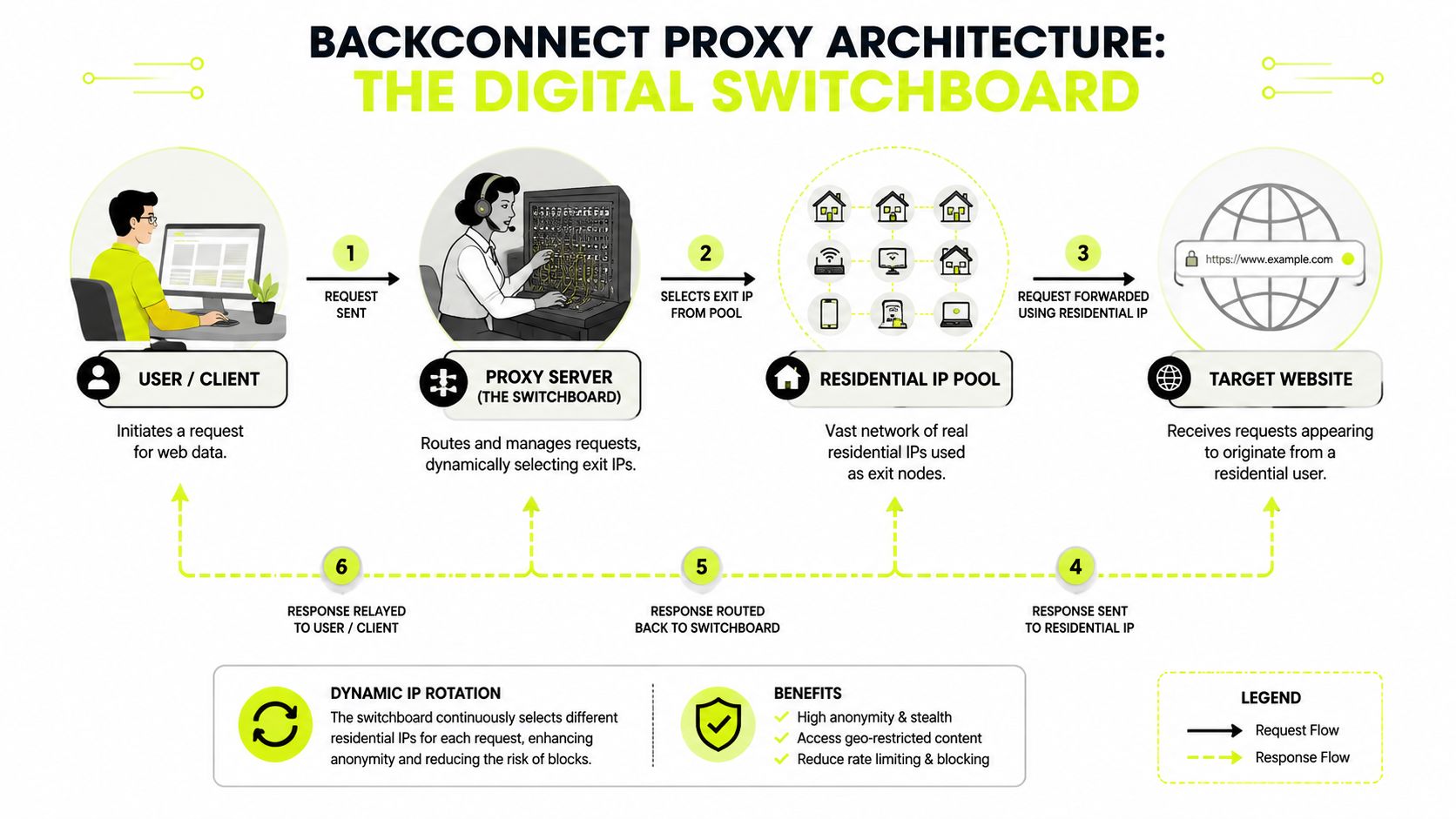
A residential backconnect proxy is easiest to understand as a switchboard. You don't dial individual extensions. You call one operator, and the operator decides which line carries the conversation.
That's what the gateway does. Your app, antidetect browser, or bot connects to one host and port. Behind that single entry point sits a managed pool of residential exits.
One endpoint instead of a proxy inventory
The key architectural detail is this: a residential backconnect proxy operates as a centralized gateway that hides an entire peer-to-peer IP pool behind a single entry point, routing traffic through dynamically assigned ports to achieve automated IP rotation without client-side configuration. That design distributes requests across thousands of residential IPs assigned by ISPs to real user devices instead of datacenter servers, which gives those exits stronger trust signals with target platforms, as outlined in Proxy Seller's breakdown of backconnect architecture.
That matters because the client doesn't need to know the pool.
Your tooling only knows:
- the gateway address,
- the auth method,
- the session rule,
- the geo filter.
Everything else happens on the provider side. Exit selection. Pool health. Rotation timing. Failover.
How the request path actually works
The flow is simple:
| Stage | What happens |
|---|---|
| Client | AdsPower, Dolphin Anty, GoLogin, Multilogin, Hidemyacc, or a scraper sends a request |
| Gateway | The backconnect layer receives it and applies the routing policy |
| Residential exit | The request leaves through a selected residential IP |
| Target | Facebook, TikTok, a store, or a landing-page checker sees residential-origin traffic |
The return path follows the same chain in reverse.
That provider-side routing changes how you think about “rotation.” In a traditional rotating setup, people often think in terms of a list they control. In backconnect, you're controlling policy, not inventory. That's better for automation because policies scale. Lists don't.
The moment you stop managing IPs one by one, you can start managing behavior instead.
For production use, the question isn't “Do I have enough proxies?” The better question is “Does the gateway expose the right session behavior for this job?” For scraping, you usually want broad churn. For account work, you want predictability. For geo-targeted campaigns, you want routing tied tightly to location filters. That's why production users often move from raw proxy lists to a rotating gateway model once volume rises.
Practical Comparison Of Proxy Infrastructure Types
Not every job should run through residential backconnect. Some should. Some absolutely shouldn't. If you use the wrong proxy type, the failure mode is predictable. Either you get blocked because the trust signal is weak, or you waste money and speed on traffic that didn't need premium reputation in the first place.
Proxy Type Comparison for Technical Users
| Proxy Type | IP Source | Typical Speed | Trust Score | Best Use Case |
|---|---|---|---|---|
| Residential backconnect | Real household devices via ISP-assigned IPs behind one gateway | Slower than datacenter in practice | High | Facebook and TikTok ad accounts, account farming, cloaking checks, geo-targeted campaigns |
| Standard residential | Real household devices, often as individual endpoints or less abstracted rotation models | Variable | High | Smaller-scale account work, manual testing, lower-volume verification |
| Mobile | Cellular carrier networks on 3G, 4G, or 5G | Variable | Very high on mobile-first targets | Antidetect workflows in AdsPower and Dolphin Anty, strict mobile-first platforms |
| Datacenter | Server infrastructure in commercial hosting environments | Fast | Lower on protected targets | High-throughput scraping on softer targets, internal automation, cheap concurrency |
| IPv6 | IPv6 address space, usually from hosting or ISP allocations depending on provider | Depends on source | Depends on source and target support | Narrow use cases where target support and filtering make IPv6 practical |
What each type looks like in production
Residential backconnect is the operational choice when you need one control plane across many browser profiles or tasks. It fits ad accounts, account farming, ad verification, cloaking review paths, and geo-targeted checks where trust matters more than raw speed.
Standard residential can still work, especially for smaller teams. The downside is overhead. You usually end up carrying more manual assignment logic, which gets painful when account counts rise or when multiple operators touch the same browser farm.
Mobile proxies sit in a separate category. They route through cellular carrier networks rather than fixed home ISPs, and those trust signals are often stronger for antidetect browsers like AdsPower and Dolphin Anty. Residential usually gives better geo accuracy and broader scale, while mobile traffic can look closer to natural handheld usage and becomes hard to block on platforms with strict mobile-first detection, according to LiveProxies' comparison of residential, datacenter, and mobile traffic.
That difference matters for account farming. If a platform heavily weights mobile-origin behavior, mobile can outperform residential even if the residential pool is clean.
Datacenter proxies win on speed and cost discipline. They're good for rough collection, non-sensitive crawling, and places where IP reputation doesn't carry the whole decision. They're usually the wrong choice for warmed Facebook profiles, TikTok ad accounts, or cloaking paths that need to survive deeper inspection.
IPv6 proxies are situational. They can be useful when the target fully supports IPv6 and isn't aggressively filtering that address family. In social platforms and ad moderation workflows, they're usually not the first tool I'd reach for. Compatibility and trust consistency matter more than address count.
If the task involves identity, use a proxy type that supports believable identity. If the task only involves volume, optimize for throughput.
A practical split looks like this:
- Use residential backconnect for Multilogin or GoLogin profiles tied to ad spend.
- Use mobile when the platform leans hard into mobile trust signals or app-like behavior.
- Use datacenter for broad collection, prefetching, and low-risk support jobs.
- Use IPv6 carefully and only where your target behavior confirms it's a fit.
Configuration For High-Stakes Use Cases
The worst configuration mistake in this space is simple. Teams use one rotation rule for everything. That damages account stability, breaks session continuity, and creates location patterns that don't make sense.
For browser-based account operations, setup quality matters as much as the proxy type.
Account management in antidetect browsers
For AdsPower, Dolphin Anty, GoLogin, Multilogin, and Hidemyacc, the priority is session consistency. You want the browser fingerprint, cookie jar, timezone, language, and proxy geography to line up. If one profile logs into a Facebook ad account from one city and then reappears from another region too quickly, you've created your own review trigger.
The most important rotation rule here comes from anti-bot workshop data: rotating residential IPs every 5 to 10 minutes for bulk social media accounts triggers immediate “impossible travel” flags, while 24 to 48 hour sticky sessions are now the standard for high-trust accounts. The same source also notes that the backconnect gateway can desynchronize session cookies during high-frequency logins if geo filters and session handling aren't tight, as described by Anonymous Proxies on sticky-session behavior.
Use that operationally:
- Facebook ad accounts: Keep long sticky sessions for warmed profiles. Don't bounce the IP during login, payment review, or Business Manager work.
- TikTok ad accounts: Same principle. Stable session continuity beats aggressive churn.
- Account farming: Bind one profile to one long-lived session policy. Don't recycle mid-flow because a generic script said “rotate frequently.”
- Geo-targeted campaigns: Match proxy location to ad audience checks, landing pages, and local review flows.
If your team is still wiring proxies manually into each browser profile, use a repeatable proxy setup workflow and standardize how sessions get assigned.
Scraping and cloaking need different rotation logic
Per-request rotation is great for stateless work. It's the right move for scraping category pages, ad verification snapshots, broad SERP collection, and monitoring jobs where each request can stand alone.
It's a bad move for identity-based tasks.
That split is where many operators lose accounts. They copy scraping habits into account automation. Then they wonder why cookies go stale, why Facebook asks for extra checks, or why TikTok starts challenging a previously healthy profile.
Here's the practical mapping:
Scraping and data extraction
- Use per-request rotation.
- Spread requests across the pool.
- Keep the browser out of it when you can.
Cloaking validation
- Use a stable session long enough to inspect the review path you care about.
- If you rotate too early, the moderation path and the user path stop matching.
Account work
- Use sticky sessions.
- Keep profile-to-session mapping stable.
- Avoid high-frequency reconnects during login sequences.
A short visual walkthrough helps if you're handing this off to another operator on the team.
Don't ask one rotation policy to do two opposite jobs. Scraping wants churn. Account trust wants continuity.
Evaluating Performance And Reliability
Residential backconnect is not fast in the datacenter sense. If you buy it expecting server-grade latency, you're buying the wrong tool.
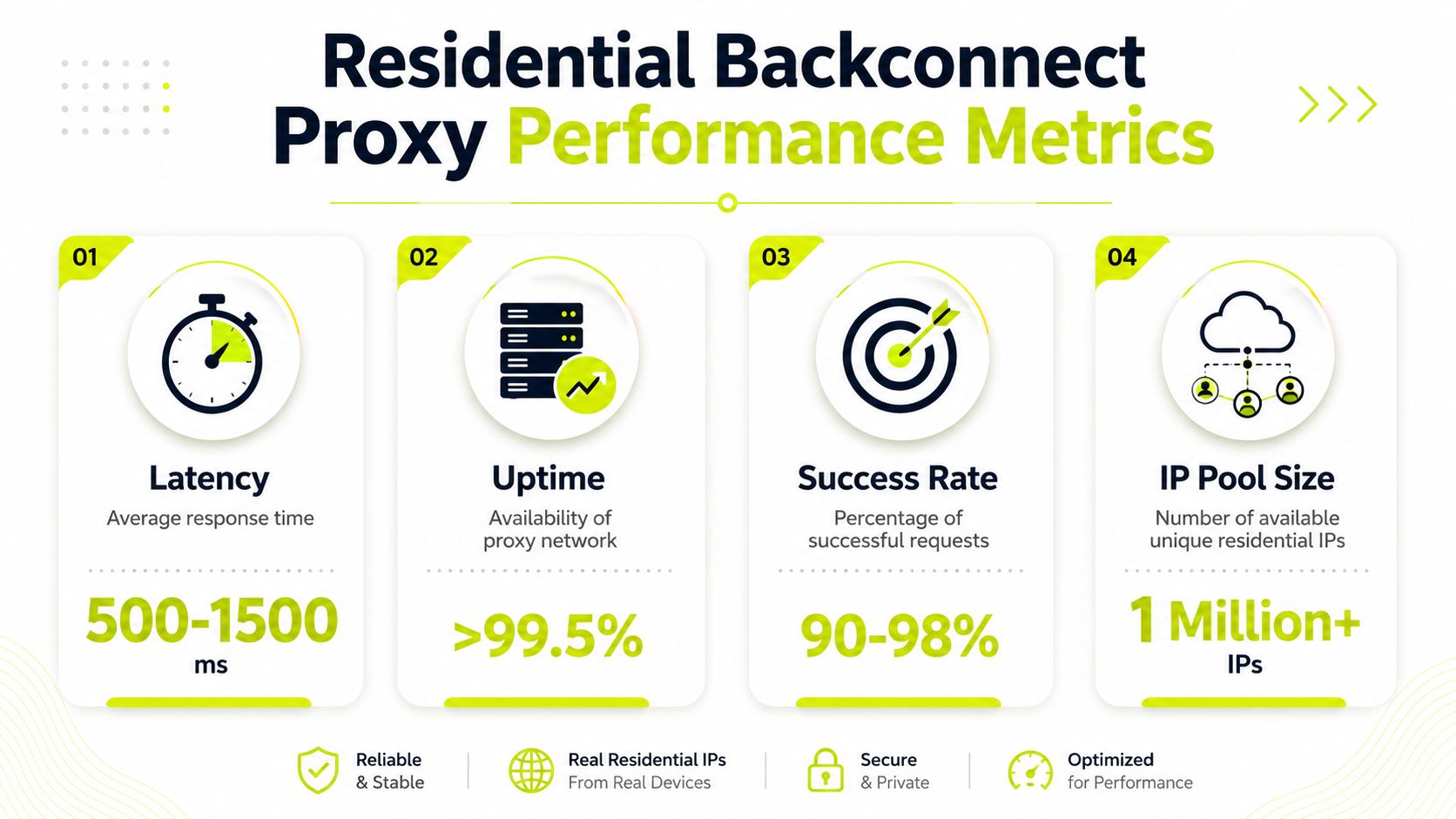
Typical response times for residential backconnect proxies sit around 200 to 2000ms, compared with 10 to 100ms for datacenter proxies. The trade-off is acceptance. Quality residential backconnect services reach success rates of 95 to 99 percent, with premium providers reaching 97 to 99 percent in benchmark tests, according to JoinMassive's residential proxy performance benchmarks.
What the latency trade-off actually means
For account management, 200 to 2000ms usually isn't the problem. Random session changes are the problem. If your Facebook profile survives checks and your TikTok account keeps continuity, you can tolerate the slower path.
For scraping, the answer depends on target friction.
- Low-friction targets: Datacenter often wins because throughput matters more than trust.
- High-friction targets: Residential backconnect wins because a faster blocked request is still a failed request.
- Mixed workloads: Split traffic. Don't force one network class to carry every job.
How to judge reliability without fooling yourself
Don't judge a provider by a dashboard screenshot or by how quickly one test page loads.
Check operationally:
- Success under target pressure: Can it hold up on the actual sites you care about?
- Session stability: Does a sticky session stay coherent through login and navigation?
- Error diagnosis: Are failures coming from the target, the browser profile, or the proxy layer?
- Repeatability: Can another operator on your team reproduce the same behavior?
When you need to validate a pool before pushing traffic, run it through a proxy checker workflow and compare the output against your session plan, not just a single connect test.
Slow and accepted beats fast and banned when the target uses reputation-heavy filtering.
Provider Selection And Operational Best Practices
Provider choice comes down to control, not branding. A bad backconnect service hides too much and exposes too little. You get one endpoint, but no useful knobs. That's dangerous for ad accounts, account farming, and cloaking because those jobs depend on matching session behavior to the task.
What to check before you buy
Use this checklist.
- Geo control: You need precise filtering for country and city when you're validating local ad delivery or running geo-targeted campaigns.
- Session options: The provider should support both sticky behavior and active rotation choices. If the controls are vague, skip it.
- Pool quality: Residential sources need to stay believable on the targets you use most.
- Support for your stack: AdsPower, Dolphin Anty, GoLogin, Multilogin, Hidemyacc, custom browsers, and script-based tooling all need clean integration paths.
- Operational transparency: You should be able to troubleshoot connection issues without guessing.
- Proxy type coverage: Teams that run mixed workloads usually benefit from access to residential, mobile, datacenter, and sometimes IPv6 from the same vendor.
A lot of teams also care about cost recovery. If you regularly recommend infrastructure to other buyers, agencies, or account operators, an affiliate setup can offset spend. Sota Proxy offers a referral program with up to 40% commission, which is relevant if your team already sends peers to tools that work. That's easiest to evaluate alongside other residential proxy provider criteria.
Operating rules that prevent avoidable damage
These are the rules I'd enforce on any traffic arbitrage or multi-account team:
- Match session type to task: Sticky for accounts. Rotation for stateless collection.
- Keep browser identity coherent: Proxy geography, timezone, language, and profile history should agree.
- Don't mix proxy classes blindly: Mobile, residential, datacenter, and IPv6 each signal differently to targets.
- Separate risky functions: Don't run scraping, cloaking, and account logins through the same behavior template.
- Audit account movement: If a profile gets challenged, inspect session duration and geo jumps first.
- Test before scaling: Run a small controlled batch before moving full spend or full account volume.
That discipline prevents more damage than any “premium” label ever will.
If you need a proxy platform that supports residential backconnect workflows alongside mobile, ISP, datacenter, and IPv6 options, take a look at Sota Proxy. It fits teams running antidetect browsers, Facebook and TikTok ad accounts, account farming, cloaking checks, and geo-targeted campaigns. If you also refer other operators or clients to infrastructure vendors, their affiliate program offers up to 40% commission.
Related articles

How to Avoid IP Ban: 2026 Guide
Learn how to avoid IP ban in 2026. Practical steps for proxy rotation, browser fingerprinting, and session management for high-volume workflows.

Fingerprint Spoofing: Methods, Detection, and Antidetect Use
Learn how fingerprint spoofing works, the methods used to bypass detection, and how antidetect browsers with proxies manage multi-account operations safely.
What Is Forward Proxy: A Complete Guide for 2026
Learn what is forward proxy, how it works for outbound traffic, and why teams use it with antidetect browsers for Facebook, TikTok, and scraping.

How to Get Around an IP Ban: A Technical Guide for 2026
Facing an IP ban? Learn how to get around an IP ban with technical steps for diagnosing block types, choosing the right proxies, and configuring your stack.

Rotating Proxy Server: Mastering Techniques for 2026
Master rotating proxy servers for farming, ad verification & scraping. Learn architecture, rotation, & anti-detection tactics.
Multiple Account Management a Secure Scalable Framework
Build a secure, scalable multiple account management system. This guide covers threat modeling, proxies, antidetect browsers, and automation for media buyers.