Landing Page Optimization: Strategies for Media Buyers
Master landing page optimization strategies for media buyers in 2026. Drive higher conversions and maximize ad spend with our expert playbook.

You launch a campaign on Facebook or TikTok, the click price looks fine, creatives are pulling, and then the lander wrecks the whole model. CTR holds. Spend ramps. CVR falls apart. The problem usually isn't the ad account first. It's the page, the tracking, the mobile layout, or the way the offer breaks across geos and profiles.
That's the part most generic CRO content misses. Traffic arbitrage teams, account farmers, and operators running geo-targeted campaigns from AdsPower, Dolphin Anty, GoLogin, Multilogin, or Hidemyacc don't need a lecture about “brand experience.” They need a page that loads fast, fires events cleanly, survives mobile traffic, and converts under pressure across multiple Facebook and TikTok ad accounts. If you're doing account farming, cloaking, or country-specific flows, landing page optimization is operational work, not design work.
The upside is real. The average landing page conversion rate across industries sits at about 6.6% in Q4 2024, while top performers reach 21% to 50%, and specific changes like video or removing navigation can materially move results according to Salesgenie's landing page statistics roundup. If you manage scaled campaigns, that spread is the difference between a traffic source you keep and one you kill.
Table of Contents
- Your High-Stakes Optimization Playbook
- Foundational Setup for Accurate Tracking
- Engineering High-Conversion Page Elements
- Optimizing for Mobile and Performance
- A Practical Framework for A/B Testing
- Geo-Targeting Verification and Cloaking
- Troubleshooting Checklist for Underperforming Landers
Your High-Stakes Optimization Playbook
When a lander fails in a high-volume setup, it doesn't fail politely. It burns budget across every connected asset. One weak page can poison optimization signals across Facebook ad accounts, stall TikTok learning, and send your farmed profiles chasing the wrong fix. Teams waste hours rotating creatives, swapping campaigns, or blaming account quality when the core issue sits above the fold.
That's why landing page optimization has to be treated like media buying infrastructure. The page isn't a static asset. It's part of the delivery system. If the offer angle on the ad doesn't match the hero, if the CTA sits too low on mobile, if the event fires break across redirects, or if the geo version shown through your antidetect browser doesn't match the buyer's country, performance drops fast.
Practical rule: Don't optimize the ad first when the page can't hold intent. Fix the path from click to event before you touch bid strategy.
Operators in AdsPower, Dolphin Anty, GoLogin, Multilogin, and Hidemyacc know this already in practice. Every profile, proxy, pixel, and pre-lander changes what data you trust. The same applies to account farming and cloaking stacks. A clean ad account can still lose money on a broken lander. A shaky account can still print if the page is tight, fast, and aligned to the traffic.
For teams validating offers across markets, this overlaps with research discipline. Good pages come from understanding what users in each geo expect to see, what they distrust, and what breaks intent after the click. That's the same mindset behind market research workflows for paid traffic operators. You're not polishing aesthetics. You're removing reasons not to convert.
Foundational Setup for Accurate Tracking
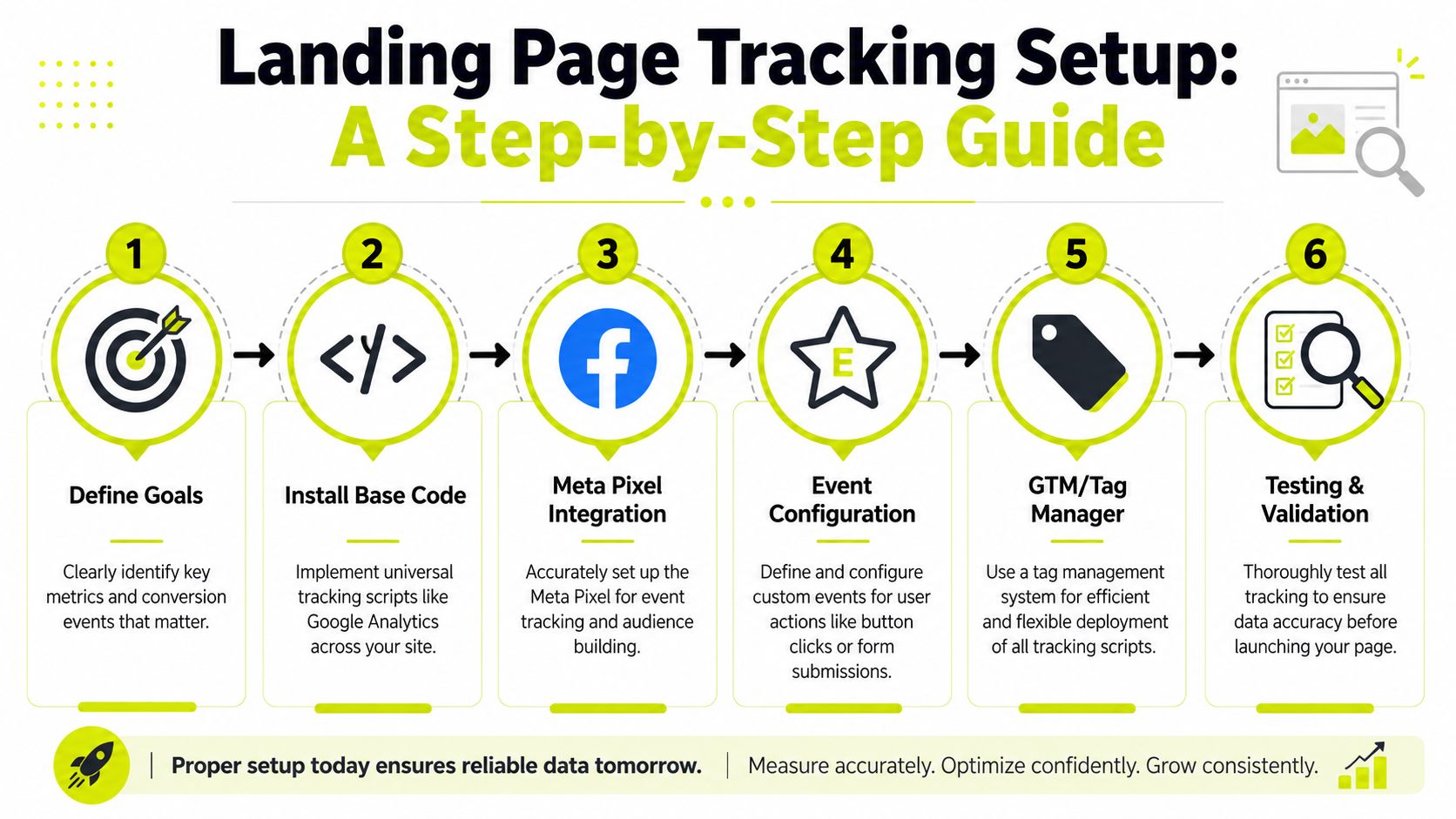
If your tracking is dirty, every optimization decision after that is fake. You'll think a headline lost when the event broke. You'll think one geo underperformed when the redirect stripped parameters. You'll think a TikTok ad account needs a reset when the pixel never saw enough clean conversion signals.
Treat tracking as account infrastructure
For Facebook, the baseline is simple and mandatory. Install Meta Pixel and Conversions API for one specific conversion event, and make sure the page loads fast on mobile without redirects so the pixel fires correctly on both page view and conversion events, as outlined in Perspective's guide to Facebook landing pages.
That single-event discipline matters in multi-account environments. If you run several Facebook ad accounts against similar offers, don't let each setup drift into different event naming, duplicate event stacks, or mixed thank-you flows. Standardize the event map. One lander family should have one logic model. Otherwise you can't compare account quality, creative quality, or geo quality with any confidence.
With TikTok, the same logic applies even if your stack differs. Keep the event path short. Avoid extra hops between click, page load, and conversion state. If you use pre-landers, advertorial flows, or cloaked review paths, validate that the event survives every branch. That includes mobile webviews and in-app browsers, where broken scripts hide for days if nobody checks manually.
What has to be true before launch
Use this pre-launch sequence:
- Lock one primary event. Don't optimize to three different outcomes on the same page family unless you want muddy platform signals.
- Check each browser profile separately. In AdsPower, GoLogin, Multilogin, Dolphin Anty, or Hidemyacc, open the full flow as a fresh user. Farmed accounts often inherit odd storage states and masked bugs.
- Validate by geo. If the page changes country, currency, language, or offer terms, run each variant through the exact proxy and profile combo used in operations.
- Remove avoidable redirects. Redirect chains break attribution and create missed fires, especially on mobile.
- Review DNS and routing behavior when geo logic depends on edge resolution or localized delivery. If your verification setup is inconsistent, understanding proxy DNS behavior helps explain why one operator sees a different version of the same page.
- Test duplicate suppression. Pixel plus server-side events can help, but only if deduplication behaves correctly.
Bad tracking creates fake winners. Teams then scale the wrong creative, pause the wrong account, and keep a broken page alive because the report says it converted.
A lot of account farming setups fail here because operators clone pages and profiles faster than they clone QA. Clean data beats clever dashboards. If you can't trust the event, you can't trust the campaign.
Engineering High-Conversion Page Elements
Most losing landers have the same structural problem. They try to explain too much before asking for action. That kills direct-response traffic, especially from Facebook and TikTok, where the user arrives with weak attention and high skepticism.
The hero has one job
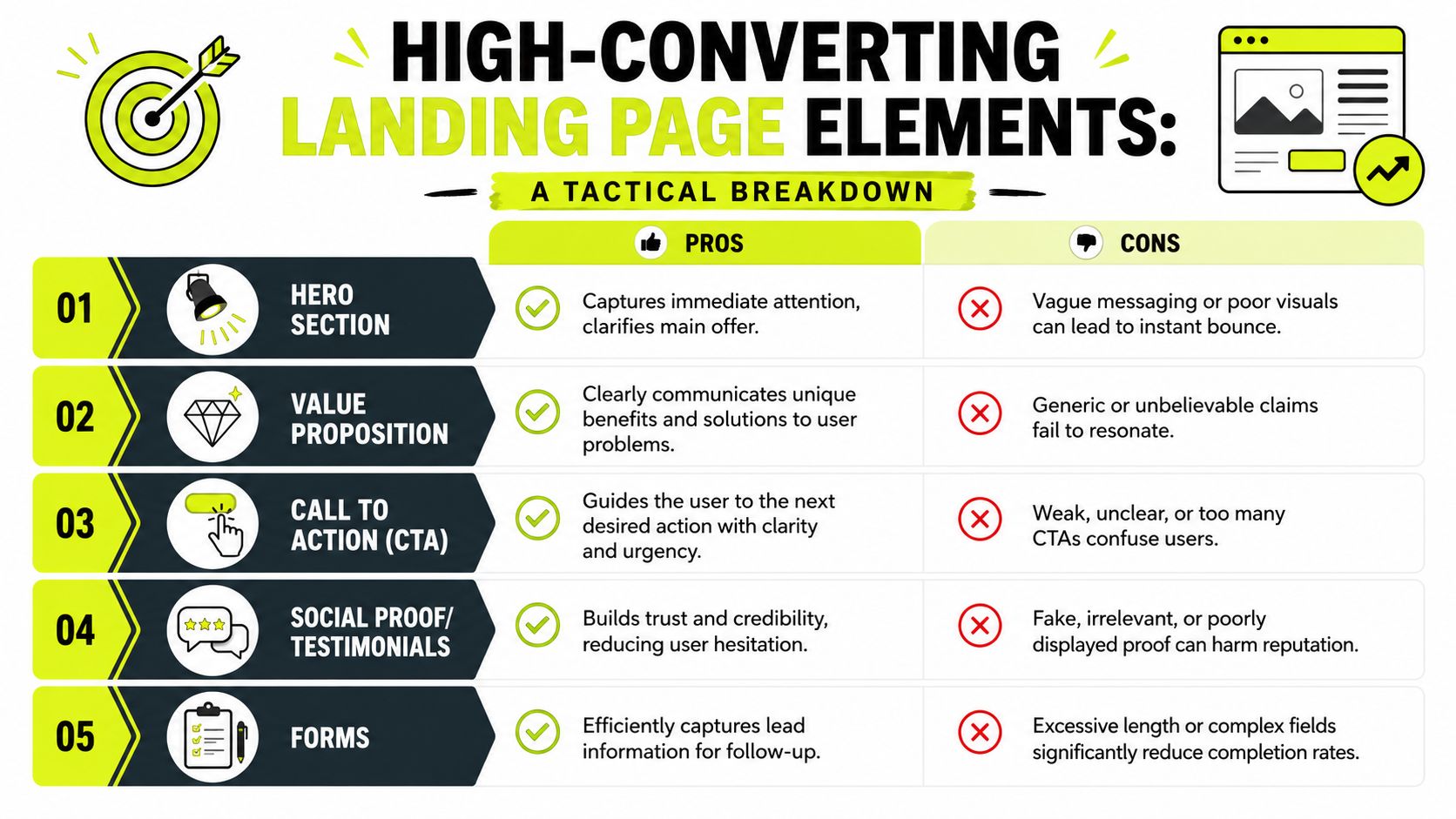
The hero needs to answer three things immediately. What is this. Why should I care. What do I do next.
According to TechnologyAdvice's landing page optimization guidance, the primary form and CTA should sit above the fold in the hero section, the CTA should use high contrast and mobile-friendly sizing, and focused layouts without sidebars or menus can increase conversion rates by up to 160% compared to pop-ups or other tools. For direct-response pages, that checks out operationally. Menus leak intent. Sidebars leak intent. Generic buttons leak intent.
Use specific CTA text. “Get Started” is better than “Submit” because it describes forward movement. In lead gen, “Check Eligibility,” “See Available Offers,” or “Get My Quote” usually beats vague button copy if it matches the ad angle and compliance limits. The point is clarity, not creativity.
A few practical page rules:
- Keep one visual hierarchy. One headline, one supporting line, one CTA path.
- Match the ad language. If the ad promises a comparison, the page should open with a comparison angle, not a generic product intro.
- Kill navigation. Sending paid traffic to a page with a full menu is a self-inflicted leak.
- Use contrast for the CTA. The button should look tappable on a cheap Android screen, not just on your desktop monitor.
Here's a good teardown to watch before rebuilding a weak hero:
Forms, proof, and friction control
Forms need discipline. If the conversion only requires an email, don't ask for a phone number, date of birth, and postal code on step one. For aggressive funnels, split the capture into stages if compliance and flow allow it. The first step should gather only what the follow-up system needs.
Trust signals matter most on pages running hard angles, affiliate pre-sells, or cloaked transitions. Users need quick reasons to believe the page is real enough to continue. That can be testimonials, logos, security badges, a visible company contact path, or plain-language disclaimers that reduce suspicion. Fake-looking proof hurts more than no proof.
The best direct-response landers feel obvious. The user never has to decode what happens next.
That matters even more when you run segmented traffic by intent or audience behavior. A page for broad TikTok cold traffic should read differently from a warmer Facebook retargeting page. If you're refining messaging by segment, consumer behavior analysis for digital campaigns is the right lens. Different users need different proof, not different decoration.
Optimizing for Mobile and Performance
A lot of teams still say a page is “mobile optimized” because the layout shrinks correctly. That's not optimization. That's responsiveness. The two are not the same thing.

Responsive is not enough
Mobile users don't browse your page the way desktop users do. They skim, stall, bounce, reopen, and quit the second the page asks for extra effort. Lucky Orange reports that 60% to 70% of mobile visitors never reach the CTA because the hero section is too tall, and the best fix is to reduce hero height, enlarge tap targets, and cut form fields to only the essentials on the first conversion step, based on their landing page optimization analysis.
That's one of the biggest conversion leaks in TikTok traffic. Media buyers look at the desktop preview, approve the page, and never notice that the actual phone view pushes the CTA below a wall of image, trust badges, and decorative copy. The user clicked with momentum. The page forces a scroll before action. Momentum dies there.
What to cut first
Don't start by adding features. Start by deleting friction.
- Trim the hero height. If the CTA or first action isn't visible fast, the hero is too tall.
- Reduce first-step fields. Mobile users abandon long forms quickly, especially in in-app browsers.
- Enlarge tap targets. Buttons and checkboxes should be easy to hit on smaller screens.
- Delay non-critical assets. Lazy-load below-the-fold images and heavy extras that don't help first action.
- Review mobile-specific exits. Fast exits often come from broken visual hierarchy, not just speed.
You should also test mobile behavior by source, not just by device class. TikTok traffic behaves differently from Facebook traffic. TikTok users often come in colder and faster. Facebook retargeting traffic may tolerate slightly more copy if the message match is strong. Don't reuse the same mobile assumptions for both.
A page can look polished and still lose money because it asks for one extra scroll, one extra field, or one extra second at the wrong moment.
A Practical Framework for A/B Testing
Most A/B testing fails because operators test whatever annoys them visually instead of what blocks conversion. A button shade won't save a page with a weak hook, a buried CTA, or a form that asks for too much too soon.
Start with a friction audit
Apexure's methodology is the right starting point: run a friction audit as a first-time visitor, identify every moment of confusion, then test one variable at a time until you reach significance. Their examples show lifts of 40% to 150% across SaaS, healthcare, and finance, with form length reduction delivering up to 120% as a high-impact intervention in some cases, according to Apexure's landing page optimization examples.
That matters more in arbitrage than in standard brand campaigns because your traffic quality shifts fast. You need tests that isolate page behavior from traffic noise. A friction audit catches the obvious leaks before you waste spend validating them with a formal split test.
Run the audit like an operator, not a designer:
- Enter cold. Open the page in a clean profile with no cookies and no familiarity.
- Follow the ad promise. Ask whether the first screen pays off the click.
- Try to break the form. Bad validation and hidden errors kill conversion unnoticed.
- Check the mobile path manually. Don't trust responsive previews.
- Review each step after submit. Redirects, thank-you pages, and event fires all matter.
Failed tests still pay rent if you document them properly. They tell you what your audience ignored, distrusted, or didn't understand.
Build tests that produce usable data
Test one thing at a time. Headline, CTA text, form length, hero arrangement, proof placement. Not all at once. If you change three variables in one pass, you won't know what caused the lift or drop. That's how teams end up “learning” nothing after spending real money.
A simple priority order works well in scaled accounts:
- Message match first. Headline and subhead.
- Action path second. CTA placement and CTA copy.
- Form friction third. Field count, field order, error handling.
- Proof and objection handling fourth. Testimonials, badges, FAQ snippets.
- Secondary layout choices last. Spacing, imagery, section order.
Document every test, including losers. If one offer converts better with blunt copy than polished copy, save that lesson by geo and by traffic source. The point of landing page optimization isn't to find one perfect page. It's to build a repeatable decision system.
Geo-Targeting Verification and Cloaking
If you run geo-targeted campaigns and never verify the page from the target location, you're guessing. The page might show the wrong language, wrong currency, wrong regulator text, wrong offer availability, or the wrong bridge page entirely. In cloaking setups, that gets even more fragile because the reviewer path and the user path are intentionally different.
Proxy selection for landing page ops
Proxy choice matters in practical terms, not theory. Different proxy types solve different operational problems.
| Proxy Type | Primary Use Case | Pros | Cons |
|---|---|---|---|
| Residential | Verifying local user experience on geo-targeted landers, checking Facebook and TikTok user-facing flows, validating cloaked user paths | Looks like normal consumer traffic, strong for country and city checks, good for ad verification | Usually slower and costlier than datacenter options |
| Mobile | Carrier-specific offer checks, mobile ad flow validation, app-web handoff testing, mobile-heavy cloaking verification | Matches real mobile network conditions better, useful when carrier context affects delivery | Less predictable speed, session control can be trickier |
| Datacenter | Fast QA, repeated page checks, bulk health monitoring across many landers | Fast, stable, efficient for repeated operational checks | Easier for platforms and targets to flag as non-consumer traffic |
| IPv6 | Scale-heavy tasks where targets support it, broad low-cost verification across compatible endpoints | Efficient address space and cost profile for some workflows | Not every target or ad flow handles IPv6 cleanly, weaker fit for some verification tasks |
Residential proxies are the default for most landing page verification because they best emulate what a real buyer in that country sees. Mobile proxies make more sense when the offer, route, or behavior differs by carrier or mobile network context. Datacenter proxies are useful for speed and repetition, but they're not ideal for checking what a real user sees in sensitive ad environments. IPv6 proxies can be efficient for certain supported tasks, but they aren't a universal replacement in paid traffic operations.
For teams checking local ad delivery and offer rendering, ad verification workflows for geo-targeted campaigns should be part of the daily routine, not an afterthought.
Where operators get sloppy
The common failure points are predictable:
- One-country QA for multi-country campaigns. A page that works in one geo can break in another because of localization logic.
- Profile and proxy mismatch. The antidetect browser says one thing, the IP says another, and the page serves the wrong branch.
- Reviewer-path complacency. Teams check the safe version and forget to test the user-facing version through the actual routing logic.
- Datacenter-only validation. Fast, yes. Representative, often no.
Cloaking raises the stakes. If you show one page to platform reviewers and another to paid users, the logic has to be consistent at scale. Clean IP quality matters. So does browser fingerprint consistency inside AdsPower, Dolphin Anty, GoLogin, Multilogin, or Hidemyacc. Sloppy combinations create weird page versions, missing scripts, and mismatched events.
If you manage referrals in this space, proxy infrastructure itself can be a revenue line. Some providers run partner programs, including offers that pay up to 40% commission to affiliates who refer other high-volume users. That's relevant if your network includes other media buyers, scraping teams, or account operators who already need residential, mobile, or datacenter capacity.
Troubleshooting Checklist for Underperforming Landers
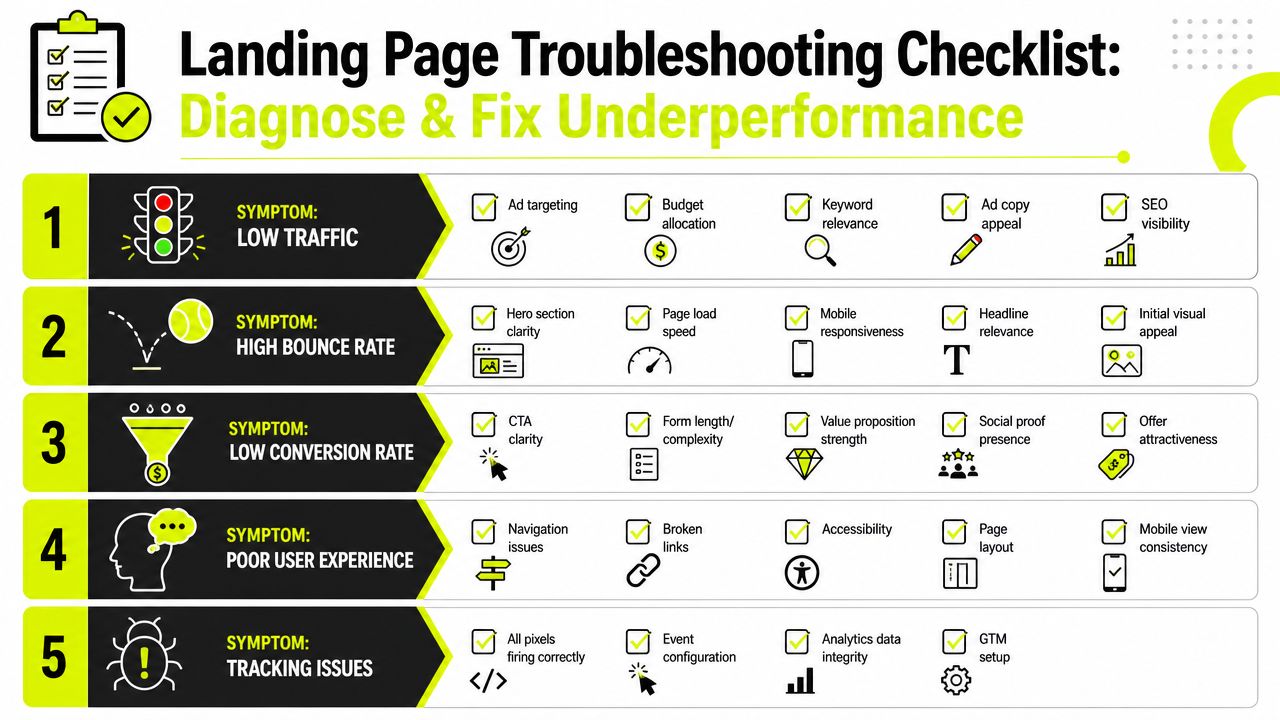
When a page underperforms, don't rewrite everything at once. Diagnose by symptom. The fix for high bounce rate is not the same as the fix for form starts with no submits, and neither has much to do with a page that isn't collecting clean tracking data.
When the page gets clicks but not conversions
Use a direct diagnostic format.
Symptom: High bounce rate
Likely cause: Slow first paint, weak message match, mobile hero overload, or users never seeing the CTA.
Action: Check load behavior on actual devices, compare the ad promise against the hero copy, and remove anything that delays first action.Symptom: CTA clicks but no submit
Likely cause: Form validation errors, broken button actions, hidden required fields, or trust collapse after the first interaction.
Action: Run through the form in a clean profile, trigger invalid states deliberately, and inspect where the flow stops.Symptom: Good engagement, weak qualified output
Likely cause: The page attracts curiosity clicks instead of intent, or the first step is too soft for the traffic source.
Action: Tighten copy, qualify earlier, and align the CTA with the intended next step.
When TikTok and Facebook data stop making sense
TikTok needs a stricter operating rhythm because creative quality and event density shape delivery quickly. Improvado recommends ranking creatives with a 6-second view rate of at least 10%, CTR of at least 1.0%, and CVR of at least 1.5%, then optimizing to Add to Cart for the first 14 days because those events happen 3 to 5 times more often than Purchases, giving the algorithm more signal, according to Improvado's TikTok advertising guide.
That's useful as a triage lens. If TikTok traffic lands and your page CVR is under that threshold, inspect the lander before you blame the creative. If the creative misses those cutoffs too, the issue may start higher in the funnel. You need both views at once.
A short live checklist helps:
- Check event integrity first. If the platform sees incomplete data, every downstream conclusion gets weaker.
- Compare by source, not blended traffic. Facebook and TikTok traffic fail differently.
- Inspect server and page stability. Intermittent failures can look like user behavior problems. If the page throws availability errors, fix that first. Understanding HTTP 503 response failures in web operations is helpful here.
- Review cloaked and uncloaked paths separately. One branch may be healthy while the revenue path is broken.
- Re-test by geo and profile. The issue may exist only in one country, one language path, or one antidetect profile family.
The fastest way to lose money is to make creative decisions on top of a broken page. The fastest way to recover is to isolate the leak and fix only that leak first.
If you run geo-targeted campaigns, account farming setups, cloaked funnels, or multi-account traffic operations, your landing page only performs as well as the infrastructure behind it. Sota Proxy gives operators residential, mobile, ISP, datacenter, and IPv6 proxy options for verification, localization checks, account management, and high-volume testing across demanding environments.
Related articles
An Affiliate Marketing Guide for Arbitrage Teams
A no-fluff affiliate marketing guide for traffic arbitrage and media buyers. Learn to manage ad accounts, use proxies, and scale campaigns on FB & TikTok.

Proxy for Google Ads: The Technical Operator's Guide
A technical guide to using a proxy for Google Ads. Learn to choose IPs, manage sessions in AdsPower/GoLogin, and run multi-account campaigns without detection.

Mastering Consumer Behavior Analysis for Arbitrage
Master consumer behavior analysis for traffic arbitrage & account farming. Learn data collection, proxy workflows, & analysis for Facebook & TikTok.
Proxy Pay as You Go Pricing: Master Costs 2026
Master pay as you go pricing for proxies. Guide for arbitrage & account farmers on billing, cost control, and choosing IPs. Optimize spend.

Secure Your Ads: Avoid a Free Rotating Proxy in 2026
A free rotating proxy poses major risks to Facebook/TikTok ads and antidetect browsers. Understand the security dangers and why paid proxies are essential for

Rotating Datacenter Proxies: A Technical Operator's Guide
A no-fluff guide to rotating datacenter proxies. Master rotation mechanics, configuration, and use cases for ad accounts, scraping, and antidetect browsers.