HTTP 503 Response Code: Fix Server & Proxy Errors
Understand the HTTP 503 response code. Practical guide for traffic arbitrage & automation teams: diagnose & fix server load & proxy issues.
You launch a Facebook or TikTok ad batch through AdsPower or Dolphin Anty. The warmup flow looks clean. Cookies stick. Proxies authenticate. Then requests start failing across the board with 503 Service Unavailable.
That's the kind of breakage that kills momentum for account farming, cloaking checks, geo-targeted campaigns, and scraper jobs at the same time. It's worse when the target still loads in a normal browser, because now you're stuck asking the critical question: is the platform down, is your own landing stack choking, or did your proxy layer just become the bottleneck?
Most guides stop at “the server is overloaded.” That's not enough for multi-account operators running GoLogin, Multilogin, Hidemyacc, or custom automation against ad platforms and review flows. In practice, 503s often sit at the boundary between origin capacity, CDN behavior, anti-bot controls, and bad proxy rotation. If you don't separate those layers fast, you'll waste hours scaling the wrong thing or swapping healthy infrastructure for no reason.
Table of Contents
- Why the 503 Error Stops Your Automation Cold
- What a 503 Error Actually Means
- Diagnosing the True Source of 503 Errors
- Hardening Your Infrastructure Against 503s
- Client-Side Strategies to Handle 503s Gracefully
- Advanced Proxy Tactics to Evade 503 Triggers
- Building a Resilient Automation Stack
Why the 503 Error Stops Your Automation Cold
A 503 usually shows up at the worst time. You've got Facebook ad accounts ready, TikTok creatives split by GEO, antidetect browser profiles mapped one-to-one with proxies, and a cloaking rule set that passed earlier checks. Then a single wave of 503s starts cascading through the whole operation.
On a media buying team, that means failed prelanders, broken review checks, and delayed campaign launches. On an account farming setup, it means profile actions stop midway and consistency goes out the window. On scraping or ad verification jobs, it means your collector can't tell whether the target is unstable or whether your own request pattern caused the failure.
The expensive mistake is treating every 503 as the same event.
Sometimes the target really is overloaded or under maintenance. Sometimes your own cloaking host or WordPress funnel can't absorb a burst. Sometimes the proxy tier is rate-limiting, dropping upstream connections, or rotating so aggressively that the target interprets your traffic as hostile. That last category gets missed all the time, especially in stacks that combine headless scripts, antidetect browsers, and rotating pools.
Practical rule: If the same endpoint works from a clean browser session but fails through your automation path, don't start by scaling servers. First isolate identity, proxy, and request-shaping differences.
That's why teams running bulk operations need a diagnostic workflow, not a guess. The fastest way to stop burning spend is to test the target, origin, and proxy layers separately, then compare behavior under the exact workload pattern you're sending. If your operation includes parsing or collection tasks, a dedicated web scraping workflow also helps expose whether the failures track with request concurrency, GEO mix, or IP reputation instead of pure application bugs.
What a 503 Error Actually Means
The HTTP 503 Service Unavailable status code has been around for a long time. It was formally defined in 1999 with RFC 2616, which standardized HTTP/1.1 and positioned 503 as a server error used when the server is temporarily unable to handle the request, typically because of overload or scheduled maintenance, as documented in MDN's 503 status reference.
Temporary refusal, not permanent failure
The key word is temporary.
A 503 means the service is reachable enough to answer, but it isn't willing or able to process the request right now. That's different from a broken application path, a dead upstream chain, or a timeout at a gateway waiting for something else.
For automation teams, that distinction changes the response:
- If it's a 503, immediate blind retries often make the situation worse.
- If it's a 500, you may be hitting an application fault.
- If it's a 502 or 504, the failure may sit in a proxy, load balancer, or upstream dependency path.
That's why reading the exact status matters when you're managing account actions in GoLogin, farming flows in Multilogin, or review simulations for cloaking pages. A 503 often means “back off and inspect pressure.” It usually doesn't mean “ship a code patch right now.”
5xx Server Error Quick Reference
| Status Code | Name | What It Means For You |
|---|---|---|
| 500 | Internal Server Error | The application or server broke in a generic way. Check app errors, recent deploys, and exception paths. |
| 502 | Bad Gateway | A proxy or gateway got a bad response from upstream. Check reverse proxies, load balancers, and upstream health. |
| 503 | Service Unavailable | The service is temporarily refusing traffic, often because of overload or maintenance. Slow down, retry carefully, and inspect capacity or throttling signals. |
| 504 | Gateway Timeout | A proxy or gateway waited too long for upstream. Check slow backends, connection pools, and timeout settings. |
A 503 says the door is there, but the service behind it can't take your request right now.
For practitioners, that usually means two immediate checks. First, verify whether the same failure appears across multiple identities and network paths. Second, look at whether the failure is tied to bursts, rotation events, or a specific stage in the flow such as login, creative upload, or landing-page fetch.
If you skip that and just restart everything, you'll blur the signal you need.
Diagnosing the True Source of 503 Errors
A common error occurs when a 503 is seen, leading directly to the assumption of “origin overloaded.” In automation stacks, that's only one possible cause.
Start with evidence from your own stack
Begin with logs and resource pressure. On Apache, Nginx, and PHP stacks, patterns like reached pm.max_children, upstream timed out, and no live upstreams are practical signals that you've hit worker exhaustion or lost a backend, as outlined in ClickMinded's 503 troubleshooting guide.
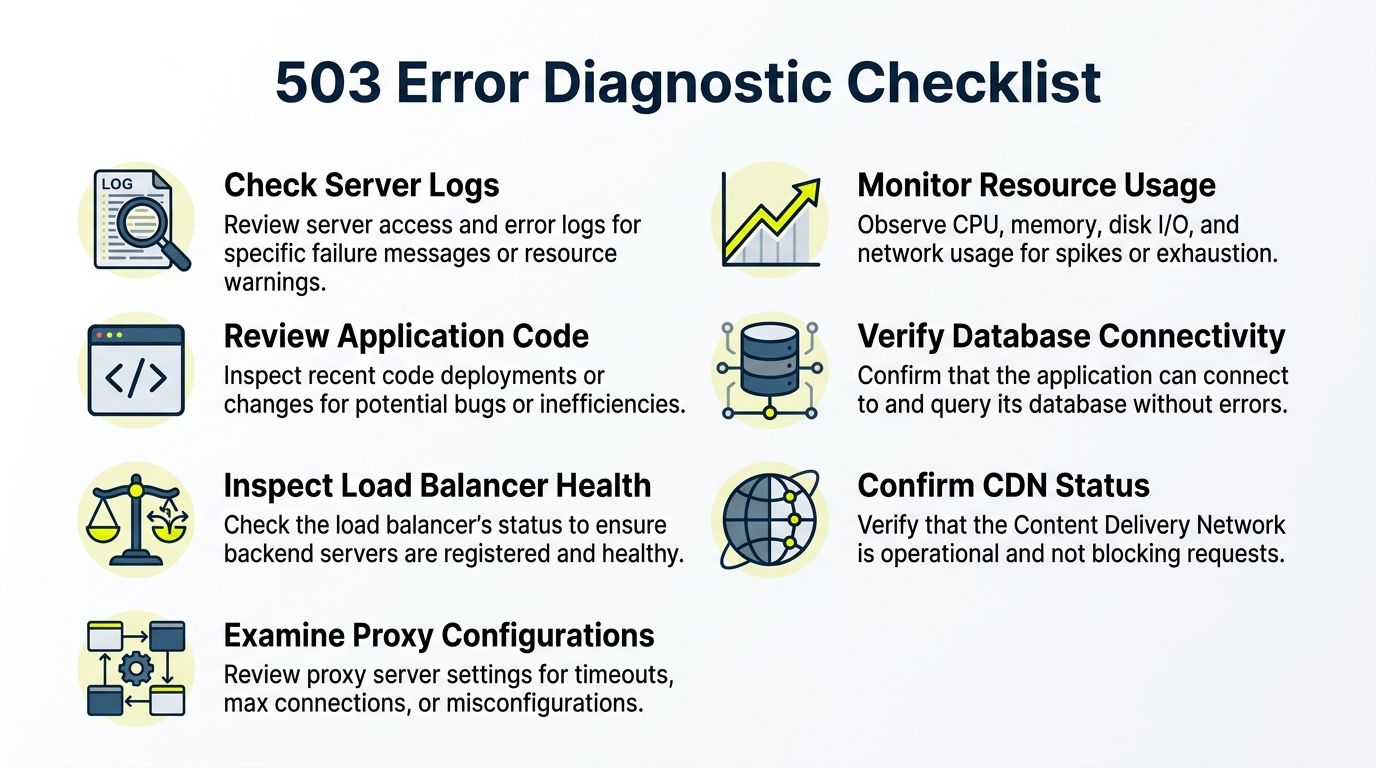
Use a short checklist before you touch anything:
- Read error logs first: Don't guess from browser output. Check web server logs, app logs, and proxy logs in the same time window.
- Check worker saturation: If PHP-FPM children are exhausted, request queues back up fast and 503s spread to otherwise healthy routes.
- Look for dead upstreams:
no live upstreamsusually means the reverse proxy lost healthy backends, not that the whole application vanished. - Compare endpoint behavior: If static assets serve but login or redirect handlers fail, the bottleneck may sit in app workers or database access.
- Map failures to deploys or cron jobs: Maintenance windows, imports, and feed syncs often create predictable 503 spikes.
A lot of arbitrage funnels fail here because operators overpack WordPress with plugins, trackers, redirect logic, and cloaking checks. The page may render under manual testing but collapse under simultaneous bot and reviewer traffic.
Then isolate the proxy layer
Now test the same target through different paths.
If Facebook business endpoints, TikTok upload flows, or landing-page checks fail only through one proxy subnet or one rotation policy, you're not looking at a universal outage. You're looking at a traffic-shaping problem. That can mean upstream throttling in your proxy network, a burned IP range, or request concurrency that looks synthetic enough to trigger protective behavior.
This matters for AdsPower, Dolphin Anty, GoLogin, Multilogin, and Hidemyacc users because the browser fingerprint may stay stable while the network signature changes underneath. The profile looks normal. The IP behavior doesn't.
For teams debugging these boundary issues, it helps to understand how proxy servers and firewalls interact, especially when retries, connection reuse, and filtering rules stack on top of each other.
A quick visual helps when the team is troubleshooting under pressure.
A fast decision tree for operators
Use this in live operations:
- Test from a clean non-automation path. If the target fails there too, the issue is broader.
- Test the same request through a second proxy group. If the failure disappears, your first pool is the suspect.
- Run the request at lower concurrency. If 503s fade, you're likely hitting capacity or throttling thresholds.
- Check whether all GEOs fail equally. Geo-targeted campaigns often break unevenly because edge paths and local filtering differ.
- Inspect your own upstream chain. Cloaking redirects, anti-bot middleware, app workers, and databases can each be the narrowest point.
Don't ask “is the site down?” Ask “which layer refuses this request under this traffic shape?”
That question gets you to the fix much faster.
Hardening Your Infrastructure Against 503s
If you control the origin, stop treating 503s as a random event. They usually expose an engineering choice you haven't hardened yet.
Common server-side causes include traffic spikes, scheduled maintenance, faulty plugins, and bad server settings. WordPress-based funnels are especially vulnerable when heavy plugin usage drains resources, as described in Network Solutions' overview of HTTP 503 causes.
Fix the obvious choke points first
Start with the parts most likely to fail under burst traffic:
- Application workers: If worker pools are too small, queues form before CPU even looks stressed.
- Reverse proxy limits: Bad keepalive, buffer, or upstream settings can make a healthy backend look unavailable.
- Plugin-heavy funnels: Cloaking logic, trackers, page builders, and extra hooks add latency and memory pressure.
- Database dependencies: Slow queries often surface as application stalls, then Nginx or Apache throws 503s upstream.
A lot of operators waste time tuning front-end behavior while leaving a weak origin untouched. That doesn't work. If your cloaked landing stack can't survive a burst from campaign approval checks plus live traffic plus your own monitoring bots, it isn't production-ready.
Build for bursts, not average load
Your infrastructure has to absorb uneven traffic. That means planning for sudden pressure from campaign launches, bot retries, QA passes, and checker traffic arriving close together.
Use load balancers when one box is doing too much. Spread work across multiple app instances. Add autoscaling rules if you're on cloud infrastructure. Keep maintenance windows isolated from launch windows. If you build your own proxy or relay layer for internal routing, this guide on how to make a proxy server is useful for understanding where connection handling and misconfiguration can introduce fresh 503 failure points.
Field note: Most “mystery 503” incidents on owned infrastructure turn out to be predictable saturation mixed with weak observability.
Also keep your stack simple. If a plugin, middleware hook, or redirect layer doesn't produce clear operational value, remove it. Every extra moving part is another place where worker time and memory disappear.
Client-Side Strategies to Handle 503s Gracefully
Even with a clean server and good proxies, some 503s will still happen. Your client has to behave like an adult when they do.
AWS CloudFront notes that a 503 usually points to origin overload, maintenance, or resource exhaustion, but in rare cases it can also come from resource constraints at an edge location, which is why smart retry behavior matters on the client side, as explained in the CloudFront 503 documentation.
Retry logic that doesn't make things worse
The worst response to a 503 is instant hammering.
If your script retries immediately at full concurrency, you're feeding the exact condition that caused the refusal. This is common in account farming tools and ad-checking scripts that assume every failure is transient and cheap to retry.
Use exponential backoff. Start with a short delay. Increase the wait after each repeated 503. Add jitter so your workers don't retry in a synchronized wave. Cap the retry count so stalled jobs don't loop forever.
A practical implementation pattern:
- First failure: Pause briefly and mark the target as degraded.
- Repeated failure: Increase delay and reduce concurrency for that route or identity.
- Persistent failure: Stop the task and requeue it later instead of forcing it through.
If you build crawlers or verification bots, the same logic belongs in your collectors from day one. This is especially true for teams doing Python web crawling against targets that mix CDNs, bot defense, and inconsistent upstream health.
Use a circuit breaker when a service starts flapping
A circuit breaker is a simple idea. When a service keeps failing, your client stops sending traffic to it for a cooldown period.
That protects your resources and gives the target time to recover. It also keeps one noisy dependency from cascading into every account, queue, or worker process you own.
Use it when:
- A target starts returning clustered 503s: Don't let every worker discover the same failure independently.
- One GEO path degrades: Open the breaker only for that route, not for the whole system.
- One proxy group turns toxic: Suspend the pool and shift work elsewhere.
Backoff handles isolated failures. A circuit breaker handles repeated instability.
For ad operations, this matters because one broken endpoint shouldn't freeze all Facebook or TikTok workflows. Segment by platform, GEO, task type, and proxy group so one failure domain doesn't contaminate everything else.
Advanced Proxy Tactics to Evade 503 Triggers
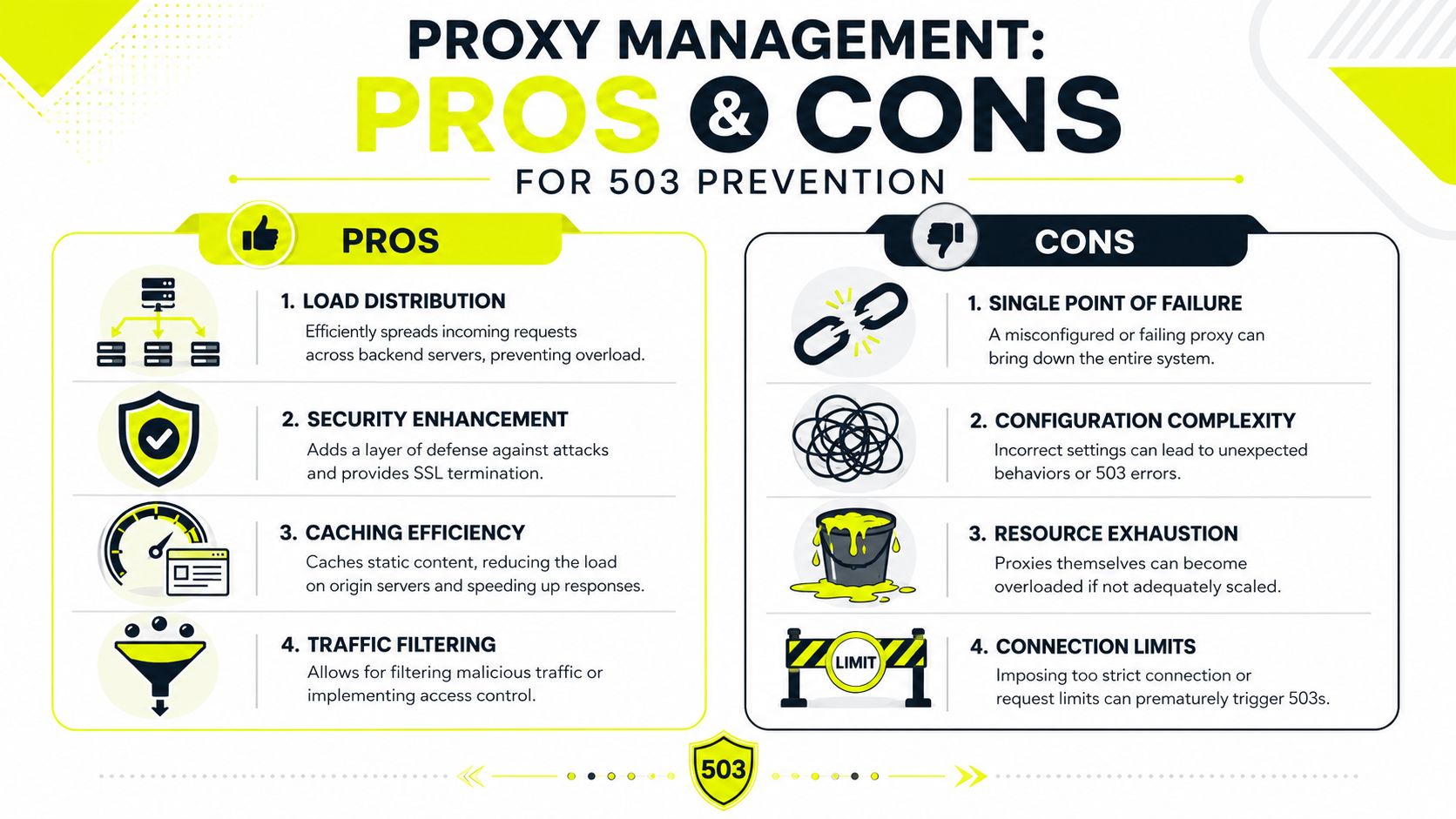
Most standard 503 guides typically fall short. They talk about origin overload and stop there. In real automation, proxies can create, amplify, or hide the failure.
Existing technical guidance often overlooks how proxy-driven request bursts distort diagnostics and make it hard to separate real unavailability from throttling behavior in automated workloads, as noted by HTTP.dev's discussion of 503 handling.
Not all proxy types fail the same way
Proxy choice directly affects how often you trigger 503-like refusal patterns.
Datacenter proxies are fast and cheap. They're good for throughput-heavy tasks where target trust requirements are low. They also get flagged faster on sensitive platforms because their network patterns are easier to classify. For raw scraping against tolerant targets, they're fine. For Facebook ad accounts, TikTok review flows, or cloaking checks, they're often the first to burn.
Residential proxies look closer to normal user traffic because requests come through consumer networks. They usually fit account operations, ad verification, and geo-targeted checks better than shared datacenter pools. They cost more, but they reduce friction where trust matters.
Mobile proxies are the safest option for the most sensitive account actions. They inherit the behavioral trust of carrier networks and often survive stricter anti-bot scrutiny. They also introduce their own trade-offs, including less predictable throughput and more careful session handling needs.
IPv6 proxies can be useful when the target supports IPv6 well and you need broad address availability. They're not a universal upgrade. Some targets still treat IPv6 traffic differently, and some third-party systems in your chain don't handle it cleanly. Test them per workload, not by assumption.
Rotation strategy matters more than raw pool size
Operators love large pools. Large pools don't save bad traffic shaping.
If you rotate on every request while performing a login, checkout, ad account edit, or warm session flow, you destroy continuity. That can trigger rate controls, identity mismatches, and synthetic traffic patterns. On the other hand, if you hold one sticky IP too long across aggressive concurrent actions, you can overload that path and invite its own throttling response.
Use rotation based on task type:
- Sticky sessions for account work: Best for Facebook and TikTok account sessions, AdsPower profiles, and Multilogin environments where continuity matters.
- Timed rotation for scraping batches: Better for collection jobs that need spread without changing identity every request.
- Controlled pool partitioning by GEO: Keep traffic for each country or city within a matching proxy segment so geo-targeted campaigns don't drift.
If you're tuning this layer, proxy IP rotation strategies are one of the first things to revisit when 503s appear in bursts.
Match proxy behavior to the workload
Don't run all jobs through one universal policy.
Account farming needs stable sessions, low noise, and network consistency that matches the antidetect profile. Cloaking checks need clean GEO alignment and repeatable reviewer simulation. Scrapers need concurrency controls tied to domain reputation and route stability. Ad verification needs location accuracy more than raw request speed.
That means splitting your proxy logic by job class, not just by target.
A practical mapping looks like this:
| Workload | Proxy behavior that usually fits | What often causes 503 trouble |
|---|---|---|
| Facebook or TikTok ad account actions | Sticky residential or mobile sessions | Per-request rotation during authenticated flows |
| Account farming in AdsPower, GoLogin, Multilogin, Dolphin Anty, Hidemyacc | Stable session-to-profile mapping | Reusing noisy subnets across many profiles |
| Cloaking and GEO checks | Clean residential IPs that match location intent | GEO mismatch, overloaded relay nodes, and retry storms |
| Large scraping batches | Controlled rotation with concurrency caps | Shared pool bursts that look like abuse |
Cheap proxy throughput can be expensive if it turns ordinary traffic into a 503 factory.
Building a Resilient Automation Stack
A reliable stack doesn't try to eliminate every 503. It assumes some will happen and keeps operating anyway.
Treat 503 handling as architecture
The durable model has three layers.
First, the client layer needs backoff, circuit breakers, task queues, and concurrency controls. That stops one unstable service from dragging the whole operation down.
Second, the network layer needs proxy policies tied to the actual workload. Use stable sessions for account actions in AdsPower, Dolphin Anty, GoLogin, Multilogin, and Hidemyacc. Use controlled rotation for scrapers. Keep Facebook and TikTok ad accounts aligned with the right GEO and session behavior. Don't let account farming, cloaking, and collection jobs share the same noisy pool by default.
Third, the origin layer has to survive bursts if you host your own prelanders, redirectors, or cloaked pages. Remove weak plugins, watch worker limits, and scale the parts that saturate.
When teams get this right, 503s stop being a mystery. They become another signal in the system. One that tells you whether to slow the client, replace a proxy segment, or fix your own infrastructure.
If you also recommend infrastructure to other operators, there's a business angle too. Some proxy providers run referral programs that pay recurring commission. Sota Proxy, for example, offers an affiliate program with up to 40% commission, which can make sense for teams that already standardize tools across client accounts or internal buying groups.
If your stack depends on clean GEO targeting, stable sessions, and predictable proxy behavior for scraping, ad verification, account management, or cloaking, Sota Proxy is built for that kind of workload. It supports residential, mobile, ISP, datacenter, and IPv6 options, plus rotation and sticky-session control, so you can shape traffic around the job instead of forcing every workflow through one brittle proxy policy.
Related articles
Resource Limit Is Reached: Fixes for Proxies, Servers, And
Learn how to fix resource limit is reached errors on proxies, servers, and APIs with practical solutions for 2026.

Geographic Distribution for Proxy Infrastructure
Master geographic distribution for proxy infrastructure. Learn how to choose locations, proxy types, and routing strategies for ad verification, scraping
What Is Sticky Session: A Technical Guide for Proxy Users
Learn what is sticky session, how session affinity works in load balancers and proxies, and when to use it for multi-accounting, scraping, and ad campaigns.
How to Avoid CAPTCHA on Automated Workflows
Learn how to avoid CAPTCHA on automated workflows with proxy tactics, antidetect browsers, request pacing, and solver fallbacks built for real operators.
AdsPower Proxy Integration: The Complete Setup Guide
Step-by-step AdsPower proxy integration with SotaProxy. Covers setup, proxy types, rotation, troubleshooting, and best practices for multi-account workflows.
7 Top Proxy Providers for Arbitrage and Scraping
Compare 7 top proxy providers by IP types, targeting, rotation, uptime, pricing signals, and fit for scraping, ad accounts, farming, and arbitrage.