Proxy High Anonymity: Elite Setup for 2026 Success
Proxy high anonymity - Master high anonymity proxies for media buyers & operators. Learn how elite proxies evade detection for account farming, ad verification

You launch a new batch of Facebook ad accounts. Profiles are warmed. Cookies look stable. Creatives passed review in one geo and failed in another, so you spin up fresh browser profiles in AdsPower and Dolphin Anty, assign proxies, and push traffic.
By morning, half the accounts are restricted, TikTok logins trigger checkpoints, and your cloaking flow starts returning inconsistent review paths. Many attribute this to the browser, the offer, or the farm. A lot of the time, the weak point is simpler. The proxy didn't just fail to hide you. It exposed a pattern the platform could score fast.
That's why proxy high anonymity matters. Not as a buzzword, but as the minimum starting layer for account farming, geo-targeted campaigns, ad verification, and automation that needs to survive contact with real detection systems.
Table of Contents
- Why Your Proxy Strategy Is Failing
- The Technical Definition of High Anonymity
- Matching Proxy Type to Trust Signals
- Beyond IP Anonymity Advanced Detection Vectors
- Use Case Blueprints Configuration for Real World Ops
- A Vetting Checklist for High Anonymity Proxy Providers
- Mastering Session Control Rotation vs Sticky IPs
Why Your Proxy Strategy Is Failing
Most failed setups don't die because the team lacks tools. They die because the stack is inconsistent.
A common pattern looks like this. The operator uses GoLogin or Multilogin correctly, loads unique cookies, spaces out actions, and still gets hit with account verification loops on Facebook or trust drops on TikTok. Then they inspect the proxy layer and realize they used a cheap endpoint that either screamed “proxy” in headers or came from an IP range with the wrong reputation for the task.
That difference matters more now than it used to. A login flow, ad account review, or farmed profile doesn't just see an IP. It sees whether the session behaves like a believable user from a believable network with believable continuity.
The real failure point
Basic proxies are fine for throwaway tasks. They're weak for anything tied to money, approvals, or long-lived sessions.
If you're running any of these, weak anonymity burns you fast:
- Facebook and TikTok ad accounts: One bad proxy can contaminate the trust profile of an otherwise solid browser identity.
- Account farming: Reused or noisy IPs create account clusters that platforms can link.
- Cloaking checks: Review and live-user paths break when geo, browser, and IP signals don't line up.
- Antidetect browsers: AdsPower, Dolphin Anty, GoLogin, Multilogin, and Hidemyacc only help if the network layer supports the identity they present.
Practical rule: If the proxy leaks proxy use, the rest of your stealth stack starts from a losing position.
What actually works
Serious operations start with high-anonymity proxies and then filter by use case. For account work, that usually means a trusted IP class and stable sessions. For scraping, it means rotation with clean pools. For geo campaigns, it means location accuracy plus session consistency.
Teams that stay alive the longest don't ask, “Is this proxy hidden?” They ask, “Does this proxy fit the trust model of the platform I'm touching?”
The Technical Definition of High Anonymity
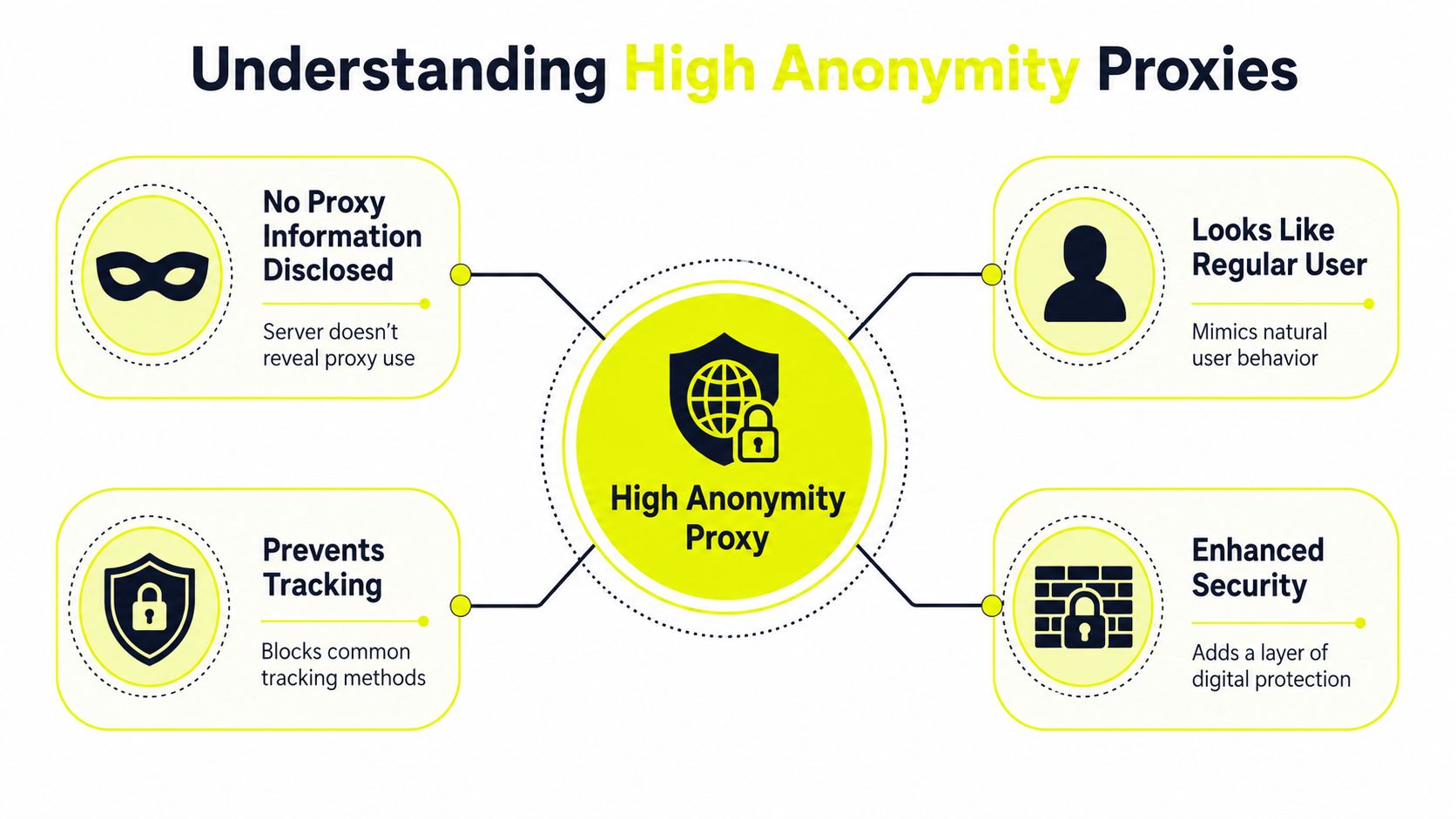
High-anonymity proxies, also called elite proxies, hide the user's original IP address and don't reveal that a proxy is being used, so the request appears to the target like a direct connection. That's the highest anonymity tier, above anonymous proxies and transparent proxies, as described in this explanation of proxy anonymity levels.
What elite actually means on the wire
Forget marketing labels. What matters is what the target receives.
Here's the practical split:
| Proxy tier | Original IP hidden | Proxy usage disclosed | Good for sensitive account work |
|---|---|---|---|
| Transparent | No | Yes | No |
| Anonymous | Yes | Yes | Usually no |
| High anonymity or elite | Yes | No | Yes, as a starting point |
If you want a broader breakdown of categories, this proxy type guide is a useful reference point.
A high-anonymity proxy is defined by two behaviors: it masks the client's original IP and does not disclose that a proxy is in use, so the destination doesn't receive identifying headers that tie the request back to the user. That matters because many anti-bot and fraud systems score requests by combining network identity with header consistency, as explained in this technical overview of high-anonymity proxies.
Why header leaks ruin everything
Here, many operators get tricked. They see the external IP changed and assume the job is done.
It isn't.
If the proxy leaks headers such as X-Forwarded-For, the target can still infer the chain behind the request. That defeats the point of paying for anonymity in the first place. For Facebook account creation, TikTok warmup, or browser-based cloaking checks, that kind of leak creates avoidable signals.
Check these points before you trust any endpoint:
- Header hygiene: The proxy shouldn't expose original-IP metadata.
- Consistency: The browser, user-agent, language, timezone, and IP locale should agree.
- Protocol support: Your tool stack should use the proxy in a way that doesn't inject extra signals through bad configuration.
Elite doesn't mean invisible. It means the proxy itself isn't volunteering evidence.
That's the right way to think about proxy high anonymity. It removes one major class of leaks. It doesn't solve trust, fingerprints, or behavior by itself.
Matching Proxy Type to Trust Signals
High anonymity solves concealment. It doesn't solve acceptance.
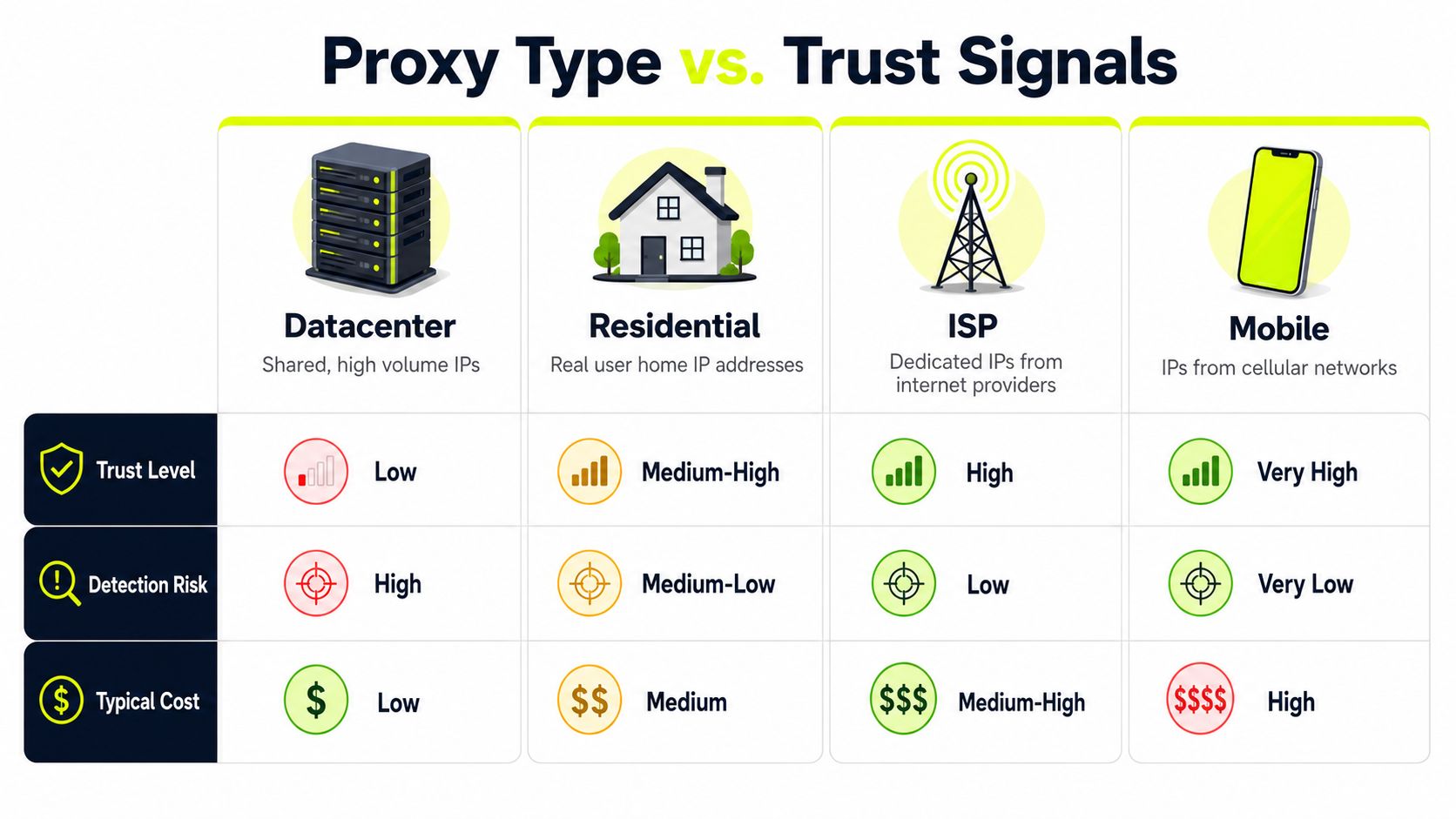
A hidden datacenter IP and a clean residential IP can both be technically elite, but platforms won't treat them the same. Current anti-fraud systems increasingly care about network reputation and behavioral consistency rather than anonymity alone, and residential and mobile IPs are often treated as more trustworthy than generic proxy IPs, as outlined in this discussion of anonymous proxy trust tradeoffs.
Anonymity is not the same as trust
This is the mistake behind a lot of failed media buying setups.
A datacenter proxy can be high-anonymity in the strict sense. It can still get challenged more often because the IP class itself doesn't fit what the platform expects from a normal account user. For ad accounts, payment flows, aged social profiles, and farmed identities, trust usually matters more than raw speed.
If you want a more direct head-to-head breakdown, this residential vs datacenter proxy comparison is worth reviewing.
Practical comparison by use case
Here's how I'd map the four common proxy types in real operations.
Datacenter proxies
Fast. Cheap. Easy to scale. Also the first type many platforms distrust in bulk. Good for low-sensitivity scraping, rough testing, and disposable tasks. Weak fit for Facebook ad accounts, TikTok login longevity, or account farming that needs stable trust.Residential proxies
Better for looking like ordinary home-user traffic. Strong fit for geo-targeted campaign checks, ad verification, and social account operations inside AdsPower, GoLogin, and Hidemyacc. They usually beat datacenter IPs when the platform scores authenticity.ISP proxies
These sit in a useful middle ground. You get server-hosted stability with an IP class that often feels more acceptable than generic datacenter space. Good fit when you need longer sessions and less volatility.Mobile proxies
Best reserved for harder surfaces. Mobile app flows, mobile-heavy fraud filters, and account operations where carrier traffic looks more natural than fixed-line traffic. Slower and costlier in practice, but often the right answer for difficult approval environments.
A simple decision table helps:
| Task | Best starting point | Why |
|---|---|---|
| Facebook account warmup | Residential or mobile | Better trust fit for consumer platforms |
| TikTok ad account access | Residential or mobile | Stronger acceptance than generic server IPs |
| Large scraping jobs | Rotating residential or datacenter | Depends on target sensitivity |
| Geo ad verification | Residential with location targeting | Better local realism |
| Fast bulk testing | Datacenter | Speed matters more than trust |
The cleanest setup usually wins by matching the IP class to the platform's expectations, not by chasing the most “hidden” label.
IPv6 also needs a reality check. It can be useful where the target accepts it cleanly and where volume matters, but many account operations still need broader compatibility and more predictable trust behavior. Don't choose IPv6 just because the inventory is large. Choose it when the target stack handles it reliably.
Beyond IP Anonymity Advanced Detection Vectors
A high-anonymity proxy can still fail in a clean browser profile if the rest of the fingerprint stack looks wrong.
That's the operational reality many teams learn the hard way. They swap in a better proxy, keep the same sloppy browser setup, and expect bans to disappear.

Modern anti-bot systems look beyond the proxy layer. Elite proxies work best when paired with realistic request timing, user-agent rotation, and session strategy, and no IP is completely undetectable because behavior and fingerprints are also evaluated. Sites can still flag “anonymous proxy detected” even when the proxy is technically elite, especially if the IP reputation is poor or the browser fingerprint is inconsistent, as described in this breakdown of proxy anonymity limits.
Your browser can betray a clean IP
Antidetect browsers earn their place here.
AdsPower, Dolphin Anty, GoLogin, Multilogin, and Hidemyacc help isolate browser identities. They control things like user-agent, canvas behavior, WebGL exposure, fonts, language, timezone, and storage separation. Without that layer, one clean residential proxy can still sit behind a browser that looks copied, synthetic, or mismatched.
The usual failure patterns are boring but common:
- Locale mismatch: US proxy, Eastern Europe timezone, random browser language.
- Profile reuse: Same browser fingerprint logic across multiple Facebook or TikTok accounts.
- Session breaks: Logging in from one IP, then refreshing flows from another without a reason.
- DNS inconsistency: Browser traffic and lookup behavior don't align. If you're troubleshooting that side, this guide on proxy DNS behavior helps frame the issue.
Behavior and network consistency still matter
Fingerprints don't stop at the browser. Detection stacks also score connection patterns and user behavior.
That includes things like request rhythm, navigation depth, login repetition, and whether the account behaves like a person or a worker script. If you farm accounts or automate review flows, bursty actions create patterns no proxy can hide.
Here's a useful mental model:
- Proxy layer hides source and should avoid disclosure.
- IP class affects trust.
- Browser fingerprint needs to match the device story.
- Behavior needs to match the account story.
For a practical walkthrough on how these layers fit into stealth browsing, this video is a solid companion:
A residential proxy won't rescue a browser profile that looks machine-made, and a polished browser profile won't rescue a bad IP with ugly reputation.
That's why proxy high anonymity should be treated as one layer in a chain, not the whole chain.
Use Case Blueprints Configuration for Real World Ops
The right setup depends on the job. The mistake is using one proxy policy for everything.
For account operators, session continuity matters. For scrapers, distribution matters. For cloaking and ad verification, geo precision matters. If you're running social workflows at scale, this social media automation use case page is a relevant companion to the setups below.
Facebook and TikTok account operations
For Facebook ad accounts, TikTok Business access, and account farming, use sticky residential or mobile proxies with one browser profile per account in AdsPower, Dolphin Anty, GoLogin, Multilogin, or Hidemyacc.
Keep the stack consistent:
- One account, one profile, one proxy identity
- Match timezone and language to proxy geo
- Don't rotate mid-session
- Keep cookie reuse deliberate, not accidental
If an account is meant to look like a local consumer profile, a residential IP usually fits better than datacenter. If the platform is particularly aggressive or the workflow is app-adjacent, mobile can be the better choice.
A practical account setup often looks like this:
- Create a fresh antidetect browser profile.
- Assign a sticky proxy from the target country or city.
- Set browser language, timezone, and WebRTC handling to match the proxy region.
- Warm the profile with normal browsing before touching ad surfaces.
- Keep future logins on the same identity path unless you have a reason to migrate.
Scraping and monitoring stacks
Scraping is a different sport.
For price monitoring, SERP collection, store checks, and competitor research, rotating proxies are usually the right call. Residential rotation works better when the target has stronger filtering. Datacenter can still work for broad collection where speed matters more than trust.
Use this blueprint:
- Choose rotation for stateless requests
- Throttle request patterns to avoid synthetic bursts
- Segment pools by target
- Separate login-required tasks from crawl tasks
Don't run authenticated account actions through the same policy you use for scrape bursts. That's where operators create self-inflicted noise.
If the request doesn't need memory, rotate it. If the task depends on cookies and identity continuity, keep it sticky.
Cloaking and geo-targeted campaign checks
At this point, operators often get sloppy.
If you're checking cloaked paths, local landing experiences, or ad delivery by location, your proxy should match the review context you want to simulate. A city-targeted residential IP is usually a stronger fit than a generic national endpoint. Browser locale should also align, or the test stops being trustworthy.
For geo-targeted campaigns:
- Use residential proxies in the same city or region as the intended audience
- Open each check in a browser profile that matches the locale
- Don't mix reviewer-path checks with production account management sessions
- Log outcomes by geo so you can spot location-specific failures
If you're checking a Facebook prelander from one city and a TikTok ad path from another, isolate both environments. Don't hop geos inside the same working profile and expect clean signals.
A Vetting Checklist for High Anonymity Proxy Providers
A provider can sell "high anonymity" proxies and still get your accounts challenged, your ad checks misread, or your browser sessions burned. The problem usually is not the label. It is whether the provider gives you the right IP type, enough control over sessions, and clean enough infrastructure for the task you are running.
I vet proxy vendors the same way I vet any traffic input. Run a small live test, push the exact workflow you care about, and look for failure patterns before you scale spend or attach real accounts.
What to test before you buy volume
Start with the question that matters operationally. What will these proxies do for you? A pool that passes a proxy checker can still fail in Facebook Ads, fail inside an antidetect browser, or fail on local ad verification if the ASN, IP type, or geo precision is wrong.
Use this checklist:
- IP type fit: Match the pool to the task. Residential or mobile usually fits account work and ad review better than datacenter.
- Header cleanliness: Confirm the proxy does not add forwarding headers or other obvious infrastructure tells.
- Session control: You need both rotation and sticky options so you can match the proxy policy to the workflow.
- Geo precision: Check city and region targeting, not just country selection.
- Pool consistency: Test multiple IPs from the same geo and same proxy type. One clean endpoint proves very little.
- Fingerprint compatibility: Run the proxy inside your browser stack and watch for login friction, checkpoints, or forced reverification.
- Auth and dashboard control: Switching location, protocol, and session mode should not require support intervention.
- Support depth: Ask technical questions before buying. If support cannot explain session persistence, subnet spread, or sticky behavior, expect trouble later.
If you are comparing vendors for browser-based work, this guide to choosing a residential proxy provider is a useful reference point.
A simple pass/fail proxy test is not enough. Use target-specific tests. Open the actual ad account, load the actual landing page, run the actual automation flow, and record what breaks.
Red flags that usually cost more later
The cheapest provider often creates the most expensive cleanup.
Watch for these signs:
- Overused IPs: Early tests pass, then trust drops as more sessions hit reused or exhausted addresses.
- Weak local targeting: The vendor offers national coverage but cannot hold city-level accuracy for review or campaign checks.
- Unclear session behavior: You cannot tell how long an IP stays assigned, when it rotates, or whether other users are hitting the same exit nodes.
- Proxy-only sales language: The vendor keeps selling anonymity but cannot speak to browser fingerprints, login stability, or account-based use cases.
- Slow incident handling: When checkout, login, or ad review fails, support replies with generic setup steps instead of troubleshooting the network path.
One more practical filter helps. Ask the provider what they would recommend for three separate jobs: public scraping, Facebook account management, and geo-targeted ad verification. If the answer is the same product for all three, they are selling inventory, not solving the detection problem.
Buy proxies the way you buy traffic. Test the exact environment, verify behavior under load, then scale.
Mastering Session Control Rotation vs Sticky IPs
A proxy setup often looks fine until the session behavior collides with the target. The login works, the page loads, and then the account gets challenged on the next refresh because the IP changed mid-flow. That is usually not an anonymity problem. It is a session control problem.
High anonymity only helps at the network layer. Targets still watch for continuity. If the job needs cookies, repeated actions, stable geography, or a consistent device profile, IP rotation can break trust faster than it protects you. If the job is stateless and high volume, staying on one IP too long does the opposite and concentrates risk.
When to rotate
Use rotation for tasks where each request can stand on its own and does not need prior session history.
Good fits include:
- SERP scraping
- Price monitoring
- Public page collection
- Ad verification at volume
The goal is distribution. Requests should spread across enough clean identities that one IP does not absorb the full request pattern, rate limit pressure, or fingerprint correlation.
Short rotation windows work best when the target only sees isolated page loads. If the flow includes pagination, cart state, login checkpoints, or repeated AJAX calls tied to one browser session, aggressive rotation creates inconsistencies that look synthetic.
When to stay sticky
Use sticky sessions when the target expects continuity.
That includes:
- Facebook and TikTok account logins
- Account farming
- Antidetect browser workflows
- Checkout or multi-step user journeys
- Cloaking checks that need stable review paths
For browser-based operations, a sticky IP usually needs to stay aligned with the rest of the environment. The browser fingerprint, timezone, language, WebRTC behavior, and geo should all tell the same story. A high-anonymity proxy can still fail if the IP is stable but the browser profile shifts between sessions, or if a datacenter IP is doing work that normally comes from residential or mobile traffic.
A simple rule works well in production. Rotate requests. Keep identities sticky.
That means using rotation for fetch-heavy collection jobs and sticky assignment for account containers, browser profiles, and long-lived sessions. For Facebook Ads, warmed accounts, or antidetect browsers, tie one profile to one sticky endpoint for a defined session window, keep geo consistent, and change the IP only at a natural boundary such as logout, profile retirement, or a planned cooldown.
Before scaling, test these points:
- Rotation trigger: Per request, per minute, or manual change
- Sticky duration: Long enough for the full workflow, not just login
- Geo consistency: City and ASN stay believable across the session
- Profile binding: One browser profile per sticky endpoint
- Failure behavior: Know what happens when an IP dies mid-session
- Target fit: Residential or mobile for trust-sensitive flows, not just high anonymity on paper
If your operation depends on stable account trust, believable geo presence, and flexible session control, Sota Proxy is built for that kind of workload. You can choose residential, mobile, ISP, datacenter, or IPv6 proxies, set rotating or sticky behavior, target by location, and manage everything from one dashboard. If you also refer tools to clients or other operators, their affiliate program pays up to 40% commission.
Related articles

Rotating Proxy Server: Mastering Techniques for 2026
Master rotating proxy servers for farming, ad verification & scraping. Learn architecture, rotation, & anti-detection tactics.

What Is a Proxy Used for: 2026 Arbitrage Guide
What is a proxy used for - Learn what a proxy is used for in 2026, from boosting security to managing multi-account operations for arbitrage teams

How to Change IP Location for Ad & Social Accounts
Learn how to change IP location using proxies, VPNs, and antidetect browsers. A guide for media buyers and account managers on avoiding blocks and bans.

How to Get Around an IP Ban: A Technical Guide for 2026
Facing an IP ban? Learn how to get around an IP ban with technical steps for diagnosing block types, choosing the right proxies, and configuring your stack.
Residential Backconnect Proxy: 2026 Guide & Best Practices
Master the residential backconnect proxy. A 2026 guide on how it works, its benefits over other proxies, and best practices for ad verification & account

How to Set Up Proxy: A Guide for Automation & Ad Teams
Learn how to set up proxy servers for technical use cases. A step-by-step guide on configuration, proxy types, automation, and troubleshooting for ad teams.