How to Fix SSL Certificate Errors with Proxies & Browsers
Stop letting SSL certificate errors kill your campaigns. This guide provides technical fixes for proxy, antidetect browser, and multi-account automation setups.

You're checking landing pages in AdsPower or GoLogin, a Facebook ad account is warming, TikTok creatives are split by geo, and suddenly the browser throws a certificate warning. The easy reaction is to blame the target site. That's often wrong.
For multi-account operators, SSL certificate errors usually sit somewhere in the path between the profile and the site. Proxy layer. Local trust store. Antivirus HTTPS scanning. A browser profile with stale root certs. A bad residential exit. A mobile proxy that works in one profile but fails in another. If you run cloaking flows, account farming, or ad verification across regions, that distinction matters. You can waste an hour replacing domains when the actual fault is your own stack.
Table of Contents
- Why SSL Certificate Errors Halt Your Operations
- A Triage Workflow for Rapid SSL TLS Diagnosis
- Solving Common Server-Side Certificate Problems
- How Proxies and Antidetect Browsers Intercept Your Traffic
- Advanced Diagnostics Using OpenSSL Commands
- Building a Resilient Proxy Setup to Prevent Errors
Why SSL Certificate Errors Halt Your Operations
SSL certificate errors don't just block a page load. They break workflows that depend on consistency. If you're rotating profiles across Facebook Business Manager, TikTok Ads Manager, cloaked review pages, affiliate prelanders, or farmed storefronts, one trust failure can look like a fraud signal, a dead landing page, or a proxy issue when none of those are the case.
The biggest mistake I see is assuming the remote server is always broken. That's the standard troubleshooting path on most blogs, but it misses a problem that matters more to ad-ops teams. Many SSL failures happen on the client side, especially when traffic is being intercepted by antivirus HTTPS scanning, corporate proxies, or locally injected root certificates, as WebsitePulse points out in its breakdown of common SSL certificate errors.
What this looks like in real ad-ops work
You'll see it in patterns like these:
- One profile fails, another works: Same URL, same target, different browser container. That usually points to profile trust-store variance, not the site.
- Residential works, datacenter fails: The target may be reacting differently to the path or the proxy vendor may be altering traffic handling.
- Base connection works, antidetect fails: Think local certificate store, browser-level interception, or profile-level SSL handling.
- Only one geo breaks: That can be a proxy exit issue, a regional interception layer, or a stale trust path in that route.
Practical rule: If the same URL loads fine on your clean local browser but fails inside AdsPower, Dolphin Anty, GoLogin, Multilogin, or Hidemyacc, treat it as a stack problem first.
Why the warning matters operationally
For traffic arbitrage, SSL errors cause three immediate problems:
| Operational area | What breaks | What it costs you |
|---|---|---|
| Ad review and launch | Review pages or landing pages won't open reliably | Delays, rejected checks, bad routing decisions |
| Account farming | Warm-up sessions look unstable or suspicious | More manual retries, more noise in account history |
| Geo testing and cloaking | Regional checks return false negatives | Wrong conclusions about offer health |
A clean SSL proxy server setup helps, but only if you separate server certificate defects from client-path interception. That's the core shift. Stop asking “is the site broken?” first. Ask “what in my route is rewriting, inspecting, or failing trust?”
A Triage Workflow for Rapid SSL TLS Diagnosis
When you manage a lot of accounts, you need a short path to the root cause. Not a theory. A decision sequence.
As of June 2025, 88.08% of websites use HTTPS, which means certificate handling affects almost everything you touch. Failures are still costly. Network Solutions notes incidents including Azure in 2014 and GitHub's CDN and Spotify in 2020 after expired certificates caused disruptions. For operators, that means two things. Certificate errors are common enough to expect, and expensive enough to triage fast.
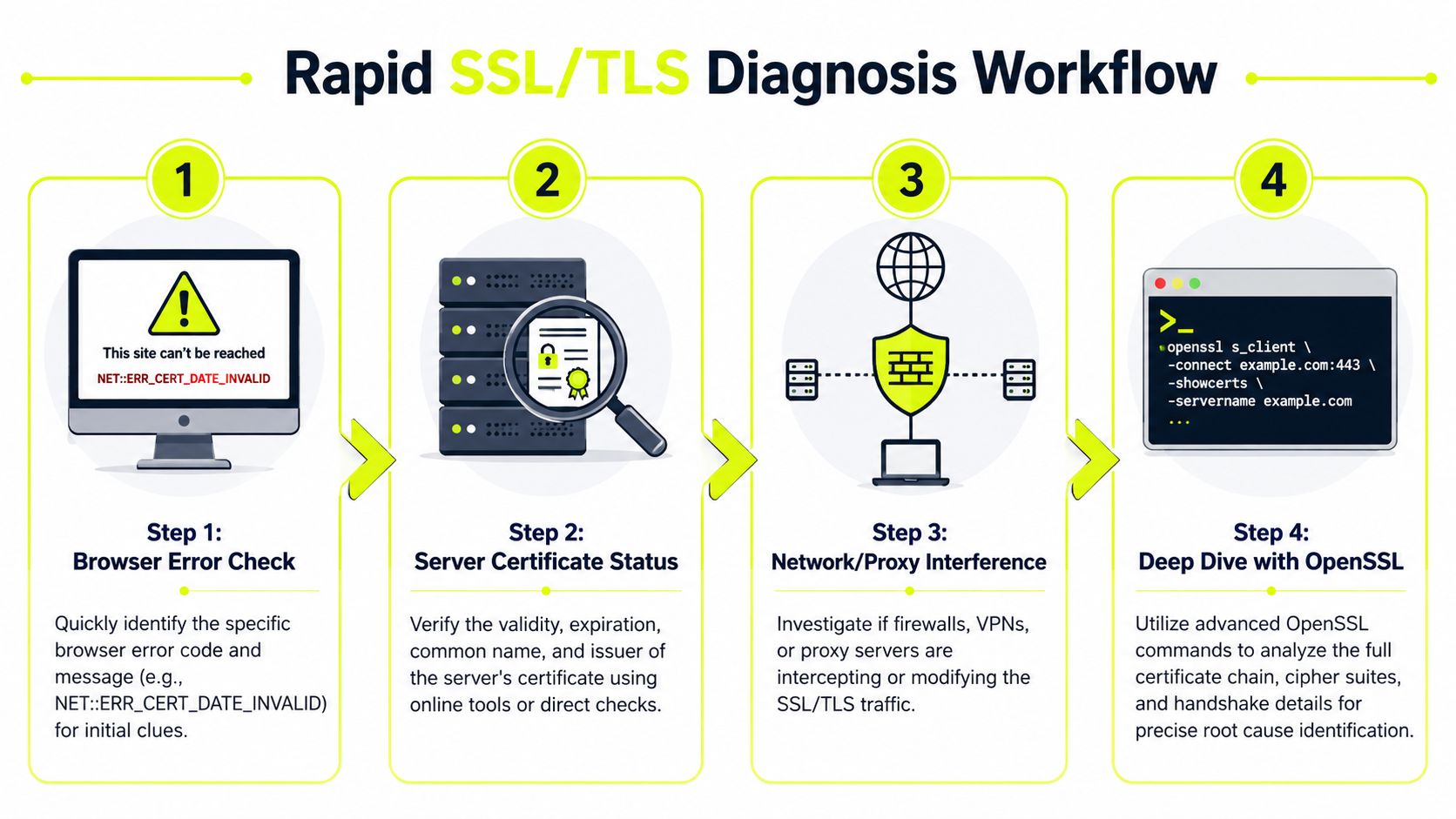
The sixty-second isolation flow
Run these checks in order. Don't skip around.
Read the exact browser error
Write down the code.NET::ERR_CERT_DATE_INVALID,ERR_CERT_AUTHORITY_INVALID, and hostname errors point in different directions. If you don't capture the exact string, you'll start guessing.Retry the URL outside the profile
Open the same URL in a clean system browser with no proxy. If it loads there, the target is probably fine and your path is dirty.Retry with the same proxy in a different client
Test the same exit in cURL or another clean browser container. If the error follows the proxy, your provider route, IP reputation, or interception behavior is the likely fault.Test with no proxy, then another proxy type
Residential, mobile, datacenter, and IPv6 behave differently in practice. Residential and mobile usually look more natural to ad platforms, but low-quality pools can still break trust chains or produce unstable routes. Datacenter is cleaner for repeatability, but more likely to hit policy controls on sensitive targets. IPv6 can be fine when the target and your tooling support it correctly, but it adds another compatibility variable.
Fast branching logic
Use this quick matrix:
- Fails everywhere: likely server-side cert issue.
- Fails only in one antidetect profile: browser profile or local trust problem.
- Fails only on one proxy provider: network path or proxy-side interception.
- Fails only in one country or carrier route: regional exit issue, proxy path inconsistency, or client trust variance.
Don't fix a certificate problem with random browser resets. First prove whether the error survives without the proxy.
A few checks that save time
- Check authorization first: A misconfigured proxy auth flow can produce misleading browser behavior. If the route itself is unstable, resolve that before SSL testing. This 407 proxy authorization required guide is relevant when the proxy layer is failing before the TLS session settles.
- Compare one sticky route to one rotating route: Rotating too early hides the bad exit and turns a reproducible problem into noise.
- Test the base machine clock: Time mismatch still causes false certificate warnings and it's easy to miss on rented boxes or old farm machines.
The order matters
A practical troubleshooting sequence is to verify the certificate itself, then hostname coverage, then full chain, then protocol and cipher support. UptimeRobot also recommends configuring expiration alerts at least 30 days before expiry so renewal issues are caught before users see failures, and notes the public certificate maximum is 398 days with the industry moving toward 47-day validity by 2029 in projections, which raises the need for automation and continuous validation. That guidance appears in UptimeRobot's SSL certificate error troubleshooting workflow.
Solving Common Server-Side Certificate Problems
Sometimes the site really is the problem. You still need to identify that quickly, even if you can't fix it.
The most common server-side SSL certificate errors fall into three buckets. Expired certs, hostname mismatch, and incomplete chain. Your job isn't to repair the origin server. Your job is to decide whether to wait, reroute, or drop the target from the current workflow.
Expired certificates
This one is straightforward. The site's cert expired, or the site is serving an old one on the endpoint you hit. Browsers will usually make that obvious.
That matters more now because certificate lifetimes got shorter. In 2020, major browsers aligned on a 398-day maximum validity period for SSL certificates, replacing longer lifetimes and forcing more frequent renewals. CrowdStrike's write-up on expired SSL certificate risk also notes projections that lifetimes could drop to six months by 2026, which means operators should expect expiration-related errors to keep showing up more often.
What this tells you operationally:
- On a branded company domain: likely temporary negligence, not necessarily a hostile setup.
- On a throwaway funnel or affiliate lander: often a sign the stack is loosely maintained. Treat all related paths with caution.
- On a platform endpoint: escalate fast. It may clear quickly, but don't keep retrying the same broken route.
Hostname mismatch
This shows up when the certificate doesn't cover the host you requested. Common example: the cert is valid for www but not the bare domain, or vice versa.
For ad-ops teams, this usually means one of two things. Either the target's redirect logic is sloppy, or your cloaking path is landing on a host that wasn't included in the cert. If you're checking ad review URLs, final landing URLs, and prelander hops, compare the exact host at each step.
If the mismatch is on a core domain, don't brute-force refreshes. Test the alternate host immediately and inspect the redirect chain.
Incomplete certificate chain
This is the classic “leaf cert looks fine but the browser still complains” case. The site may present the server certificate but omit an intermediate certificate, or present the chain in a way some clients don't like.
That's why one browser can pass while another fails. Older clients, hardened profiles, and odd trust stores are less forgiving. For operators, the signal is useful. A target with chain issues may pass on one machine and fail inside a locked-down browser profile or through a stricter proxy path.
What to do when you can't fix the server
Use this decision table:
| Error type | What it usually means | Your best move |
|---|---|---|
| Expired cert | Renewal failure or stale deployment | Pause checks, retry later, avoid scaling traffic to it |
| Hostname mismatch | Bad redirect or wrong host in flow | Test alternate host, inspect redirect path |
| Incomplete chain | Misconfigured TLS deployment | Verify in another browser or route before blaming proxy |
If you're buying traffic at speed, the right move is often to classify the target and move on. Don't burn account sessions on a dead trust path.
How Proxies and Antidetect Browsers Intercept Your Traffic
Most multi-account teams lose time in this situation. They see a certificate warning and think “the site cert is bad.” In a proxy-heavy setup, that's only one possibility.
The same certificate can pass in one browser and fail in another because of differing root stores or outdated trust settings. Sematext explains this browser and device variance around SSL certificate errors. For people running many accounts, proxies, or geos, that's the normal case. Not the edge case.
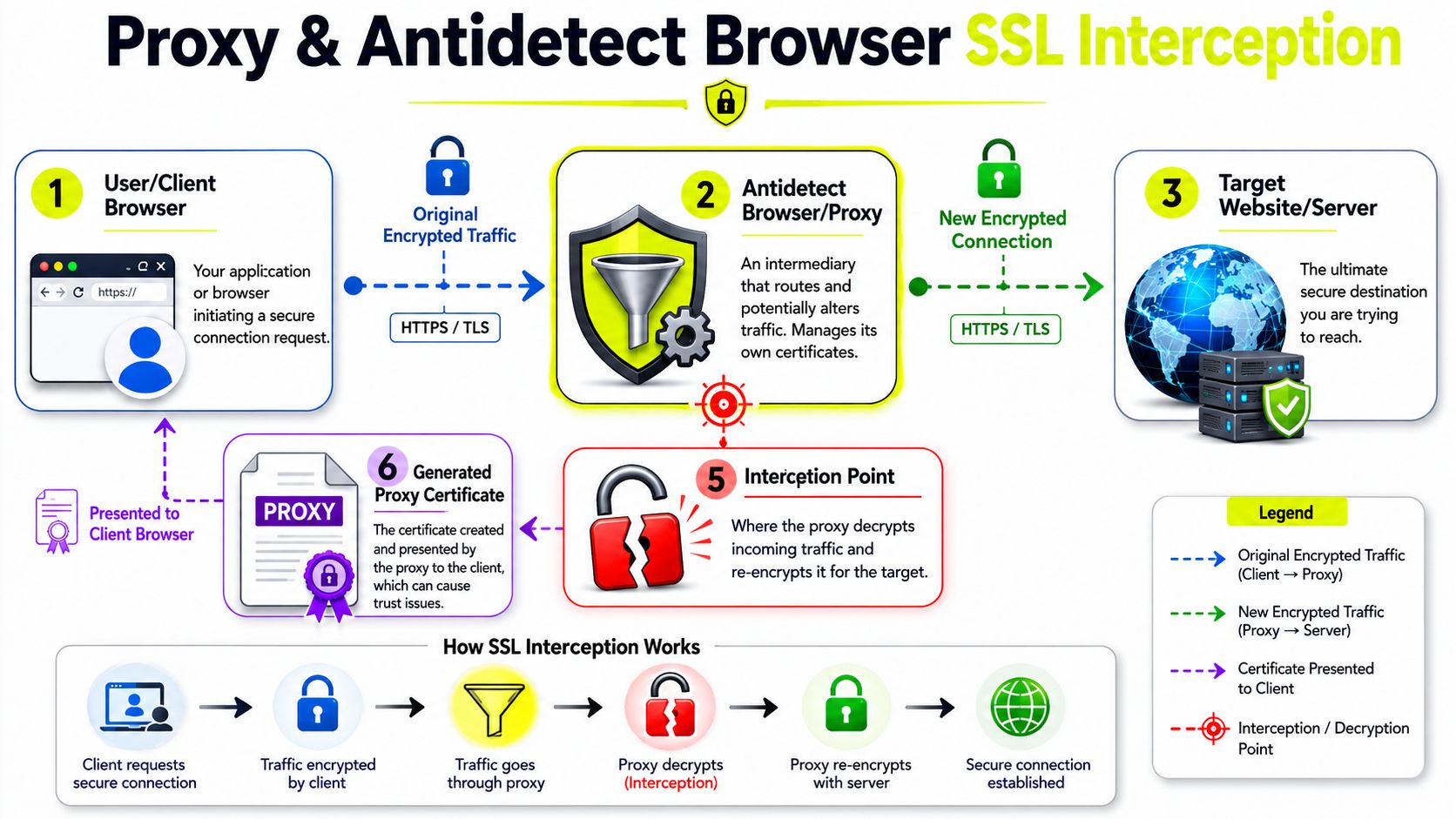
What actually happens in the path
A standard browser-to-site HTTPS session is simple. Your browser validates the certificate chain presented by the target and checks that the hostname matches.
A multi-account stack is different. You may have:
- An antidetect browser layer managing profile isolation
- A proxy transport layer handling IP routing
- Local security software scanning HTTPS
- A custom trust store inside the browser container
- A remote desktop or farm environment with stale roots
Any one of those can alter trust behavior.
Proxy types don't fail the same way
Here's the practical difference.
| Proxy type | Typical use | SSL-related trade-off |
|---|---|---|
| Residential | Ad verification, social account actions, cloaking checks | Better platform acceptance, but low-grade pools can be unstable or poorly routed |
| Mobile | Sensitive social actions, higher-trust browsing patterns | Good for difficult platforms, but carrier-path inconsistency can complicate debugging |
| Datacenter | Repeatable automation, scripts, scraping | Cleaner performance and reproducibility, but stricter sites may scrutinize the path harder |
| IPv6 | Scale where tooling and target support it | Fine when fully supported, risky when part of the stack handles IPv6 poorly |
This matters on Facebook and TikTok. Those platforms don't just care whether a page loads. They react to browser behavior, trust signals, session consistency, and route quality. If the path looks manipulated, you may see certificate-style errors that are really handshake failures, blocked negotiation, or profile-level trust issues.
Where antidetect browsers complicate things
AdsPower, Dolphin Anty, GoLogin, Multilogin, and Hidemyacc don't all behave the same around certificate stores, browser cores, and profile isolation. A profile cloned months ago can carry old assumptions about trust. A fresh profile can pass. That's why copying the same proxy into a new browser container is one of the fastest tests you can run.
If you use GoLogin proxy integration workflows, keep the browser profile state separate from the proxy verdict. Operators often replace a good proxy because an old profile has a local trust problem.
A certificate warning inside one antidetect profile does not prove the target is broken. It barely proves the proxy is broken. It proves that this exact trust path failed.
Interception is sometimes local, not remote
A lot of “bad cert” reports come from software on the machine. Antivirus HTTPS inspection is a known cause. So are corporate filtering tools, local root injections, and internal CAs that weren't added correctly to the trusted root store.
That's why some setups fail only on rented farm boxes or agency laptops. The browser isn't seeing the public site certificate directly. It's seeing a substitute certificate presented by a local interceptor, and it doesn't trust the issuer.
What works and what doesn't
What works:
- Clean A/B testing between no proxy, one sticky proxy, and one fresh profile
- Keeping browser cores and root stores current
- Avoiding random rotation while debugging
- Using proxy providers that don't create trust weirdness on HTTPS paths
What doesn't:
- Nuking cookies and calling it SSL troubleshooting
- Swapping ten proxies at once
- Blaming cloakers first
- Disabling verification in production workflows
If you run account farming or geo-targeted campaign checks, treat SSL certificate errors as path validation failures first. That framing gets you to the fix faster.
Advanced Diagnostics Using OpenSSL Commands
When the browser message is vague, OpenSSL gives you a precise answer. It shows what certificate chain the endpoint presents, whether SNI changes the result, and whether your path is interfering with the handshake.

Trustico specifically calls out two high-value checks. Use OpenSSL to compare the modulus of the certificate and private key, and inspect the full chain with s_client. It also notes that mismatched keys or missing intermediates break verification even when the leaf certificate looks valid, and that servers should enable at least TLS 1.2. That guidance is covered in Trustico's explanation of SSL certificate errors.
Start with the remote chain
Use s_client first.
openssl s_client -connect example.com:443 -servername example.com -showcerts
What to look for:
- certificate subject and issuer
- whether intermediates are present
- handshake errors near the end of output
- whether the returned cert matches the hostname you requested
If the result changes when you remove -servername, the target depends on SNI and your browser or proxy path may be mishandling it.
Pull just the dates and hostname check
These are fast sanity checks.
echo | openssl s_client -connect example.com:443 -servername example.com 2>/dev/null | openssl x509 -noout -dates -subject -issuer
echo | openssl s_client -connect example.com:443 -servername example.com 2>/dev/null | openssl x509 -noout -checkhost example.com
If -checkhost fails, stop blaming the proxy. The certificate doesn't cover the host you hit.
For proxy-based testing from the command line, this cURL integration page is useful when you want to compare browser behavior with a cleaner client.
A video walkthrough helps if you want to watch the output patterns before you test your own stack:
Check whether the server cert and key match
This matters when you control the server, a reverse proxy, or a self-hosted cloaker. Compare the modulus hash from both files.
openssl x509 -noout -modulus -in server.crt | openssl md5
openssl rsa -noout -modulus -in server.key | openssl md5
If the hashes differ, the wrong key is installed for that certificate. Browsers won't tell you that clearly. OpenSSL will.
Browser warnings are symptoms.
openssl s_clientis evidence.
Building a Resilient Proxy Setup to Prevent Errors
Reactive debugging is expensive when you run many profiles. The better move is to remove weak points before they hit your traffic.
The setup matters more than the headline feature list. Clean routing, predictable trust behavior, updated browser cores, and a repeatable way to test one profile against one sticky exit do more for uptime than endless profile tweaks.
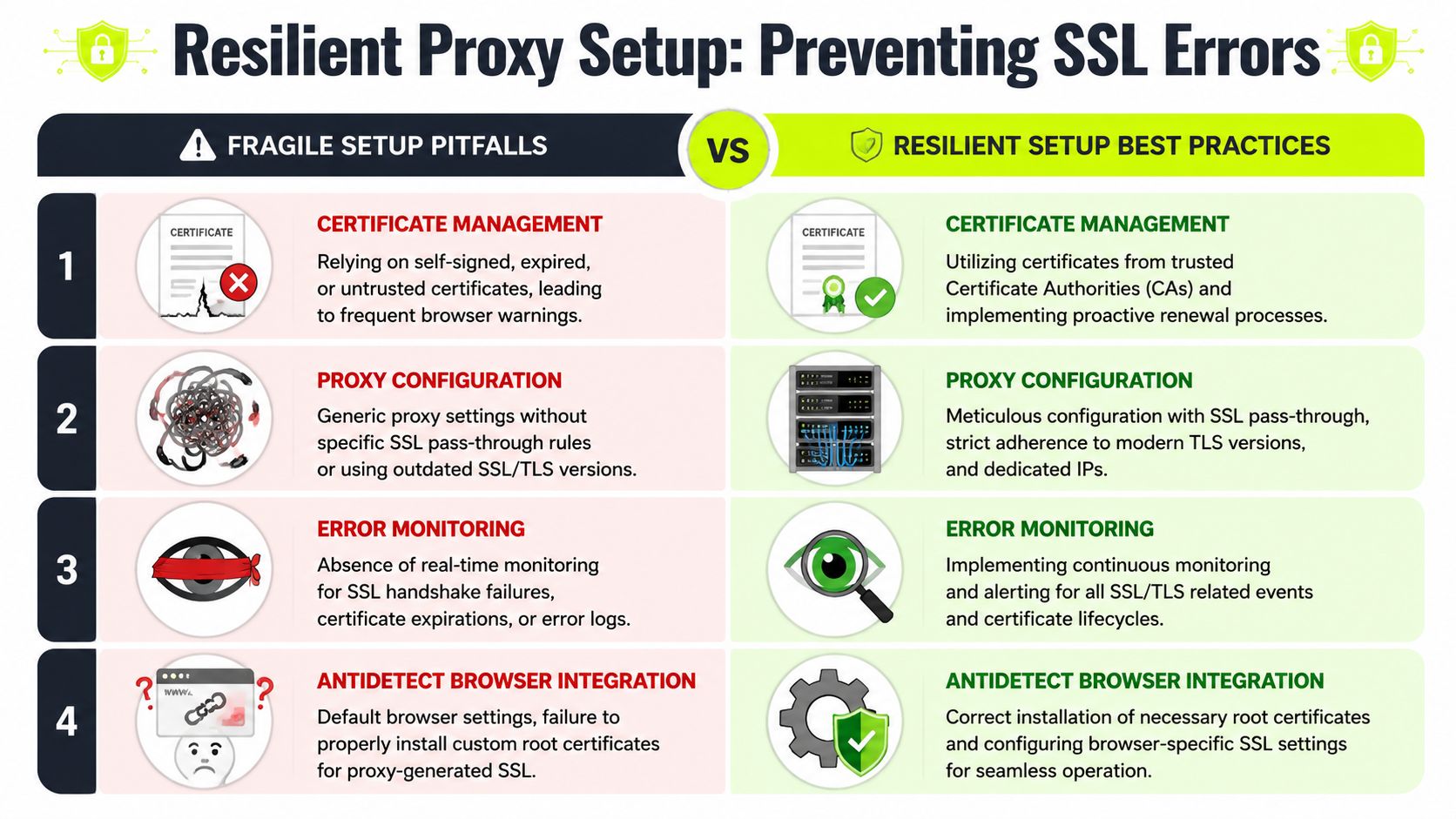
Build for repeatability
If you farm accounts or verify ads across geos, split your proxy usage by task:
- Use residential for ad platform interaction and geo checks when you need normal consumer routing behavior.
- Use mobile for sensitive social flows where carrier-origin traffic helps reduce friction.
- Use datacenter for stable automation jobs where reproducibility matters more than looking retail.
- Use IPv6 only where your full stack supports it cleanly, including browser, proxy tool, and target.
A resilient setup also keeps profile age, browser core, and trust-store state under control. Old cloned profiles are a common source of weird SSL certificate errors.
Standardize your prevention checklist
Use a simple operating baseline:
| Area | Fragile setup | Resilient setup |
|---|---|---|
| Browser profiles | Old clones with unknown trust state | Fresh profile templates and scheduled refreshes |
| Proxy routing | Random rotation during testing | Sticky route for diagnosis, rotation only after validation |
| Local machine | Antivirus HTTPS scanning left on | Explicit review of interception software |
| Monitoring | Waiting for user-facing breakage | Renewal and handshake checks in routine ops |
One practical option for teams that need residential, mobile, ISP, and datacenter routes in one place is Sota Proxy. It also publishes guidance on proxy IP rotation strategies, which matters when you need to separate debugging from normal rotation behavior.
Don't ignore the business side
If your team already recommends the same infrastructure stack to partners or buyers, Sota Proxy also has a referral program with up to 40% commission. That only matters if the service fits your workflow. For many teams, the bigger win is reducing false SSL investigations caused by bad exits and inconsistent proxy paths.
If SSL certificate errors keep hitting your browser profiles, ad checks, or cloaking flows, stop treating them like random browser noise. Audit the path. Test the profile. Test the proxy. If you need one place to manage residential, mobile, ISP, and datacenter routes for that process, Sota Proxy is built for exactly that kind of operational setup.
Related articles
Residential Backconnect Proxy: 2026 Guide & Best Practices
Master the residential backconnect proxy. A 2026 guide on how it works, its benefits over other proxies, and best practices for ad verification & account

Fingerprint Spoofing: Methods, Detection, and Antidetect Use
Learn how fingerprint spoofing works, the methods used to bypass detection, and how antidetect browsers with proxies manage multi-account operations safely.

What Is Forward Proxy: A Complete Guide for 2026
Learn what is forward proxy, how it works for outbound traffic, and why teams use it with antidetect browsers for Facebook, TikTok, and scraping.
Authentication Issues: Proxy and Antidetect Browser Fixes
Resolve authentication issues with proxies and antidetect browsers. Practical fixes for seamless access in 2026.

Rotating Proxy Server: Mastering Techniques for 2026
Master rotating proxy servers for farming, ad verification & scraping. Learn architecture, rotation, & anti-detection tactics.

How to Avoid CAPTCHA on Automated Workflows
Learn how to avoid CAPTCHA on automated workflows with proxy tactics, antidetect browsers, request pacing, and solver fallbacks built for real operators.